AI Voice Agent Setup: A Step-by-Step Guide for Businesses
AI Voice Agent Setup: A Step-by-Step Guide for Businesses
Insights
18 min

Setting up an AI voice agent comes down to seven moves: define the job, pick a build path, write the agent’s role and knowledge, connect it to your phone line and business tools, test it on real calls, add a human handoff, and then monitor it after launch. With a no-code platform you can do the first draft in an afternoon. The work that makes it good, testing and tuning, takes a little longer. This guide walks through each step so your agent answers calls the way your best team member would.
DroxyAnswer Calls Without the WaitDroxy lets businesses deploy AI agents for phone interactions, giving customers instant answers around the clock in your brand's voice.Explore Droxy
TL;DR
An AI voice agent combines speech recognition, a language model, a knowledge base, and a voice, plus tools that let it take actions such as booking or transferring a call.
For most small and mid-size businesses, a no-code platform is the fastest path. Custom builds make sense when your process is unusual or outgrows a platform.
Write a narrow role, load accurate knowledge, and define exactly when the agent hands off to a person.
Test with real, messy calls before launch, then review transcripts every week after.
In the US, calls with AI-generated voices fall under the TCPA, so check consent and disclosure rules before outbound calling.
Table of Contents
What an AI voice agent is made of
Step 1: Define the job before you touch a tool
Step 2: Choose your build path
Step 3: Configure the role, voice, and personality
Step 4: Build the knowledge base
Step 5: Connect phones, calendars, and business systems
Step 6: Design the human handoff
Step 7: Test like a skeptical customer
Privacy and legal checks before you go live
Launch and keep improving
Our perspective on voice agent setup
Put your voice agent to work with Droxy
Common setup mistakes to avoid
Sources
What an AI voice agent is made of
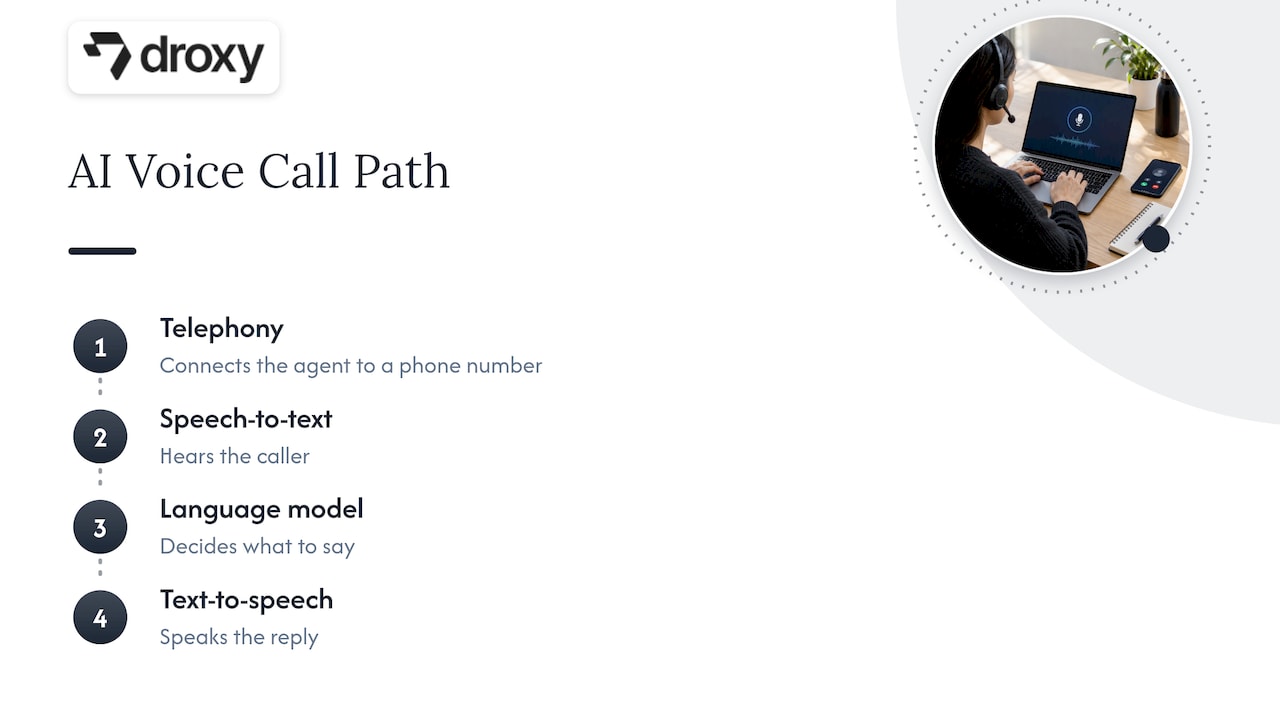
An AI voice agent answers phone calls (or makes them) and holds a natural conversation. Behind the voice sit a few parts working in sequence: speech-to-text hears the caller, a language model decides what to say, text-to-speech speaks the reply, and a telephony layer connects it all to a phone number. If you want the plain-language basics first, we cover them in what an AI voice agent is.
Two technical details are worth knowing even if you never touch code. Engineering write-ups of production systems describe real-time audio streamed over WebSockets, carrying binary audio frames alongside JSON control messages. That streaming is why a good agent can respond mid-sentence instead of waiting for the caller to finish a long pause.
The second detail matters more for your business. The same research notes that to make an agent useful rather than merely conversational, you add tools or function calling so it can look up information, book appointments, update systems, or transfer calls. A voice that only talks is a novelty. A voice that books the job and updates your calendar is a team member.
Step 1: Define the job before you touch a tool
The most common setup mistake is starting with the platform. Start with the call.
Pull your last 50 to 100 inbound calls, from voicemail, your phone provider’s call log, or your team’s memory, and sort them into types. A typical business sees a pattern like this:
Simple questions: hours, location, pricing ranges, service areas.
Booking requests: new appointments, reschedules, cancellations.
Lead inquiries: someone wants a quote or a callback.
Status checks: “Where is my order?” or “Is my technician on the way?”
Complex or sensitive calls: complaints, emergencies, billing disputes.
Your agent should own types 1 through 3 on day one, handle 4 if you can connect the right system, and hand off type 5 to a person. Write that down as a one-page job description. It becomes the backbone of everything below.
Then choose one success measure. Good options are the share of calls answered within a few seconds, the number of appointments booked outside office hours, or the drop in missed inquiries. One clear number keeps your tuning honest.
Step 2: Choose your build path
You have four realistic routes, and the right one depends on how standard your process is.
Path | Best for | Technical skill | Typical effort to first live call |
|---|---|---|---|
No-code platform | Standard front-desk and sales calls | None | Hours to days |
Hosted voice tools you assemble | Teams with a developer and custom needs | Moderate | Days to weeks |
Open-source components | Engineering teams wanting full control | High | Weeks |
Fully custom build | Unusual processes, strict infrastructure needs | High | Weeks to months |
A useful rule of thumb from software consultants: choose off-the-shelf for standard processes, no-code or low-code for internal tools, and custom software for processes specific to you or that outgrow a platform. Answering the phone, qualifying a lead, and booking an appointment are standard processes. That is why most businesses start on a no-code platform.
There is also a hidden cost in building from parts. Engineers interviewed on this build-versus-buy question stress that, whichever way you go, you should treat the platform as a product and prioritize long-term operational maintenance over the initial implementation. When you assemble your own stack, you also own latency tuning, vendor updates, uptime, and fixes. With a managed platform, that is part of the subscription.
If you’re comparing no-code options, our voice agent omnichannel comparison shows which criteria to weigh.
Step 3: Configure the role, voice, and personality
This is where your agent starts to sound like your business instead of a generic assistant.
Write a tight role prompt
The role is a short set of instructions the agent follows on every call. A strong one covers:
Who it is: “You are the phone assistant for Riverside Heating & Air.”
What it can do: answer service questions, book visits, take messages.
What it must not do: quote exact prices you haven’t approved, diagnose problems, promise arrival times it cannot see.
How it speaks: short sentences, warm and professional, one question at a time.
When to hand off: a list of triggers (covered in Step 6).
Keep it narrow. An agent told to do five things well beats one told to do twenty.
Pick a voice that fits
Choose a voice that matches your customer base: calm and measured for a medical practice, friendly and upbeat for a restaurant. Set a speaking pace slightly slower than you think you need, since phone audio compresses speech. Listen to a sample on an actual phone, not just laptop speakers.
Set the greeting
The first five seconds decide whether callers stay on the line. A good greeting names your business, says it is an automated assistant, and asks one open question: “Thanks for calling Riverside Heating & Air. I’m the virtual assistant. How can I help?” Being upfront about automation builds trust and also keeps you on the right side of disclosure expectations.
Step 4: Build the knowledge base
Your agent is only as accurate as what you feed it. Gather the sources a new hire would study:
Your website pages and FAQs
Service menus and pricing guidance (ranges, not guesses)
Policies: cancellations, warranties, returns, deposits
Service areas, hours, and holiday closures
Scripts for your most common calls
Two habits keep the knowledge clean. First, write answers the way you would say them out loud, in short plain sentences, because long written paragraphs sound stilted when spoken. Second, give the agent a fallback for anything missing: “I don’t have that detail, but I can have someone call you back today.” An agent allowed to say “I’m not sure” is far safer than one that improvises.
Assign an owner for the knowledge base. When prices, hours, or policies change, the agent needs updating the same day.
Step 5: Connect phones, calendars, and business systems
A voice agent has to live somewhere on your phone setup. There are three common patterns:
A new dedicated number. The simplest launch. You publish it on a landing page, in ads, or as an after-hours line.
Call forwarding. Your existing number forwards to the agent when you’re busy, after hours, or when nobody picks up within a few rings.
Porting or routing through your phone system. Your main number routes to the agent first, which then transfers to staff as needed.
Start with forwarding on missed calls and after hours. The risk is low, the value is immediate, and you can widen the agent’s coverage as confidence grows.
Next, connect the tools behind the conversation. The most valuable connections are:
Calendar or booking software, so the agent can see real availability and book directly. Our roundup of AI appointment booking tools explains what to look for.
CRM or lead sheet, so every caller’s name, number, and need is captured.
Messaging, so a summary reaches your team by email, text, or Slack.
Order or ticket systems, for status questions.
API connections and automation tools such as Zapier cover most of these without code. With Droxy’s phone agent, the same agent knowledge can also run on website chat, WhatsApp, Instagram, and Facebook, so customers get consistent answers whichever channel they pick.
Step 6: Design the human handoff
No agent should trap a caller. Decide in advance when a person takes over, and make the transition smooth.
Common handoff triggers:
The caller asks for a person, even once.
The caller sounds upset, or the agent fails to understand twice in a row.
Emergencies (a gas smell, a medical concern, a burst pipe).
Billing disputes, legal threats, or anything outside the job description.
High-value leads you want a human to close.
Decide the destination for each trigger: a live transfer to a number during business hours, a callback request with a summary after hours, or an urgent text to the on-call person. The agent should pass context along, so the caller never repeats themselves. For healthcare or emergency-adjacent services, program the agent to direct callers to 911 for urgent situations rather than attempting to handle them.
Step 7: Test like a skeptical customer
A demo call in a quiet office tells you almost nothing. Real callers mumble, interrupt, call from cars, and ask three things at once. Build a test plan with these categories:
Test | What to try | What good looks like |
|---|---|---|
Accuracy | Ask every FAQ in several phrasings | Correct answer or a clean “I’m not sure” |
Latency | Time the pause after you stop talking | Natural, no long dead air |
Interruptions | Talk over the agent mid-sentence | It stops and listens |
Noise and accents | Call from a car, a street, a speakerphone | Still understands or asks to repeat |
Booking flow | Book, reschedule, cancel | Calendar updates correctly |
Edge cases | Off-topic questions, angry tone, silence | Graceful recovery or handoff |
Sensitive requests | Ask for personal data or medical advice | Refuses and routes to a person |
Have three or four colleagues, friends, or a few regular customers call with no script. Log every failure and fix the cause: usually a missing knowledge entry, an unclear instruction, or a handoff trigger that is too loose.
Run this in rounds. Fix, retest, and only then go live with a limited slice of calls, such as after-hours only.
Privacy and legal checks before you go live
Voice is regulated more tightly than chat, so check these before launch.
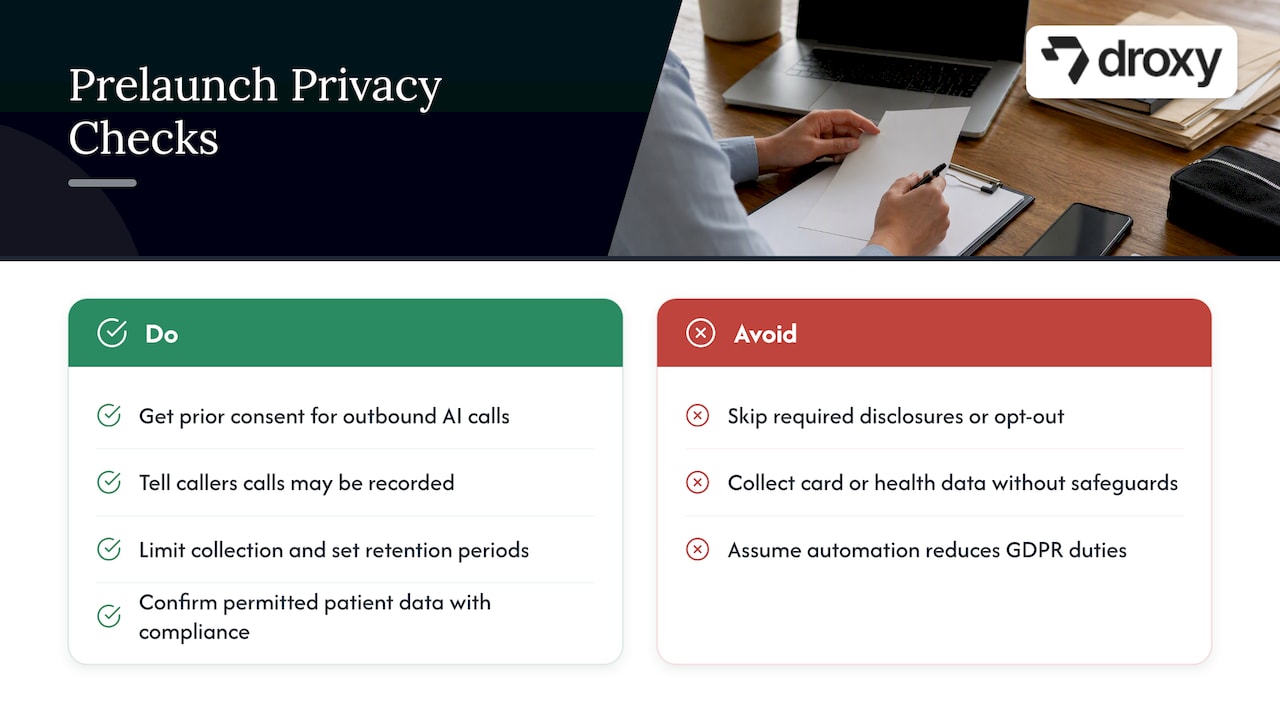
Outbound calls in the US. In February 2024, the FCC ruled that calls made with AI-generated voices are “artificial” under the Telephone Consumer Protection Act. In practice, that means outbound AI calls generally need the called person’s prior express consent, and law firms analyzing the ruling note that the required disclosures and an opt-out mechanism apply. If you plan to use the agent for outreach, read our guides on AI outbound calling and AI for sales calls, and have your attorney review your consent process.
Recording and transcription. Recording-consent rules vary by state, and some require all parties to agree. Tell callers in the greeting that the call may be recorded.
Data protection. If you serve customers in Europe, note that regulators there are clear that automation does not lighten your duties. Spain’s data protection authority, for example, warns that AI does not reduce GDPR obligations and that organizations must manage errors and bias proactively. Whatever your market, limit what the agent collects, set retention periods, and keep payment card details and health information out of the conversation unless your setup is designed for them.
Healthcare. If you run a medical practice, confirm with your compliance lead which patient information the agent may handle before it touches scheduling data.
Launch and keep improving
Going live is the start of the work. The Rootly engineers’ advice about operations applies directly: the agent needs an owner. A simple routine works for most teams:
Daily for week one: skim call summaries and flagged handoffs.
Weekly after that: read 10 to 20 transcripts, especially the ones that ended in a handoff or a hang-up.
Monthly: review your success number, update the knowledge base, and tighten or widen the agent’s scope.
Watch for patterns: questions the agent could not answer (add them to the knowledge base), callers who asked for a human right away (fix the greeting or tone), and spikes at certain hours (adjust routing). Call analytics help here, and our guide on using AI to analyze calls shows what to measure.
If you manage voice agents for several clients, the discipline of steady monitoring is what separates a pilot from a service. Data on AI productivity gains for agencies shows why teams that build reliable routines around their tools see the strongest returns.
Our perspective on voice agent setup
Most voice agent projects fail for a boring reason: the team treated setup as a build project instead of an operations habit. The phone is the most personal channel a customer uses, and people forgive a slow answer far more readily than a wrong one.
That is why we design Droxy around a short path to a working agent, with deep customization of voice, knowledge, and brand tone, and human handoff built in. You shouldn’t need a developer to get a polished first version. You should need good judgment about your own customers, and you already have that.
Our advice is to start small, with after-hours and missed calls, keep the agent’s job narrow, and let real transcripts tell you what to expand next. Once the phone agent is solid, the same knowledge can power your website, WhatsApp, Instagram, and Facebook conversations, so customers get one consistent voice everywhere. Agencies can take it further with white-labeled agents under their own brand.
Elena
Put your voice agent to work with Droxy
If you’d rather not stitch speech, language, and telephony tools together yourself, Droxy is a no-code platform for building AI agents that answer customers around the clock. You configure the role, voice, and knowledge, connect your systems through API or Zapier, and set when a person takes over. Plans start at $16 per month for Basic, $80 per month for Advanced, and $240 per month for Enterprise, all listed on the Droxy pricing page.

Ready to hear it on your own line? Explore the Droxy AI phone agent or start building your agent.
Common setup mistakes to avoid
Launching with too broad a scope. Begin with three or four call types and expand.
Feeding it messy documents. Clean, spoken-style answers beat pasted PDFs.
Skipping the fallback line. Without “I’m not sure,” an agent guesses.
Hiding the handoff. Callers who can’t reach a person hang up angry.
Never reviewing transcripts. The agent only improves if someone reads what it said.
Forgetting consent rules. Especially for outbound calls and recordings.
If you’re also weighing a simpler front-desk option, see our list of the best AI answering services for how answering-only tools differ from fully configurable agents.
FAQ
How long does an AI voice agent setup take?
With a no-code platform, a first working version can be ready in a few hours once your FAQs and policies are gathered. Plan on a week or two of testing and tuning before you route all calls to it. Custom builds from components take far longer.
Do I need coding skills to set up an AI voice agent?
Not on a no-code platform. You write instructions in plain language, upload your knowledge, and connect tools with built-in integrations or Zapier. Coding becomes relevant only when you assemble open-source components or need highly custom infrastructure.
Can an AI voice agent transfer calls to my staff?
Yes, handoff is a standard part of a good setup. You define triggers such as a request for a person, repeated confusion, or an emergency, then choose whether the agent transfers live or books a callback with a summary.
Is it legal to use an AI voice agent for phone calls in the US?
Answering inbound calls is common practice, but outbound calls are regulated. The FCC has ruled that AI-generated voices count as artificial under the TCPA, so consent and disclosure rules apply. Talk to an attorney about your specific calling plans and state recording laws.
Sources
Building Enterprise Realtime Voice Agents from Scratch (arXiv)
Buy, build, or adopt: seasoned platform engineers weigh in (Rootly)
FCC Rules AI-Generated Voices Are “Artificial” Under the TCPA (Wilson Sonsini)
Spain’s Supervisory Authority Issues New Guidance on AI-Based Voice Transcription (Inside Privacy)
Recommended
Setting up an AI voice agent comes down to seven moves: define the job, pick a build path, write the agent’s role and knowledge, connect it to your phone line and business tools, test it on real calls, add a human handoff, and then monitor it after launch. With a no-code platform you can do the first draft in an afternoon. The work that makes it good, testing and tuning, takes a little longer. This guide walks through each step so your agent answers calls the way your best team member would.
DroxyAnswer Calls Without the WaitDroxy lets businesses deploy AI agents for phone interactions, giving customers instant answers around the clock in your brand's voice.Explore Droxy
TL;DR
An AI voice agent combines speech recognition, a language model, a knowledge base, and a voice, plus tools that let it take actions such as booking or transferring a call.
For most small and mid-size businesses, a no-code platform is the fastest path. Custom builds make sense when your process is unusual or outgrows a platform.
Write a narrow role, load accurate knowledge, and define exactly when the agent hands off to a person.
Test with real, messy calls before launch, then review transcripts every week after.
In the US, calls with AI-generated voices fall under the TCPA, so check consent and disclosure rules before outbound calling.
Table of Contents
What an AI voice agent is made of
Step 1: Define the job before you touch a tool
Step 2: Choose your build path
Step 3: Configure the role, voice, and personality
Step 4: Build the knowledge base
Step 5: Connect phones, calendars, and business systems
Step 6: Design the human handoff
Step 7: Test like a skeptical customer
Privacy and legal checks before you go live
Launch and keep improving
Our perspective on voice agent setup
Put your voice agent to work with Droxy
Common setup mistakes to avoid
Sources
What an AI voice agent is made of
An AI voice agent answers phone calls (or makes them) and holds a natural conversation. Behind the voice sit a few parts working in sequence: speech-to-text hears the caller, a language model decides what to say, text-to-speech speaks the reply, and a telephony layer connects it all to a phone number. If you want the plain-language basics first, we cover them in what an AI voice agent is.
Two technical details are worth knowing even if you never touch code. Engineering write-ups of production systems describe real-time audio streamed over WebSockets, carrying binary audio frames alongside JSON control messages. That streaming is why a good agent can respond mid-sentence instead of waiting for the caller to finish a long pause.
The second detail matters more for your business. The same research notes that to make an agent useful rather than merely conversational, you add tools or function calling so it can look up information, book appointments, update systems, or transfer calls. A voice that only talks is a novelty. A voice that books the job and updates your calendar is a team member.
Step 1: Define the job before you touch a tool
The most common setup mistake is starting with the platform. Start with the call.
Pull your last 50 to 100 inbound calls, from voicemail, your phone provider’s call log, or your team’s memory, and sort them into types. A typical business sees a pattern like this:
Simple questions: hours, location, pricing ranges, service areas.
Booking requests: new appointments, reschedules, cancellations.
Lead inquiries: someone wants a quote or a callback.
Status checks: “Where is my order?” or “Is my technician on the way?”
Complex or sensitive calls: complaints, emergencies, billing disputes.
Your agent should own types 1 through 3 on day one, handle 4 if you can connect the right system, and hand off type 5 to a person. Write that down as a one-page job description. It becomes the backbone of everything below.
Then choose one success measure. Good options are the share of calls answered within a few seconds, the number of appointments booked outside office hours, or the drop in missed inquiries. One clear number keeps your tuning honest.
Step 2: Choose your build path
You have four realistic routes, and the right one depends on how standard your process is.
Path | Best for | Technical skill | Typical effort to first live call |
|---|---|---|---|
No-code platform | Standard front-desk and sales calls | None | Hours to days |
Hosted voice tools you assemble | Teams with a developer and custom needs | Moderate | Days to weeks |
Open-source components | Engineering teams wanting full control | High | Weeks |
Fully custom build | Unusual processes, strict infrastructure needs | High | Weeks to months |
A useful rule of thumb from software consultants: choose off-the-shelf for standard processes, no-code or low-code for internal tools, and custom software for processes specific to you or that outgrow a platform. Answering the phone, qualifying a lead, and booking an appointment are standard processes. That is why most businesses start on a no-code platform.
There is also a hidden cost in building from parts. Engineers interviewed on this build-versus-buy question stress that, whichever way you go, you should treat the platform as a product and prioritize long-term operational maintenance over the initial implementation. When you assemble your own stack, you also own latency tuning, vendor updates, uptime, and fixes. With a managed platform, that is part of the subscription.
If you’re comparing no-code options, our voice agent omnichannel comparison shows which criteria to weigh.
Step 3: Configure the role, voice, and personality
This is where your agent starts to sound like your business instead of a generic assistant.
Write a tight role prompt
The role is a short set of instructions the agent follows on every call. A strong one covers:
Who it is: “You are the phone assistant for Riverside Heating & Air.”
What it can do: answer service questions, book visits, take messages.
What it must not do: quote exact prices you haven’t approved, diagnose problems, promise arrival times it cannot see.
How it speaks: short sentences, warm and professional, one question at a time.
When to hand off: a list of triggers (covered in Step 6).
Keep it narrow. An agent told to do five things well beats one told to do twenty.
Pick a voice that fits
Choose a voice that matches your customer base: calm and measured for a medical practice, friendly and upbeat for a restaurant. Set a speaking pace slightly slower than you think you need, since phone audio compresses speech. Listen to a sample on an actual phone, not just laptop speakers.
Set the greeting
The first five seconds decide whether callers stay on the line. A good greeting names your business, says it is an automated assistant, and asks one open question: “Thanks for calling Riverside Heating & Air. I’m the virtual assistant. How can I help?” Being upfront about automation builds trust and also keeps you on the right side of disclosure expectations.
Step 4: Build the knowledge base
Your agent is only as accurate as what you feed it. Gather the sources a new hire would study:
Your website pages and FAQs
Service menus and pricing guidance (ranges, not guesses)
Policies: cancellations, warranties, returns, deposits
Service areas, hours, and holiday closures
Scripts for your most common calls
Two habits keep the knowledge clean. First, write answers the way you would say them out loud, in short plain sentences, because long written paragraphs sound stilted when spoken. Second, give the agent a fallback for anything missing: “I don’t have that detail, but I can have someone call you back today.” An agent allowed to say “I’m not sure” is far safer than one that improvises.
Assign an owner for the knowledge base. When prices, hours, or policies change, the agent needs updating the same day.
Step 5: Connect phones, calendars, and business systems
A voice agent has to live somewhere on your phone setup. There are three common patterns:
A new dedicated number. The simplest launch. You publish it on a landing page, in ads, or as an after-hours line.
Call forwarding. Your existing number forwards to the agent when you’re busy, after hours, or when nobody picks up within a few rings.
Porting or routing through your phone system. Your main number routes to the agent first, which then transfers to staff as needed.
Start with forwarding on missed calls and after hours. The risk is low, the value is immediate, and you can widen the agent’s coverage as confidence grows.
Next, connect the tools behind the conversation. The most valuable connections are:
Calendar or booking software, so the agent can see real availability and book directly. Our roundup of AI appointment booking tools explains what to look for.
CRM or lead sheet, so every caller’s name, number, and need is captured.
Messaging, so a summary reaches your team by email, text, or Slack.
Order or ticket systems, for status questions.
API connections and automation tools such as Zapier cover most of these without code. With Droxy’s phone agent, the same agent knowledge can also run on website chat, WhatsApp, Instagram, and Facebook, so customers get consistent answers whichever channel they pick.
Step 6: Design the human handoff
No agent should trap a caller. Decide in advance when a person takes over, and make the transition smooth.
Common handoff triggers:
The caller asks for a person, even once.
The caller sounds upset, or the agent fails to understand twice in a row.
Emergencies (a gas smell, a medical concern, a burst pipe).
Billing disputes, legal threats, or anything outside the job description.
High-value leads you want a human to close.
Decide the destination for each trigger: a live transfer to a number during business hours, a callback request with a summary after hours, or an urgent text to the on-call person. The agent should pass context along, so the caller never repeats themselves. For healthcare or emergency-adjacent services, program the agent to direct callers to 911 for urgent situations rather than attempting to handle them.
Step 7: Test like a skeptical customer
A demo call in a quiet office tells you almost nothing. Real callers mumble, interrupt, call from cars, and ask three things at once. Build a test plan with these categories:
Test | What to try | What good looks like |
|---|---|---|
Accuracy | Ask every FAQ in several phrasings | Correct answer or a clean “I’m not sure” |
Latency | Time the pause after you stop talking | Natural, no long dead air |
Interruptions | Talk over the agent mid-sentence | It stops and listens |
Noise and accents | Call from a car, a street, a speakerphone | Still understands or asks to repeat |
Booking flow | Book, reschedule, cancel | Calendar updates correctly |
Edge cases | Off-topic questions, angry tone, silence | Graceful recovery or handoff |
Sensitive requests | Ask for personal data or medical advice | Refuses and routes to a person |
Have three or four colleagues, friends, or a few regular customers call with no script. Log every failure and fix the cause: usually a missing knowledge entry, an unclear instruction, or a handoff trigger that is too loose.
Run this in rounds. Fix, retest, and only then go live with a limited slice of calls, such as after-hours only.
Privacy and legal checks before you go live
Voice is regulated more tightly than chat, so check these before launch.
Outbound calls in the US. In February 2024, the FCC ruled that calls made with AI-generated voices are “artificial” under the Telephone Consumer Protection Act. In practice, that means outbound AI calls generally need the called person’s prior express consent, and law firms analyzing the ruling note that the required disclosures and an opt-out mechanism apply. If you plan to use the agent for outreach, read our guides on AI outbound calling and AI for sales calls, and have your attorney review your consent process.
Recording and transcription. Recording-consent rules vary by state, and some require all parties to agree. Tell callers in the greeting that the call may be recorded.
Data protection. If you serve customers in Europe, note that regulators there are clear that automation does not lighten your duties. Spain’s data protection authority, for example, warns that AI does not reduce GDPR obligations and that organizations must manage errors and bias proactively. Whatever your market, limit what the agent collects, set retention periods, and keep payment card details and health information out of the conversation unless your setup is designed for them.
Healthcare. If you run a medical practice, confirm with your compliance lead which patient information the agent may handle before it touches scheduling data.
Launch and keep improving
Going live is the start of the work. The Rootly engineers’ advice about operations applies directly: the agent needs an owner. A simple routine works for most teams:
Daily for week one: skim call summaries and flagged handoffs.
Weekly after that: read 10 to 20 transcripts, especially the ones that ended in a handoff or a hang-up.
Monthly: review your success number, update the knowledge base, and tighten or widen the agent’s scope.
Watch for patterns: questions the agent could not answer (add them to the knowledge base), callers who asked for a human right away (fix the greeting or tone), and spikes at certain hours (adjust routing). Call analytics help here, and our guide on using AI to analyze calls shows what to measure.
If you manage voice agents for several clients, the discipline of steady monitoring is what separates a pilot from a service. Data on AI productivity gains for agencies shows why teams that build reliable routines around their tools see the strongest returns.
Our perspective on voice agent setup
Most voice agent projects fail for a boring reason: the team treated setup as a build project instead of an operations habit. The phone is the most personal channel a customer uses, and people forgive a slow answer far more readily than a wrong one.
That is why we design Droxy around a short path to a working agent, with deep customization of voice, knowledge, and brand tone, and human handoff built in. You shouldn’t need a developer to get a polished first version. You should need good judgment about your own customers, and you already have that.
Our advice is to start small, with after-hours and missed calls, keep the agent’s job narrow, and let real transcripts tell you what to expand next. Once the phone agent is solid, the same knowledge can power your website, WhatsApp, Instagram, and Facebook conversations, so customers get one consistent voice everywhere. Agencies can take it further with white-labeled agents under their own brand.
Elena
Put your voice agent to work with Droxy
If you’d rather not stitch speech, language, and telephony tools together yourself, Droxy is a no-code platform for building AI agents that answer customers around the clock. You configure the role, voice, and knowledge, connect your systems through API or Zapier, and set when a person takes over. Plans start at $16 per month for Basic, $80 per month for Advanced, and $240 per month for Enterprise, all listed on the Droxy pricing page.
Ready to hear it on your own line? Explore the Droxy AI phone agent or start building your agent.
Common setup mistakes to avoid
Launching with too broad a scope. Begin with three or four call types and expand.
Feeding it messy documents. Clean, spoken-style answers beat pasted PDFs.
Skipping the fallback line. Without “I’m not sure,” an agent guesses.
Hiding the handoff. Callers who can’t reach a person hang up angry.
Never reviewing transcripts. The agent only improves if someone reads what it said.
Forgetting consent rules. Especially for outbound calls and recordings.
If you’re also weighing a simpler front-desk option, see our list of the best AI answering services for how answering-only tools differ from fully configurable agents.
FAQ
How long does an AI voice agent setup take?
With a no-code platform, a first working version can be ready in a few hours once your FAQs and policies are gathered. Plan on a week or two of testing and tuning before you route all calls to it. Custom builds from components take far longer.
Do I need coding skills to set up an AI voice agent?
Not on a no-code platform. You write instructions in plain language, upload your knowledge, and connect tools with built-in integrations or Zapier. Coding becomes relevant only when you assemble open-source components or need highly custom infrastructure.
Can an AI voice agent transfer calls to my staff?
Yes, handoff is a standard part of a good setup. You define triggers such as a request for a person, repeated confusion, or an emergency, then choose whether the agent transfers live or books a callback with a summary.
Is it legal to use an AI voice agent for phone calls in the US?
Answering inbound calls is common practice, but outbound calls are regulated. The FCC has ruled that AI-generated voices count as artificial under the TCPA, so consent and disclosure rules apply. Talk to an attorney about your specific calling plans and state recording laws.
Sources
Building Enterprise Realtime Voice Agents from Scratch (arXiv)
Buy, build, or adopt: seasoned platform engineers weigh in (Rootly)
FCC Rules AI-Generated Voices Are “Artificial” Under the TCPA (Wilson Sonsini)
Spain’s Supervisory Authority Issues New Guidance on AI-Based Voice Transcription (Inside Privacy)
Recommended



🚀
Powered by Droxy
Turn every interaction into a conversion
Customer facing AI agents that engage, convert, and support so you can scale what matters.
✨
Learn more
Recent posts

Insights
3 min read
Introducing Agent Memories
Improve your agents' performance with Agent Memories. Prevent agents from repeating the same mistakes by giving them feedback.
Read more

Insights
15 min read
HVAC Marketing in 2025: The Definitive Lead Gen Guide
Discover 15 proven HVAC marketing strategies, plus learn how Droxy's AI website agent converts curious visitors into qualified leads by answering their questions instantly - right when they're most interested in your services.
Read more

Insights
10 min read
10 Best AI Sales Agents in 2025: Tested & Ranked
Discover the top 10 AI sales agents of 2025, designed to enhance lead generation, personalize outreach, and ultimately, close more deals
Read more
Insights
3 min read
Introducing Agent Memories
Improve your agents' performance with Agent Memories. Prevent agents from repeating the same mistakes by giving them feedback.
Read more
Insights
15 min read
HVAC Marketing in 2025: The Definitive Lead Gen Guide
Discover 15 proven HVAC marketing strategies, plus learn how Droxy's AI website agent converts curious visitors into qualified leads by answering their questions instantly - right when they're most interested in your services.
Read more