Chatbot Escalation Policies: Rules, Triggers and Handoffs
Chatbot Escalation Policies: Rules, Triggers and Handoffs
Insights
17 min

A chatbot escalation policy is a written set of rules that says when your bot stops answering and a person takes over, who that person is, what they receive, and what happens if nobody is available. A good one covers four things: clear triggers, a routing matrix, a complete handoff packet, and a fallback for when the transfer fails. Get those four right and your bot handles the routine questions while your team gets the conversations that really need them.
This guide walks through each part, with examples you can adapt for ecommerce, hospitality, home services, real estate and healthcare.
DroxyGive Every Conversation a Clear Next StepDroxy deploys customizable AI agents across chat and messaging channels, helping businesses answer inquiries instantly and keep customer interactions moving.Explore Droxy
TL;DR
Escalate on four kinds of signals: an explicit request for a human, sensitive or high-risk topics, repeated failure to resolve, and high-value moments such as a hot lead.
Organize rules into a matrix: trigger, priority, destination, channel behavior and fallback, so every rule is a job a person can finish.
Pass the question, the customer details, what the bot already tried, the sources it used and the reason for escalation, so nobody starts over.
Always write a fallback for when no human is available: capture contact details, set a response time, and confirm it to the customer.
Test the rules with real scenarios, then track escalation patterns every week and tune them.
Table of Contents
Why escalation rules matter more than the bot’s answers
When a chatbot should escalate to a human
Build an escalation matrix your team can actually use
What a good handoff contains
What to do when no human is available
Adapt the rules to channel and business
Perspective: why we start with the exit
Test, measure and improve your policy
Putting it into practice with Droxy
Sources
Why escalation rules matter more than the bot’s answers
Most teams spend their time on what the bot can answer. The conversations that damage trust are the ones it should have passed on. A customer who asks for a person three times and keeps getting a menu will remember it long after they forget the correct answers they received.
Regulators have noticed the same pattern. The Consumer Financial Protection Bureau warned in 2023 that chatbots can trap people in “doom loops” of unhelpful replies and that a lack of human interaction can leave consumers without answers. That warning was aimed at financial institutions, but the lesson applies to any business: a bot with no exit is a liability.
The NIST AI Risk Management Framework resources make a related point in more general terms. Human roles and responsibilities in AI oversight should be clearly defined, and some systems specifically require human oversight. An escalation policy is how a small business turns that principle into something a front-line team can follow.
When a chatbot should escalate to a human
Think of triggers in four groups. Each one needs a plain-language definition so the bot, and the people who maintain it, know exactly what counts.
1. The customer asks for a person
This is the simplest rule and the one most often broken. If a visitor says “agent,” “human,” “representative” or “call me,” the bot should acknowledge the request and start the transfer. It should not try to talk the customer out of it. A single clarifying question is fine if it speeds up routing, such as “Is this about an order or a booking?” Two is too many.
2. Sensitive, risky or regulated topics
Some subjects should never be resolved by a bot alone:
Safety or urgency: a gas smell, a burst pipe, a medical emergency, a threat of harm.
Money and account changes: refunds above a set amount, billing disputes, cancellations, chargebacks.
Legal, medical or compliance questions where a wrong answer has consequences.
Complaints, especially ones that mention reviews, lawyers or regulators.
Personal data requests, such as access or deletion.
For urgent safety situations, the bot’s first message should tell the person to call emergency services or the relevant hotline, and then alert your team. A healthcare practice, for instance, should never let a bot assess symptoms; the rule is to point to emergency care for anything urgent and route everything clinical to staff.
A useful principle comes from Microsoft’s guidance on human-in-the-loop design: agents should work within defined policy boundaries, and requests for exceptions need human authorization even when the agent is highly confident. If your refund policy says 30 days and a customer asks for day 45, the bot should not grant it, however sure it sounds.
3. The bot is failing
Some conversations go wrong without any sensitive topic. Build in failure triggers:
The bot gives its fallback answer (“I’m not sure”) twice in a row.
The customer repeats the same question three times.
The knowledge sources contain no relevant answer.
Sentiment turns clearly negative: profanity, all caps, “this is ridiculous.”
The conversation passes a turn limit without a resolution, for example eight to ten exchanges.
The exact numbers are yours to set. Start conservative, then adjust using real data (more on that below).
4. High-value moments
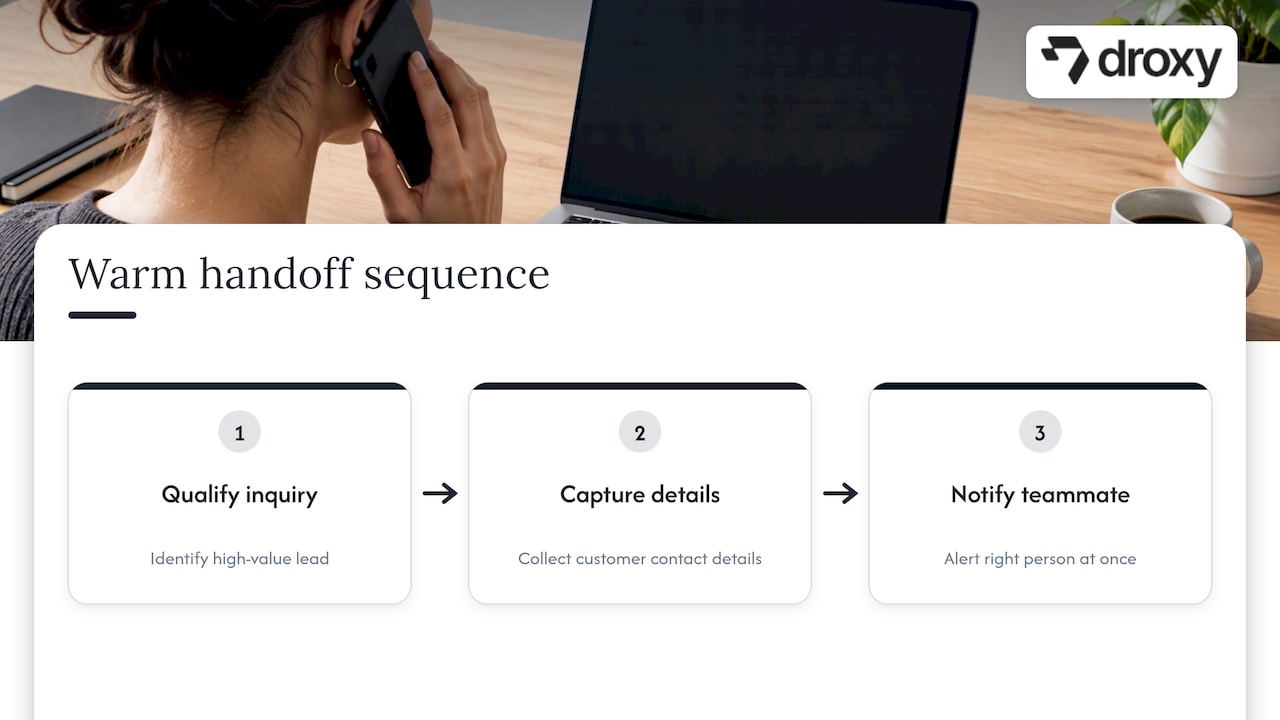
Escalation is not only a safety net. It is also how you win business. A real estate lead asking to see a property tonight, an ecommerce buyer with a large cart and a question about bulk pricing, or a restaurant guest planning an event for 40 people all deserve a human quickly. Define these as “warm handoff” triggers: the bot qualifies, captures contact details, and notifies the right person at once.
Build an escalation matrix your team can actually use
Rules written as prose are hard to test and easy to forget. Put them in a matrix. Each row is one rule, and each rule is a job a person can finish.
Trigger | Priority | Destination | Bot behavior | Fallback if no one is available |
|---|---|---|---|---|
Customer asks for a human | Normal | General support queue | Confirms the transfer, summarizes the issue | Collect email or phone, promise a reply window |
Urgent safety issue | Critical | On-call person, phone alert | Gives emergency instructions first | Escalate to a second contact, then send an SMS alert |
Refund or billing dispute | High | Billing or account owner | Explains policy, does not promise outcomes | Create a ticket, confirm timing |
Hot lead (booking, quote, viewing) | High | Sales or booking staff | Captures name, contact, need, timing | Offer an appointment slot or callback |
Two failed answers in a row | Normal | Support queue | Apologizes briefly, offers a human | Offer a ticket plus a link to the best-matching article |
Angry or negative sentiment | High | Senior agent | Acknowledges, does not argue | Prioritize first in the next shift |
Legal or medical wording | High | Manager or clinician | Declines to advise, routes | Ticket plus clear response time |
A few habits keep the matrix healthy:
One owner per rule. Someone is named for each destination, not just a team.
One reason code per trigger. “requested_human,” “billing_dispute,” “failed_twice.” These codes become your analytics later.
Priority drives speed. Critical items alert people directly; normal items wait in a queue.
Review quarterly. New products, seasons and policies change the rules.
If you manage several client accounts, build one master matrix and clone it per client. Agencies using Droxy can create white-labeled agents and adjust each client’s escalation rows without rebuilding from scratch.
What a good handoff contains
The quickest way to lose a customer after escalating is to make them repeat themselves. The person who receives the conversation should be able to act in the first minute. Every handoff packet should carry:
The question or problem in one sentence, written by the bot.
Customer context: name, contact details, order or booking number, plan or account type, language, and channel.
What the bot already tried: answers given, links shared, steps the customer already followed.
Sources used: which help pages or documents the bot relied on, so the agent can spot an outdated article.
Why it escalated: the reason code from your matrix.
Sentiment and urgency, so the agent knows the tone to take.
The full transcript should sit one click away, but the summary comes first. Agents rarely read twenty messages before replying.
On the customer side, the transfer message matters too. Say who is coming, roughly when, and that the conversation will carry over: “I’m bringing in a teammate who can see everything we’ve discussed. Expect a reply within about 10 minutes.” Only promise a time you can meet during the hours you really staff.
If you are building this yourself, our guide on chatbot human handoff for engineers goes deeper on the technical side, and the API reference shows how to save a chatbot conversation into your own systems.
What to do when no human is available
A policy without a fallback is half a policy. Outside business hours, during a rush or when a transfer fails, the bot still needs a plan. Decide these things in advance:
Check availability before offering a human. If nobody is on shift, do not say “connecting you now.” Say what is true: “Our team is offline until 9 a.m. Eastern.”
Offer a real alternative. Capture an email or phone number, create a ticket, or let the customer book a callback slot.
Set a time limit. If an agent does not pick up within, say, two minutes, the bot returns to the customer, apologizes, and moves to the fallback instead of leaving them waiting in silence.
Retry and reroute. If the first contact does not respond, escalate to a second person or a shared inbox.
Confirm in writing. Send a short confirmation by email or the original channel so the customer knows the request was logged.
Keep the bot useful meanwhile. It can keep answering simple questions, but it should not contradict the pending handoff.
For urgent categories, an out-of-hours fallback should alert someone by phone or SMS. A home service company that gets a flooding call at 11 p.m. should not rely on an inbox that gets read at 8 a.m.
Adapt the rules to channel and business
The same trigger behaves differently depending on where the conversation happens.
Website chat: Customers expect a live transfer inside the same window. Show a clear “talk to a person” option at all times.
Phone: Callers are less patient. Escalate faster, after one failed attempt, and warm-transfer with a spoken summary. Offer a callback if the queue is long.
WhatsApp, Instagram and Facebook: These are asynchronous. Customers will leave and come back, so handoff means “a teammate will reply here,” not “please wait.” Keep the thread open and tag it for an agent.
Shopify and ecommerce: Lean on order data. Routine tracking questions stay with the bot; damaged goods, failed payments and high-value carts go to people.
Business type shapes the matrix as well:
Business | Usually stays with the bot | Usually goes to a person |
|---|---|---|
Ecommerce | Order status, shipping times, returns policy | Damaged items, refund exceptions, wholesale inquiries |
Hospitality | Hours, menus, simple bookings | Large groups, allergies, complaints, event quotes |
Home services | Service areas, scheduling, pricing ranges | Emergencies, complex quotes, disputes |
Real estate | Listing details, viewing requests | Hot buyers, offers, negotiation |
Healthcare | Office hours, location, appointment booking | Anything clinical, urgent or involving records |
For channel-specific agents, you can see how each one works on the website agent, phone agent and WhatsApp agent pages.
Perspective: why we start with the exit
When we talk to business owners about AI agents, the first worry is almost never “Will it answer correctly?” It is “What happens when it can’t?” That is the right question, and we think the answer should be designed before the first answer is written.
Our view is simple. A customer should never need to win an argument with a bot to reach a person. We design agents so the handoff is a feature of good service, not an admission of failure. The bot handles the repetitive 24/7 questions instantly, and the human steps in with the full story already in front of them. That is how response times fall and conversations still feel human.
We also encourage a small start. Launch with five or six rules, watch the real conversations, then add. Policies written in a meeting room rarely survive contact with real customers; policies tuned on real transcripts do.
— Elena
Test, measure and improve your policy
A policy is only as good as the evidence that it works. Treat it like any other system in your business.
Test before you publish
Write 20 to 30 test conversations that cover each row of your matrix, plus the awkward ones: a customer who asks for a human in the middle of a sentence, a message in another language, a request that matches two triggers at once, and a transfer when nobody is online. Run each one and check three things: did it escalate, did it go to the right place, and did the packet contain what the agent needed.
Track the right numbers
The NIST-hosted AI Risk & Governance paper notes that a central monitoring and escalation process is often essential and recommends predefined performance thresholds, with safety mechanisms that can take a system out of deployment when the use case requires it. For a support bot, that translates into a short dashboard:
Escalation rate, overall and by reason code.
Time to human, from request to first agent reply.
Resolution rate after handoff.
Repeat contacts on the same issue within a week.
Customer satisfaction on escalated versus bot-only conversations.
Microsoft’s guidance adds that tracking escalation patterns can reveal unnecessary escalations, capability gaps and calibration drift. In practice:
Too many escalations on one topic usually means a gap in the knowledge base. Fix the content, not the rule.
Too few escalations with low satisfaction means the bot is too stubborn. Loosen the failure triggers.
A slow creep in either direction over months means the bot or your products have drifted, and the rules need a refresh.
For more on which indicators matter, see our piece on chatbot analytics KPIs.
Review on a schedule
Read a sample of escalated conversations every week for the first month, then monthly. Ask the agents who receive them what was missing. Their answers go straight into the handoff packet.
Putting it into practice with Droxy
Droxy is a no-code platform for building AI agents that answer customers on website chat, phone, WhatsApp, Instagram, Facebook and Shopify. It includes human hand-off, smart routing, appointment booking, lead capture, analytics and integrations through API and Zapier, so the pieces of an escalation policy live in one place. You can set your own tone and instructions, so the moment of handoff sounds like your brand.
Plans start at $16 per month for Basic, $80 per month for Advanced and $240 per month for Enterprise; you can compare them on the Droxy pricing page.

If you want to see how an agent behaves before you commit, start with Droxy and build your first escalation rules on a real conversation.
FAQ
What is a chatbot escalation policy?
It is a documented set of rules that defines when a chatbot hands a conversation to a person, who receives it, what information travels with it, and what happens if no one is available. It turns “use common sense” into something you can test and measure.
How many failed answers should trigger an escalation?
Two consecutive fallback answers is a common starting point, and many teams also escalate when a customer repeats the same question three times. Treat these as starting values. Review your transcripts and adjust until escalations are neither premature nor slow.
Should the bot ever refuse to transfer?
Not when the customer clearly asks for a person. For anything involving safety, complaints or account exceptions, the transfer should be automatic. The only reasonable delay is one short routing question, or an honest message that your team is offline, paired with a fallback such as a callback or ticket.
What should happen to escalations outside business hours?
The bot should say plainly that the team is offline, collect contact details, create a ticket and state when to expect a reply. Urgent categories should trigger a phone or SMS alert to an on-call person instead of waiting for the next shift.
Do escalation rules differ by channel?
Yes. Phone calls need faster escalation and a spoken summary, website chat can transfer live, and WhatsApp, Instagram and Facebook threads are asynchronous, so handoff means a teammate will reply in the same thread. Build channel behavior into each row of your matrix.
Sources
Recommended
A chatbot escalation policy is a written set of rules that says when your bot stops answering and a person takes over, who that person is, what they receive, and what happens if nobody is available. A good one covers four things: clear triggers, a routing matrix, a complete handoff packet, and a fallback for when the transfer fails. Get those four right and your bot handles the routine questions while your team gets the conversations that really need them.
This guide walks through each part, with examples you can adapt for ecommerce, hospitality, home services, real estate and healthcare.
DroxyGive Every Conversation a Clear Next StepDroxy deploys customizable AI agents across chat and messaging channels, helping businesses answer inquiries instantly and keep customer interactions moving.Explore Droxy
TL;DR
Escalate on four kinds of signals: an explicit request for a human, sensitive or high-risk topics, repeated failure to resolve, and high-value moments such as a hot lead.
Organize rules into a matrix: trigger, priority, destination, channel behavior and fallback, so every rule is a job a person can finish.
Pass the question, the customer details, what the bot already tried, the sources it used and the reason for escalation, so nobody starts over.
Always write a fallback for when no human is available: capture contact details, set a response time, and confirm it to the customer.
Test the rules with real scenarios, then track escalation patterns every week and tune them.
Table of Contents
Why escalation rules matter more than the bot’s answers
When a chatbot should escalate to a human
Build an escalation matrix your team can actually use
What a good handoff contains
What to do when no human is available
Adapt the rules to channel and business
Perspective: why we start with the exit
Test, measure and improve your policy
Putting it into practice with Droxy
Sources
Why escalation rules matter more than the bot’s answers
Most teams spend their time on what the bot can answer. The conversations that damage trust are the ones it should have passed on. A customer who asks for a person three times and keeps getting a menu will remember it long after they forget the correct answers they received.
Regulators have noticed the same pattern. The Consumer Financial Protection Bureau warned in 2023 that chatbots can trap people in “doom loops” of unhelpful replies and that a lack of human interaction can leave consumers without answers. That warning was aimed at financial institutions, but the lesson applies to any business: a bot with no exit is a liability.
The NIST AI Risk Management Framework resources make a related point in more general terms. Human roles and responsibilities in AI oversight should be clearly defined, and some systems specifically require human oversight. An escalation policy is how a small business turns that principle into something a front-line team can follow.
When a chatbot should escalate to a human
Think of triggers in four groups. Each one needs a plain-language definition so the bot, and the people who maintain it, know exactly what counts.
1. The customer asks for a person
This is the simplest rule and the one most often broken. If a visitor says “agent,” “human,” “representative” or “call me,” the bot should acknowledge the request and start the transfer. It should not try to talk the customer out of it. A single clarifying question is fine if it speeds up routing, such as “Is this about an order or a booking?” Two is too many.
2. Sensitive, risky or regulated topics
Some subjects should never be resolved by a bot alone:
Safety or urgency: a gas smell, a burst pipe, a medical emergency, a threat of harm.
Money and account changes: refunds above a set amount, billing disputes, cancellations, chargebacks.
Legal, medical or compliance questions where a wrong answer has consequences.
Complaints, especially ones that mention reviews, lawyers or regulators.
Personal data requests, such as access or deletion.
For urgent safety situations, the bot’s first message should tell the person to call emergency services or the relevant hotline, and then alert your team. A healthcare practice, for instance, should never let a bot assess symptoms; the rule is to point to emergency care for anything urgent and route everything clinical to staff.
A useful principle comes from Microsoft’s guidance on human-in-the-loop design: agents should work within defined policy boundaries, and requests for exceptions need human authorization even when the agent is highly confident. If your refund policy says 30 days and a customer asks for day 45, the bot should not grant it, however sure it sounds.
3. The bot is failing
Some conversations go wrong without any sensitive topic. Build in failure triggers:
The bot gives its fallback answer (“I’m not sure”) twice in a row.
The customer repeats the same question three times.
The knowledge sources contain no relevant answer.
Sentiment turns clearly negative: profanity, all caps, “this is ridiculous.”
The conversation passes a turn limit without a resolution, for example eight to ten exchanges.
The exact numbers are yours to set. Start conservative, then adjust using real data (more on that below).
4. High-value moments
Escalation is not only a safety net. It is also how you win business. A real estate lead asking to see a property tonight, an ecommerce buyer with a large cart and a question about bulk pricing, or a restaurant guest planning an event for 40 people all deserve a human quickly. Define these as “warm handoff” triggers: the bot qualifies, captures contact details, and notifies the right person at once.
Build an escalation matrix your team can actually use
Rules written as prose are hard to test and easy to forget. Put them in a matrix. Each row is one rule, and each rule is a job a person can finish.
Trigger | Priority | Destination | Bot behavior | Fallback if no one is available |
|---|---|---|---|---|
Customer asks for a human | Normal | General support queue | Confirms the transfer, summarizes the issue | Collect email or phone, promise a reply window |
Urgent safety issue | Critical | On-call person, phone alert | Gives emergency instructions first | Escalate to a second contact, then send an SMS alert |
Refund or billing dispute | High | Billing or account owner | Explains policy, does not promise outcomes | Create a ticket, confirm timing |
Hot lead (booking, quote, viewing) | High | Sales or booking staff | Captures name, contact, need, timing | Offer an appointment slot or callback |
Two failed answers in a row | Normal | Support queue | Apologizes briefly, offers a human | Offer a ticket plus a link to the best-matching article |
Angry or negative sentiment | High | Senior agent | Acknowledges, does not argue | Prioritize first in the next shift |
Legal or medical wording | High | Manager or clinician | Declines to advise, routes | Ticket plus clear response time |
A few habits keep the matrix healthy:
One owner per rule. Someone is named for each destination, not just a team.
One reason code per trigger. “requested_human,” “billing_dispute,” “failed_twice.” These codes become your analytics later.
Priority drives speed. Critical items alert people directly; normal items wait in a queue.
Review quarterly. New products, seasons and policies change the rules.
If you manage several client accounts, build one master matrix and clone it per client. Agencies using Droxy can create white-labeled agents and adjust each client’s escalation rows without rebuilding from scratch.
What a good handoff contains
The quickest way to lose a customer after escalating is to make them repeat themselves. The person who receives the conversation should be able to act in the first minute. Every handoff packet should carry:
The question or problem in one sentence, written by the bot.
Customer context: name, contact details, order or booking number, plan or account type, language, and channel.
What the bot already tried: answers given, links shared, steps the customer already followed.
Sources used: which help pages or documents the bot relied on, so the agent can spot an outdated article.
Why it escalated: the reason code from your matrix.
Sentiment and urgency, so the agent knows the tone to take.
The full transcript should sit one click away, but the summary comes first. Agents rarely read twenty messages before replying.
On the customer side, the transfer message matters too. Say who is coming, roughly when, and that the conversation will carry over: “I’m bringing in a teammate who can see everything we’ve discussed. Expect a reply within about 10 minutes.” Only promise a time you can meet during the hours you really staff.
If you are building this yourself, our guide on chatbot human handoff for engineers goes deeper on the technical side, and the API reference shows how to save a chatbot conversation into your own systems.
What to do when no human is available
A policy without a fallback is half a policy. Outside business hours, during a rush or when a transfer fails, the bot still needs a plan. Decide these things in advance:
Check availability before offering a human. If nobody is on shift, do not say “connecting you now.” Say what is true: “Our team is offline until 9 a.m. Eastern.”
Offer a real alternative. Capture an email or phone number, create a ticket, or let the customer book a callback slot.
Set a time limit. If an agent does not pick up within, say, two minutes, the bot returns to the customer, apologizes, and moves to the fallback instead of leaving them waiting in silence.
Retry and reroute. If the first contact does not respond, escalate to a second person or a shared inbox.
Confirm in writing. Send a short confirmation by email or the original channel so the customer knows the request was logged.
Keep the bot useful meanwhile. It can keep answering simple questions, but it should not contradict the pending handoff.
For urgent categories, an out-of-hours fallback should alert someone by phone or SMS. A home service company that gets a flooding call at 11 p.m. should not rely on an inbox that gets read at 8 a.m.
Adapt the rules to channel and business
The same trigger behaves differently depending on where the conversation happens.
Website chat: Customers expect a live transfer inside the same window. Show a clear “talk to a person” option at all times.
Phone: Callers are less patient. Escalate faster, after one failed attempt, and warm-transfer with a spoken summary. Offer a callback if the queue is long.
WhatsApp, Instagram and Facebook: These are asynchronous. Customers will leave and come back, so handoff means “a teammate will reply here,” not “please wait.” Keep the thread open and tag it for an agent.
Shopify and ecommerce: Lean on order data. Routine tracking questions stay with the bot; damaged goods, failed payments and high-value carts go to people.
Business type shapes the matrix as well:
Business | Usually stays with the bot | Usually goes to a person |
|---|---|---|
Ecommerce | Order status, shipping times, returns policy | Damaged items, refund exceptions, wholesale inquiries |
Hospitality | Hours, menus, simple bookings | Large groups, allergies, complaints, event quotes |
Home services | Service areas, scheduling, pricing ranges | Emergencies, complex quotes, disputes |
Real estate | Listing details, viewing requests | Hot buyers, offers, negotiation |
Healthcare | Office hours, location, appointment booking | Anything clinical, urgent or involving records |
For channel-specific agents, you can see how each one works on the website agent, phone agent and WhatsApp agent pages.
Perspective: why we start with the exit
When we talk to business owners about AI agents, the first worry is almost never “Will it answer correctly?” It is “What happens when it can’t?” That is the right question, and we think the answer should be designed before the first answer is written.
Our view is simple. A customer should never need to win an argument with a bot to reach a person. We design agents so the handoff is a feature of good service, not an admission of failure. The bot handles the repetitive 24/7 questions instantly, and the human steps in with the full story already in front of them. That is how response times fall and conversations still feel human.
We also encourage a small start. Launch with five or six rules, watch the real conversations, then add. Policies written in a meeting room rarely survive contact with real customers; policies tuned on real transcripts do.
— Elena
Test, measure and improve your policy
A policy is only as good as the evidence that it works. Treat it like any other system in your business.
Test before you publish
Write 20 to 30 test conversations that cover each row of your matrix, plus the awkward ones: a customer who asks for a human in the middle of a sentence, a message in another language, a request that matches two triggers at once, and a transfer when nobody is online. Run each one and check three things: did it escalate, did it go to the right place, and did the packet contain what the agent needed.
Track the right numbers
The NIST-hosted AI Risk & Governance paper notes that a central monitoring and escalation process is often essential and recommends predefined performance thresholds, with safety mechanisms that can take a system out of deployment when the use case requires it. For a support bot, that translates into a short dashboard:
Escalation rate, overall and by reason code.
Time to human, from request to first agent reply.
Resolution rate after handoff.
Repeat contacts on the same issue within a week.
Customer satisfaction on escalated versus bot-only conversations.
Microsoft’s guidance adds that tracking escalation patterns can reveal unnecessary escalations, capability gaps and calibration drift. In practice:
Too many escalations on one topic usually means a gap in the knowledge base. Fix the content, not the rule.
Too few escalations with low satisfaction means the bot is too stubborn. Loosen the failure triggers.
A slow creep in either direction over months means the bot or your products have drifted, and the rules need a refresh.
For more on which indicators matter, see our piece on chatbot analytics KPIs.
Review on a schedule
Read a sample of escalated conversations every week for the first month, then monthly. Ask the agents who receive them what was missing. Their answers go straight into the handoff packet.
Putting it into practice with Droxy
Droxy is a no-code platform for building AI agents that answer customers on website chat, phone, WhatsApp, Instagram, Facebook and Shopify. It includes human hand-off, smart routing, appointment booking, lead capture, analytics and integrations through API and Zapier, so the pieces of an escalation policy live in one place. You can set your own tone and instructions, so the moment of handoff sounds like your brand.
Plans start at $16 per month for Basic, $80 per month for Advanced and $240 per month for Enterprise; you can compare them on the Droxy pricing page.
If you want to see how an agent behaves before you commit, start with Droxy and build your first escalation rules on a real conversation.
FAQ
What is a chatbot escalation policy?
It is a documented set of rules that defines when a chatbot hands a conversation to a person, who receives it, what information travels with it, and what happens if no one is available. It turns “use common sense” into something you can test and measure.
How many failed answers should trigger an escalation?
Two consecutive fallback answers is a common starting point, and many teams also escalate when a customer repeats the same question three times. Treat these as starting values. Review your transcripts and adjust until escalations are neither premature nor slow.
Should the bot ever refuse to transfer?
Not when the customer clearly asks for a person. For anything involving safety, complaints or account exceptions, the transfer should be automatic. The only reasonable delay is one short routing question, or an honest message that your team is offline, paired with a fallback such as a callback or ticket.
What should happen to escalations outside business hours?
The bot should say plainly that the team is offline, collect contact details, create a ticket and state when to expect a reply. Urgent categories should trigger a phone or SMS alert to an on-call person instead of waiting for the next shift.
Do escalation rules differ by channel?
Yes. Phone calls need faster escalation and a spoken summary, website chat can transfer live, and WhatsApp, Instagram and Facebook threads are asynchronous, so handoff means a teammate will reply in the same thread. Build channel behavior into each row of your matrix.
Sources
Recommended



🚀
Powered by Droxy
Turn every interaction into a conversion
Customer facing AI agents that engage, convert, and support so you can scale what matters.
✨
Learn more
Recent posts

Insights
3 min read
Introducing Agent Memories
Improve your agents' performance with Agent Memories. Prevent agents from repeating the same mistakes by giving them feedback.
Read more

Insights
15 min read
HVAC Marketing in 2025: The Definitive Lead Gen Guide
Discover 15 proven HVAC marketing strategies, plus learn how Droxy's AI website agent converts curious visitors into qualified leads by answering their questions instantly - right when they're most interested in your services.
Read more

Insights
10 min read
10 Best AI Sales Agents in 2025: Tested & Ranked
Discover the top 10 AI sales agents of 2025, designed to enhance lead generation, personalize outreach, and ultimately, close more deals
Read more
Insights
3 min read
Introducing Agent Memories
Improve your agents' performance with Agent Memories. Prevent agents from repeating the same mistakes by giving them feedback.
Read more
Insights
15 min read
HVAC Marketing in 2025: The Definitive Lead Gen Guide
Discover 15 proven HVAC marketing strategies, plus learn how Droxy's AI website agent converts curious visitors into qualified leads by answering their questions instantly - right when they're most interested in your services.
Read more