Facebook Messenger Automation Pilot in 2–3 Weeks for Marketing and Ops
Facebook Messenger Automation Pilot in 2–3 Weeks for Marketing and Ops
Insights
10 min
Facebook Messenger automation cuts response times, captures leads around the clock, and routes routine questions away from your support team so agents work on what actually needs a human. If you want quick wins, enable Inbox Automations in Meta Business Suite today. If you need custom logic or CRM integration, plan for a Meta developer app with a Page access token and webhook setup instead. Platforms like Droxy shorten that build significantly.
TL;DR:
Automated Messenger workflows can significantly reduce response times and increase lead capture when properly integrated with CRM and support systems.
Starting with simple no-code tools like Meta Business Suite is ideal for quick deployment of FAQs and away messages, while API integration supports complex logic and multichannel consistency.
Successful automation requires tracking response time, deflection, lead conversion, and message volume, with ongoing A/B testing to optimize fallback and escalation flows.
Deploying Droxy speeds implementation by enabling AI-driven responses across Messenger, WhatsApp, and Instagram from a single platform, without needing extensive code.
Running a pilot on your top three intents for two to three weeks allows measurement of key metrics before scaling to full automation, minimizing risk and maximizing ROI.
Table of Contents
Why Facebook Messenger Automation Matters for Your Business
How Do You Set Up Facebook Messenger Automation?
What Are the Best Messenger Automation Workflows to Build First?
Which Integrations and Metrics Actually Prove Your Bot Works?
How Droxy Speeds Up Your Messenger Automation Rollout
Should You Build No-Code or API-Driven Messenger Automation?
Move From Pilot to a Full Messenger Automation Program
Sources
Why Facebook Messenger Automation Matters for Your Business
Messenger reaches customers where they already spend time. People open messaging apps far more often than they check email, and a well-built bot answers at 2 a.m. just as reliably as at 2 p.m. That matters because every hour a lead sits unanswered, your odds of converting them drop.
The efficiency case is just as strong. Automating FAQs, order status checks, and appointment confirmations frees your team from repetitive tickets and lets them focus on complex cases. Zapier’s research on Messenger workflows shows that automated quick replies and CRM logging meaningfully speed up how fast teams respond and how consistently conversations get tracked.
Deciding which path to take comes down to speed versus flexibility:
No-code builders (Meta Business Suite) get you live in a day, ideal for FAQs and away messages.
API and webhook integrations support custom business logic, CRM sync, and multichannel data.
Track outcomes from day one: response time, deflection rate, and lead capture volume all tell you whether the automation is paying off.
Pro Tip: Set a baseline for your average response time before launch. Without it, you can’t prove the automation actually improved anything.
How Do You Set Up Facebook Messenger Automation?
Getting a bot live involves two tracks: the fast no-code route and the developer route for deeper functionality; refer to the Automatic Meta Descriptions: A Practical Rollout Guide for insights on coordinated content workflows and messaging automation rollout. Most businesses start with the first and graduate to the second as needs grow.
Enable Inbox Automations. In Meta Business Suite, go to Inbox → Automations and turn on instant replies, away messages, and FAQ automations. This alone handles a large share of routine inquiries with zero code.
Register a developer app. For custom bots, go to developers.facebook.com, create a Meta app, and copy your App ID and App Secret. These credentials authenticate every API call your bot makes.
Generate a Page access token. Link your Page, add or remove connected Pages as needed, and copy the token somewhere secure. Rotate it if it’s ever exposed.
Configure webhooks. Set your callback URL, verify it, and subscribe to fields like
messages,messaging_postbacks,messaging_options, andmessage_deliveries. Microsoft’s Azure Bot Service documentation walks through the exact App ID, App Secret, and webhook configuration steps required to connect a bot to Messenger.Run the testing checklist. Send a test message from your Page, confirm webhook deliveries are landing, and verify your token and event subscriptions are active before going live.
One timing note worth planning around: Meta’s business verification process, required for some Messenger API features, typically takes 2 to 7 business days. Start that verification early so it doesn’t block your launch date.
Pro Tip: Log every webhook failure from day one. Transient delivery errors happen, and a retry mechanism saves you from silently losing messages during your first weeks live.
For teams building the developer route from scratch, a chatbot integration walkthrough covers the API side in more depth.
What Are the Best Messenger Automation Workflows to Build First?
Four workflows cover most of what businesses need from a Messenger bot, and each one has a distinct setup pattern.
Lead capture: Trigger from an ad, a post, or the persistent menu, ask two or three qualifying questions in the thread, then push the result straight into your CRM.
Comment-to-message: Convert public post comments into private conversations with a qualifying question and a targeted offer. Zapier notes this is one of the most effective ways to monetize organic engagement without new ad spend.
FAQ deflection: Automate your top five recurring questions, build a clear fallback for anything outside that scope, and hand off to a human the moment the bot can’t help.
Booking and transactional flows: Send confirmations, reminders, and receipts directly through Messenger so customers don’t have to check email.
Pro Tip: Design your welcome message to explain what the bot can do within three seconds of the first reply. Infobip’s guidance on chatbot design notes that users abandon the conversation almost immediately when they don’t understand what they’re talking to.
Which Integrations and Metrics Actually Prove Your Bot Works?
Three integrations matter most at launch: your CRM for lead push, your ticketing system for support handoff, and your order system for status lookups. Routing rules on top of those, business hours, skill based assignment, and clear escalation triggers, keep conversations moving to the right person without losing context. Zendesk’s guidance on Messenger deployments emphasizes preserving conversation context during handoff so customers never have to repeat themselves to a human agent.
Four metrics tell you whether the bot is working:
Average response time across all Messenger conversations
Deflection rate, the percentage of requests resolved without an agent
Conversion rate of leads captured through Messenger
Messages per ticket, a proxy for how efficiently the bot resolves issues
Log webhook events and A/B test your bot’s messaging regularly. A best practices guide is a useful reference for iterating on fallback flows once your baseline data comes in.
How Droxy Speeds Up Your Messenger Automation Rollout
Droxy deploys AI agents across Facebook Messenger, WhatsApp, Instagram, and web chat from a single no-code setup, which means you’re not rebuilding logic separately for every channel your customers use. That shared foundation is exactly what specialists recommend when scaling across Meta channels to avoid Messenger and Instagram Direct giving customers two different experiences.
24/7 automated answers pulled from your own knowledge base, not generic scripts
Human hand-off with Email Hand-off so complex conversations reach the right person without losing context
Multichannel knowledge integration, meaning one setup powers Messenger, WhatsApp, and Instagram consistently
Businesses running Droxy typically see faster response times and stronger lead capture because the bot is trained on their actual content, not a generic template. Over 60,000 users currently rely on Droxy to handle customer interaction across these channels.
Should You Build No-Code or API-Driven Messenger Automation?
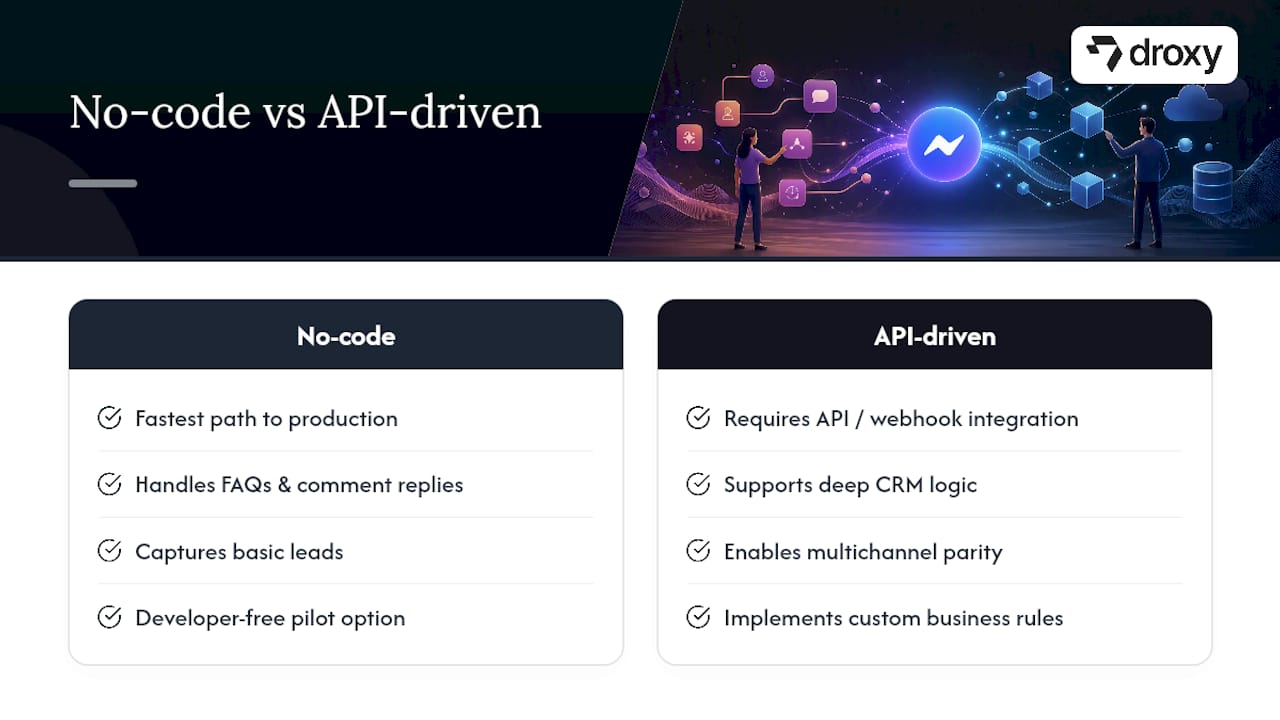
The honest framework here is simpler than most vendors make it sound. No-code builders through Meta Business Suite are the fastest path to production and handle FAQs, comment replies, and basic lead capture without a developer touching a line of code. API and webhook integration becomes necessary only when you need deep CRM logic, multichannel parity, or custom business rules that a no-code tool can’t express.
Most teams overthink this decision upfront. The smarter move is a hybrid path: launch a no-code pilot on your top three intents, measure deflection and conversion for a few weeks, then migrate only the highest-value flows to an API-driven build. You’ll know exactly which flows deserve that investment instead of guessing before you have any data.
— Elena
Move From Pilot to a Full Messenger Automation Program
Droxy gives you a faster route from pilot to production than stitching together a developer app, token management, and webhook logging yourself. It deploys no-code across Messenger, WhatsApp, and Instagram in parallel, so once your bot works on one channel, it carries the same knowledge base and voice to the others without a rebuild.

To evaluate fit, run a short pilot on your top three inbound intents, connect it to your CRM, and measure deflection rate and lead capture over two to three weeks. If the numbers hold up, Droxy’s Facebook Messenger agent is built to handle that scale with human hand-off already built in. Agencies managing automation for multiple clients can also explore Droxy’s white-label agency option. Full pricing details are available at droxy.ai/pricing when you’re ready to compare plans.
Sources
Recommended
Facebook Messenger automation cuts response times, captures leads around the clock, and routes routine questions away from your support team so agents work on what actually needs a human. If you want quick wins, enable Inbox Automations in Meta Business Suite today. If you need custom logic or CRM integration, plan for a Meta developer app with a Page access token and webhook setup instead. Platforms like Droxy shorten that build significantly.
TL;DR:
Automated Messenger workflows can significantly reduce response times and increase lead capture when properly integrated with CRM and support systems.
Starting with simple no-code tools like Meta Business Suite is ideal for quick deployment of FAQs and away messages, while API integration supports complex logic and multichannel consistency.
Successful automation requires tracking response time, deflection, lead conversion, and message volume, with ongoing A/B testing to optimize fallback and escalation flows.
Deploying Droxy speeds implementation by enabling AI-driven responses across Messenger, WhatsApp, and Instagram from a single platform, without needing extensive code.
Running a pilot on your top three intents for two to three weeks allows measurement of key metrics before scaling to full automation, minimizing risk and maximizing ROI.
Table of Contents
Why Facebook Messenger Automation Matters for Your Business
How Do You Set Up Facebook Messenger Automation?
What Are the Best Messenger Automation Workflows to Build First?
Which Integrations and Metrics Actually Prove Your Bot Works?
How Droxy Speeds Up Your Messenger Automation Rollout
Should You Build No-Code or API-Driven Messenger Automation?
Move From Pilot to a Full Messenger Automation Program
Sources
Why Facebook Messenger Automation Matters for Your Business
Messenger reaches customers where they already spend time. People open messaging apps far more often than they check email, and a well-built bot answers at 2 a.m. just as reliably as at 2 p.m. That matters because every hour a lead sits unanswered, your odds of converting them drop.
The efficiency case is just as strong. Automating FAQs, order status checks, and appointment confirmations frees your team from repetitive tickets and lets them focus on complex cases. Zapier’s research on Messenger workflows shows that automated quick replies and CRM logging meaningfully speed up how fast teams respond and how consistently conversations get tracked.
Deciding which path to take comes down to speed versus flexibility:
No-code builders (Meta Business Suite) get you live in a day, ideal for FAQs and away messages.
API and webhook integrations support custom business logic, CRM sync, and multichannel data.
Track outcomes from day one: response time, deflection rate, and lead capture volume all tell you whether the automation is paying off.
Pro Tip: Set a baseline for your average response time before launch. Without it, you can’t prove the automation actually improved anything.
How Do You Set Up Facebook Messenger Automation?
Getting a bot live involves two tracks: the fast no-code route and the developer route for deeper functionality; refer to the Automatic Meta Descriptions: A Practical Rollout Guide for insights on coordinated content workflows and messaging automation rollout. Most businesses start with the first and graduate to the second as needs grow.
Enable Inbox Automations. In Meta Business Suite, go to Inbox → Automations and turn on instant replies, away messages, and FAQ automations. This alone handles a large share of routine inquiries with zero code.
Register a developer app. For custom bots, go to developers.facebook.com, create a Meta app, and copy your App ID and App Secret. These credentials authenticate every API call your bot makes.
Generate a Page access token. Link your Page, add or remove connected Pages as needed, and copy the token somewhere secure. Rotate it if it’s ever exposed.
Configure webhooks. Set your callback URL, verify it, and subscribe to fields like
messages,messaging_postbacks,messaging_options, andmessage_deliveries. Microsoft’s Azure Bot Service documentation walks through the exact App ID, App Secret, and webhook configuration steps required to connect a bot to Messenger.Run the testing checklist. Send a test message from your Page, confirm webhook deliveries are landing, and verify your token and event subscriptions are active before going live.
One timing note worth planning around: Meta’s business verification process, required for some Messenger API features, typically takes 2 to 7 business days. Start that verification early so it doesn’t block your launch date.
Pro Tip: Log every webhook failure from day one. Transient delivery errors happen, and a retry mechanism saves you from silently losing messages during your first weeks live.
For teams building the developer route from scratch, a chatbot integration walkthrough covers the API side in more depth.
What Are the Best Messenger Automation Workflows to Build First?
Four workflows cover most of what businesses need from a Messenger bot, and each one has a distinct setup pattern.
Lead capture: Trigger from an ad, a post, or the persistent menu, ask two or three qualifying questions in the thread, then push the result straight into your CRM.
Comment-to-message: Convert public post comments into private conversations with a qualifying question and a targeted offer. Zapier notes this is one of the most effective ways to monetize organic engagement without new ad spend.
FAQ deflection: Automate your top five recurring questions, build a clear fallback for anything outside that scope, and hand off to a human the moment the bot can’t help.
Booking and transactional flows: Send confirmations, reminders, and receipts directly through Messenger so customers don’t have to check email.
Pro Tip: Design your welcome message to explain what the bot can do within three seconds of the first reply. Infobip’s guidance on chatbot design notes that users abandon the conversation almost immediately when they don’t understand what they’re talking to.
Which Integrations and Metrics Actually Prove Your Bot Works?
Three integrations matter most at launch: your CRM for lead push, your ticketing system for support handoff, and your order system for status lookups. Routing rules on top of those, business hours, skill based assignment, and clear escalation triggers, keep conversations moving to the right person without losing context. Zendesk’s guidance on Messenger deployments emphasizes preserving conversation context during handoff so customers never have to repeat themselves to a human agent.
Four metrics tell you whether the bot is working:
Average response time across all Messenger conversations
Deflection rate, the percentage of requests resolved without an agent
Conversion rate of leads captured through Messenger
Messages per ticket, a proxy for how efficiently the bot resolves issues
Log webhook events and A/B test your bot’s messaging regularly. A best practices guide is a useful reference for iterating on fallback flows once your baseline data comes in.
How Droxy Speeds Up Your Messenger Automation Rollout
Droxy deploys AI agents across Facebook Messenger, WhatsApp, Instagram, and web chat from a single no-code setup, which means you’re not rebuilding logic separately for every channel your customers use. That shared foundation is exactly what specialists recommend when scaling across Meta channels to avoid Messenger and Instagram Direct giving customers two different experiences.
24/7 automated answers pulled from your own knowledge base, not generic scripts
Human hand-off with Email Hand-off so complex conversations reach the right person without losing context
Multichannel knowledge integration, meaning one setup powers Messenger, WhatsApp, and Instagram consistently
Businesses running Droxy typically see faster response times and stronger lead capture because the bot is trained on their actual content, not a generic template. Over 60,000 users currently rely on Droxy to handle customer interaction across these channels.
Should You Build No-Code or API-Driven Messenger Automation?
The honest framework here is simpler than most vendors make it sound. No-code builders through Meta Business Suite are the fastest path to production and handle FAQs, comment replies, and basic lead capture without a developer touching a line of code. API and webhook integration becomes necessary only when you need deep CRM logic, multichannel parity, or custom business rules that a no-code tool can’t express.
Most teams overthink this decision upfront. The smarter move is a hybrid path: launch a no-code pilot on your top three intents, measure deflection and conversion for a few weeks, then migrate only the highest-value flows to an API-driven build. You’ll know exactly which flows deserve that investment instead of guessing before you have any data.
— Elena
Move From Pilot to a Full Messenger Automation Program
Droxy gives you a faster route from pilot to production than stitching together a developer app, token management, and webhook logging yourself. It deploys no-code across Messenger, WhatsApp, and Instagram in parallel, so once your bot works on one channel, it carries the same knowledge base and voice to the others without a rebuild.
To evaluate fit, run a short pilot on your top three inbound intents, connect it to your CRM, and measure deflection rate and lead capture over two to three weeks. If the numbers hold up, Droxy’s Facebook Messenger agent is built to handle that scale with human hand-off already built in. Agencies managing automation for multiple clients can also explore Droxy’s white-label agency option. Full pricing details are available at droxy.ai/pricing when you’re ready to compare plans.
Sources
Recommended



🚀
Powered by Droxy
Turn every interaction into a conversion
Customer facing AI agents that engage, convert, and support so you can scale what matters.
✨
Learn more
Recent posts

Insights
3 min read
Introducing Agent Memories
Improve your agents' performance with Agent Memories. Prevent agents from repeating the same mistakes by giving them feedback.
Read more

Insights
15 min read
HVAC Marketing in 2025: The Definitive Lead Gen Guide
Discover 15 proven HVAC marketing strategies, plus learn how Droxy's AI website agent converts curious visitors into qualified leads by answering their questions instantly - right when they're most interested in your services.
Read more

Insights
10 min read
10 Best AI Sales Agents in 2025: Tested & Ranked
Discover the top 10 AI sales agents of 2025, designed to enhance lead generation, personalize outreach, and ultimately, close more deals
Read more
Insights
3 min read
Introducing Agent Memories
Improve your agents' performance with Agent Memories. Prevent agents from repeating the same mistakes by giving them feedback.
Read more
Insights
15 min read
HVAC Marketing in 2025: The Definitive Lead Gen Guide
Discover 15 proven HVAC marketing strategies, plus learn how Droxy's AI website agent converts curious visitors into qualified leads by answering their questions instantly - right when they're most interested in your services.
Read more