Resolve Questions in Two Exchanges: FAQ Chatbot Design for Support
Resolve Questions in Two Exchanges: FAQ Chatbot Design for Support
Insights
22 min
The single best approach to FAQ chatbot design for customer service is a focused, document-backed retrieval layer paired with intent routing and explicit human-handover rules. This structure keeps answers accurate and easy to maintain, and it prevents small knowledge gaps from turning into frustrating dead ends. The rest of this guide covers architecture, conversation UX, content training, and quality assurance so you can build a bot that actually resolves issues instead of just deflecting them.
TL;DR:
A narrow, well-maintained knowledge base reduces confabulation and improves answer accuracy, especially for high-volume, routine questions.
Conversation flows should focus on one clarifying question at a time, using quick replies to speed resolution and avoid user abandonment.
Use retrieval-augmented generation for dynamic content and canned responses for fixed facts, with clear documentation of data sources and review dates.
Escalation criteria include repeated failures, low-confidence scores, or complex issues, with payloads summarizing the conversation for seamless human handoff.
Regular monitoring, testing, and audits of low-confidence and escalated conversations ensure ongoing quality and build trust in the FAQ chatbot.
DroxyAnswer Customer Questions InstantlyDroxy helps businesses provide human-like, brand-aligned answers across chat, phone, WhatsApp, social channels, and Shopify.Explore Droxy
Table of Contents
Core Design Principles to Guide Every Decision
Designing Conversation Flows That Resolve Issues Fast
Designing the Knowledge Layer Behind Every Answer
Getting Intent Recognition and Entity Extraction Right
Building the Right Handover Rules and Human-in-the-Loop Setup
What to Measure and How to Test FAQ Chatbots Reliably
A Practical Workflow for Training and Content Authoring
How Droxy Applies These Principles in Practice
Designing the Interface Around Accessibility
Making Responses Feel Personal Without Overreaching
Supporting Multiple Languages Without Fragmenting Your Knowledge Base
Protecting Customer Data in Chatbot Design
When a Simple FAQ Bot Beats a Full RAG Setup
Put This Design Into Production With Droxy
Sources
Core Design Principles to Guide Every Decision
Before you write a single prompt or map a single intent, decide what job your bot is actually doing. Some teams want pure containment: answer the question, close the loop, no human involved. Others want assisted resolution, where the bot handles the first 80% of a conversation and hands off the rest. Your architecture, your metrics, and your escalation rules all flow from this one decision.
Scope discipline matters just as much. A bot trained on a tight, well-maintained knowledge base of shipping policies, return windows, and account settings will outperform a bot that tries to answer everything about your business. Broader scope means more room for confabulation, the industry term for a chatbot confidently generating an answer that sounds right but isn’t grounded in your actual documentation.
The NIST Generative AI Profile treats confabulation as a high-stakes risk for large language model chatbots and recommends that teams explicitly define which queries the system should refuse to answer, along with clear feedback and recourse channels for customers who hit a wall.
Apply these principles when scoping your build:
Write down the bot’s primary job (containment, triage, or assisted resolution) before choosing tools.
Keep the knowledge base narrow enough that every fact has one clear owner.
Define an acceptable-use policy that lists topics the bot should decline to answer.
Assign a content owner, a model owner, and a documented escalation path for anything outside scope.
Pro Tip: Write your acceptable-use list before your happy-path scripts. Knowing what the bot won’t touch makes every other design choice faster.
If you’re still deciding between chatbot types for your business, this comparison of chatbot options walks through the tradeoffs in more depth.
Designing Conversation Flows That Resolve Issues Fast
A good FAQ chatbot greets the customer with a clear sense of what it can help with, not a blank “How can I help you today?” that forces the customer to guess. Frame the opening around common tasks: “I can help with orders, returns, or account questions. What’s going on?”
The biggest UX mistake in FAQ bot design is asking too much at once. A customer typing on a phone screen will abandon a bot that demands five pieces of information before it says anything useful. Limit yourself to one clarifying question per turn wherever possible, a pattern sometimes called progressive disclosure.
Follow this sequence when structuring a resolution flow:
Acknowledge the request in plain language before asking anything else.
Ask one clarifying question, using buttons or quick replies instead of free text when the answer is a fixed set of options.
Offer a direct answer or a short numbered set of choices, never an open-ended essay.
If the bot cannot resolve the issue in two exchanges, disclose that plainly and offer a next step.
Buttons and quick replies do double duty: they speed up the interaction and they narrow the intent space your natural language understanding layer has to guess at. Pair that with fallback language that admits uncertainty honestly, since research on perceived humanness suggests customers respond better to natural, confident phrasing than to repeated disclaimers about being AI, as long as the bot doesn’t overstate what it knows. Practical tips on structuring these flows are covered in this chatbot best practices guide.
Designing the Knowledge Layer Behind Every Answer
Every FAQ answer should trace back to exactly one canonical source. When three different documents describe your return policy slightly differently, your bot will eventually surface the wrong one, and customers will notice before your team does. Canonicalization means picking one authoritative version of each answer and retiring the rest.
Once that’s in place, you need a pipeline for getting documents into the bot: file formats get normalized, long documents get split into chunks sized for retrieval, and each chunk carries metadata like source, last-updated date, and topic tags. Version control matters here as much as it does in software, because a stale policy document is worse than no document at all.
This is where retrieval-augmented generation, or RAG, earns its place. Instead of hard-coding every possible phrasing of an answer, RAG lets the bot search your indexed documents at query time and generate a response grounded in what it finds. Open-source patterns like the ingest-chunk-embed-retrieve pipeline documented in projects such as DocChat have become the standard architecture for document-backed chatbots. For simple, unchanging answers like store hours, a static canned response is often faster and safer than a full retrieval call.
Key practices for the knowledge layer:
Tag every chunk with a source and a last-reviewed date so audits are fast.
Reserve RAG for nuanced or frequently changing content, and canned answers for fixed facts.
Schedule a recurring audit of the highest-traffic answers, not just the newest ones.
Log which document a given answer came from so support staff can trace errors.
A framework worth applying here: the Wharton Mack Institute’s chatbot framework lays out five design dimensions, including knowledge scope and quality assurance, that map directly onto the ingestion decisions above; it argues that scope should follow business goals rather than default to full automation.
Getting Intent Recognition and Entity Extraction Right
Most reliable FAQ bots use a hybrid approach rather than betting everything on one model. Rule-based matching handles obvious, high-frequency questions instantly. Embedding-based similarity search catches paraphrased versions of those same questions. A classifier layered on top resolves ambiguous cases and assigns a confidence score.
That confidence score decides what happens next. High confidence means answer directly. Medium confidence means offer a clarifying question or a short list of likely intents. Low confidence should trigger a graceful fallback, not a guess dressed up as an answer.
Entity extraction fills in the details, pulling order numbers, dates, or product names out of a message so the bot can personalize its response without asking the customer to repeat information they already gave.
Build your NLU layer around these habits:
Combine rules, embeddings, and a classifier rather than relying on one method alone.
Set explicit confidence thresholds and route low-confidence queries to clarification or a human.
Extract entities for slot-filling so customers aren’t asked for information already in their message.
Review misclassified intents weekly and retrain before drift compounds.
Building the Right Handover Rules and Human-in-the-Loop Setup
No FAQ bot should try to resolve everything on its own. The design question is when to hand off, and what context travels with that handoff.
Set clear triggers first:
Escalate after two failed resolution attempts on the same issue.
Escalate immediately when confidence scores fall below your defined threshold.
Escalate when a conversation exceeds a set time limit without progress.
Escalate on keywords tied to complaints, safety, or billing disputes regardless of confidence.
When a handoff happens, the payload matters as much as the trigger. Research on service recovery design recommends that the handover payload include a short conversation summary, the detected intent, any extracted entities, and what the bot already tried, so the human agent isn’t starting from zero.
The Wharton Mack Institute framework describes six human-AI workflow configurations ranging from full automation to full human control. For most customer-service FAQ bots, a middle configuration works best: the bot handles routine resolution independently but hands off automatically once risk or complexity crosses a defined line.
Pro Tip: Build your handoff summary template before launch, not after your first bad escalation. A missing detail in that first handoff is what erodes agent trust in the bot.
What to Measure and How to Test FAQ Chatbots Reliably
Track containment rate, escalation rate, customer satisfaction, task completion, and response accuracy together, since optimizing for any single metric in isolation tends to distort the others. A bot with a high containment rate that quietly frustrates customers isn’t actually working.
Order effects deserve attention too. A controlled experiment on conversational breakdowns found that breakdowns significantly reduce trust, especially when they occur later in a conversation, though trust can partially recover if the bot succeeds on a later task. That means a single early stumble is more forgivable than a late one, so prioritize accuracy on the closing steps of a flow, not just the opening ones.
Set a logging policy that samples a percentage of conversations for human review, flags low-confidence exchanges automatically, and routes anything tagged as an error into a review pipeline your content team actually checks. Before shipping a change to your prompts or your retrieval settings, run it against a fixed regression set of known questions.
A relevant finding: the same study, an online experiment with 257 participants, showed that trust recovery is possible but not guaranteed, which is a strong argument for catching breakdowns before they reach real customers.
Ongoing QA should include:
Weekly review of a sampled set of low-confidence or escalated conversations.
A/B tests on prompt or retrieval changes measured against the regression set, not live traffic alone.
Automated flags for answers that cite outdated or removed documents.
Quarterly review of containment versus satisfaction to catch metric drift.
A Practical Workflow for Training and Content Authoring
Getting a bot from documents to deployable answers is a content project as much as an engineering one. Start by authoring canonical answers for your highest-volume questions and mapping each one to a specific intent, not a vague topic.
From there, build out training utterances that reflect how customers actually phrase things, typos, slang, and incomplete sentences included, not just the clean phrasing your team would use internally.
Draft canonical answers first and map each to one intent.
Generate diversified training utterances, including edge cases and ambiguous phrasing.
Tag misclassified queries during review and route corrections back to the content owner.
Roll out changes through staging tests, then shadow mode against live traffic, then a monitored launch with rollback ready.
Document-based training works best when the source material is already organized. Guides on implementing chatbots for customer service in e-commerce and on how conversational AI processes retrieval are useful references while you build out this pipeline. For tone consistency across authored answers, a resource like this guide to humanizing AI-generated text is worth reviewing before final publication.
How Droxy Applies These Principles in Practice
Elena covers chatbot design and deployment for customer service teams, drawing on the frameworks and studies cited throughout this piece. Droxy, a no-code platform for building AI customer support agents, applies several of the principles above directly:
Document ingestion across multiple file types feeds the knowledge layer behind each agent.
Deployment spans website chat, phone, WhatsApp, Instagram, and Facebook from one knowledge base.
Human handover routes conversations to a live agent when confidence or complexity requires it.
Analytics dashboards track containment and escalation patterns over time.
Use the checklist in this guide, not vendor claims, as your baseline when evaluating any platform’s fit for your team.
Designing the Interface Around Accessibility
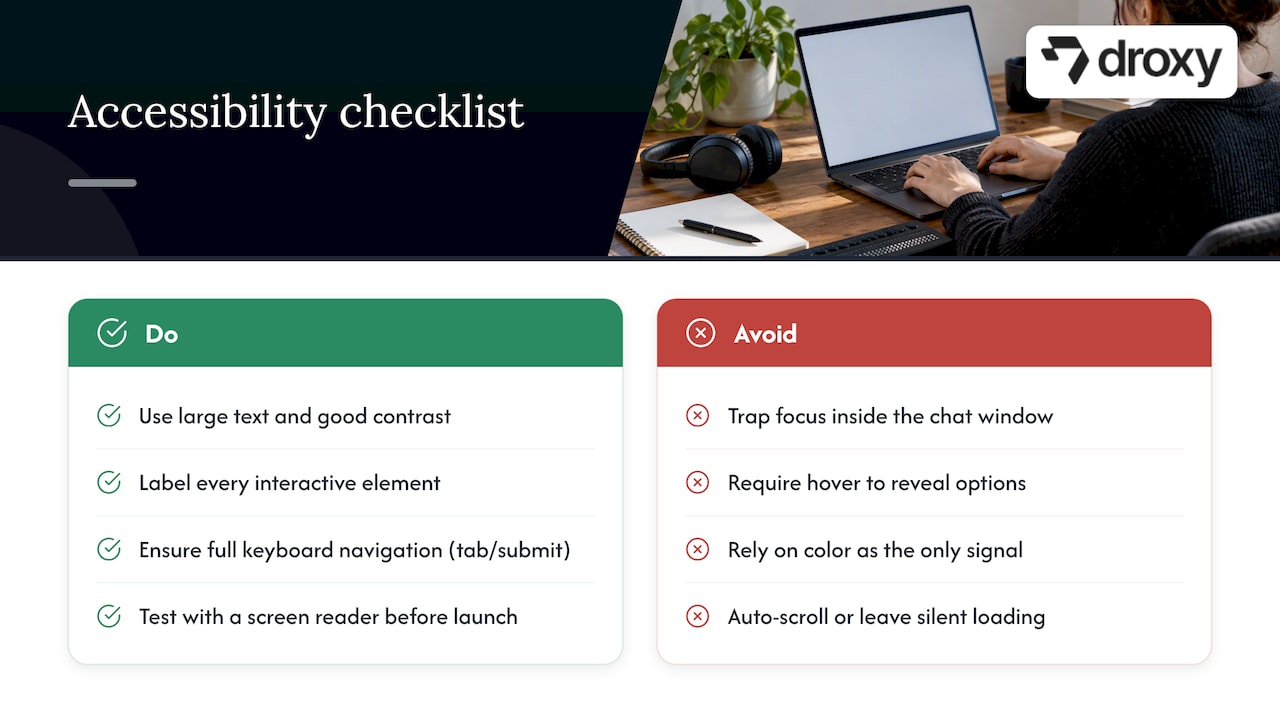
A well-designed FAQ chatbot interface earns its keep by staying out of the way. Text should be large enough to read on a phone without zooming, contrast should meet standard accessibility guidelines, and every interactive element, buttons, quick replies, menus, needs a label that a screen reader can announce clearly.
Keyboard navigation matters more than most teams assume. A customer using assistive technology should be able to tab through suggested replies and submit a response without touching a mouse. Avoid interfaces that trap focus inside a chat window or that require hover states to reveal options, since neither works for screen-reader or keyboard-only users.
Keep visual hierarchy simple: one primary action per screen, clear separation between the bot’s message and the customer’s, and enough white space that the conversation doesn’t feel cramped on a small screen. Avoid auto-scrolling behavior that yanks focus away from a message a customer is still reading.
Color should never be the only signal for status. If a message indicates an error or a successful action, pair the color with a text label or an icon so customers with color vision differences aren’t left guessing. Loading states need a visible indicator too. Silence during a retrieval call reads as a broken bot, even when it’s just doing its job a few seconds slower than expected.
Test your interface with a screen reader before launch, not after a complaint. It takes less time than most teams expect and catches problems that are nearly impossible to spot by eye alone.
Making Responses Feel Personal Without Overreaching
Personalization in an FAQ bot means using context the customer has already given, not guessing at preferences the bot has no basis for. If a customer mentions an order number early in the conversation, every following answer should reference it automatically instead of asking again.
Context-awareness works best when it’s scoped to the current session plus any account data your systems can safely surface, like order history or account tier. A bot that remembers a customer said “I already tried resetting my password” three messages ago, and doesn’t suggest that step again, feels dramatically more competent than one that repeats itself.
There’s a limit worth respecting here. Research on perceived humanness found that it raises satisfaction, but over-explaining that the bot is an AI, or conversely, pretending to have memory or empathy it doesn’t have, can undercut trust. The safer path is natural, direct language that uses real context without overstating what the bot knows about the customer as a person.
Practical personalization touches include referencing the customer’s plan or product when it’s available, adjusting suggested next steps based on what they’ve already tried, and avoiding generic responses when specific account context is on hand. None of this requires guesswork, just consistent use of the information already in the conversation.
Supporting Multiple Languages Without Fragmenting Your Knowledge Base
Multi-language support works best when it sits on top of one canonical knowledge base rather than forking into separate documents per language. Translate the customer-facing responses, but keep the source-of-truth content in one place so updates don’t have to be repeated across five language versions.
Detect the customer’s language early in the conversation, either from browser settings or from the first message, and confirm it rather than assuming. A customer who switches languages mid-conversation should be able to continue without restarting the flow.
Machine translation works well for straightforward FAQ content like shipping times or return policies. It works less well for nuanced or emotionally sensitive exchanges, where a mistranslation can escalate frustration instead of resolving it. Flag those categories for human-reviewed translations rather than relying on automated output alone.
Localization goes beyond language. Date formats, currency symbols, and regional policy differences, like which return windows apply in which markets, need their own metadata tags in your knowledge base so the bot serves the right version to the right customer automatically.
Protecting Customer Data in Chatbot Design
Security in FAQ chatbot design starts with minimizing what the bot collects. If a task doesn’t require an email address or an account number, don’t ask for it. Every piece of personal data captured in a chat log is a piece of data your team has to secure and eventually delete.
Encrypt conversation logs both in transit and at rest, and set a retention policy that actually gets enforced rather than left as a written intention. Access to raw conversation logs should be limited to the people who need them for review or debugging, not open to the entire team by default.
When a bot needs to verify identity, for account changes or order details, use your existing authentication systems rather than building a parallel one inside the chat interface. And document how customer data flows from the chatbot into any connected systems, since that data map is exactly what a privacy review or a security audit will ask for first.
When a Simple FAQ Bot Beats a Full RAG Setup
A simple, static FAQ bot is often the right call for a small, stable set of questions that rarely change. Reach for RAG and document retrieval once your content is large, updates frequently, or answers require nuance a fixed script can’t capture. Before choosing either, check your team’s capacity to maintain the knowledge base you’re about to build.
— Elena
Put This Design Into Production With Droxy
Some platforms turn the architecture in this guide into something you can actually deploy: document ingestion feeds the knowledge base, human handover triggers when a conversation needs a live agent, and dashboards track performance across multiple communication channels.

Plans start on the Droxy pricing page, covering Basic, Advanced, and Enterprise tiers, and agencies managing multiple clients can explore the agency program for white-labeled deployments. If your setup involves complex integrations, contacting sales directly is the faster route than trying to configure everything solo.
Sources
FAQ
What are five things I should avoid discussing with a chatbot?
Avoid sharing full payment card numbers, government identification numbers, medical details, passwords, or highly sensitive legal matters through a chatbot, since these typically require secure, verified channels rather than open chat. A well-designed FAQ bot should redirect these topics to a secure form or a human agent automatically.
Can you legally marry a chatbot?
No jurisdiction currently recognizes a chatbot as a legal party capable of entering marriage, since marriage law requires a human participant with legal capacity to consent. This falls outside what an FAQ chatbot is designed or authorized to address.
What are the four types of chatbots?
Common categorizations include rule-based bots that follow scripted decision trees, retrieval-based bots that pull answers from a knowledge base, generative bots that produce responses using a language model, and hybrid bots that combine rules, retrieval, and generation. Most modern customer-service FAQ bots use a hybrid approach for reliability.
How much does it cost to build a chatbot?
Cost depends heavily on whether you build custom infrastructure or use a no-code platform, with the latter typically priced as a monthly subscription rather than a one-time build. Droxy’s plans start from $16 per month on the Basic tier, with Advanced and Enterprise tiers available for larger deployments.
Recommended
The single best approach to FAQ chatbot design for customer service is a focused, document-backed retrieval layer paired with intent routing and explicit human-handover rules. This structure keeps answers accurate and easy to maintain, and it prevents small knowledge gaps from turning into frustrating dead ends. The rest of this guide covers architecture, conversation UX, content training, and quality assurance so you can build a bot that actually resolves issues instead of just deflecting them.
TL;DR:
A narrow, well-maintained knowledge base reduces confabulation and improves answer accuracy, especially for high-volume, routine questions.
Conversation flows should focus on one clarifying question at a time, using quick replies to speed resolution and avoid user abandonment.
Use retrieval-augmented generation for dynamic content and canned responses for fixed facts, with clear documentation of data sources and review dates.
Escalation criteria include repeated failures, low-confidence scores, or complex issues, with payloads summarizing the conversation for seamless human handoff.
Regular monitoring, testing, and audits of low-confidence and escalated conversations ensure ongoing quality and build trust in the FAQ chatbot.
DroxyAnswer Customer Questions InstantlyDroxy helps businesses provide human-like, brand-aligned answers across chat, phone, WhatsApp, social channels, and Shopify.Explore Droxy
Table of Contents
Core Design Principles to Guide Every Decision
Designing Conversation Flows That Resolve Issues Fast
Designing the Knowledge Layer Behind Every Answer
Getting Intent Recognition and Entity Extraction Right
Building the Right Handover Rules and Human-in-the-Loop Setup
What to Measure and How to Test FAQ Chatbots Reliably
A Practical Workflow for Training and Content Authoring
How Droxy Applies These Principles in Practice
Designing the Interface Around Accessibility
Making Responses Feel Personal Without Overreaching
Supporting Multiple Languages Without Fragmenting Your Knowledge Base
Protecting Customer Data in Chatbot Design
When a Simple FAQ Bot Beats a Full RAG Setup
Put This Design Into Production With Droxy
Sources
Core Design Principles to Guide Every Decision
Before you write a single prompt or map a single intent, decide what job your bot is actually doing. Some teams want pure containment: answer the question, close the loop, no human involved. Others want assisted resolution, where the bot handles the first 80% of a conversation and hands off the rest. Your architecture, your metrics, and your escalation rules all flow from this one decision.
Scope discipline matters just as much. A bot trained on a tight, well-maintained knowledge base of shipping policies, return windows, and account settings will outperform a bot that tries to answer everything about your business. Broader scope means more room for confabulation, the industry term for a chatbot confidently generating an answer that sounds right but isn’t grounded in your actual documentation.
The NIST Generative AI Profile treats confabulation as a high-stakes risk for large language model chatbots and recommends that teams explicitly define which queries the system should refuse to answer, along with clear feedback and recourse channels for customers who hit a wall.
Apply these principles when scoping your build:
Write down the bot’s primary job (containment, triage, or assisted resolution) before choosing tools.
Keep the knowledge base narrow enough that every fact has one clear owner.
Define an acceptable-use policy that lists topics the bot should decline to answer.
Assign a content owner, a model owner, and a documented escalation path for anything outside scope.
Pro Tip: Write your acceptable-use list before your happy-path scripts. Knowing what the bot won’t touch makes every other design choice faster.
If you’re still deciding between chatbot types for your business, this comparison of chatbot options walks through the tradeoffs in more depth.
Designing Conversation Flows That Resolve Issues Fast
A good FAQ chatbot greets the customer with a clear sense of what it can help with, not a blank “How can I help you today?” that forces the customer to guess. Frame the opening around common tasks: “I can help with orders, returns, or account questions. What’s going on?”
The biggest UX mistake in FAQ bot design is asking too much at once. A customer typing on a phone screen will abandon a bot that demands five pieces of information before it says anything useful. Limit yourself to one clarifying question per turn wherever possible, a pattern sometimes called progressive disclosure.
Follow this sequence when structuring a resolution flow:
Acknowledge the request in plain language before asking anything else.
Ask one clarifying question, using buttons or quick replies instead of free text when the answer is a fixed set of options.
Offer a direct answer or a short numbered set of choices, never an open-ended essay.
If the bot cannot resolve the issue in two exchanges, disclose that plainly and offer a next step.
Buttons and quick replies do double duty: they speed up the interaction and they narrow the intent space your natural language understanding layer has to guess at. Pair that with fallback language that admits uncertainty honestly, since research on perceived humanness suggests customers respond better to natural, confident phrasing than to repeated disclaimers about being AI, as long as the bot doesn’t overstate what it knows. Practical tips on structuring these flows are covered in this chatbot best practices guide.
Designing the Knowledge Layer Behind Every Answer
Every FAQ answer should trace back to exactly one canonical source. When three different documents describe your return policy slightly differently, your bot will eventually surface the wrong one, and customers will notice before your team does. Canonicalization means picking one authoritative version of each answer and retiring the rest.
Once that’s in place, you need a pipeline for getting documents into the bot: file formats get normalized, long documents get split into chunks sized for retrieval, and each chunk carries metadata like source, last-updated date, and topic tags. Version control matters here as much as it does in software, because a stale policy document is worse than no document at all.
This is where retrieval-augmented generation, or RAG, earns its place. Instead of hard-coding every possible phrasing of an answer, RAG lets the bot search your indexed documents at query time and generate a response grounded in what it finds. Open-source patterns like the ingest-chunk-embed-retrieve pipeline documented in projects such as DocChat have become the standard architecture for document-backed chatbots. For simple, unchanging answers like store hours, a static canned response is often faster and safer than a full retrieval call.
Key practices for the knowledge layer:
Tag every chunk with a source and a last-reviewed date so audits are fast.
Reserve RAG for nuanced or frequently changing content, and canned answers for fixed facts.
Schedule a recurring audit of the highest-traffic answers, not just the newest ones.
Log which document a given answer came from so support staff can trace errors.
A framework worth applying here: the Wharton Mack Institute’s chatbot framework lays out five design dimensions, including knowledge scope and quality assurance, that map directly onto the ingestion decisions above; it argues that scope should follow business goals rather than default to full automation.
Getting Intent Recognition and Entity Extraction Right
Most reliable FAQ bots use a hybrid approach rather than betting everything on one model. Rule-based matching handles obvious, high-frequency questions instantly. Embedding-based similarity search catches paraphrased versions of those same questions. A classifier layered on top resolves ambiguous cases and assigns a confidence score.
That confidence score decides what happens next. High confidence means answer directly. Medium confidence means offer a clarifying question or a short list of likely intents. Low confidence should trigger a graceful fallback, not a guess dressed up as an answer.
Entity extraction fills in the details, pulling order numbers, dates, or product names out of a message so the bot can personalize its response without asking the customer to repeat information they already gave.
Build your NLU layer around these habits:
Combine rules, embeddings, and a classifier rather than relying on one method alone.
Set explicit confidence thresholds and route low-confidence queries to clarification or a human.
Extract entities for slot-filling so customers aren’t asked for information already in their message.
Review misclassified intents weekly and retrain before drift compounds.
Building the Right Handover Rules and Human-in-the-Loop Setup
No FAQ bot should try to resolve everything on its own. The design question is when to hand off, and what context travels with that handoff.
Set clear triggers first:
Escalate after two failed resolution attempts on the same issue.
Escalate immediately when confidence scores fall below your defined threshold.
Escalate when a conversation exceeds a set time limit without progress.
Escalate on keywords tied to complaints, safety, or billing disputes regardless of confidence.
When a handoff happens, the payload matters as much as the trigger. Research on service recovery design recommends that the handover payload include a short conversation summary, the detected intent, any extracted entities, and what the bot already tried, so the human agent isn’t starting from zero.
The Wharton Mack Institute framework describes six human-AI workflow configurations ranging from full automation to full human control. For most customer-service FAQ bots, a middle configuration works best: the bot handles routine resolution independently but hands off automatically once risk or complexity crosses a defined line.
Pro Tip: Build your handoff summary template before launch, not after your first bad escalation. A missing detail in that first handoff is what erodes agent trust in the bot.
What to Measure and How to Test FAQ Chatbots Reliably
Track containment rate, escalation rate, customer satisfaction, task completion, and response accuracy together, since optimizing for any single metric in isolation tends to distort the others. A bot with a high containment rate that quietly frustrates customers isn’t actually working.
Order effects deserve attention too. A controlled experiment on conversational breakdowns found that breakdowns significantly reduce trust, especially when they occur later in a conversation, though trust can partially recover if the bot succeeds on a later task. That means a single early stumble is more forgivable than a late one, so prioritize accuracy on the closing steps of a flow, not just the opening ones.
Set a logging policy that samples a percentage of conversations for human review, flags low-confidence exchanges automatically, and routes anything tagged as an error into a review pipeline your content team actually checks. Before shipping a change to your prompts or your retrieval settings, run it against a fixed regression set of known questions.
A relevant finding: the same study, an online experiment with 257 participants, showed that trust recovery is possible but not guaranteed, which is a strong argument for catching breakdowns before they reach real customers.
Ongoing QA should include:
Weekly review of a sampled set of low-confidence or escalated conversations.
A/B tests on prompt or retrieval changes measured against the regression set, not live traffic alone.
Automated flags for answers that cite outdated or removed documents.
Quarterly review of containment versus satisfaction to catch metric drift.
A Practical Workflow for Training and Content Authoring
Getting a bot from documents to deployable answers is a content project as much as an engineering one. Start by authoring canonical answers for your highest-volume questions and mapping each one to a specific intent, not a vague topic.
From there, build out training utterances that reflect how customers actually phrase things, typos, slang, and incomplete sentences included, not just the clean phrasing your team would use internally.
Draft canonical answers first and map each to one intent.
Generate diversified training utterances, including edge cases and ambiguous phrasing.
Tag misclassified queries during review and route corrections back to the content owner.
Roll out changes through staging tests, then shadow mode against live traffic, then a monitored launch with rollback ready.
Document-based training works best when the source material is already organized. Guides on implementing chatbots for customer service in e-commerce and on how conversational AI processes retrieval are useful references while you build out this pipeline. For tone consistency across authored answers, a resource like this guide to humanizing AI-generated text is worth reviewing before final publication.
How Droxy Applies These Principles in Practice
Elena covers chatbot design and deployment for customer service teams, drawing on the frameworks and studies cited throughout this piece. Droxy, a no-code platform for building AI customer support agents, applies several of the principles above directly:
Document ingestion across multiple file types feeds the knowledge layer behind each agent.
Deployment spans website chat, phone, WhatsApp, Instagram, and Facebook from one knowledge base.
Human handover routes conversations to a live agent when confidence or complexity requires it.
Analytics dashboards track containment and escalation patterns over time.
Use the checklist in this guide, not vendor claims, as your baseline when evaluating any platform’s fit for your team.
Designing the Interface Around Accessibility
A well-designed FAQ chatbot interface earns its keep by staying out of the way. Text should be large enough to read on a phone without zooming, contrast should meet standard accessibility guidelines, and every interactive element, buttons, quick replies, menus, needs a label that a screen reader can announce clearly.
Keyboard navigation matters more than most teams assume. A customer using assistive technology should be able to tab through suggested replies and submit a response without touching a mouse. Avoid interfaces that trap focus inside a chat window or that require hover states to reveal options, since neither works for screen-reader or keyboard-only users.
Keep visual hierarchy simple: one primary action per screen, clear separation between the bot’s message and the customer’s, and enough white space that the conversation doesn’t feel cramped on a small screen. Avoid auto-scrolling behavior that yanks focus away from a message a customer is still reading.
Color should never be the only signal for status. If a message indicates an error or a successful action, pair the color with a text label or an icon so customers with color vision differences aren’t left guessing. Loading states need a visible indicator too. Silence during a retrieval call reads as a broken bot, even when it’s just doing its job a few seconds slower than expected.
Test your interface with a screen reader before launch, not after a complaint. It takes less time than most teams expect and catches problems that are nearly impossible to spot by eye alone.
Making Responses Feel Personal Without Overreaching
Personalization in an FAQ bot means using context the customer has already given, not guessing at preferences the bot has no basis for. If a customer mentions an order number early in the conversation, every following answer should reference it automatically instead of asking again.
Context-awareness works best when it’s scoped to the current session plus any account data your systems can safely surface, like order history or account tier. A bot that remembers a customer said “I already tried resetting my password” three messages ago, and doesn’t suggest that step again, feels dramatically more competent than one that repeats itself.
There’s a limit worth respecting here. Research on perceived humanness found that it raises satisfaction, but over-explaining that the bot is an AI, or conversely, pretending to have memory or empathy it doesn’t have, can undercut trust. The safer path is natural, direct language that uses real context without overstating what the bot knows about the customer as a person.
Practical personalization touches include referencing the customer’s plan or product when it’s available, adjusting suggested next steps based on what they’ve already tried, and avoiding generic responses when specific account context is on hand. None of this requires guesswork, just consistent use of the information already in the conversation.
Supporting Multiple Languages Without Fragmenting Your Knowledge Base
Multi-language support works best when it sits on top of one canonical knowledge base rather than forking into separate documents per language. Translate the customer-facing responses, but keep the source-of-truth content in one place so updates don’t have to be repeated across five language versions.
Detect the customer’s language early in the conversation, either from browser settings or from the first message, and confirm it rather than assuming. A customer who switches languages mid-conversation should be able to continue without restarting the flow.
Machine translation works well for straightforward FAQ content like shipping times or return policies. It works less well for nuanced or emotionally sensitive exchanges, where a mistranslation can escalate frustration instead of resolving it. Flag those categories for human-reviewed translations rather than relying on automated output alone.
Localization goes beyond language. Date formats, currency symbols, and regional policy differences, like which return windows apply in which markets, need their own metadata tags in your knowledge base so the bot serves the right version to the right customer automatically.
Protecting Customer Data in Chatbot Design
Security in FAQ chatbot design starts with minimizing what the bot collects. If a task doesn’t require an email address or an account number, don’t ask for it. Every piece of personal data captured in a chat log is a piece of data your team has to secure and eventually delete.
Encrypt conversation logs both in transit and at rest, and set a retention policy that actually gets enforced rather than left as a written intention. Access to raw conversation logs should be limited to the people who need them for review or debugging, not open to the entire team by default.
When a bot needs to verify identity, for account changes or order details, use your existing authentication systems rather than building a parallel one inside the chat interface. And document how customer data flows from the chatbot into any connected systems, since that data map is exactly what a privacy review or a security audit will ask for first.
When a Simple FAQ Bot Beats a Full RAG Setup
A simple, static FAQ bot is often the right call for a small, stable set of questions that rarely change. Reach for RAG and document retrieval once your content is large, updates frequently, or answers require nuance a fixed script can’t capture. Before choosing either, check your team’s capacity to maintain the knowledge base you’re about to build.
— Elena
Put This Design Into Production With Droxy
Some platforms turn the architecture in this guide into something you can actually deploy: document ingestion feeds the knowledge base, human handover triggers when a conversation needs a live agent, and dashboards track performance across multiple communication channels.
Plans start on the Droxy pricing page, covering Basic, Advanced, and Enterprise tiers, and agencies managing multiple clients can explore the agency program for white-labeled deployments. If your setup involves complex integrations, contacting sales directly is the faster route than trying to configure everything solo.
Sources
FAQ
What are five things I should avoid discussing with a chatbot?
Avoid sharing full payment card numbers, government identification numbers, medical details, passwords, or highly sensitive legal matters through a chatbot, since these typically require secure, verified channels rather than open chat. A well-designed FAQ bot should redirect these topics to a secure form or a human agent automatically.
Can you legally marry a chatbot?
No jurisdiction currently recognizes a chatbot as a legal party capable of entering marriage, since marriage law requires a human participant with legal capacity to consent. This falls outside what an FAQ chatbot is designed or authorized to address.
What are the four types of chatbots?
Common categorizations include rule-based bots that follow scripted decision trees, retrieval-based bots that pull answers from a knowledge base, generative bots that produce responses using a language model, and hybrid bots that combine rules, retrieval, and generation. Most modern customer-service FAQ bots use a hybrid approach for reliability.
How much does it cost to build a chatbot?
Cost depends heavily on whether you build custom infrastructure or use a no-code platform, with the latter typically priced as a monthly subscription rather than a one-time build. Droxy’s plans start from $16 per month on the Basic tier, with Advanced and Enterprise tiers available for larger deployments.
Recommended



🚀
Powered by Droxy
Turn every interaction into a conversion
Customer facing AI agents that engage, convert, and support so you can scale what matters.
✨
Learn more
Recent posts

Insights
3 min read
Introducing Agent Memories
Improve your agents' performance with Agent Memories. Prevent agents from repeating the same mistakes by giving them feedback.
Read more

Insights
15 min read
HVAC Marketing in 2025: The Definitive Lead Gen Guide
Discover 15 proven HVAC marketing strategies, plus learn how Droxy's AI website agent converts curious visitors into qualified leads by answering their questions instantly - right when they're most interested in your services.
Read more

Insights
10 min read
10 Best AI Sales Agents in 2025: Tested & Ranked
Discover the top 10 AI sales agents of 2025, designed to enhance lead generation, personalize outreach, and ultimately, close more deals
Read more
Insights
3 min read
Introducing Agent Memories
Improve your agents' performance with Agent Memories. Prevent agents from repeating the same mistakes by giving them feedback.
Read more
Insights
15 min read
HVAC Marketing in 2025: The Definitive Lead Gen Guide
Discover 15 proven HVAC marketing strategies, plus learn how Droxy's AI website agent converts curious visitors into qualified leads by answering their questions instantly - right when they're most interested in your services.
Read more