Launch Helpdesk Chatbot Integration in a Few Weeks for IT Managers
Launch Helpdesk Chatbot Integration in a Few Weeks for IT Managers
Insights
22 min

The fastest path to results is an API-first integration with deep routing rules and a human hand-off built in from day one. This approach gives you fewer repetitive tickets, faster first responses, and stronger SLA compliance because every conversation either resolves instantly or lands with the right agent, fully briefed. The rest of this guide walks you through the runbook that gets you there.
TL;DR:
Use API-first integration for deeper control, but start with native connectors or middleware for quicker deployment and less engineering effort.
Focus on high-volume, low-risk use cases like password resets and status checks before tackling more complex tickets requiring sensitive data handling.
Ensure full context and structured metadata are captured during escalation to speed up ticket resolution and maintain customer satisfaction.
Conduct thorough testing of intent recognition, fallback rates, and escalation paths before going live, and monitor key metrics like deflection rate and CSAT afterward.
Prioritize phased rollout with small canary deployments, clear acceptance criteria, and a solid rollback plan to minimize risks during implementation.
DroxyGive Your Helpdesk Instant AnswersDroxy deploys customizable AI agents across your website and other channels, helping reduce wait times and missed customer inquiries.Visit Droxy
Table of Contents
Why Integrate a Chatbot Into Your Helpdesk?
Integration Approaches: API, Native Connectors, Middleware, and Webhooks
Your Step-by-Step Integration Checklist and Runbook
Testing, Validation, and Monitoring
Security, Privacy, and Access Control Considerations
Costs and Timeline Estimates for Planning Your Budget
Deployment Playbook and Rollback Strategy
Droxy’s Implementation Notes for Faster Time-to-Value
Compliance Requirements for Chatbot Data Handling
Conversation Design Best Practices for Helpdesk Use Cases
Common Challenges and Troubleshooting Tips
Prioritization Guidance for IT Leaders
Droxy as a Practical Option: Demo, Trial, and Pricing
Sources
Why Integrate a Chatbot Into Your Helpdesk?
Your support queue is full of questions that do not need a human: password resets, order status checks, basic troubleshooting. A chatbot connected to your helpdesk handles these around the clock, which means your team spends its time on the tickets that actually require judgment.
Gartner reports that organizations measure chatbot value through operational metrics like ticket deflection and reduced agent handling time, which is exactly where the business case for integration starts. When a chatbot resolves a password reset or pulls a shipping status without a human touch, that ticket never hits your queue, and your average handling time drops across the board.
The highest-value use cases for IT and support teams tend to cluster around a few patterns:
Password resets and account unlocks, which are high-volume and low-risk, making them ideal first candidates.
Incident triage, where the bot gathers details, checks known outages, and routes urgent cases immediately.
Service request intake, like software installs or access requests, with structured forms instead of open-ended chat.
Status updates, pulling live ticket or order information from your systems instead of making agents look it up.
Leadership cares less about the technology and more about what it moves. Watch CSAT, mean time to acknowledge (MTTA), mean time to resolve (MTTR), and cost per ticket. These four numbers tell you whether your integration is actually working or just adding another interface for customers to navigate.
Ticket deflection only works when the bot knows when to stop trying. A chatbot that keeps guessing instead of escalating creates more frustration than it removes, which is why routing logic matters as much as the bot’s conversational skill.
Integration Approaches: API, Native Connectors, Middleware, and Webhooks
Four technical patterns dominate helpdesk chatbot integration, and picking the right one depends on your existing stack, your team’s engineering capacity, and how much control you need over the conversation flow.
API-first integration gives you direct control over data flow, error handling, and custom logic, at the cost of upfront development time and ongoing maintenance.
Native connectors, built by your helpdesk vendor or the chatbot provider, deploy fastest but often limit how deeply you can customize routing or field mapping.
Middleware or iPaaS tools sit between legacy systems and modern chatbot platforms, a practical choice when your helpdesk cannot expose a clean API on its own.
Event-driven webhooks push updates in real time, which keeps ticket status in sync, but they require careful idempotency handling so the same event never gets processed twice.
Vendor platform pages commonly recommend API or webhook-based integrations for reliable ticket sync and context transfer between systems, and that recommendation holds up in practice: the tighter your integration, the less information gets lost between the chatbot and the human agent who picks up the conversation.
If you run Zendesk or Freshdesk, start with their native connector to validate the use case, then move to API-first once you know which fields and flows actually matter. Teams juggling multiple legacy ticketing tools often lean on middleware instead, since building direct API integrations for each one eats far more engineering time than the deflection gains justify early on. Our comparison of Zendesk and Intercom walks through how connector limitations differ across platforms, which is worth a look before you commit to one path.
Your decision criteria should come down to three questions: how much customization do you need, how much engineering time can you spend, and how fast do you need to launch. Answer those honestly and the right approach usually becomes obvious.
Your Step-by-Step Integration Checklist and Runbook
A successful integration follows a predictable sequence: discovery, design, implementation, and operation. Skipping steps here is where most projects stall.
Map your channels and knowledge sources. List every channel (web, email, phone, chat) and every knowledge base article, macro, and canned response your agents currently rely on.
Document your ticket fields and user journeys. Know which fields are mandatory, which are optional, and how a ticket moves from creation to resolution today.
Design your conversation flows and escalation rules. Decide what the bot handles alone, what it escalates immediately, and what metadata it captures at each step.
Clean and sync your knowledge base. Canonical identifiers for products, services, and policies prevent the bot from giving two different answers to the same question. Our chatbot training guide covers the data hygiene steps that matter most here.
Build the technical integration. Set up authentication, define your message schema, and build in idempotency so retried messages never create duplicate tickets.
Build the human hand-off mechanism. Every escalation should carry the full conversation transcript plus structured metadata like customer ID, issue category, and urgency, so agents never ask customers to repeat themselves.
Test in staging with real ticket scenarios. Run your actual historical tickets through the bot before anyone sees it live.
Roll out as a canary to a small percentage of traffic. Watch error rates and escalation spikes before expanding further.
Document a rollback plan. Know exactly how to disable the bot and revert to standard queuing if something breaks.
McKinsey’s research on operations management notes that capturing context at the hand-off point, meaning the full transcript plus structured metadata, preserves resolution time when routing to a human agent instead of forcing a restart.
Pro Tip: Build your escalation and hand-off logic before you build the bot’s happy-path conversation. It is much easier to design good answers around solid escalation rules than to retrofit escalation into a chatbot that was built to just chat.
Testing, Validation, and Monitoring
Before launch, run three categories of tests: intent coverage (does the bot recognize the range of questions it will actually get), fallback rate (how often it says “I don’t understand”), and escalation path checks (does every escalation route reach a live agent with full context).
Once live, track these operational metrics continuously:
Deflection rate, the share of conversations resolved without a human agent.
Escalation rate, how often the bot hands off, and whether that rate climbs over time.
MTTA and MTTR, to confirm the bot is actually speeding up response and resolution, not just shifting work around.
CSAT, measured specifically on bot-handled and bot-escalated conversations separately.
Case studies and independent tests often show meaningful ticket reduction and faster response times when chatbots are paired with clean knowledge bases and clear escalation rules, though results vary by industry and ticket mix.
Set up logging and alerting thresholds for error spikes, latency increases, and sudden drops in deflection rate. A synthetic test that runs a handful of known conversation paths every hour catches breakage before customers do. Treat each rollout phase as a gate: define acceptance criteria upfront, and do not expand traffic until the previous phase clears them.
Security, Privacy, and Access Control Considerations
A chatbot that touches your helpdesk also touches customer data, account details, and sometimes payment or health information, so your security review needs to happen before launch, not after.
Use OAuth or mutual TLS for service-to-service authentication, and avoid long-lived API keys with broad permissions.
Apply least-privilege service accounts, so the bot’s integration credentials can only touch the systems and fields it actually needs.
Redact or mask personally identifiable information in logs, and define retention policies for conversation transcripts before you start collecting them.
Require role-based approval for sensitive actions, like account changes or refunds, so the bot can suggest but never execute without a human sign-off on high-risk flows.
Keep an audit trail of every automated decision and hand-off, since auditors and compliance teams will ask for it eventually.
Any third-party platform you evaluate should be able to document its data handling practices clearly enough to satisfy your own security team’s review, not just its sales deck.
Costs and Timeline Estimates for Planning Your Budget
A pilot integration covering one or two high-volume use cases typically takes a few weeks to stand up, mostly spent on knowledge base cleanup and flow design rather than raw engineering. A scoped integration across multiple channels and deeper routing logic takes longer, often stretching into a couple of months once you factor in testing and stakeholder review. A full enterprise rollout across every channel and legacy system can run considerably longer, driven mostly by integration complexity rather than the chatbot technology itself.
Your main cost drivers will be:
Custom integration work, especially against legacy ticketing systems without modern APIs.
Knowledge base cleanup, which is often underestimated and takes longer than the integration itself.
Multichannel licensing, since adding phone, WhatsApp, or social channels usually means separate connector costs.
Plan for ongoing maintenance too. Someone on your team needs to own knowledge base updates, review escalation patterns monthly, and retrain or reconfigure flows as your products and policies change. Treat this as a standing responsibility, not a one-time project.
Deployment Playbook and Rollback Strategy
Launching safely means expanding gradually and watching the right signals at every step.
Start with a small canary, routing a limited percentage of traffic to the new bot while the rest continues through your existing flow.
Watch your gating metrics closely: latency, error spikes, and escalation rate. Any of these moving sharply in the wrong direction is your signal to pause.
Expand in increments once each phase clears its acceptance criteria, rather than jumping straight to full traffic.
Communicate internally before each phase, so your support team knows what is changing and can flag issues the bot’s metrics might miss.
Hold a retro after each phase, comparing actual deflection and CSAT against your targets before deciding to expand further.
Keep your rollback path documented and tested, so disabling the bot and reverting to standard queuing takes minutes, not hours.
A Harvard Business Review analysis emphasizes that automation succeeds when organizations pair the technology with process redesign and clear measurement, not when they treat deployment as a one-time switch to flip. Vendor and industry guidance consistently recommends this same phased approach with clear gating metrics to control risk during launch, which is why skipping straight to full rollout rarely goes well even when the pilot looked strong.
Droxy’s Implementation Notes for Faster Time-to-Value
For IT teams weighing build-versus-buy, a no-code platform can remove a meaningful chunk of the engineering burden described above, particularly around knowledge base ingestion and multichannel setup.
Droxy is a no-code platform that lets businesses deploy AI agents for customer interaction across website chat, phone, WhatsApp, Instagram, Facebook, and Shopify.
We built our platform to solve slow response times and missed inquiries with instant, 24/7 answers, integrating into existing systems with deep customization so interactions stay human-like and on brand voice.
Businesses using our platform report improved engagement, reduced wait times, and higher lead conversion, and many users currently rely on our solution to power their customer service.
We publish detailed guides, including our Zendesk vs Intercom comparison, to help teams understand connector-level tradeoffs before committing engineering time.
A no-code approach reduces project risk mainly where knowledge base ingestion and multichannel deployment would otherwise consume the most custom development time. When your bottleneck is speed to pilot rather than deep system-level customization, that tradeoff tends to favor a no-code path.
Compliance Requirements for Chatbot Data Handling
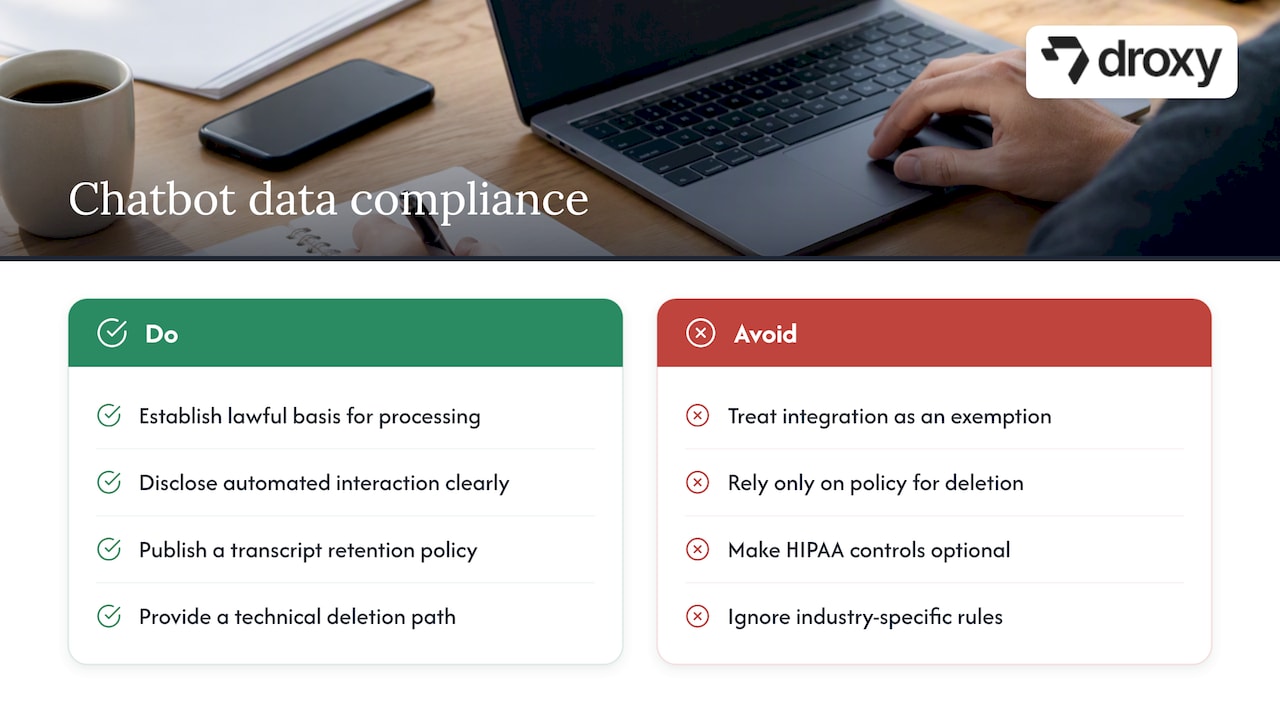
Any chatbot touching customer data needs to respect the same regulations your helpdesk already operates under, and integration does not create an exemption.
Under GDPR, you need a lawful basis for processing personal data through the bot, clear disclosure that customers are interacting with an automated system, and a documented retention policy for transcripts. Customers also retain the right to request deletion of their conversation data, which means your integration needs a technical path to actually fulfill that request, not just a policy that says you will.
If your helpdesk touches health information, HIPAA requirements apply to any chatbot that processes protected health information, which means encryption in transit and at rest, signed business associate agreements with any vendor involved, and strict access logging become non-negotiable rather than optional hardening.
Beyond those two frameworks, check your industry and region for sector-specific rules. Financial services, education, and government contractors often carry additional data handling obligations that general-purpose integration guides will not cover. When in doubt, loop in your compliance or legal team before data starts flowing through the bot, not after.
Document your data flows clearly: what the bot collects, where it stores it, who can access it, and how long it stays. This documentation is not just good practice, it is often the first thing an auditor or regulator asks for.
Conversation Design Best Practices for Helpdesk Use Cases
A helpdesk chatbot needs tighter, more directive conversation design than a general marketing or sales bot, because the stakes of a wrong answer are higher and the user is often already frustrated.
Keep the bot’s scope narrow and explicit. Tell users plainly what it can and cannot help with rather than letting them discover the limits through trial and error. Design clear escalation triggers: a confused user, repeated clarification requests, or an explicit request for a human should all route immediately rather than getting one more automated attempt.
Favor structured inputs over open-ended questions wherever the ticket type allows it. A dropdown for “issue category” resolves faster and more accurately than asking a user to describe their problem in free text. Write fallback responses that acknowledge the limitation honestly rather than looping the same clarifying question. Our chatbot best practices guide covers tone and flow design in more depth, which is worth reviewing before you finalize your scripts.
Always confirm resolution before closing a conversation. A bot that marks a ticket resolved without checking back creates silent failures that only surface in your CSAT scores weeks later.
Common Challenges and Troubleshooting Tips
Most integration problems trace back to a handful of recurring issues. Knowledge base drift is the most common: your bot answers correctly on launch day, then gives outdated information three months later because nobody updated the source documents. Assign explicit ownership for knowledge base freshness before launch, not after you notice the drift.
Duplicate tickets from webhook retries are another frequent headache. If your integration is not idempotent, a single customer message can create two or three tickets, confusing both your queue and your metrics. Build deduplication logic using a unique message or conversation identifier from day one.
Escalations that lose context frustrate customers the most. If an agent picking up a handed-off conversation has to ask “what’s your issue again,” you have lost most of the time savings the bot was supposed to create. Test this specific handoff experience directly, not just the bot’s standalone performance.
Finally, watch for scope creep. Teams often expand bot responsibilities faster than they validate them, which erodes trust when the bot starts guessing outside its tested range. Expand scope deliberately, one validated use case at a time.
Prioritization Guidance for IT Leaders
Start with your highest-volume, lowest-risk interactions, password resets and status checks, and require a human hand-off path for anything touching sensitive data or account changes. That sequencing builds trust with both your team and your customers before you ask either to rely on the bot for anything complicated.
Build your funding case on measured outcomes, not projected ones. Run your pilot, capture real deflection and CSAT numbers, then use those figures to justify the next phase. Executives fund what they can see working.
If you only tackle one thing this quarter, make it this: pick your two highest-volume, lowest-risk ticket types, integrate those first, and measure relentlessly before expanding scope.
— Elena
Droxy as a Practical Option: Demo, Trial, and Pricing
If the runbook above feels like more engineering time than your team has available right now, we built Droxy as the faster path to the same outcome. We handle knowledge base ingestion, multichannel deployment across website chat, phone, WhatsApp, Instagram, and Facebook, and routing logic through a no-code interface, so you skip most of the custom integration work described earlier without skipping the controls that actually matter.

Our platform includes built-in analytics to track deflection, escalation, and resolution metrics from day one instead of building that instrumentation yourself. For agencies managing multiple clients, our agency program adds white-labeling and unified client management on top of the core platform.
If you want to see how this fits your helpdesk specifically, start with a pilot on one or two ticket types and compare the results against your current baseline. Our pricing page lists the Basic, Advanced, and Enterprise plans, starting from a low monthly price, so you can pick the tier that matches your scope before committing further engineering time.
FAQ
How are chatbots used in customer service?
Chatbots handle repetitive, high-volume questions like password resets, order status, and basic troubleshooting, then escalate anything complex to a human agent with full context attached. This frees support teams to focus on the tickets that genuinely need judgment rather than lookup.
Is the help desk being replaced by AI?
No, AI chatbots handle the routine, high-volume layer of support, while human agents remain essential for complex, sensitive, or emotionally charged interactions. The most effective setups combine both, with clear routing rules deciding which conversations go where.
How do I integrate a chatbot into my helpdesk?
Start with discovery (mapping channels, knowledge bases, and ticket fields), then design your conversation and escalation flows, build the technical integration with proper authentication and idempotency, and test thoroughly in staging before a canary rollout. Our complete chatbot integration guide walks through each phase in more technical depth.
What is the best AI helpdesk software?
The right choice depends on your existing stack, engineering capacity, and how many channels you need to cover. Platforms like Droxy offer a no-code path across website, phone, WhatsApp, Instagram, and Facebook for teams that want faster deployment, while API-first builds suit teams that need deeper custom control.
Sources
Recommended
The fastest path to results is an API-first integration with deep routing rules and a human hand-off built in from day one. This approach gives you fewer repetitive tickets, faster first responses, and stronger SLA compliance because every conversation either resolves instantly or lands with the right agent, fully briefed. The rest of this guide walks you through the runbook that gets you there.
TL;DR:
Use API-first integration for deeper control, but start with native connectors or middleware for quicker deployment and less engineering effort.
Focus on high-volume, low-risk use cases like password resets and status checks before tackling more complex tickets requiring sensitive data handling.
Ensure full context and structured metadata are captured during escalation to speed up ticket resolution and maintain customer satisfaction.
Conduct thorough testing of intent recognition, fallback rates, and escalation paths before going live, and monitor key metrics like deflection rate and CSAT afterward.
Prioritize phased rollout with small canary deployments, clear acceptance criteria, and a solid rollback plan to minimize risks during implementation.
DroxyGive Your Helpdesk Instant AnswersDroxy deploys customizable AI agents across your website and other channels, helping reduce wait times and missed customer inquiries.Visit Droxy
Table of Contents
Why Integrate a Chatbot Into Your Helpdesk?
Integration Approaches: API, Native Connectors, Middleware, and Webhooks
Your Step-by-Step Integration Checklist and Runbook
Testing, Validation, and Monitoring
Security, Privacy, and Access Control Considerations
Costs and Timeline Estimates for Planning Your Budget
Deployment Playbook and Rollback Strategy
Droxy’s Implementation Notes for Faster Time-to-Value
Compliance Requirements for Chatbot Data Handling
Conversation Design Best Practices for Helpdesk Use Cases
Common Challenges and Troubleshooting Tips
Prioritization Guidance for IT Leaders
Droxy as a Practical Option: Demo, Trial, and Pricing
Sources
Why Integrate a Chatbot Into Your Helpdesk?
Your support queue is full of questions that do not need a human: password resets, order status checks, basic troubleshooting. A chatbot connected to your helpdesk handles these around the clock, which means your team spends its time on the tickets that actually require judgment.
Gartner reports that organizations measure chatbot value through operational metrics like ticket deflection and reduced agent handling time, which is exactly where the business case for integration starts. When a chatbot resolves a password reset or pulls a shipping status without a human touch, that ticket never hits your queue, and your average handling time drops across the board.
The highest-value use cases for IT and support teams tend to cluster around a few patterns:
Password resets and account unlocks, which are high-volume and low-risk, making them ideal first candidates.
Incident triage, where the bot gathers details, checks known outages, and routes urgent cases immediately.
Service request intake, like software installs or access requests, with structured forms instead of open-ended chat.
Status updates, pulling live ticket or order information from your systems instead of making agents look it up.
Leadership cares less about the technology and more about what it moves. Watch CSAT, mean time to acknowledge (MTTA), mean time to resolve (MTTR), and cost per ticket. These four numbers tell you whether your integration is actually working or just adding another interface for customers to navigate.
Ticket deflection only works when the bot knows when to stop trying. A chatbot that keeps guessing instead of escalating creates more frustration than it removes, which is why routing logic matters as much as the bot’s conversational skill.
Integration Approaches: API, Native Connectors, Middleware, and Webhooks
Four technical patterns dominate helpdesk chatbot integration, and picking the right one depends on your existing stack, your team’s engineering capacity, and how much control you need over the conversation flow.
API-first integration gives you direct control over data flow, error handling, and custom logic, at the cost of upfront development time and ongoing maintenance.
Native connectors, built by your helpdesk vendor or the chatbot provider, deploy fastest but often limit how deeply you can customize routing or field mapping.
Middleware or iPaaS tools sit between legacy systems and modern chatbot platforms, a practical choice when your helpdesk cannot expose a clean API on its own.
Event-driven webhooks push updates in real time, which keeps ticket status in sync, but they require careful idempotency handling so the same event never gets processed twice.
Vendor platform pages commonly recommend API or webhook-based integrations for reliable ticket sync and context transfer between systems, and that recommendation holds up in practice: the tighter your integration, the less information gets lost between the chatbot and the human agent who picks up the conversation.
If you run Zendesk or Freshdesk, start with their native connector to validate the use case, then move to API-first once you know which fields and flows actually matter. Teams juggling multiple legacy ticketing tools often lean on middleware instead, since building direct API integrations for each one eats far more engineering time than the deflection gains justify early on. Our comparison of Zendesk and Intercom walks through how connector limitations differ across platforms, which is worth a look before you commit to one path.
Your decision criteria should come down to three questions: how much customization do you need, how much engineering time can you spend, and how fast do you need to launch. Answer those honestly and the right approach usually becomes obvious.
Your Step-by-Step Integration Checklist and Runbook
A successful integration follows a predictable sequence: discovery, design, implementation, and operation. Skipping steps here is where most projects stall.
Map your channels and knowledge sources. List every channel (web, email, phone, chat) and every knowledge base article, macro, and canned response your agents currently rely on.
Document your ticket fields and user journeys. Know which fields are mandatory, which are optional, and how a ticket moves from creation to resolution today.
Design your conversation flows and escalation rules. Decide what the bot handles alone, what it escalates immediately, and what metadata it captures at each step.
Clean and sync your knowledge base. Canonical identifiers for products, services, and policies prevent the bot from giving two different answers to the same question. Our chatbot training guide covers the data hygiene steps that matter most here.
Build the technical integration. Set up authentication, define your message schema, and build in idempotency so retried messages never create duplicate tickets.
Build the human hand-off mechanism. Every escalation should carry the full conversation transcript plus structured metadata like customer ID, issue category, and urgency, so agents never ask customers to repeat themselves.
Test in staging with real ticket scenarios. Run your actual historical tickets through the bot before anyone sees it live.
Roll out as a canary to a small percentage of traffic. Watch error rates and escalation spikes before expanding further.
Document a rollback plan. Know exactly how to disable the bot and revert to standard queuing if something breaks.
McKinsey’s research on operations management notes that capturing context at the hand-off point, meaning the full transcript plus structured metadata, preserves resolution time when routing to a human agent instead of forcing a restart.
Pro Tip: Build your escalation and hand-off logic before you build the bot’s happy-path conversation. It is much easier to design good answers around solid escalation rules than to retrofit escalation into a chatbot that was built to just chat.
Testing, Validation, and Monitoring
Before launch, run three categories of tests: intent coverage (does the bot recognize the range of questions it will actually get), fallback rate (how often it says “I don’t understand”), and escalation path checks (does every escalation route reach a live agent with full context).
Once live, track these operational metrics continuously:
Deflection rate, the share of conversations resolved without a human agent.
Escalation rate, how often the bot hands off, and whether that rate climbs over time.
MTTA and MTTR, to confirm the bot is actually speeding up response and resolution, not just shifting work around.
CSAT, measured specifically on bot-handled and bot-escalated conversations separately.
Case studies and independent tests often show meaningful ticket reduction and faster response times when chatbots are paired with clean knowledge bases and clear escalation rules, though results vary by industry and ticket mix.
Set up logging and alerting thresholds for error spikes, latency increases, and sudden drops in deflection rate. A synthetic test that runs a handful of known conversation paths every hour catches breakage before customers do. Treat each rollout phase as a gate: define acceptance criteria upfront, and do not expand traffic until the previous phase clears them.
Security, Privacy, and Access Control Considerations
A chatbot that touches your helpdesk also touches customer data, account details, and sometimes payment or health information, so your security review needs to happen before launch, not after.
Use OAuth or mutual TLS for service-to-service authentication, and avoid long-lived API keys with broad permissions.
Apply least-privilege service accounts, so the bot’s integration credentials can only touch the systems and fields it actually needs.
Redact or mask personally identifiable information in logs, and define retention policies for conversation transcripts before you start collecting them.
Require role-based approval for sensitive actions, like account changes or refunds, so the bot can suggest but never execute without a human sign-off on high-risk flows.
Keep an audit trail of every automated decision and hand-off, since auditors and compliance teams will ask for it eventually.
Any third-party platform you evaluate should be able to document its data handling practices clearly enough to satisfy your own security team’s review, not just its sales deck.
Costs and Timeline Estimates for Planning Your Budget
A pilot integration covering one or two high-volume use cases typically takes a few weeks to stand up, mostly spent on knowledge base cleanup and flow design rather than raw engineering. A scoped integration across multiple channels and deeper routing logic takes longer, often stretching into a couple of months once you factor in testing and stakeholder review. A full enterprise rollout across every channel and legacy system can run considerably longer, driven mostly by integration complexity rather than the chatbot technology itself.
Your main cost drivers will be:
Custom integration work, especially against legacy ticketing systems without modern APIs.
Knowledge base cleanup, which is often underestimated and takes longer than the integration itself.
Multichannel licensing, since adding phone, WhatsApp, or social channels usually means separate connector costs.
Plan for ongoing maintenance too. Someone on your team needs to own knowledge base updates, review escalation patterns monthly, and retrain or reconfigure flows as your products and policies change. Treat this as a standing responsibility, not a one-time project.
Deployment Playbook and Rollback Strategy
Launching safely means expanding gradually and watching the right signals at every step.
Start with a small canary, routing a limited percentage of traffic to the new bot while the rest continues through your existing flow.
Watch your gating metrics closely: latency, error spikes, and escalation rate. Any of these moving sharply in the wrong direction is your signal to pause.
Expand in increments once each phase clears its acceptance criteria, rather than jumping straight to full traffic.
Communicate internally before each phase, so your support team knows what is changing and can flag issues the bot’s metrics might miss.
Hold a retro after each phase, comparing actual deflection and CSAT against your targets before deciding to expand further.
Keep your rollback path documented and tested, so disabling the bot and reverting to standard queuing takes minutes, not hours.
A Harvard Business Review analysis emphasizes that automation succeeds when organizations pair the technology with process redesign and clear measurement, not when they treat deployment as a one-time switch to flip. Vendor and industry guidance consistently recommends this same phased approach with clear gating metrics to control risk during launch, which is why skipping straight to full rollout rarely goes well even when the pilot looked strong.
Droxy’s Implementation Notes for Faster Time-to-Value
For IT teams weighing build-versus-buy, a no-code platform can remove a meaningful chunk of the engineering burden described above, particularly around knowledge base ingestion and multichannel setup.
Droxy is a no-code platform that lets businesses deploy AI agents for customer interaction across website chat, phone, WhatsApp, Instagram, Facebook, and Shopify.
We built our platform to solve slow response times and missed inquiries with instant, 24/7 answers, integrating into existing systems with deep customization so interactions stay human-like and on brand voice.
Businesses using our platform report improved engagement, reduced wait times, and higher lead conversion, and many users currently rely on our solution to power their customer service.
We publish detailed guides, including our Zendesk vs Intercom comparison, to help teams understand connector-level tradeoffs before committing engineering time.
A no-code approach reduces project risk mainly where knowledge base ingestion and multichannel deployment would otherwise consume the most custom development time. When your bottleneck is speed to pilot rather than deep system-level customization, that tradeoff tends to favor a no-code path.
Compliance Requirements for Chatbot Data Handling
Any chatbot touching customer data needs to respect the same regulations your helpdesk already operates under, and integration does not create an exemption.
Under GDPR, you need a lawful basis for processing personal data through the bot, clear disclosure that customers are interacting with an automated system, and a documented retention policy for transcripts. Customers also retain the right to request deletion of their conversation data, which means your integration needs a technical path to actually fulfill that request, not just a policy that says you will.
If your helpdesk touches health information, HIPAA requirements apply to any chatbot that processes protected health information, which means encryption in transit and at rest, signed business associate agreements with any vendor involved, and strict access logging become non-negotiable rather than optional hardening.
Beyond those two frameworks, check your industry and region for sector-specific rules. Financial services, education, and government contractors often carry additional data handling obligations that general-purpose integration guides will not cover. When in doubt, loop in your compliance or legal team before data starts flowing through the bot, not after.
Document your data flows clearly: what the bot collects, where it stores it, who can access it, and how long it stays. This documentation is not just good practice, it is often the first thing an auditor or regulator asks for.
Conversation Design Best Practices for Helpdesk Use Cases
A helpdesk chatbot needs tighter, more directive conversation design than a general marketing or sales bot, because the stakes of a wrong answer are higher and the user is often already frustrated.
Keep the bot’s scope narrow and explicit. Tell users plainly what it can and cannot help with rather than letting them discover the limits through trial and error. Design clear escalation triggers: a confused user, repeated clarification requests, or an explicit request for a human should all route immediately rather than getting one more automated attempt.
Favor structured inputs over open-ended questions wherever the ticket type allows it. A dropdown for “issue category” resolves faster and more accurately than asking a user to describe their problem in free text. Write fallback responses that acknowledge the limitation honestly rather than looping the same clarifying question. Our chatbot best practices guide covers tone and flow design in more depth, which is worth reviewing before you finalize your scripts.
Always confirm resolution before closing a conversation. A bot that marks a ticket resolved without checking back creates silent failures that only surface in your CSAT scores weeks later.
Common Challenges and Troubleshooting Tips
Most integration problems trace back to a handful of recurring issues. Knowledge base drift is the most common: your bot answers correctly on launch day, then gives outdated information three months later because nobody updated the source documents. Assign explicit ownership for knowledge base freshness before launch, not after you notice the drift.
Duplicate tickets from webhook retries are another frequent headache. If your integration is not idempotent, a single customer message can create two or three tickets, confusing both your queue and your metrics. Build deduplication logic using a unique message or conversation identifier from day one.
Escalations that lose context frustrate customers the most. If an agent picking up a handed-off conversation has to ask “what’s your issue again,” you have lost most of the time savings the bot was supposed to create. Test this specific handoff experience directly, not just the bot’s standalone performance.
Finally, watch for scope creep. Teams often expand bot responsibilities faster than they validate them, which erodes trust when the bot starts guessing outside its tested range. Expand scope deliberately, one validated use case at a time.
Prioritization Guidance for IT Leaders
Start with your highest-volume, lowest-risk interactions, password resets and status checks, and require a human hand-off path for anything touching sensitive data or account changes. That sequencing builds trust with both your team and your customers before you ask either to rely on the bot for anything complicated.
Build your funding case on measured outcomes, not projected ones. Run your pilot, capture real deflection and CSAT numbers, then use those figures to justify the next phase. Executives fund what they can see working.
If you only tackle one thing this quarter, make it this: pick your two highest-volume, lowest-risk ticket types, integrate those first, and measure relentlessly before expanding scope.
— Elena
Droxy as a Practical Option: Demo, Trial, and Pricing
If the runbook above feels like more engineering time than your team has available right now, we built Droxy as the faster path to the same outcome. We handle knowledge base ingestion, multichannel deployment across website chat, phone, WhatsApp, Instagram, and Facebook, and routing logic through a no-code interface, so you skip most of the custom integration work described earlier without skipping the controls that actually matter.
Our platform includes built-in analytics to track deflection, escalation, and resolution metrics from day one instead of building that instrumentation yourself. For agencies managing multiple clients, our agency program adds white-labeling and unified client management on top of the core platform.
If you want to see how this fits your helpdesk specifically, start with a pilot on one or two ticket types and compare the results against your current baseline. Our pricing page lists the Basic, Advanced, and Enterprise plans, starting from a low monthly price, so you can pick the tier that matches your scope before committing further engineering time.
FAQ
How are chatbots used in customer service?
Chatbots handle repetitive, high-volume questions like password resets, order status, and basic troubleshooting, then escalate anything complex to a human agent with full context attached. This frees support teams to focus on the tickets that genuinely need judgment rather than lookup.
Is the help desk being replaced by AI?
No, AI chatbots handle the routine, high-volume layer of support, while human agents remain essential for complex, sensitive, or emotionally charged interactions. The most effective setups combine both, with clear routing rules deciding which conversations go where.
How do I integrate a chatbot into my helpdesk?
Start with discovery (mapping channels, knowledge bases, and ticket fields), then design your conversation and escalation flows, build the technical integration with proper authentication and idempotency, and test thoroughly in staging before a canary rollout. Our complete chatbot integration guide walks through each phase in more technical depth.
What is the best AI helpdesk software?
The right choice depends on your existing stack, engineering capacity, and how many channels you need to cover. Platforms like Droxy offer a no-code path across website, phone, WhatsApp, Instagram, and Facebook for teams that want faster deployment, while API-first builds suit teams that need deeper custom control.
Sources
Recommended



🚀
Powered by Droxy
Turn every interaction into a conversion
Customer facing AI agents that engage, convert, and support so you can scale what matters.
✨
Learn more
Recent posts

Insights
3 min read
Introducing Agent Memories
Improve your agents' performance with Agent Memories. Prevent agents from repeating the same mistakes by giving them feedback.
Read more

Insights
15 min read
HVAC Marketing in 2025: The Definitive Lead Gen Guide
Discover 15 proven HVAC marketing strategies, plus learn how Droxy's AI website agent converts curious visitors into qualified leads by answering their questions instantly - right when they're most interested in your services.
Read more

Insights
10 min read
10 Best AI Sales Agents in 2025: Tested & Ranked
Discover the top 10 AI sales agents of 2025, designed to enhance lead generation, personalize outreach, and ultimately, close more deals
Read more
Insights
3 min read
Introducing Agent Memories
Improve your agents' performance with Agent Memories. Prevent agents from repeating the same mistakes by giving them feedback.
Read more
Insights
15 min read
HVAC Marketing in 2025: The Definitive Lead Gen Guide
Discover 15 proven HVAC marketing strategies, plus learn how Droxy's AI website agent converts curious visitors into qualified leads by answering their questions instantly - right when they're most interested in your services.
Read more