Support Leaders: Five RAG Parts for Knowledge Base Chatbots
Support Leaders: Five RAG Parts for Knowledge Base Chatbots
Insights
16 min

A knowledge base chatbot pulls answers from your existing documentation, help center, and support tickets, then generates a natural-language response instead of forcing customers to search or wait in a queue. Use one when your team fields the same handful of questions on repeat and your knowledge base is organized enough to trust. If your content is thin or scattered across a dozen tools, fix that first. The rest of this guide covers the architecture, the build steps, and the operational habits that keep it accurate.
TL;DR:
A knowledge base chatbot works best when your documentation is thorough, well-organized, and regularly updated to prevent confidently sharing outdated information.
The system relies on a retrieval step that finds the most relevant content chunks from your materials, reducing hallucinations but still requiring source governance.
Setting appropriate escalation thresholds and logging unanswered questions is critical to maintaining accuracy and preventing drift into wrong answers over time.
Integrating the chatbot with ticketing, CRM, and analytics systems enhances its effectiveness and ensures seamless hand-offs for complex queries.
Start small by tackling high-volume, low-risk questions, continuously monitor performance metrics, and adjust content and thresholds for sustainable long-term operations.
Table of Contents
What Is a Knowledge Base Chatbot, and Why Does It Matter for Support?
How Do Knowledge Base Chatbots Work Under the Hood?
Building a Knowledge Base Chatbot: A Step-by-Step Checklist
Where Should Your Knowledge Base Chatbot Live and Connect?
Keeping Your Bot Accurate: Governance and Hallucination Prevention
What Metrics Actually Prove a Knowledge Base Chatbot Is Working?
A Real-World Deployment Pattern Worth Studying
The Trade-Offs Nobody Puts in the Sales Deck
Get Your Knowledge Base Chatbot Live Without Writing Code
Sources
What Is a Knowledge Base Chatbot, and Why Does It Matter for Support?
A knowledge base chatbot is software that answers questions by retrieving relevant content from your documentation and generating a response grounded in that content, rather than relying purely on a pre-trained model’s general knowledge. The technique behind most modern versions is retrieval-augmented generation, or RAG: the bot searches a vector index built from your knowledge base, pulls the most relevant passages, and hands them to a language model to compose the final answer. Platforms like Droxy build on this pattern, letting a business connect its help center, PDFs, and past tickets so the bot answers from that material specifically.
This matters because support teams spend most of their time on repetitive questions. According to IBM’s overview of AI customer service chatbots, automating routine inquiries against a structured knowledge base cuts ticket volume and gives customers answers around the clock instead of during business hours only.
The practical benefits show up in a few specific places:
Round-the-clock coverage without staffing a night shift
Fewer repetitive tickets landing in an agent’s queue
Lead capture and qualification happening inside the same conversation
Faster resolution for customers who would otherwise dig through a help center
A knowledge base chatbot is a poor fit when your documentation is outdated, when most questions require account-specific data you can’t safely expose, or when the volume of inquiries is too low to justify the setup. Forcing a bot onto thin or messy content just produces confident wrong answers faster than a human would.
How Do Knowledge Base Chatbots Work Under the Hood?
The architecture behind a knowledge base chatbot has five moving parts, and understanding each one matters if you’re evaluating platforms or building custom.
Connectors pull content from your help center, wikis, PDFs, and ticketing history into a central pipeline.
Document store and vector database hold that content as chunks with numerical embeddings, so the system can search by meaning rather than exact keyword match.
Retriever takes an incoming question, embeds it the same way, and finds the closest matching chunks.
Generator (the LLM) takes those retrieved chunks and the user’s question, then writes a coherent answer grounded in that material.
Citation layer attaches the source article or document to the response, so both the user and your team can verify where the answer came from.
That retrieval step is what separates a knowledge base chatbot from a generic chatbot running on a model’s general training. HubSpot’s research on customer service chatbots notes that the strongest deployments combine retrieval over your actual documents with generation, which produces answers that sound natural but stay tied to source content. That combination is what reduces hallucination, though it doesn’t eliminate it entirely. If your knowledge base contains outdated or contradictory articles, the retriever will faithfully surface the wrong one.
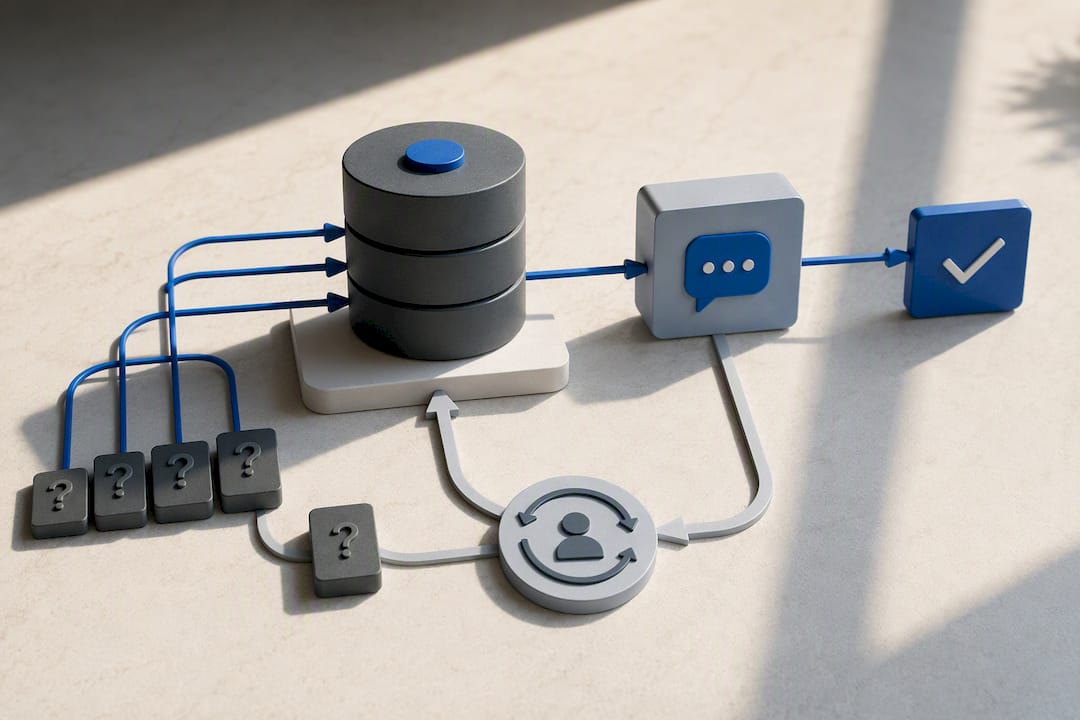
A typical query flow: a customer asks about your refund policy. The retriever finds the three most relevant chunks from your policy page and a related FAQ. The generator drafts an answer citing both. A confidence score gets attached based on how closely the retrieved content matched the question. If that score falls below a set threshold, the system routes to a human agent with the full conversation attached rather than guessing.
That confidence threshold is the real safety valve. Comparative testing of knowledge base chatbot platforms found that escalation design, not the model itself, is often the deciding factor in whether a deployment feels trustworthy. A bot that says “I’m not certain, let me connect you with someone” beats one that improvises.
Building a Knowledge Base Chatbot: A Step-by-Step Checklist
Building one in the right order saves you from re-indexing everything twice. Here’s the sequence that works.
Audit your sources. Pull together your help center articles, product docs, and the last six months of support tickets. Flag anything outdated before it goes anywhere near the index.
Scope what’s included. Decide explicitly what the bot is allowed to answer from, whether that’s public help content only or also internal wikis. Scoping mistakes are the most common cause of wrong answers later.
Prepare the content. Break long documents into chunks sized for retrieval, tag each chunk with metadata (product, category, last updated date), and canonicalize duplicate answers so the bot doesn’t pull two conflicting versions of the same policy.
Choose your retrieval stack. Pick an embedding model and vector database, or use a no-code platform that handles this layer for you, then connect your preferred LLM for generation.
Define escalation rules. Set the confidence threshold where the bot hands off to a human, and make sure that hand-off carries full conversation context so the agent isn’t starting cold.
Test before launch. Run a batch of real historical questions through the system, check edge cases deliberately (ambiguous phrasing, multi-part questions), and have a small group of real users try it before a full rollout.
Plan the rollout. Decide which channel launches first, whether you need multiple languages at launch, and how you’ll monitor the first two weeks of live traffic.
Pro Tip: Run your worst support tickets from the last quarter, the ones that took multiple back-and-forth messages, through the bot before launch. If it can’t handle those cleanly, your escalation threshold is set too loose.
Zoho SalesIQ’s documentation on building a knowledge base chatbot describes a similar sequence, including bulk import of existing articles and automatic logging of questions the bot couldn’t answer, which becomes your first content backlog after launch.
Where Should Your Knowledge Base Chatbot Live and Connect?
A bot that only answers questions in isolation is half a solution. The integrations you wire in decide whether it actually reduces workload or just adds another disconnected tool.
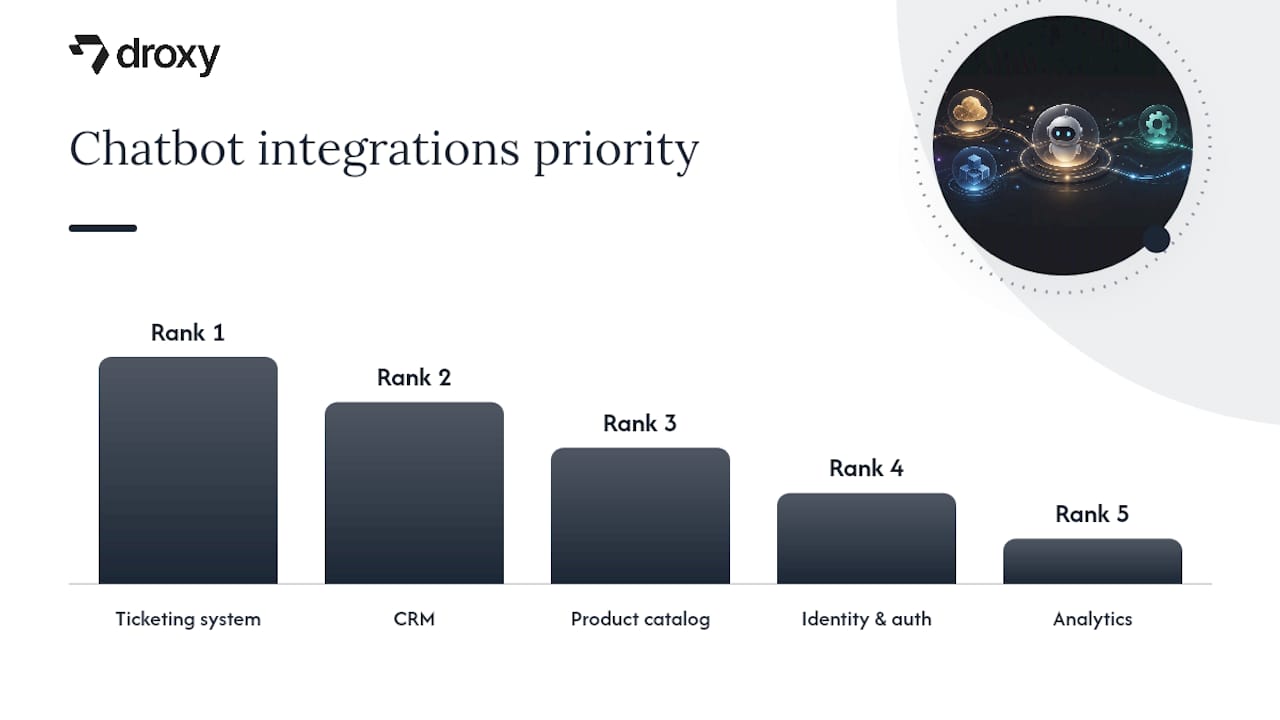
Prioritize these connections in roughly this order:
Ticketing system (Zendesk, Freshdesk, or similar) so escalations create a real ticket with context instead of a dead end.
CRM so the bot can recognize returning customers and personalize responses without asking them to repeat account details.
Product catalog for ecommerce and retail deployments, so the bot can answer inventory and pricing questions directly.
Identity and authentication if any answers touch account-specific or sensitive data.
Analytics to track what’s being asked, where the bot fails, and where volume is concentrated.
HubSpot’s guidance on service chatbots points out that connecting to CRM and knowledge management systems together, rather than either one alone, is what reduces friction in escalations, since the receiving agent already has both the conversation and the customer record.
Channel choice depends on where your customers actually ask questions. A web widget covers your site traffic, but WhatsApp, Instagram, and Facebook Messenger matter more for ecommerce and hospitality brands where customers expect to message rather than browse a help center. Voice deployment is a different animal entirely and worth a separate evaluation.
Multilingual support isn’t optional once you serve more than one region. Decide early whether translation happens at the retrieval layer (indexing content in each language) or at generation time, since that choice affects accuracy more than most teams expect.
Security and data residency decisions belong at the start, not after launch. Decide what data leaves your systems, where it’s processed, and who can see conversation logs before you connect a single production data source.
Keeping Your Bot Accurate: Governance and Hallucination Prevention
An accurate knowledge base chatbot on launch day can drift into a liability within a quarter if nobody owns the upkeep. The failure pattern is consistent across platforms: stale documentation and loose source scoping produce confidently wrong answers, according to HubSpot’s analysis of chatbot deployments.
A few governance habits prevent most of that drift:
Maintain an explicit allow list of sources the bot can pull from, and review it whenever a major product or policy changes.
Set a re-index cadence, weekly for fast-moving content like pricing, monthly for stable reference material.
Require citation-first responses so every answer names its source, making bad answers easy to spot and fix.
Log every low-confidence or “I don’t know” response and route it to a human, then feed the resolution back into the knowledge base.
Review conversational analytics on a fixed schedule, not just when something breaks.
Pro Tip: Treat your unanswered-questions log like a product backlog. Triage it weekly, not quarterly, and you’ll catch content gaps while they’re still small.
Zoho’s platform documentation on logging unanswered queries describes exactly this loop: questions the bot can’t confidently answer get flagged automatically, giving your team a running list of what to add next. Keeping content current also pays off outside the bot. Regularly updated web content improves search visibility as a byproduct of the same discipline you’re already applying to your knowledge base.
What Metrics Actually Prove a Knowledge Base Chatbot Is Working?
Five numbers tell you almost everything about whether a deployment is paying for itself:
Containment rate — the share of conversations resolved without human involvement.
Ticket deflection — the drop in ticket volume for questions the bot now handles.
CSAT on bot-only conversations versus human-handled ones.
Average handle time for conversations that do escalate, since good context transfer should shorten them.
Conversion uplift on any sales-adjacent conversations, particularly relevant for ecommerce deployments.
To test a change, whether it’s a new confidence threshold or a rewritten set of source documents, run an A/B split: route half your traffic through the updated configuration and half through the current one for at least two weeks, then compare containment and CSAT side by side rather than eyeballing a single metric.
Turning those numbers into an ROI estimate is straightforward: multiply deflected tickets by your average cost per ticket (agent time plus overhead), then subtract your platform and maintenance cost. A related labor and automation analysis from NBER offers useful context for setting realistic productivity expectations rather than assuming automation eliminates support staffing needs entirely. The goal isn’t replacing your team, it’s freeing them for the conversations that actually need a human, a distinction worth keeping in front of any stakeholder reviewing the business case.
A Real-World Deployment Pattern Worth Studying
A no-code deployment path looks like this in practice: connect your help center, product PDFs, and past ticket exports to the platform, let it build the retrieval index automatically, then publish the same bot across your website, phone line, WhatsApp, Instagram, and Facebook without rebuilding it channel by channel. Droxy follows this pattern, and its platform is used across ecommerce, hospitality, real estate, and healthcare businesses.
Whatever platform you evaluate, run it through this checklist during any demo or pilot:
Can it index multiple source types (help center, PDFs, tickets) without manual reformatting?
Does human hand-off preserve full conversation context, or does the agent start blind?
Are analytics granular enough to show which questions the bot handles well versus poorly?
Can you customize tone and responses to match your brand voice rather than sounding generic?
Does it support the channels your customers actually use, not just the ones that are easiest to build?
That last point separates a genuinely useful deployment from a demo that looks good and underperforms in production.
The Trade-Offs Nobody Puts in the Sales Deck
Most teams overestimate how fast a knowledge base chatbot pays off and underestimate how much ongoing attention it needs. Deploy incrementally. Launch on your highest-volume, lowest-risk question category first, measure containment for a few weeks, then expand scope. Teams that try to answer everything on day one usually end up debugging escalation logic and content gaps simultaneously, which is a worse position than either problem alone.
Content quality and escalation design matter more than which model powers the generator. A mediocre model on excellent, well-scoped documentation outperforms a great model pointed at a messy help center. Expect to spend real time tuning thresholds and refreshing content, this isn’t a set-and-forget system.
Once escalation, security, and audit logging are solid, consider whether a knowledge-only bot is even the right long-term target, or whether an action-capable AI agent that can actually process requests fits your roadmap better.
— Elena
Get Your Knowledge Base Chatbot Live Without Writing Code
Droxy provides a path from documentation to a working bot by connecting help center content, PDFs, and ticket history, building the retrieval index, and deploying the agent across multiple channels without separate builds for each.

This fits a specific buyer well: a business owner or support lead who has decent documentation already, fields repetitive questions across multiple channels, and doesn’t want to hire a developer to stitch together a vector database and an LLM API by hand. Agencies managing this for multiple clients can white-label the platform under their own brand. For a look at how the underlying architecture compares across use cases, Droxy’s chatbot selection guide breaks down what to prioritize before you commit to a vendor.
Pricing options are here: https://www.droxy.ai/pricing. If you’re ready to see how your own documentation performs once it’s indexed, start with Droxy’s plans and connect your first knowledge source today.
Sources
Recommended
A knowledge base chatbot pulls answers from your existing documentation, help center, and support tickets, then generates a natural-language response instead of forcing customers to search or wait in a queue. Use one when your team fields the same handful of questions on repeat and your knowledge base is organized enough to trust. If your content is thin or scattered across a dozen tools, fix that first. The rest of this guide covers the architecture, the build steps, and the operational habits that keep it accurate.
TL;DR:
A knowledge base chatbot works best when your documentation is thorough, well-organized, and regularly updated to prevent confidently sharing outdated information.
The system relies on a retrieval step that finds the most relevant content chunks from your materials, reducing hallucinations but still requiring source governance.
Setting appropriate escalation thresholds and logging unanswered questions is critical to maintaining accuracy and preventing drift into wrong answers over time.
Integrating the chatbot with ticketing, CRM, and analytics systems enhances its effectiveness and ensures seamless hand-offs for complex queries.
Start small by tackling high-volume, low-risk questions, continuously monitor performance metrics, and adjust content and thresholds for sustainable long-term operations.
Table of Contents
What Is a Knowledge Base Chatbot, and Why Does It Matter for Support?
How Do Knowledge Base Chatbots Work Under the Hood?
Building a Knowledge Base Chatbot: A Step-by-Step Checklist
Where Should Your Knowledge Base Chatbot Live and Connect?
Keeping Your Bot Accurate: Governance and Hallucination Prevention
What Metrics Actually Prove a Knowledge Base Chatbot Is Working?
A Real-World Deployment Pattern Worth Studying
The Trade-Offs Nobody Puts in the Sales Deck
Get Your Knowledge Base Chatbot Live Without Writing Code
Sources
What Is a Knowledge Base Chatbot, and Why Does It Matter for Support?
A knowledge base chatbot is software that answers questions by retrieving relevant content from your documentation and generating a response grounded in that content, rather than relying purely on a pre-trained model’s general knowledge. The technique behind most modern versions is retrieval-augmented generation, or RAG: the bot searches a vector index built from your knowledge base, pulls the most relevant passages, and hands them to a language model to compose the final answer. Platforms like Droxy build on this pattern, letting a business connect its help center, PDFs, and past tickets so the bot answers from that material specifically.
This matters because support teams spend most of their time on repetitive questions. According to IBM’s overview of AI customer service chatbots, automating routine inquiries against a structured knowledge base cuts ticket volume and gives customers answers around the clock instead of during business hours only.
The practical benefits show up in a few specific places:
Round-the-clock coverage without staffing a night shift
Fewer repetitive tickets landing in an agent’s queue
Lead capture and qualification happening inside the same conversation
Faster resolution for customers who would otherwise dig through a help center
A knowledge base chatbot is a poor fit when your documentation is outdated, when most questions require account-specific data you can’t safely expose, or when the volume of inquiries is too low to justify the setup. Forcing a bot onto thin or messy content just produces confident wrong answers faster than a human would.
How Do Knowledge Base Chatbots Work Under the Hood?
The architecture behind a knowledge base chatbot has five moving parts, and understanding each one matters if you’re evaluating platforms or building custom.
Connectors pull content from your help center, wikis, PDFs, and ticketing history into a central pipeline.
Document store and vector database hold that content as chunks with numerical embeddings, so the system can search by meaning rather than exact keyword match.
Retriever takes an incoming question, embeds it the same way, and finds the closest matching chunks.
Generator (the LLM) takes those retrieved chunks and the user’s question, then writes a coherent answer grounded in that material.
Citation layer attaches the source article or document to the response, so both the user and your team can verify where the answer came from.
That retrieval step is what separates a knowledge base chatbot from a generic chatbot running on a model’s general training. HubSpot’s research on customer service chatbots notes that the strongest deployments combine retrieval over your actual documents with generation, which produces answers that sound natural but stay tied to source content. That combination is what reduces hallucination, though it doesn’t eliminate it entirely. If your knowledge base contains outdated or contradictory articles, the retriever will faithfully surface the wrong one.
A typical query flow: a customer asks about your refund policy. The retriever finds the three most relevant chunks from your policy page and a related FAQ. The generator drafts an answer citing both. A confidence score gets attached based on how closely the retrieved content matched the question. If that score falls below a set threshold, the system routes to a human agent with the full conversation attached rather than guessing.
That confidence threshold is the real safety valve. Comparative testing of knowledge base chatbot platforms found that escalation design, not the model itself, is often the deciding factor in whether a deployment feels trustworthy. A bot that says “I’m not certain, let me connect you with someone” beats one that improvises.
Building a Knowledge Base Chatbot: A Step-by-Step Checklist
Building one in the right order saves you from re-indexing everything twice. Here’s the sequence that works.
Audit your sources. Pull together your help center articles, product docs, and the last six months of support tickets. Flag anything outdated before it goes anywhere near the index.
Scope what’s included. Decide explicitly what the bot is allowed to answer from, whether that’s public help content only or also internal wikis. Scoping mistakes are the most common cause of wrong answers later.
Prepare the content. Break long documents into chunks sized for retrieval, tag each chunk with metadata (product, category, last updated date), and canonicalize duplicate answers so the bot doesn’t pull two conflicting versions of the same policy.
Choose your retrieval stack. Pick an embedding model and vector database, or use a no-code platform that handles this layer for you, then connect your preferred LLM for generation.
Define escalation rules. Set the confidence threshold where the bot hands off to a human, and make sure that hand-off carries full conversation context so the agent isn’t starting cold.
Test before launch. Run a batch of real historical questions through the system, check edge cases deliberately (ambiguous phrasing, multi-part questions), and have a small group of real users try it before a full rollout.
Plan the rollout. Decide which channel launches first, whether you need multiple languages at launch, and how you’ll monitor the first two weeks of live traffic.
Pro Tip: Run your worst support tickets from the last quarter, the ones that took multiple back-and-forth messages, through the bot before launch. If it can’t handle those cleanly, your escalation threshold is set too loose.
Zoho SalesIQ’s documentation on building a knowledge base chatbot describes a similar sequence, including bulk import of existing articles and automatic logging of questions the bot couldn’t answer, which becomes your first content backlog after launch.
Where Should Your Knowledge Base Chatbot Live and Connect?
A bot that only answers questions in isolation is half a solution. The integrations you wire in decide whether it actually reduces workload or just adds another disconnected tool.
Prioritize these connections in roughly this order:
Ticketing system (Zendesk, Freshdesk, or similar) so escalations create a real ticket with context instead of a dead end.
CRM so the bot can recognize returning customers and personalize responses without asking them to repeat account details.
Product catalog for ecommerce and retail deployments, so the bot can answer inventory and pricing questions directly.
Identity and authentication if any answers touch account-specific or sensitive data.
Analytics to track what’s being asked, where the bot fails, and where volume is concentrated.
HubSpot’s guidance on service chatbots points out that connecting to CRM and knowledge management systems together, rather than either one alone, is what reduces friction in escalations, since the receiving agent already has both the conversation and the customer record.
Channel choice depends on where your customers actually ask questions. A web widget covers your site traffic, but WhatsApp, Instagram, and Facebook Messenger matter more for ecommerce and hospitality brands where customers expect to message rather than browse a help center. Voice deployment is a different animal entirely and worth a separate evaluation.
Multilingual support isn’t optional once you serve more than one region. Decide early whether translation happens at the retrieval layer (indexing content in each language) or at generation time, since that choice affects accuracy more than most teams expect.
Security and data residency decisions belong at the start, not after launch. Decide what data leaves your systems, where it’s processed, and who can see conversation logs before you connect a single production data source.
Keeping Your Bot Accurate: Governance and Hallucination Prevention
An accurate knowledge base chatbot on launch day can drift into a liability within a quarter if nobody owns the upkeep. The failure pattern is consistent across platforms: stale documentation and loose source scoping produce confidently wrong answers, according to HubSpot’s analysis of chatbot deployments.
A few governance habits prevent most of that drift:
Maintain an explicit allow list of sources the bot can pull from, and review it whenever a major product or policy changes.
Set a re-index cadence, weekly for fast-moving content like pricing, monthly for stable reference material.
Require citation-first responses so every answer names its source, making bad answers easy to spot and fix.
Log every low-confidence or “I don’t know” response and route it to a human, then feed the resolution back into the knowledge base.
Review conversational analytics on a fixed schedule, not just when something breaks.
Pro Tip: Treat your unanswered-questions log like a product backlog. Triage it weekly, not quarterly, and you’ll catch content gaps while they’re still small.
Zoho’s platform documentation on logging unanswered queries describes exactly this loop: questions the bot can’t confidently answer get flagged automatically, giving your team a running list of what to add next. Keeping content current also pays off outside the bot. Regularly updated web content improves search visibility as a byproduct of the same discipline you’re already applying to your knowledge base.
What Metrics Actually Prove a Knowledge Base Chatbot Is Working?
Five numbers tell you almost everything about whether a deployment is paying for itself:
Containment rate — the share of conversations resolved without human involvement.
Ticket deflection — the drop in ticket volume for questions the bot now handles.
CSAT on bot-only conversations versus human-handled ones.
Average handle time for conversations that do escalate, since good context transfer should shorten them.
Conversion uplift on any sales-adjacent conversations, particularly relevant for ecommerce deployments.
To test a change, whether it’s a new confidence threshold or a rewritten set of source documents, run an A/B split: route half your traffic through the updated configuration and half through the current one for at least two weeks, then compare containment and CSAT side by side rather than eyeballing a single metric.
Turning those numbers into an ROI estimate is straightforward: multiply deflected tickets by your average cost per ticket (agent time plus overhead), then subtract your platform and maintenance cost. A related labor and automation analysis from NBER offers useful context for setting realistic productivity expectations rather than assuming automation eliminates support staffing needs entirely. The goal isn’t replacing your team, it’s freeing them for the conversations that actually need a human, a distinction worth keeping in front of any stakeholder reviewing the business case.
A Real-World Deployment Pattern Worth Studying
A no-code deployment path looks like this in practice: connect your help center, product PDFs, and past ticket exports to the platform, let it build the retrieval index automatically, then publish the same bot across your website, phone line, WhatsApp, Instagram, and Facebook without rebuilding it channel by channel. Droxy follows this pattern, and its platform is used across ecommerce, hospitality, real estate, and healthcare businesses.
Whatever platform you evaluate, run it through this checklist during any demo or pilot:
Can it index multiple source types (help center, PDFs, tickets) without manual reformatting?
Does human hand-off preserve full conversation context, or does the agent start blind?
Are analytics granular enough to show which questions the bot handles well versus poorly?
Can you customize tone and responses to match your brand voice rather than sounding generic?
Does it support the channels your customers actually use, not just the ones that are easiest to build?
That last point separates a genuinely useful deployment from a demo that looks good and underperforms in production.
The Trade-Offs Nobody Puts in the Sales Deck
Most teams overestimate how fast a knowledge base chatbot pays off and underestimate how much ongoing attention it needs. Deploy incrementally. Launch on your highest-volume, lowest-risk question category first, measure containment for a few weeks, then expand scope. Teams that try to answer everything on day one usually end up debugging escalation logic and content gaps simultaneously, which is a worse position than either problem alone.
Content quality and escalation design matter more than which model powers the generator. A mediocre model on excellent, well-scoped documentation outperforms a great model pointed at a messy help center. Expect to spend real time tuning thresholds and refreshing content, this isn’t a set-and-forget system.
Once escalation, security, and audit logging are solid, consider whether a knowledge-only bot is even the right long-term target, or whether an action-capable AI agent that can actually process requests fits your roadmap better.
— Elena
Get Your Knowledge Base Chatbot Live Without Writing Code
Droxy provides a path from documentation to a working bot by connecting help center content, PDFs, and ticket history, building the retrieval index, and deploying the agent across multiple channels without separate builds for each.
This fits a specific buyer well: a business owner or support lead who has decent documentation already, fields repetitive questions across multiple channels, and doesn’t want to hire a developer to stitch together a vector database and an LLM API by hand. Agencies managing this for multiple clients can white-label the platform under their own brand. For a look at how the underlying architecture compares across use cases, Droxy’s chatbot selection guide breaks down what to prioritize before you commit to a vendor.
Pricing options are here: https://www.droxy.ai/pricing. If you’re ready to see how your own documentation performs once it’s indexed, start with Droxy’s plans and connect your first knowledge source today.
Sources
Recommended



🚀
Powered by Droxy
Turn every interaction into a conversion
Customer facing AI agents that engage, convert, and support so you can scale what matters.
✨
Learn more
Recent posts

Insights
3 min read
Introducing Agent Memories
Improve your agents' performance with Agent Memories. Prevent agents from repeating the same mistakes by giving them feedback.
Read more

Insights
15 min read
HVAC Marketing in 2025: The Definitive Lead Gen Guide
Discover 15 proven HVAC marketing strategies, plus learn how Droxy's AI website agent converts curious visitors into qualified leads by answering their questions instantly - right when they're most interested in your services.
Read more

Insights
10 min read
10 Best AI Sales Agents in 2025: Tested & Ranked
Discover the top 10 AI sales agents of 2025, designed to enhance lead generation, personalize outreach, and ultimately, close more deals
Read more
Insights
3 min read
Introducing Agent Memories
Improve your agents' performance with Agent Memories. Prevent agents from repeating the same mistakes by giving them feedback.
Read more
Insights
15 min read
HVAC Marketing in 2025: The Definitive Lead Gen Guide
Discover 15 proven HVAC marketing strategies, plus learn how Droxy's AI website agent converts curious visitors into qualified leads by answering their questions instantly - right when they're most interested in your services.
Read more