Agencies: Launch a No Code AI Agent to Production in 1–2 Weeks
Agencies: Launch a No Code AI Agent to Production in 1–2 Weeks
Insights
17 min
No-code AI agents are autonomous workflows that reason through a task, pull from your data and tools, and take real action, not just answer a chat prompt. Platforms like n8n, Make, and Taskade already run these in production, and for a wide range of professional tasks, with the right guardrails, they hold up. This guide walks you through the use cases worth automating, a build checklist you can run this week, the evaluation criteria that matter in procurement, and where Droxy fits as a customer-facing production option.
TL;DR:
No-code AI agents are capable of autonomous actions that directly integrate with business systems, enabling tasks like ticket resolution and lead qualification.
Building and deploying effective agents require clear goals, mapped integrations, staged testing, and ongoing monitoring with detailed logs for troubleshooting.
Evaluation criteria should focus on integration coverage, actionability, governance, observability, extensibility, deployment timeline, and total cost.
Droxy is a purpose-built platform for omnichannel customer support, offering deep customization, human hand-off, and analytics, suitable for active, real-world deployment.
To maintain agent performance post-launch, schedule regular log reviews, update knowledge bases promptly, and assign dedicated ownership to prevent drift.
DroxyDeploy Customer-Facing AI AgentsDroxy helps businesses provide instant, customized customer interactions across chat, phone, WhatsApp, social channels, and Shopify.Explore Droxy
Table of Contents
What No-Code AI Agents Do (and Where They Actually Pay Off)
How to Build and Deploy a No-Code AI Agent, Step by Step
How to Evaluate a No-Code AI Agent Platform: A Scorecard
Why Droxy Is a Practical Production Option for Customer-Facing Agents
Where No-Code Agents Fall Short (and How to Guard Against It)
What It Actually Takes to Reach Production
Real-World Patterns Behind Successful Deployments
Comparing the Major No-Code Agent Platforms
Keeping a No-Code Agent Sharp After Launch
When No-Code Is the Right Call, and When It Isn’t
Droxy: Your Next Step for Customer-Facing Agents
Sources
What No-Code AI Agents Do (and Where They Actually Pay Off)
A chatbot answers a question. A no-code AI agent plans a sequence of steps, acts on them, and revises course when something doesn’t go as expected. That distinction is the whole ballgame. A simple chatbot might tell a customer your return policy. An agent checks the order in your system, confirms it’s eligible, issues the return label, and updates the CRM, all without a human touching a keyboard.
For consultants and agency owners, that action-taking capability opens up work that used to require a developer on retainer. Here’s where no-code agents earn their keep:
Support ticket triage and resolution — categorize incoming tickets, resolve the routine ones (password resets, order status), and escalate the rest with full context attached.
Inbound lead qualification — ask the right questions on a website chat or WhatsApp, score the lead, and push qualified prospects straight into your CRM.
Research and summarization — pull data from multiple sources and hand a consultant a clean brief instead of ten open tabs.
Scheduling and bookings — check calendar availability, confirm a slot, and send reminders without back-and-forth email.
Automated internal reporting — compile weekly metrics from separate tools into one summary, delivered on a schedule.
Content triage and drafting — sort inbound content requests by priority and draft a first pass for human review.
What makes these production-grade rather than a novelty demo is the systems integration. n8n’s agent builder documents agents that query data and call APIs directly, meaning the agent updates your ticketing system or CRM instead of just describing what should happen next. That’s the line between a chat toy and a working employee.
The ROI signals to track are straightforward: response time drop, lead capture rate, and hours saved on repetitive tasks each week. Agencies deploying AI across client work have reported meaningful productivity gains, with one analysis pointing to a 3.2x return on AI investment in agency settings. Track your own numbers from week one so you have a real baseline, not a guess.
How to Build and Deploy a No-Code AI Agent, Step by Step
Skipping steps here is how a promising prototype turns into an agent that emails the wrong client. Follow this order.
Define the goal and acceptance criteria. Write down the KPI you’re targeting (faster first response, higher qualification rate) and the exact actions the agent is allowed to take. If you can’t state the boundary, the agent can’t respect it.
Map your data and integrations. List every system the agent needs to touch, your CRM, a shared inbox, a scheduling tool, a knowledge base, and decide how it accesses knowledge. Most platforms support retrieval-augmented generation (RAG) or direct API calls to your existing systems.
Assemble the agent inside the canvas. Write the system prompt that defines its role and tone, define the specific tools or actions it can call, choose a memory strategy (does it remember past conversations with a contact?), and wire up the triggers.
Test in shadow mode first. Run the agent alongside your human team without letting it act publicly. Compare its decisions to what a person would have done before it goes live.
Roll out in stages with human approval gates. Start with low-stakes actions, add rate limits, and require human sign-off on anything irreversible, like a refund over a certain amount.
Launch with monitoring and a rollback plan. Pick your channel (website chat, WhatsApp, phone), set up logging you can replay after the fact, and schedule a monthly review to update prompts and knowledge sources.
Pro Tip: Keep every test run’s transcript. When an agent makes a bad call, you need a replayable log to diagnose whether the prompt, the data, or the tool integration was the actual problem, not a guess after the fact.
Make’s agent builder provides a reasoning panel that shows the decision trail for each action, which is exactly the kind of replayable log step five requires. Build that visibility in from day one rather than bolting it on after something breaks.
How to Evaluate a No-Code AI Agent Platform: A Scorecard
Most procurement conversations get stuck comparing chatbot features when the real differentiators sit elsewhere. Score any platform you’re considering against these seven criteria:
Integration breadth. How many prebuilt connectors does it ship with, and do they cover your actual stack? Zapier’s ecosystem, for instance, spans thousands of apps, which matters more than any single flashy feature if your workflow touches a dozen tools.
Actionability. Can the agent call APIs and update systems, or does it only produce chat replies you have to act on manually? This is the single biggest gap between platforms that look similar in a demo.
Governance. Look for model controls, data residency options, audit logs, and role-based access. Zapier positions itself around exactly this, with action restrictions and auditability built for enterprise use.
Observability and debugging. You need reasoning traces and step replays, not a black box that occasionally does something strange.
Extensibility. Templates get you started, but check whether custom tools or optional scripting are available when a template isn’t enough.
Deployment options and timeline. Self-host versus managed cloud, published SLAs, and a realistic implementation window rather than a vague “weeks to months.”
Total cost. Look past the subscription line item at integration costs, per-seat pricing at scale, and what a real pilot will cost to run before you commit.
Weight governance and observability higher than most vendors want you to. A charming demo means nothing if you can’t audit what the agent did six weeks after launch.
Why Droxy Is a Practical Production Option for Customer-Facing Agents
Droxy is built specifically for customer interaction across multiple channels through a no-code platform. Omnichannel scope matters because businesses can lose leads from slow responses across whichever channel a customer chooses.
Some key capabilities to look for include deep customization to match brand voice, human hand-off for moments needing escalation, knowledge integration from multiple sources, analytics to track response-time and conversion metrics, and white-labeling options for agencies.
Over 60,000 users currently run their customer service through Droxy, which is the kind of adoption scale that suggests the platform holds up outside a sales demo. If you’re evaluating a production option rather than another prototype, start with a trial or a demo and measure it against your own response-time baseline.
Where No-Code Agents Fall Short (and How to Guard Against It)
No-code doesn’t mean risk-free. Three failure modes show up again and again, and each has a practical fix.
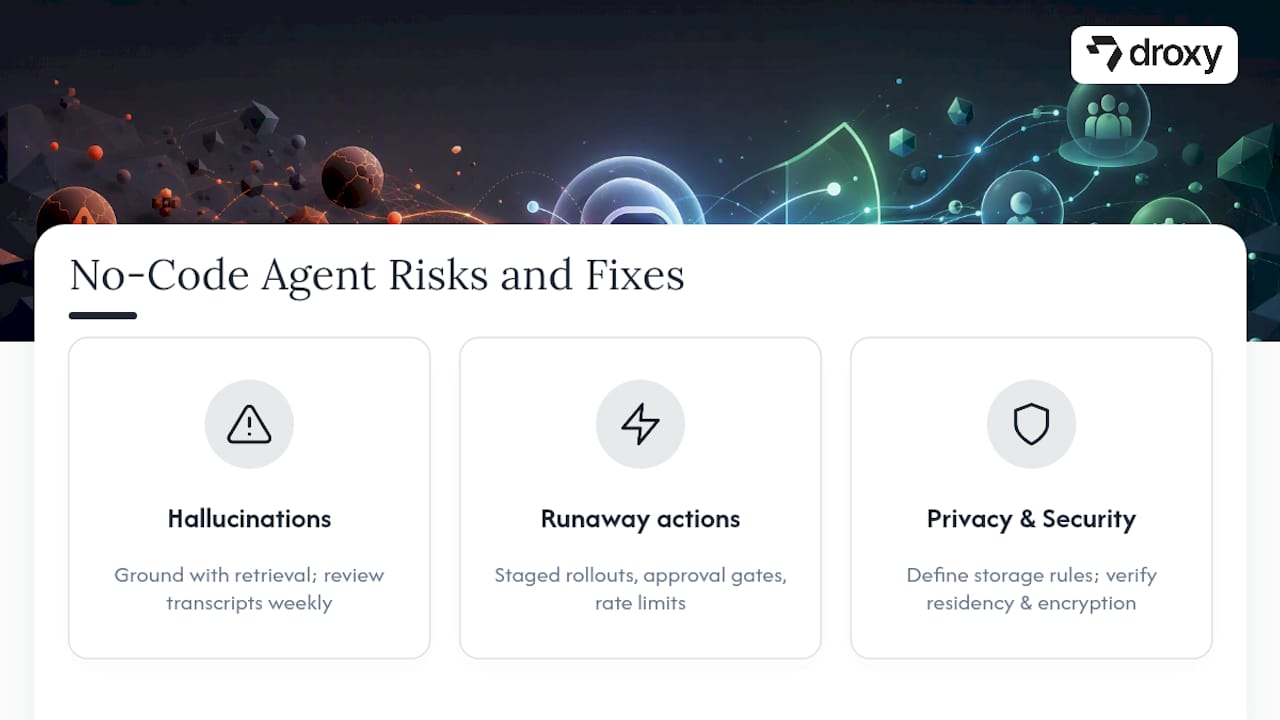
Hallucinations. An agent can state something confidently that simply isn’t true, especially when its knowledge base is thin or outdated. The fix is grounding: connect the agent to your actual documentation through retrieval rather than letting it rely on general training knowledge, and review a sample of transcripts weekly to catch drift before a customer does.
Runaway actions. An agent with API access can, in theory, issue ten refunds instead of one, or email the wrong list. This is why staged rollouts and approval gates aren’t optional extras. Rate limits and a required human sign-off on irreversible actions turn a catastrophic failure into a minor annoyance.
Privacy and security exposure. Any agent touching customer data needs clear rules about what it stores, for how long, and who can see it. Ask any platform directly about data residency, encryption, and whether conversation logs are used to train shared models. If the answer is vague, treat that as your answer.
None of these risks are reasons to avoid no-code agents. They’re reasons to build with the same discipline you’d apply to any system handling customer data and taking action on your behalf. A shadow-mode testing period, sensible rate limits, and a documented escalation path close most of the gap between “impressive demo” and “trustworthy production system.”
What It Actually Takes to Reach Production
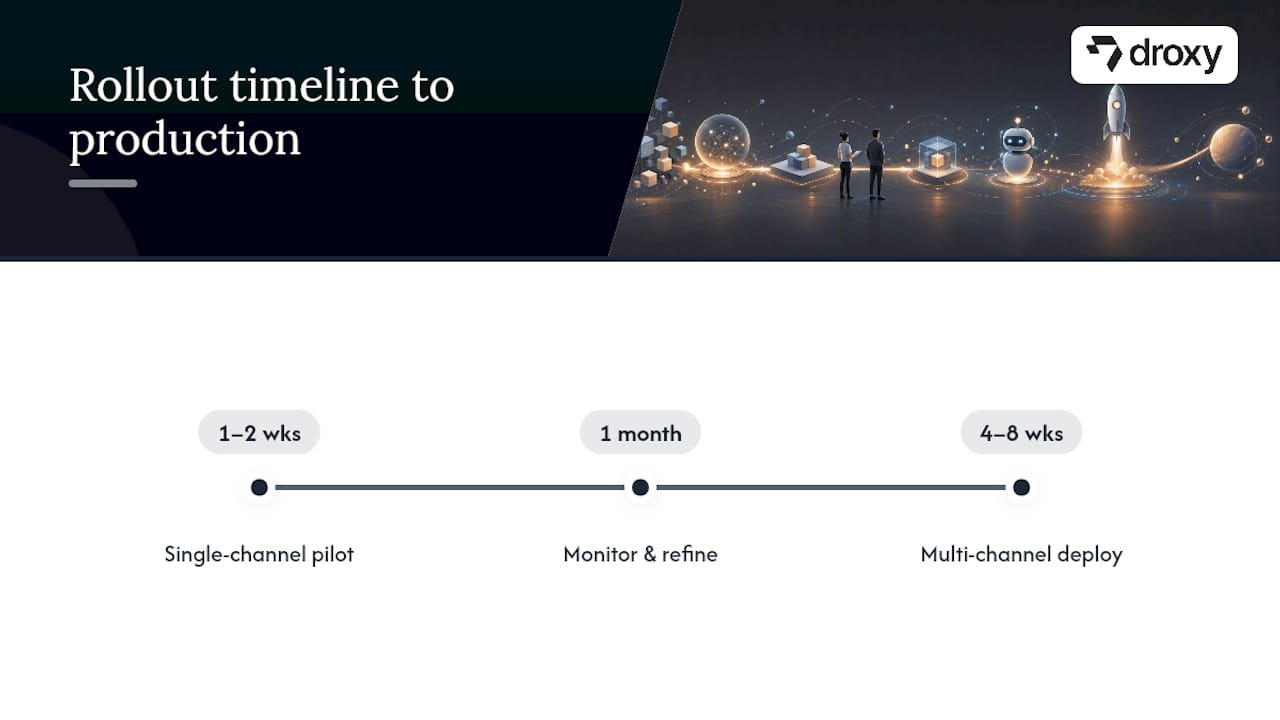
The gap between a working prototype and a production-ready agent is usually measured in weeks, not months, if you scope the pilot tightly. A single-channel agent handling one well-defined task (lead qualification on a website chat, say) can go from first build to live pilot in one to two weeks using a visual builder, while multi-channel deployment with CRM integration, human hand-off logic, and a testing period typically stretches that timeline to four to eight weeks.
Cost follows a similar pattern. Most no-code platforms run on a subscription model, so the bigger variable is implementation effort: mapping integrations, writing and testing prompts, and training your team to monitor the agent once it’s live. Budget time for a maintenance cadence, not just a launch date. An agent that ships and never gets revisited degrades as your product, pricing, or policies change underneath it.
The realistic path looks like this: a two-week pilot on one channel with a narrow task, a month of monitoring and prompt refinement, then expansion to additional channels once the metrics justify it. Trying to launch five channels simultaneously without a monitoring routine is the most common way pilots stall out.
Real-World Patterns Behind Successful Deployments
The no-code agent deployments that hold up share a pattern regardless of industry: they start narrow, prove the metric, and expand from a position of evidence rather than optimism.
An agency running client support through a no-code platform typically starts with a single high-volume, low-complexity task, order status inquiries or appointment confirmations, and measures the response-time drop before adding scope. That sequencing matters more than the specific tool chosen. Widening the range of tasks or channels an agent handles at launch, before the team has a clear read on error rates and edge cases, is where deployments run into trouble.
Taskade’s approach of deploying a working app from a single prompt shows how fast the prototype stage can move. Speed to prototype isn’t the hard part anymore. The hard part is the deliberate slowdown between prototype and production: shadow testing, staged rollout, and a monitoring routine that catches drift before a customer does. Teams that skip that slowdown to hit a launch date are the ones that end up rebuilding trust with clients after a public misfire.
Comparing the Major No-Code Agent Platforms
No single platform wins on every axis, so the right choice depends on which criterion matters most for your use case.
Platform type | Strength | Trade-off |
|---|---|---|
Deep API access, hybrid no-code plus optional custom code, strong for complex multi-step workflows | Steeper learning curve than pure chat-style builders | |
Transparent decision logs across thousands of app integrations, easier to audit agent behavior | Best suited to teams already comfortable with automation logic | |
Strong audit logs, action restrictions, enterprise access controls | Governance features add setup overhead for small teams | |
Fastest path from idea to a live, shareable app | Less suited to deep custom integration work at scale | |
Customer-interaction specialists (like Droxy) | Purpose-built for omnichannel support, deep brand customization, human hand-off | Narrower scope than general automation platforms, by design |
The practical takeaway: general automation platforms give you the widest range of possible workflows, while purpose-built platforms like Droxy trade some of that breadth for depth on the specific job of customer interaction.
Keeping a No-Code Agent Sharp After Launch
Deployment isn’t the finish line. Agents drift as your products, policies, and customer questions change, and a set-and-forget approach guarantees that drift goes unnoticed until a customer complains.
Review conversation logs weekly during the first month, then monthly once the agent stabilizes. Update the knowledge base every time a policy or product changes rather than batching updates quarterly. Re-test the agent’s core workflows after any platform update, since a change to an underlying model or connector can shift behavior in ways that aren’t obvious from the interface. Keep a change log of every prompt edit and knowledge update so you can trace exactly what caused a shift in agent behavior if something goes wrong.
Assign one person ownership of the agent, even part-time. Agents that get treated as “everyone’s responsibility” tend to become nobody’s responsibility, and that’s when quality quietly slips.
When No-Code Is the Right Call, and When It Isn’t
No-code wins when the workflow is well-defined, the integrations are standard (CRM, calendar, ticketing), and you need to prove value fast. Most support and lead-qualification use cases fit that description.
Plan for engineering support when you need custom data pipelines, non-standard security certifications, or logic too complex for a visual canvas to express cleanly. The handoff checklist is short: document every prompt and tool decision, export your conversation logs, and hand engineering a working baseline instead of a blank page. That baseline is worth more than any spec document you could write from scratch.
— Elena
Droxy: Your Next Step for Customer-Facing Agents
If everything in this guide points to one conclusion, it’s that omnichannel customer interaction is a narrower, more specific job than general workflow automation, and it deserves a platform built for exactly that job. Droxy handles website chat, phone, WhatsApp, Instagram, Facebook, and Shopify from a single no-code build, with human hand-off for the moments that need a real person and analytics to prove the response-time gains you’re chasing.

If you’re an agency or consultant evaluating this for client work, the consultation page walks through white-label options and how deployments get supported after launch. If your priority is specific channel coverage, check the WhatsApp agent or Instagram agent pages directly. For agencies planning to resell under their own brand, the agency page covers that setup. When you’re ready to see actual numbers for your business, check pricing or start a trial to test it against your current response times.
Sources
For readers who want to go deeper on the general automation side before committing to a customer-interaction specialist, these platform pages are worth a direct look:
Build Custom AI Agents With Logic & Control | n8n Automation Platform
Make AI Agents | Build transparent AI agents across 3000+ apps | Make
Recommended
No-code AI agents are autonomous workflows that reason through a task, pull from your data and tools, and take real action, not just answer a chat prompt. Platforms like n8n, Make, and Taskade already run these in production, and for a wide range of professional tasks, with the right guardrails, they hold up. This guide walks you through the use cases worth automating, a build checklist you can run this week, the evaluation criteria that matter in procurement, and where Droxy fits as a customer-facing production option.
TL;DR:
No-code AI agents are capable of autonomous actions that directly integrate with business systems, enabling tasks like ticket resolution and lead qualification.
Building and deploying effective agents require clear goals, mapped integrations, staged testing, and ongoing monitoring with detailed logs for troubleshooting.
Evaluation criteria should focus on integration coverage, actionability, governance, observability, extensibility, deployment timeline, and total cost.
Droxy is a purpose-built platform for omnichannel customer support, offering deep customization, human hand-off, and analytics, suitable for active, real-world deployment.
To maintain agent performance post-launch, schedule regular log reviews, update knowledge bases promptly, and assign dedicated ownership to prevent drift.
DroxyDeploy Customer-Facing AI AgentsDroxy helps businesses provide instant, customized customer interactions across chat, phone, WhatsApp, social channels, and Shopify.Explore Droxy
Table of Contents
What No-Code AI Agents Do (and Where They Actually Pay Off)
How to Build and Deploy a No-Code AI Agent, Step by Step
How to Evaluate a No-Code AI Agent Platform: A Scorecard
Why Droxy Is a Practical Production Option for Customer-Facing Agents
Where No-Code Agents Fall Short (and How to Guard Against It)
What It Actually Takes to Reach Production
Real-World Patterns Behind Successful Deployments
Comparing the Major No-Code Agent Platforms
Keeping a No-Code Agent Sharp After Launch
When No-Code Is the Right Call, and When It Isn’t
Droxy: Your Next Step for Customer-Facing Agents
Sources
What No-Code AI Agents Do (and Where They Actually Pay Off)
A chatbot answers a question. A no-code AI agent plans a sequence of steps, acts on them, and revises course when something doesn’t go as expected. That distinction is the whole ballgame. A simple chatbot might tell a customer your return policy. An agent checks the order in your system, confirms it’s eligible, issues the return label, and updates the CRM, all without a human touching a keyboard.
For consultants and agency owners, that action-taking capability opens up work that used to require a developer on retainer. Here’s where no-code agents earn their keep:
Support ticket triage and resolution — categorize incoming tickets, resolve the routine ones (password resets, order status), and escalate the rest with full context attached.
Inbound lead qualification — ask the right questions on a website chat or WhatsApp, score the lead, and push qualified prospects straight into your CRM.
Research and summarization — pull data from multiple sources and hand a consultant a clean brief instead of ten open tabs.
Scheduling and bookings — check calendar availability, confirm a slot, and send reminders without back-and-forth email.
Automated internal reporting — compile weekly metrics from separate tools into one summary, delivered on a schedule.
Content triage and drafting — sort inbound content requests by priority and draft a first pass for human review.
What makes these production-grade rather than a novelty demo is the systems integration. n8n’s agent builder documents agents that query data and call APIs directly, meaning the agent updates your ticketing system or CRM instead of just describing what should happen next. That’s the line between a chat toy and a working employee.
The ROI signals to track are straightforward: response time drop, lead capture rate, and hours saved on repetitive tasks each week. Agencies deploying AI across client work have reported meaningful productivity gains, with one analysis pointing to a 3.2x return on AI investment in agency settings. Track your own numbers from week one so you have a real baseline, not a guess.
How to Build and Deploy a No-Code AI Agent, Step by Step
Skipping steps here is how a promising prototype turns into an agent that emails the wrong client. Follow this order.
Define the goal and acceptance criteria. Write down the KPI you’re targeting (faster first response, higher qualification rate) and the exact actions the agent is allowed to take. If you can’t state the boundary, the agent can’t respect it.
Map your data and integrations. List every system the agent needs to touch, your CRM, a shared inbox, a scheduling tool, a knowledge base, and decide how it accesses knowledge. Most platforms support retrieval-augmented generation (RAG) or direct API calls to your existing systems.
Assemble the agent inside the canvas. Write the system prompt that defines its role and tone, define the specific tools or actions it can call, choose a memory strategy (does it remember past conversations with a contact?), and wire up the triggers.
Test in shadow mode first. Run the agent alongside your human team without letting it act publicly. Compare its decisions to what a person would have done before it goes live.
Roll out in stages with human approval gates. Start with low-stakes actions, add rate limits, and require human sign-off on anything irreversible, like a refund over a certain amount.
Launch with monitoring and a rollback plan. Pick your channel (website chat, WhatsApp, phone), set up logging you can replay after the fact, and schedule a monthly review to update prompts and knowledge sources.
Pro Tip: Keep every test run’s transcript. When an agent makes a bad call, you need a replayable log to diagnose whether the prompt, the data, or the tool integration was the actual problem, not a guess after the fact.
Make’s agent builder provides a reasoning panel that shows the decision trail for each action, which is exactly the kind of replayable log step five requires. Build that visibility in from day one rather than bolting it on after something breaks.
How to Evaluate a No-Code AI Agent Platform: A Scorecard
Most procurement conversations get stuck comparing chatbot features when the real differentiators sit elsewhere. Score any platform you’re considering against these seven criteria:
Integration breadth. How many prebuilt connectors does it ship with, and do they cover your actual stack? Zapier’s ecosystem, for instance, spans thousands of apps, which matters more than any single flashy feature if your workflow touches a dozen tools.
Actionability. Can the agent call APIs and update systems, or does it only produce chat replies you have to act on manually? This is the single biggest gap between platforms that look similar in a demo.
Governance. Look for model controls, data residency options, audit logs, and role-based access. Zapier positions itself around exactly this, with action restrictions and auditability built for enterprise use.
Observability and debugging. You need reasoning traces and step replays, not a black box that occasionally does something strange.
Extensibility. Templates get you started, but check whether custom tools or optional scripting are available when a template isn’t enough.
Deployment options and timeline. Self-host versus managed cloud, published SLAs, and a realistic implementation window rather than a vague “weeks to months.”
Total cost. Look past the subscription line item at integration costs, per-seat pricing at scale, and what a real pilot will cost to run before you commit.
Weight governance and observability higher than most vendors want you to. A charming demo means nothing if you can’t audit what the agent did six weeks after launch.
Why Droxy Is a Practical Production Option for Customer-Facing Agents
Droxy is built specifically for customer interaction across multiple channels through a no-code platform. Omnichannel scope matters because businesses can lose leads from slow responses across whichever channel a customer chooses.
Some key capabilities to look for include deep customization to match brand voice, human hand-off for moments needing escalation, knowledge integration from multiple sources, analytics to track response-time and conversion metrics, and white-labeling options for agencies.
Over 60,000 users currently run their customer service through Droxy, which is the kind of adoption scale that suggests the platform holds up outside a sales demo. If you’re evaluating a production option rather than another prototype, start with a trial or a demo and measure it against your own response-time baseline.
Where No-Code Agents Fall Short (and How to Guard Against It)
No-code doesn’t mean risk-free. Three failure modes show up again and again, and each has a practical fix.
Hallucinations. An agent can state something confidently that simply isn’t true, especially when its knowledge base is thin or outdated. The fix is grounding: connect the agent to your actual documentation through retrieval rather than letting it rely on general training knowledge, and review a sample of transcripts weekly to catch drift before a customer does.
Runaway actions. An agent with API access can, in theory, issue ten refunds instead of one, or email the wrong list. This is why staged rollouts and approval gates aren’t optional extras. Rate limits and a required human sign-off on irreversible actions turn a catastrophic failure into a minor annoyance.
Privacy and security exposure. Any agent touching customer data needs clear rules about what it stores, for how long, and who can see it. Ask any platform directly about data residency, encryption, and whether conversation logs are used to train shared models. If the answer is vague, treat that as your answer.
None of these risks are reasons to avoid no-code agents. They’re reasons to build with the same discipline you’d apply to any system handling customer data and taking action on your behalf. A shadow-mode testing period, sensible rate limits, and a documented escalation path close most of the gap between “impressive demo” and “trustworthy production system.”
What It Actually Takes to Reach Production
The gap between a working prototype and a production-ready agent is usually measured in weeks, not months, if you scope the pilot tightly. A single-channel agent handling one well-defined task (lead qualification on a website chat, say) can go from first build to live pilot in one to two weeks using a visual builder, while multi-channel deployment with CRM integration, human hand-off logic, and a testing period typically stretches that timeline to four to eight weeks.
Cost follows a similar pattern. Most no-code platforms run on a subscription model, so the bigger variable is implementation effort: mapping integrations, writing and testing prompts, and training your team to monitor the agent once it’s live. Budget time for a maintenance cadence, not just a launch date. An agent that ships and never gets revisited degrades as your product, pricing, or policies change underneath it.
The realistic path looks like this: a two-week pilot on one channel with a narrow task, a month of monitoring and prompt refinement, then expansion to additional channels once the metrics justify it. Trying to launch five channels simultaneously without a monitoring routine is the most common way pilots stall out.
Real-World Patterns Behind Successful Deployments
The no-code agent deployments that hold up share a pattern regardless of industry: they start narrow, prove the metric, and expand from a position of evidence rather than optimism.
An agency running client support through a no-code platform typically starts with a single high-volume, low-complexity task, order status inquiries or appointment confirmations, and measures the response-time drop before adding scope. That sequencing matters more than the specific tool chosen. Widening the range of tasks or channels an agent handles at launch, before the team has a clear read on error rates and edge cases, is where deployments run into trouble.
Taskade’s approach of deploying a working app from a single prompt shows how fast the prototype stage can move. Speed to prototype isn’t the hard part anymore. The hard part is the deliberate slowdown between prototype and production: shadow testing, staged rollout, and a monitoring routine that catches drift before a customer does. Teams that skip that slowdown to hit a launch date are the ones that end up rebuilding trust with clients after a public misfire.
Comparing the Major No-Code Agent Platforms
No single platform wins on every axis, so the right choice depends on which criterion matters most for your use case.
Platform type | Strength | Trade-off |
|---|---|---|
Deep API access, hybrid no-code plus optional custom code, strong for complex multi-step workflows | Steeper learning curve than pure chat-style builders | |
Transparent decision logs across thousands of app integrations, easier to audit agent behavior | Best suited to teams already comfortable with automation logic | |
Strong audit logs, action restrictions, enterprise access controls | Governance features add setup overhead for small teams | |
Fastest path from idea to a live, shareable app | Less suited to deep custom integration work at scale | |
Customer-interaction specialists (like Droxy) | Purpose-built for omnichannel support, deep brand customization, human hand-off | Narrower scope than general automation platforms, by design |
The practical takeaway: general automation platforms give you the widest range of possible workflows, while purpose-built platforms like Droxy trade some of that breadth for depth on the specific job of customer interaction.
Keeping a No-Code Agent Sharp After Launch
Deployment isn’t the finish line. Agents drift as your products, policies, and customer questions change, and a set-and-forget approach guarantees that drift goes unnoticed until a customer complains.
Review conversation logs weekly during the first month, then monthly once the agent stabilizes. Update the knowledge base every time a policy or product changes rather than batching updates quarterly. Re-test the agent’s core workflows after any platform update, since a change to an underlying model or connector can shift behavior in ways that aren’t obvious from the interface. Keep a change log of every prompt edit and knowledge update so you can trace exactly what caused a shift in agent behavior if something goes wrong.
Assign one person ownership of the agent, even part-time. Agents that get treated as “everyone’s responsibility” tend to become nobody’s responsibility, and that’s when quality quietly slips.
When No-Code Is the Right Call, and When It Isn’t
No-code wins when the workflow is well-defined, the integrations are standard (CRM, calendar, ticketing), and you need to prove value fast. Most support and lead-qualification use cases fit that description.
Plan for engineering support when you need custom data pipelines, non-standard security certifications, or logic too complex for a visual canvas to express cleanly. The handoff checklist is short: document every prompt and tool decision, export your conversation logs, and hand engineering a working baseline instead of a blank page. That baseline is worth more than any spec document you could write from scratch.
— Elena
Droxy: Your Next Step for Customer-Facing Agents
If everything in this guide points to one conclusion, it’s that omnichannel customer interaction is a narrower, more specific job than general workflow automation, and it deserves a platform built for exactly that job. Droxy handles website chat, phone, WhatsApp, Instagram, Facebook, and Shopify from a single no-code build, with human hand-off for the moments that need a real person and analytics to prove the response-time gains you’re chasing.
If you’re an agency or consultant evaluating this for client work, the consultation page walks through white-label options and how deployments get supported after launch. If your priority is specific channel coverage, check the WhatsApp agent or Instagram agent pages directly. For agencies planning to resell under their own brand, the agency page covers that setup. When you’re ready to see actual numbers for your business, check pricing or start a trial to test it against your current response times.
Sources
For readers who want to go deeper on the general automation side before committing to a customer-interaction specialist, these platform pages are worth a direct look:
Build Custom AI Agents With Logic & Control | n8n Automation Platform
Make AI Agents | Build transparent AI agents across 3000+ apps | Make
Recommended



🚀
Powered by Droxy
Turn every interaction into a conversion
Customer facing AI agents that engage, convert, and support so you can scale what matters.
✨
Learn more
Recent posts

Insights
3 min read
Introducing Agent Memories
Improve your agents' performance with Agent Memories. Prevent agents from repeating the same mistakes by giving them feedback.
Read more

Insights
15 min read
HVAC Marketing in 2025: The Definitive Lead Gen Guide
Discover 15 proven HVAC marketing strategies, plus learn how Droxy's AI website agent converts curious visitors into qualified leads by answering their questions instantly - right when they're most interested in your services.
Read more

Insights
10 min read
10 Best AI Sales Agents in 2025: Tested & Ranked
Discover the top 10 AI sales agents of 2025, designed to enhance lead generation, personalize outreach, and ultimately, close more deals
Read more
Insights
3 min read
Introducing Agent Memories
Improve your agents' performance with Agent Memories. Prevent agents from repeating the same mistakes by giving them feedback.
Read more
Insights
15 min read
HVAC Marketing in 2025: The Definitive Lead Gen Guide
Discover 15 proven HVAC marketing strategies, plus learn how Droxy's AI website agent converts curious visitors into qualified leads by answering their questions instantly - right when they're most interested in your services.
Read more