Ship Website Chat Greetings With Copy First Templates and UX Rules
Ship Website Chat Greetings With Copy First Templates and UX Rules
Insights
22 min
Try this formula on any high-intent page: “Hi, welcome! Need a hand with [specific task on this page]? I’m here in chat.” It works best on pricing, checkout, and product pages where visitors already know what they want. Let it trigger on user action first, and if you use proactive timing, keep the delay conservative so it feels helpful, not pushy.
TL;DR:
Greetings should be highly relevant to the specific page or product to increase engagement and avoid appearing generic or insincere.
Proactive chat triggers must rely on user behavior, such as scroll depth or inactivity, rather than fixed timers, especially on mobile devices.
Personalization using accurate data like visitor name or referral source can boost responses, but fallback to generic greetings is better if data is unreliable.
Limiting greetings to one per session and respecting dismissals prevents visitors from feeling overwhelmed or pushed.
Tracking key metrics like chat activation rate, conversion, and user sentiment during A/B testing helps determine the most effective greeting approach.
Droxydroxy.aiMake Every Greeting More HelpfulDeploy customizable AI agents that answer visitors instantly on your website, while matching your brand’s voice and supporting customer conversations.Visit Droxy
Table of Contents
What Makes a Website Chat Greeting Effective
Timing, Triggers, and Placement: UX Rules to Avoid Being Pushy
Ready-to-Use Greeting Templates by Scenario
Micro Copy and Voice Tips to Increase Replies
Signals to Personalize Greetings and Safe Fallbacks
Metrics and A/B Test Designs That Prove Impact
Droxy’s Approach to Greeting Automation
How to Segment Visitors Beyond Basic Intent
Cultural and Language Considerations in Chat Greetings
Legal and Privacy Considerations for Chat Greetings
My 7-Day Rollout Plan
How Droxy Helps You Ship Greetings Across Every Channel
Sources
What Makes a Website Chat Greeting Effective
A greeting earns a reply when it does four things at once: it matches the page, sounds like a person, tells the visitor what happens next, and asks one clear question. Miss any of these and even a well-timed message gets ignored or closed.
Relevance comes first. A greeting on your pricing page should mention pricing. One on a product page should mention that product. Generic lines like “Hi, how can I help?” waste the moment because they could appear anywhere, which tells the visitor you haven’t actually looked at where they are.
Tone matters just as much as content. Keep it warm, short, and conversational, the way you’d greet someone who walked into your store and paused near a shelf. Skip corporate phrasing like “How may I assist you today?” in favor of something closer to how your team actually talks.
Personalization tokens, like a first name or a product the visitor viewed, work well when the data is reliable and the tone stays natural. When you don’t have clean data, a solid generic greeting beats a broken personalization token every time.
Expectation setting closes the loop. Tell visitors what to expect: a live person, an AI agent, or a short wait. This single addition reduces drop-off because nobody likes typing into a box without knowing who, or what, is on the other end.
Keep it to one or two sentences. A greeting is an invitation, not an explanation.
Relevance: mention the page or product the visitor is actually looking at.
Tone: write it the way your best support rep would say it out loud.
Personalization: use a name or product only when the data is accurate.
Expectation setting: say whether a human or an AI agent is responding.
Length: one or two sentences, never a paragraph.
Pro Tip: Read your greeting out loud. If it sounds like a form letter, rewrite it until it sounds like a text message from a helpful coworker.
Timing, Triggers, and Placement: UX Rules to Avoid Being Pushy
Chat access that visitors find on their own, through a footer link, header icon, or help center, tends to feel safer than a window that pops up uninvited. Usability testing from Baymard finds that site-initiated overlays and persistent sticky chat widgets are often experienced as disruptive, while chat placed somewhere predictable gets used without friction. That doesn’t mean proactive greetings are off the table. It means they need guardrails.
If you do trigger proactively, base it on behavior, not a blind timer. Reasonable starting points:
Time on page: wait a moderate amount of time before any proactive message appears.
Scroll depth: trigger only after a visitor has scrolled past the main content, showing real engagement.
Inactivity: a pause after active scrolling can signal hesitation worth addressing.
Exit intent: reserve this for high-value pages like checkout, since it’s the most intrusive trigger available.
Mobile needs extra caution. A large share of web traffic now comes from mobile devices, and a sticky overlay that covers a chunk of a small screen does far more damage there than on desktop. Keep mobile greetings collapsible, placed at the edge of the screen, and easy to dismiss with one tap.
One greeting per session is a reasonable cap, measured against engagement data. Once a visitor dismisses a greeting, respect it: don’t re-trigger the same message on the same visit. That single rule prevents most of the “pushy chatbot” complaints site owners run into.
Ready-to-Use Greeting Templates by Scenario
Copy these as a starting point, then adjust the bracketed parts to match your product and voice.
General homepage greetings:
“Hi, welcome! Looking for something specific, or just browsing? I’m here if you need a hand.”
“Hey there! Quick question, or want a tour of what we offer?”
“Welcome! If you’re not sure where to start, tell me what brought you here today.”
New visitor and product-explorer templates:
“First time here? Happy to point you toward the right [product/category] if you tell me what you need.”
“Checking out [product name]? I can answer sizing, shipping, or feature questions right here.”
“Curious about [product category]? I can narrow it down based on what you’re looking for.”
Returning customer and logged-in user templates:
“Welcome back! Need help with your last order, or looking for something new?”
“Hi again! Want me to pull up your account or recent order details?”
“Good to see you back. Anything from your last visit I can help finish up?”
Pricing and checkout templates: Keep these short and direct. A visitor on this page already knows what they want, so the greeting should remove friction, not add conversation.
“Questions about pricing or which plan fits? I can walk you through it in under a minute.”
“Almost there! Need help completing your order, or have a question about checkout?”
“Stuck on a plan choice? Tell me your use case and I’ll point you to the right one.”
Cart abandonment and stall re-engagement templates:
“Still deciding on your cart? Happy to answer any last questions before you check out.”
“Saved your cart for you. Need a discount code or shipping info to finish up?”
“Looks like you paused here. I can help if something’s unclear about your order.”
Support and troubleshooting openings: These should set expectations immediately, since support visitors are often frustrated and want to know help is actually coming.
“Hi, I’m here to help troubleshoot. What’s going wrong, and I’ll get you sorted.”
“Sorry you’re running into an issue. Give me the details and I’ll find a fix or get you to someone who can.”
“I can usually resolve this in chat. What’s the problem you’re seeing?”
Seasonal, promotional, and lead-capture templates:
“Checking out our [holiday/seasonal] deals? I can help you find the best fit before they’re gone.”
“Want early access to [offer]? Drop your email and I’ll get you set up.”
“New here? Grab [discount/resource] and let me know if you have questions.”
A randomized field experiment on AI assistance in online chats found that AI-assisted responses sped up replies and improved customer sentiment across many of these scenarios, though the benefit varied by conversation type. Support and troubleshooting chats, in particular, need a clear path to a human when the AI hits the edge of what it can resolve, so build that handoff into the template rather than bolting it on later.
Micro Copy and Voice Tips to Increase Replies
Small wording choices move reply rates more than most site owners expect. Two moves matter most: shortening and being specific. “How can I help?” is short but vague. “Need help picking a size?” is barely longer and far more useful, because it gives the visitor something concrete to respond to.
Emoji use is worth testing rather than assuming. Research on chatbot response strategies and emoji use found that proactive chatbots using emojis reduced psychological distance and increased purchase intention compared to reactive chatbots without them, though the effect depended on context. A friendly emoji on a product page might build warmth; the same emoji on a billing support chat could undercut trust. Test by conversation type instead of applying one rule everywhere.
Name-first personalization, when the data is accurate, tends to increase replies because it signals the message isn’t generic. Always have a clean fallback greeting ready for visitors without a known name, since a broken token like “Hi {firstname}!” damages trust faster than no personalization at all.
Three simple tests worth running:
Tone test: casual phrasing against formal phrasing on the same page.
CTA test: a question-based greeting against a statement-based one.
Emoji test: the same greeting with and without an emoji, split by page type.
Pro Tip: Run one test at a time. Changing tone and emoji together tells you nothing about which change actually moved the needle.
For teams writing AI-assisted chat copy, guidance on humanizing AI-generated text is a useful reference for keeping these templates from sounding scripted once they’re adapted at scale.
Signals to Personalize Greetings and Safe Fallbacks
The most useful personalization signals are often already sitting in your analytics: referrer source, UTM parameters, page type, and on-site behavior like scroll depth or repeat visits. Mapped well, these signals turn one generic greeting into several relevant ones without requiring a rebuild of your chat setup.
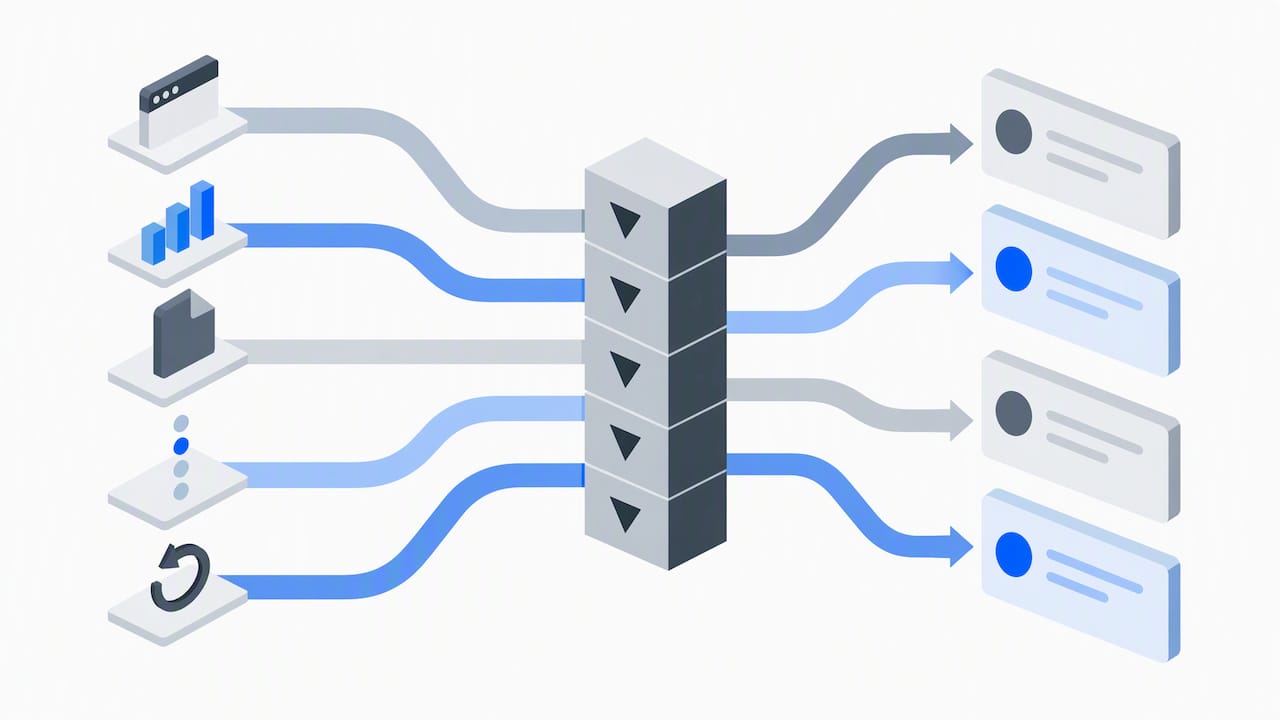
A visitor arriving from a paid search ad for “best running shoes” can get a greeting referencing running shoes directly. Someone landing from an email campaign about a sale can see a greeting that mentions the sale by name. A returning visitor who viewed a product three times in a week can get a nudge about that specific item. Page type alone, pricing versus support versus homepage, already covers most of the scenarios above, and it’s the easiest signal to start with.
Keep the variant count manageable. Five to eight greeting variants covering your highest-traffic page types is plenty for most sites; beyond that, maintenance becomes harder than the personalization is worth. Version them with simple names and dates so your team knows which greeting is live where.
Stick to first-party, aggregated signals rather than anything identifying. Referrer and page type are safe starting points that don’t require storing personal data.
Referrer or UTM source: match the greeting to the campaign or search term that brought the visitor in.
Page type: pricing, product, support, and homepage each get a distinct greeting.
Repeat visit behavior: acknowledge a returning visitor without needing their name.
Fallback rule: every personalized variant needs a generic version ready if the signal is missing or unreliable.
Metrics and A/B Test Designs That Prove Impact
Track chat engagement rate (visitors who open the chat), chat-to-lead conversion, and overall conversion lift on the page as your primary signals. Secondary metrics worth watching include customer satisfaction scores, average handle time, bounce rate, and average order value on pages where chat is active.
A simple test structure:
Hypothesis: a specific, relevant greeting will out-convert a generic one on the pricing page.
Variants: run the current generic greeting against one or two specific alternatives.
Duration: run for at least two full weeks to smooth out day-of-week traffic patterns.
Sample size: wait for enough conversions per variant, not just visitors, before reading results, since low-traffic pages need longer runs.
Set a frequency cap and a rollback trigger before you launch: if engagement drops or complaints rise, pull the variant immediately rather than waiting out the full test window. A randomized field experiment on AI-assisted chat found AI benefits varied by context and could backfire after early comprehension failures, which is a good reason to monitor sentiment, not just click-through, during any test.
Droxy’s Approach to Greeting Automation
Some no-code platforms let businesses deploy AI agents across website chat, phone, WhatsApp, Instagram, Facebook, and Shopify, built to answer instantly instead of leaving visitors waiting. A large number of users rely on a no-code platform to handle customer interaction across these channels.
For greeting variants specifically, Droxy’s customization lets a business set different opening messages by page or channel while keeping the AI agent’s voice consistent with the brand. When a conversation needs a human, Droxy supports handoff so visitors aren’t stuck with a bot that’s reached its limit.
Deploys the same greeting logic across website chat, WhatsApp, Instagram, and Facebook from one platform.
Lets businesses customize tone and wording so AI responses sound like the brand, not a generic script.
Includes human handoff for conversations that need a person, paired with analytics to see what’s working.
For setup guidance, see this guide to choosing a chatbot for your website or this comparison of live chat and chatbot approaches.
How to Segment Visitors Beyond Basic Intent
Visitor intent (new, returning, ready to buy) is a useful starting filter, but it’s a blunt one. Layering in a second dimension sharpens your greetings without multiplying your workload.
Device type is one worth testing. A mobile shopper browsing on a lunch break behaves differently than a desktop visitor doing deep research, and your greeting length and CTA should reflect that. Traffic source is another: a visitor from an organic search for a specific product term is closer to a buying decision than one who clicked a broad social ad, so the greeting can be more direct with the former and more exploratory with the latter.
Session depth matters too. Someone on their fifth page view in one session is behaving differently than someone who just landed, even if both are “new” visitors by cookie status. A greeting that references how far they’ve browsed (“Looks like you’ve checked out a few options, want help narrowing it down?”) often reads as more attentive than one based on intent alone.
Time of day and day of week can factor in for B2B sites, where a visitor browsing during business hours might get a greeting mentioning live support, while an after-hours visitor gets one setting expectations around response time. The goal isn’t more segments for their own sake, it’s matching the greeting to what the visitor is actually doing, not just who they’re assumed to be.
Cultural and Language Considerations in Chat Greetings
A greeting that reads as friendly in one market can read as overly familiar, or oddly distant, in another. Directness is the clearest example: a greeting like “Need help? I’m here!” lands as warm in many English-speaking markets but can feel abrupt in cultures that expect a more formal opening exchange before getting to business.
Translation alone isn’t enough. A greeting built around an idiom or a casual contraction often loses its tone entirely when translated word for word, and sometimes reads as confusing rather than friendly. Work with native speakers, or at minimum have someone fluent review translated greetings for tone, not just accuracy.
Formality defaults vary by language too. Some languages carry formal and informal address built into their grammar, and defaulting to the wrong one in a greeting can undercut trust before the conversation even starts. When your chat supports multiple languages, treat each one as its own greeting to write, not a direct port of the English version.
Time zones and business hours deserve a mention here as well. A greeting promising a fast reply only holds up if your team, or your AI agent, is actually available when that visitor is browsing. For multilingual or multi-region sites, pairing greetings with accurate availability messaging matters as much as the wording itself.
Legal and Privacy Considerations for Chat Greetings
Proactive greetings that reference a visitor’s specific behavior, like a product they viewed or a cart they abandoned, rely on tracking data, and that data is subject to privacy rules that vary by region. Before a greeting references anything beyond the current page, confirm the site’s cookie and tracking consent covers that use, particularly for visitors in regions with active consent requirements.
Keep personalization tied to first-party, aggregated signals rather than anything that identifies an individual visitor without clear consent. A greeting referencing “the running shoes you looked at” requires that behavioral tracking be disclosed and consented to under most current privacy frameworks; a greeting referencing only the current page type does not carry that same requirement, since it uses no stored visitor history.
If your chat greeting triggers data collection, such as capturing an email through a lead-capture template, make sure your privacy policy and consent flow cover that collection point specifically, not just the site in general. This matters most on cart abandonment and lead-capture greetings, since both involve either behavioral data or direct collection of contact information.
When in doubt, default to the least invasive greeting version and consult your own legal counsel or a privacy professional for guidance specific to the regions where your visitors are located, since rules differ by jurisdiction and change over time.
My 7-Day Rollout Plan
Pick one high-value page, pricing works well, and write three greeting variants using the formulas above. Set conservative triggers: user-initiated as the default, a single time-based proactive trigger as a test. Run it for two weeks, watching engagement and conversion lift rather than just open rate. At day seven, check which variant is pulling ahead before making any permanent call. Once you see a clear winner, expand the pattern to your next highest-traffic page rather than rolling it out everywhere at once.
— Elena
How Droxy Helps You Ship Greetings Across Every Channel
Writing the right greeting is half the work. Getting it live across your website, WhatsApp, Instagram, and Facebook without juggling four separate tools is the other half, and that’s where Droxy fits.

Droxy’s AI powered website agent lets you set the greeting variants covered in this guide, by page, by trigger, by channel, and keep them consistent with your brand voice. Ecommerce stores and small service businesses tend to see the fastest results, since pricing and checkout pages are exactly where a relevant greeting earns its keep.
Deploy the same greeting logic on your website and across WhatsApp, Instagram, and Facebook from one dashboard.
Set human handoff rules so a visitor never gets stuck with an AI agent that’s out of its depth.
Track engagement and conversion by page to see which greeting variant is actually working.
Plans start on the pricing page, where you can compare Basic, Advanced, and Enterprise options and pick the fit for your site.
FAQ
What are some common greetings used in chat?
Common chat greetings include simple openers like “Hi, how can I help?” and more specific ones tied to the page a visitor is on, such as a pricing question or product detail. The most effective versions combine a warm tone with a direct question about what the visitor needs, rather than a vague, one-size-fits-all line.
What is a good welcome message for a website?
A good welcome message is short, mentions what the page is about, and invites a specific response rather than a generic one. For a homepage, something like “Welcome! Looking for something specific, or just browsing?” works better than “How can I help you today?” because it gives the visitor an easy way to respond.
What is a good greeting message to send in a group chat?
A good group chat greeting acknowledges the group’s purpose and invites a quick response without putting pressure on any one person to reply first. Keeping it brief and specific to why the group exists tends to get more engagement than a generic “Hello everyone.”
Can you give me some examples of customer service greetings?
Strong customer service greetings set expectations immediately, such as “I’m here to help troubleshoot, what’s going wrong?” or “Sorry you’re running into an issue, give me the details and I’ll find a fix.” These work because they acknowledge the visitor’s situation and signal that help is already underway rather than asking a vague opening question.
Sources
Engaging Customers with AI in Online Chats: Evidence from a Randomized Field Experiment
Share of website traffic coming from mobile devices — Statista
Recommended
Try this formula on any high-intent page: “Hi, welcome! Need a hand with [specific task on this page]? I’m here in chat.” It works best on pricing, checkout, and product pages where visitors already know what they want. Let it trigger on user action first, and if you use proactive timing, keep the delay conservative so it feels helpful, not pushy.
TL;DR:
Greetings should be highly relevant to the specific page or product to increase engagement and avoid appearing generic or insincere.
Proactive chat triggers must rely on user behavior, such as scroll depth or inactivity, rather than fixed timers, especially on mobile devices.
Personalization using accurate data like visitor name or referral source can boost responses, but fallback to generic greetings is better if data is unreliable.
Limiting greetings to one per session and respecting dismissals prevents visitors from feeling overwhelmed or pushed.
Tracking key metrics like chat activation rate, conversion, and user sentiment during A/B testing helps determine the most effective greeting approach.
Droxydroxy.aiMake Every Greeting More HelpfulDeploy customizable AI agents that answer visitors instantly on your website, while matching your brand’s voice and supporting customer conversations.Visit Droxy
Table of Contents
What Makes a Website Chat Greeting Effective
Timing, Triggers, and Placement: UX Rules to Avoid Being Pushy
Ready-to-Use Greeting Templates by Scenario
Micro Copy and Voice Tips to Increase Replies
Signals to Personalize Greetings and Safe Fallbacks
Metrics and A/B Test Designs That Prove Impact
Droxy’s Approach to Greeting Automation
How to Segment Visitors Beyond Basic Intent
Cultural and Language Considerations in Chat Greetings
Legal and Privacy Considerations for Chat Greetings
My 7-Day Rollout Plan
How Droxy Helps You Ship Greetings Across Every Channel
Sources
What Makes a Website Chat Greeting Effective
A greeting earns a reply when it does four things at once: it matches the page, sounds like a person, tells the visitor what happens next, and asks one clear question. Miss any of these and even a well-timed message gets ignored or closed.
Relevance comes first. A greeting on your pricing page should mention pricing. One on a product page should mention that product. Generic lines like “Hi, how can I help?” waste the moment because they could appear anywhere, which tells the visitor you haven’t actually looked at where they are.
Tone matters just as much as content. Keep it warm, short, and conversational, the way you’d greet someone who walked into your store and paused near a shelf. Skip corporate phrasing like “How may I assist you today?” in favor of something closer to how your team actually talks.
Personalization tokens, like a first name or a product the visitor viewed, work well when the data is reliable and the tone stays natural. When you don’t have clean data, a solid generic greeting beats a broken personalization token every time.
Expectation setting closes the loop. Tell visitors what to expect: a live person, an AI agent, or a short wait. This single addition reduces drop-off because nobody likes typing into a box without knowing who, or what, is on the other end.
Keep it to one or two sentences. A greeting is an invitation, not an explanation.
Relevance: mention the page or product the visitor is actually looking at.
Tone: write it the way your best support rep would say it out loud.
Personalization: use a name or product only when the data is accurate.
Expectation setting: say whether a human or an AI agent is responding.
Length: one or two sentences, never a paragraph.
Pro Tip: Read your greeting out loud. If it sounds like a form letter, rewrite it until it sounds like a text message from a helpful coworker.
Timing, Triggers, and Placement: UX Rules to Avoid Being Pushy
Chat access that visitors find on their own, through a footer link, header icon, or help center, tends to feel safer than a window that pops up uninvited. Usability testing from Baymard finds that site-initiated overlays and persistent sticky chat widgets are often experienced as disruptive, while chat placed somewhere predictable gets used without friction. That doesn’t mean proactive greetings are off the table. It means they need guardrails.
If you do trigger proactively, base it on behavior, not a blind timer. Reasonable starting points:
Time on page: wait a moderate amount of time before any proactive message appears.
Scroll depth: trigger only after a visitor has scrolled past the main content, showing real engagement.
Inactivity: a pause after active scrolling can signal hesitation worth addressing.
Exit intent: reserve this for high-value pages like checkout, since it’s the most intrusive trigger available.
Mobile needs extra caution. A large share of web traffic now comes from mobile devices, and a sticky overlay that covers a chunk of a small screen does far more damage there than on desktop. Keep mobile greetings collapsible, placed at the edge of the screen, and easy to dismiss with one tap.
One greeting per session is a reasonable cap, measured against engagement data. Once a visitor dismisses a greeting, respect it: don’t re-trigger the same message on the same visit. That single rule prevents most of the “pushy chatbot” complaints site owners run into.
Ready-to-Use Greeting Templates by Scenario
Copy these as a starting point, then adjust the bracketed parts to match your product and voice.
General homepage greetings:
“Hi, welcome! Looking for something specific, or just browsing? I’m here if you need a hand.”
“Hey there! Quick question, or want a tour of what we offer?”
“Welcome! If you’re not sure where to start, tell me what brought you here today.”
New visitor and product-explorer templates:
“First time here? Happy to point you toward the right [product/category] if you tell me what you need.”
“Checking out [product name]? I can answer sizing, shipping, or feature questions right here.”
“Curious about [product category]? I can narrow it down based on what you’re looking for.”
Returning customer and logged-in user templates:
“Welcome back! Need help with your last order, or looking for something new?”
“Hi again! Want me to pull up your account or recent order details?”
“Good to see you back. Anything from your last visit I can help finish up?”
Pricing and checkout templates: Keep these short and direct. A visitor on this page already knows what they want, so the greeting should remove friction, not add conversation.
“Questions about pricing or which plan fits? I can walk you through it in under a minute.”
“Almost there! Need help completing your order, or have a question about checkout?”
“Stuck on a plan choice? Tell me your use case and I’ll point you to the right one.”
Cart abandonment and stall re-engagement templates:
“Still deciding on your cart? Happy to answer any last questions before you check out.”
“Saved your cart for you. Need a discount code or shipping info to finish up?”
“Looks like you paused here. I can help if something’s unclear about your order.”
Support and troubleshooting openings: These should set expectations immediately, since support visitors are often frustrated and want to know help is actually coming.
“Hi, I’m here to help troubleshoot. What’s going wrong, and I’ll get you sorted.”
“Sorry you’re running into an issue. Give me the details and I’ll find a fix or get you to someone who can.”
“I can usually resolve this in chat. What’s the problem you’re seeing?”
Seasonal, promotional, and lead-capture templates:
“Checking out our [holiday/seasonal] deals? I can help you find the best fit before they’re gone.”
“Want early access to [offer]? Drop your email and I’ll get you set up.”
“New here? Grab [discount/resource] and let me know if you have questions.”
A randomized field experiment on AI assistance in online chats found that AI-assisted responses sped up replies and improved customer sentiment across many of these scenarios, though the benefit varied by conversation type. Support and troubleshooting chats, in particular, need a clear path to a human when the AI hits the edge of what it can resolve, so build that handoff into the template rather than bolting it on later.
Micro Copy and Voice Tips to Increase Replies
Small wording choices move reply rates more than most site owners expect. Two moves matter most: shortening and being specific. “How can I help?” is short but vague. “Need help picking a size?” is barely longer and far more useful, because it gives the visitor something concrete to respond to.
Emoji use is worth testing rather than assuming. Research on chatbot response strategies and emoji use found that proactive chatbots using emojis reduced psychological distance and increased purchase intention compared to reactive chatbots without them, though the effect depended on context. A friendly emoji on a product page might build warmth; the same emoji on a billing support chat could undercut trust. Test by conversation type instead of applying one rule everywhere.
Name-first personalization, when the data is accurate, tends to increase replies because it signals the message isn’t generic. Always have a clean fallback greeting ready for visitors without a known name, since a broken token like “Hi {firstname}!” damages trust faster than no personalization at all.
Three simple tests worth running:
Tone test: casual phrasing against formal phrasing on the same page.
CTA test: a question-based greeting against a statement-based one.
Emoji test: the same greeting with and without an emoji, split by page type.
Pro Tip: Run one test at a time. Changing tone and emoji together tells you nothing about which change actually moved the needle.
For teams writing AI-assisted chat copy, guidance on humanizing AI-generated text is a useful reference for keeping these templates from sounding scripted once they’re adapted at scale.
Signals to Personalize Greetings and Safe Fallbacks
The most useful personalization signals are often already sitting in your analytics: referrer source, UTM parameters, page type, and on-site behavior like scroll depth or repeat visits. Mapped well, these signals turn one generic greeting into several relevant ones without requiring a rebuild of your chat setup.
A visitor arriving from a paid search ad for “best running shoes” can get a greeting referencing running shoes directly. Someone landing from an email campaign about a sale can see a greeting that mentions the sale by name. A returning visitor who viewed a product three times in a week can get a nudge about that specific item. Page type alone, pricing versus support versus homepage, already covers most of the scenarios above, and it’s the easiest signal to start with.
Keep the variant count manageable. Five to eight greeting variants covering your highest-traffic page types is plenty for most sites; beyond that, maintenance becomes harder than the personalization is worth. Version them with simple names and dates so your team knows which greeting is live where.
Stick to first-party, aggregated signals rather than anything identifying. Referrer and page type are safe starting points that don’t require storing personal data.
Referrer or UTM source: match the greeting to the campaign or search term that brought the visitor in.
Page type: pricing, product, support, and homepage each get a distinct greeting.
Repeat visit behavior: acknowledge a returning visitor without needing their name.
Fallback rule: every personalized variant needs a generic version ready if the signal is missing or unreliable.
Metrics and A/B Test Designs That Prove Impact
Track chat engagement rate (visitors who open the chat), chat-to-lead conversion, and overall conversion lift on the page as your primary signals. Secondary metrics worth watching include customer satisfaction scores, average handle time, bounce rate, and average order value on pages where chat is active.
A simple test structure:
Hypothesis: a specific, relevant greeting will out-convert a generic one on the pricing page.
Variants: run the current generic greeting against one or two specific alternatives.
Duration: run for at least two full weeks to smooth out day-of-week traffic patterns.
Sample size: wait for enough conversions per variant, not just visitors, before reading results, since low-traffic pages need longer runs.
Set a frequency cap and a rollback trigger before you launch: if engagement drops or complaints rise, pull the variant immediately rather than waiting out the full test window. A randomized field experiment on AI-assisted chat found AI benefits varied by context and could backfire after early comprehension failures, which is a good reason to monitor sentiment, not just click-through, during any test.
Droxy’s Approach to Greeting Automation
Some no-code platforms let businesses deploy AI agents across website chat, phone, WhatsApp, Instagram, Facebook, and Shopify, built to answer instantly instead of leaving visitors waiting. A large number of users rely on a no-code platform to handle customer interaction across these channels.
For greeting variants specifically, Droxy’s customization lets a business set different opening messages by page or channel while keeping the AI agent’s voice consistent with the brand. When a conversation needs a human, Droxy supports handoff so visitors aren’t stuck with a bot that’s reached its limit.
Deploys the same greeting logic across website chat, WhatsApp, Instagram, and Facebook from one platform.
Lets businesses customize tone and wording so AI responses sound like the brand, not a generic script.
Includes human handoff for conversations that need a person, paired with analytics to see what’s working.
For setup guidance, see this guide to choosing a chatbot for your website or this comparison of live chat and chatbot approaches.
How to Segment Visitors Beyond Basic Intent
Visitor intent (new, returning, ready to buy) is a useful starting filter, but it’s a blunt one. Layering in a second dimension sharpens your greetings without multiplying your workload.
Device type is one worth testing. A mobile shopper browsing on a lunch break behaves differently than a desktop visitor doing deep research, and your greeting length and CTA should reflect that. Traffic source is another: a visitor from an organic search for a specific product term is closer to a buying decision than one who clicked a broad social ad, so the greeting can be more direct with the former and more exploratory with the latter.
Session depth matters too. Someone on their fifth page view in one session is behaving differently than someone who just landed, even if both are “new” visitors by cookie status. A greeting that references how far they’ve browsed (“Looks like you’ve checked out a few options, want help narrowing it down?”) often reads as more attentive than one based on intent alone.
Time of day and day of week can factor in for B2B sites, where a visitor browsing during business hours might get a greeting mentioning live support, while an after-hours visitor gets one setting expectations around response time. The goal isn’t more segments for their own sake, it’s matching the greeting to what the visitor is actually doing, not just who they’re assumed to be.
Cultural and Language Considerations in Chat Greetings
A greeting that reads as friendly in one market can read as overly familiar, or oddly distant, in another. Directness is the clearest example: a greeting like “Need help? I’m here!” lands as warm in many English-speaking markets but can feel abrupt in cultures that expect a more formal opening exchange before getting to business.
Translation alone isn’t enough. A greeting built around an idiom or a casual contraction often loses its tone entirely when translated word for word, and sometimes reads as confusing rather than friendly. Work with native speakers, or at minimum have someone fluent review translated greetings for tone, not just accuracy.
Formality defaults vary by language too. Some languages carry formal and informal address built into their grammar, and defaulting to the wrong one in a greeting can undercut trust before the conversation even starts. When your chat supports multiple languages, treat each one as its own greeting to write, not a direct port of the English version.
Time zones and business hours deserve a mention here as well. A greeting promising a fast reply only holds up if your team, or your AI agent, is actually available when that visitor is browsing. For multilingual or multi-region sites, pairing greetings with accurate availability messaging matters as much as the wording itself.
Legal and Privacy Considerations for Chat Greetings
Proactive greetings that reference a visitor’s specific behavior, like a product they viewed or a cart they abandoned, rely on tracking data, and that data is subject to privacy rules that vary by region. Before a greeting references anything beyond the current page, confirm the site’s cookie and tracking consent covers that use, particularly for visitors in regions with active consent requirements.
Keep personalization tied to first-party, aggregated signals rather than anything that identifies an individual visitor without clear consent. A greeting referencing “the running shoes you looked at” requires that behavioral tracking be disclosed and consented to under most current privacy frameworks; a greeting referencing only the current page type does not carry that same requirement, since it uses no stored visitor history.
If your chat greeting triggers data collection, such as capturing an email through a lead-capture template, make sure your privacy policy and consent flow cover that collection point specifically, not just the site in general. This matters most on cart abandonment and lead-capture greetings, since both involve either behavioral data or direct collection of contact information.
When in doubt, default to the least invasive greeting version and consult your own legal counsel or a privacy professional for guidance specific to the regions where your visitors are located, since rules differ by jurisdiction and change over time.
My 7-Day Rollout Plan
Pick one high-value page, pricing works well, and write three greeting variants using the formulas above. Set conservative triggers: user-initiated as the default, a single time-based proactive trigger as a test. Run it for two weeks, watching engagement and conversion lift rather than just open rate. At day seven, check which variant is pulling ahead before making any permanent call. Once you see a clear winner, expand the pattern to your next highest-traffic page rather than rolling it out everywhere at once.
— Elena
How Droxy Helps You Ship Greetings Across Every Channel
Writing the right greeting is half the work. Getting it live across your website, WhatsApp, Instagram, and Facebook without juggling four separate tools is the other half, and that’s where Droxy fits.
Droxy’s AI powered website agent lets you set the greeting variants covered in this guide, by page, by trigger, by channel, and keep them consistent with your brand voice. Ecommerce stores and small service businesses tend to see the fastest results, since pricing and checkout pages are exactly where a relevant greeting earns its keep.
Deploy the same greeting logic on your website and across WhatsApp, Instagram, and Facebook from one dashboard.
Set human handoff rules so a visitor never gets stuck with an AI agent that’s out of its depth.
Track engagement and conversion by page to see which greeting variant is actually working.
Plans start on the pricing page, where you can compare Basic, Advanced, and Enterprise options and pick the fit for your site.
FAQ
What are some common greetings used in chat?
Common chat greetings include simple openers like “Hi, how can I help?” and more specific ones tied to the page a visitor is on, such as a pricing question or product detail. The most effective versions combine a warm tone with a direct question about what the visitor needs, rather than a vague, one-size-fits-all line.
What is a good welcome message for a website?
A good welcome message is short, mentions what the page is about, and invites a specific response rather than a generic one. For a homepage, something like “Welcome! Looking for something specific, or just browsing?” works better than “How can I help you today?” because it gives the visitor an easy way to respond.
What is a good greeting message to send in a group chat?
A good group chat greeting acknowledges the group’s purpose and invites a quick response without putting pressure on any one person to reply first. Keeping it brief and specific to why the group exists tends to get more engagement than a generic “Hello everyone.”
Can you give me some examples of customer service greetings?
Strong customer service greetings set expectations immediately, such as “I’m here to help troubleshoot, what’s going wrong?” or “Sorry you’re running into an issue, give me the details and I’ll find a fix.” These work because they acknowledge the visitor’s situation and signal that help is already underway rather than asking a vague opening question.
Sources
Engaging Customers with AI in Online Chats: Evidence from a Randomized Field Experiment
Share of website traffic coming from mobile devices — Statista
Recommended



🚀
Powered by Droxy
Turn every interaction into a conversion
Customer facing AI agents that engage, convert, and support so you can scale what matters.
✨
Learn more
Recent posts

Insights
3 min read
Introducing Agent Memories
Improve your agents' performance with Agent Memories. Prevent agents from repeating the same mistakes by giving them feedback.
Read more

Insights
15 min read
HVAC Marketing in 2025: The Definitive Lead Gen Guide
Discover 15 proven HVAC marketing strategies, plus learn how Droxy's AI website agent converts curious visitors into qualified leads by answering their questions instantly - right when they're most interested in your services.
Read more

Insights
10 min read
10 Best AI Sales Agents in 2025: Tested & Ranked
Discover the top 10 AI sales agents of 2025, designed to enhance lead generation, personalize outreach, and ultimately, close more deals
Read more
Insights
3 min read
Introducing Agent Memories
Improve your agents' performance with Agent Memories. Prevent agents from repeating the same mistakes by giving them feedback.
Read more
Insights
15 min read
HVAC Marketing in 2025: The Definitive Lead Gen Guide
Discover 15 proven HVAC marketing strategies, plus learn how Droxy's AI website agent converts curious visitors into qualified leads by answering their questions instantly - right when they're most interested in your services.
Read more