Two Routes to WhatsApp Green Tick Verification in 2026: API or Meta Verified
Two Routes to WhatsApp Green Tick Verification in 2026: API or Meta Verified
Insights
12 min

The WhatsApp “green tick” is Official Business Account verification, and you can get it two ways: the free API/OBA route, which demands real notability, or the paid Meta Verified subscription, available in select markets. If your business has API access and press coverage, pursue OBA. If it doesn’t, Meta Verified is usually the faster, more realistic path.
TL;DR:
The verification badge is now typically blue, but many still call it the green tick due to legacy references and past branding.
The OBA route requires genuine notability, API access, and media coverage, while Meta Verified is a faster, paid alternative for smaller businesses.
All applicants must meet strict criteria, including account verification, matching display names, and proof of third-party coverage, or risk rejection.
OBA processing takes about two to four business days, but the badge offers measurable trust and engagement benefits in WhatsApp searches.
Businesses should prepare detailed documentation and account info before applying, prioritizing verification if brand impersonation or trust are urgent concerns.
DroxyTurn WhatsApp Chats Into Faster AnswersDroxy helps businesses provide instant, human-like customer responses on WhatsApp while reducing wait times and missed inquiries.Explore Droxy
Table of Contents
What Is WhatsApp Green Tick Verification, Really?
Two Routes to Verification: OBA vs. Meta Verified
Eligibility Checklist: What Meta Actually Checks
How to Apply: Step-by-Step for Each Route
Why Applications Get Rejected (and How to Fix Them)
Timeline and Cost: What to Budget For
What Changes Once You’re Verified
Pre-Submission Checklist: Do This the Week Before
How Verification Pairs With Automated WhatsApp Support
Should You Prioritize Verification Right Now?
Turn a Verified Badge Into Faster Responses and More Leads
Useful Resources for Verification
Sources
What Is WhatsApp Green Tick Verification, Really?
WhatsApp green tick verification is Meta’s confirmation that your business account is authentic, based on your activity across Meta’s platforms or documents you submit directly. It’s not a decoration. It’s a signal that customers, banks, and ad partners use to decide whether they’re talking to the real business or an impersonator.
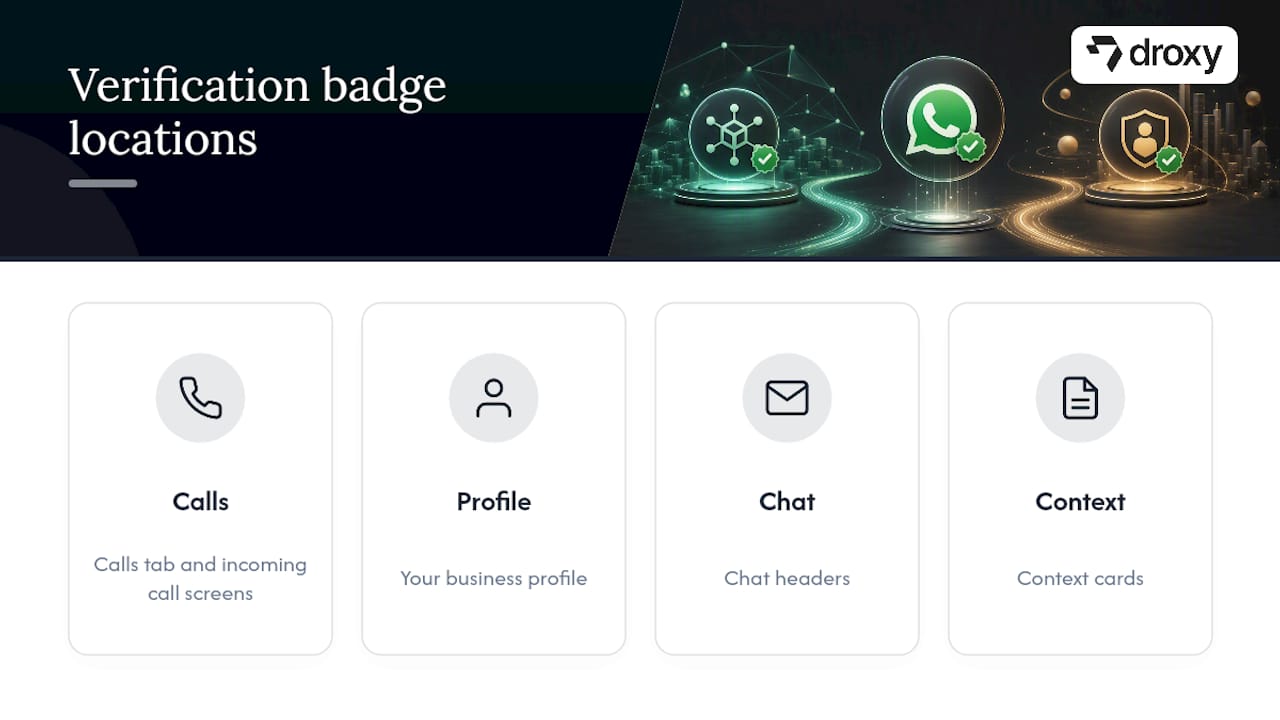
The badge shows up in several places: the calls tab, your business profile, chat headers, context cards, and incoming call screens, according to WhatsApp’s own Help Center. Here’s the part that trips up a lot of business owners: the badge is now commonly blue, not green. Meta unified its verification colors across platforms starting in 2024, but old guides, forum threads, and even some of Meta’s own messaging still call it the “green tick” out of habit, as one industry breakdown of the color change points out. Same badge, same meaning, different color in most current rollouts.
Two Routes to Verification: OBA vs. Meta Verified
You have two real options, and they work very differently.
Official Business Account (OBA) verification runs through the WhatsApp Business API. It’s free, but it’s merit-based: Meta wants proof your business is genuinely notable, not just active. You’ll typically need a Business Solution Provider (BSP) to submit the request on your behalf, since the self-serve button isn’t visible on every account, according to BSP documentation on the process.
Meta Verified for Business is a paid monthly subscription purchased inside the WhatsApp Business app. It includes the verified badge, impersonation protection, and prioritized support, but availability varies by market, per Meta’s own subscription page.
Here’s the decision rule:
If you have API access, a BSP relationship, and genuine press coverage, pursue OBA.
If you’re a smaller operation without media mentions, or Meta Verified is live in your country, that subscription is usually the quicker win.
Eligibility Checklist: What Meta Actually Checks
Before you apply for either route, confirm every item below. Missing one is the fastest way to get an automatic rejection.
Meta Business Manager verification completed and approved for your business entity.
Phone number registered and able to receive SMS or a call, with two-step verification enabled, a requirement WhatsApp states plainly for account verification.
API account active for at least 30 days if you’re going the OBA route.
Display name matching your legal business registration exactly, no abbreviations, no extra taglines.
Notability evidence: independent editorial coverage in real publications. Press releases, sponsored posts, and paid advertorials don’t count.
Clean account health: no policy strikes, and you’re not operating in a restricted industry category (gambling, adult content, certain financial services).
Pro Tip: Screenshot your Meta Business Manager details and your WhatsApp display name side by side before applying. If they don’t match character for character, fix that first. It’s the single most common rejection trigger.
How to Apply: Step-by-Step for Each Route
For OBA through the API:
Secure API access directly or through a BSP.
Confirm your Meta Business Manager verification is complete and approved.
Enable two-step verification on the WhatsApp number.
Gather three to five links to independent editorial coverage of your business.
Set your display name to match your legal documents exactly.
Have your BSP submit the verification request, including the notability links in the supporting fields.
For Meta Verified:
Open the WhatsApp Business app and check whether Meta Verified is available in your market.
Choose your subscription package.
Complete identity verification with your business documents.
Pay the monthly fee to activate.
Select which accounts you want covered under the subscription.
After submission, monitor your Business Manager dashboard for status updates. Most straightforward OBA cases resolve within a few business days; Meta Verified activates shortly after payment clears where the feature is live.
Why Applications Get Rejected (and How to Fix Them)
Most rejections trace back to one of four fixable problems.
Display-name mismatch: your legal documents, Meta Business Manager, and WhatsApp profile all need to show the identical name. Update whichever one is out of sync before you resubmit.
Weak notability evidence: paid placements, guest posts, and press releases won’t pass. You need genuine third-party editorial coverage, independently written and published.
Incomplete business verification: finish every field in Meta Business Manager before applying, not just the minimum required ones.
Account quality flags: high block rates, spam complaints, or policy violations will sink an application even when your paperwork is perfect.
Pro Tip: A rejected OBA application usually comes with a 30-day cooldown before you can reapply. Don’t waste that month. Instead, use it to land two or three solid press mentions and clean up your account’s complaint history.
Timeline and Cost: What to Budget For
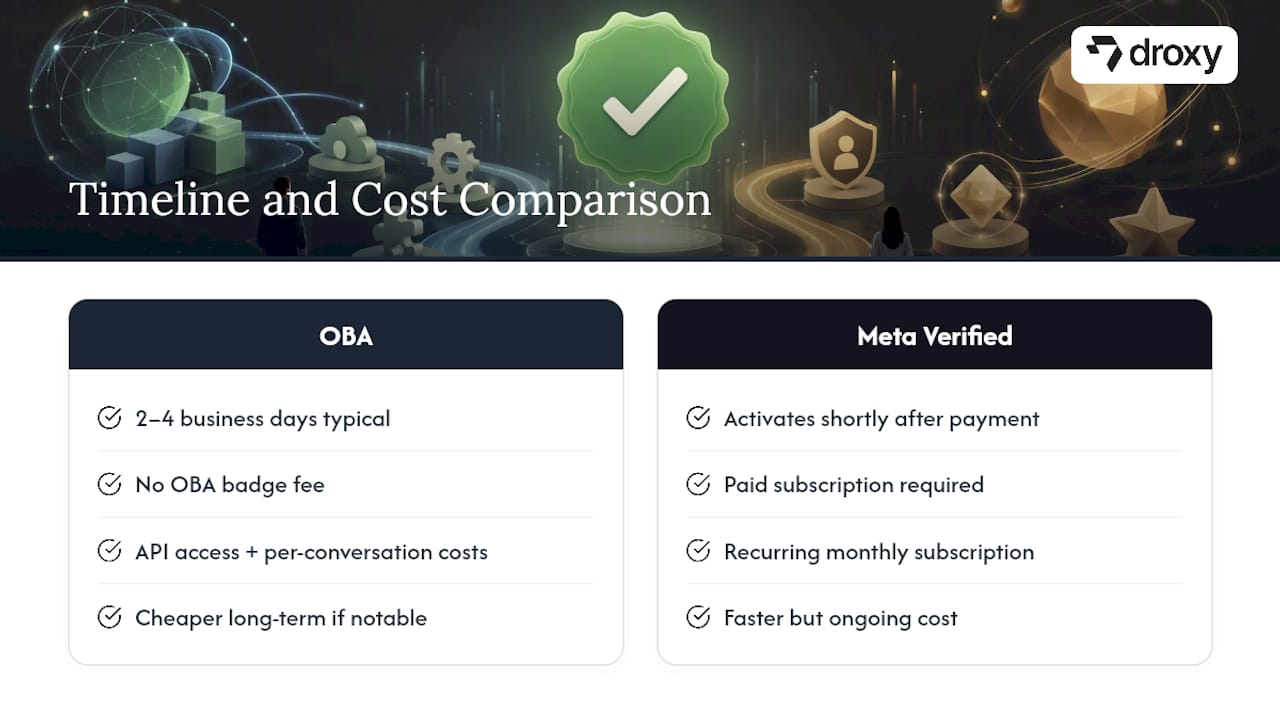
OBA review typically takes two to four business days for straightforward cases, though anything involving unusual industries or incomplete documentation can stretch longer, according to WhatChimp’s BSP guidance. There’s no badge fee for OBA itself, but you’re still paying for API access and per-conversation messaging costs through your provider.
Meta Verified activates shortly after payment clears in markets where it’s offered, and it runs as a recurring monthly subscription rather than a one-time fee. Budget accordingly: OBA is cheaper long-term if you clear notability, Meta Verified is faster but ongoing.
What Changes Once You’re Verified
A verified OBA badge makes your business easier to find in WhatsApp search, since the platform favors verified names in results. Verified accounts also see measurably better engagement. Customers open and reply to messages from a badge-carrying business more readily than an unverified one, largely because impersonation risk drops sharply once the badge appears.
You’ll see it in the calls tab, your business profile header, chat threads, and context cards, per Meta’s Help Center. It’s a small visual change with an outsized trust effect.
Pre-Submission Checklist: Do This the Week Before
Run through this list before you touch the application:
Confirm Meta Business Manager verification and match every document to your display name.
Collect three to five editorial links for OBA, or confirm Meta Verified’s availability in your country.
Enable two-step verification and double-check your registered phone number.
Audit your account for policy flags, spam reports, or unusually high complaint rates.
How Verification Pairs With Automated WhatsApp Support
A verified badge builds trust the moment someone sees it. That trust compounds when the account behind it responds instantly. Pairing verification with a no-code WhatsApp agent from Droxy means every verified conversation gets an immediate, on-brand reply, with human hand-off for anything that needs a person. Over 60,000 businesses already run customer conversations this way, matching brand voice while keeping response times near zero.
Should You Prioritize Verification Right Now?
If WhatsApp is your primary sales channel, or impersonation is actively hurting your brand, get verified now. If it isn’t, spend your energy first on response speed, reviews, and a verified website; the badge matters less if the conversation behind it is slow or generic. My rule of thumb: chase OBA only once you have real press coverage in hand, otherwise take the Meta Verified subscription where it’s available and revisit OBA later.
— Elena
Turn a Verified Badge Into Faster Responses and More Leads
A verified badge earns the click. What happens after someone messages you decides whether it becomes a sale. Droxy gives verified WhatsApp accounts a no-code AI agent that answers instantly, around the clock, books appointments, captures leads, and hands off to a human the moment a conversation needs one.

It’s built for businesses scaling past manual replies: multilingual support for international customers, analytics to track what’s converting, and white-label options through the Droxy agency program for consultants managing multiple clients. Once your badge is live, connect it to a Droxy agent and see the current pricing plans to find the tier that matches your message volume.
Useful Resources for Verification
Start with WhatsApp’s own verified business accounts page and the Meta Verified subscription details for official eligibility language. For the practical, step-by-step side of BSP-submitted OBA requests, WhatChimp’s application guide walks through the supporting documentation Meta expects. If notability is your bottleneck, understanding why brands struggle with online discoverability helps explain what editorial coverage actually needs to look like.
Sources
FAQ
What’s the Difference Between the Blue Tick and Green Tick on WhatsApp?
They’re the same badge. Meta unified verification colors across its apps, so most accounts now show blue instead of green, though the underlying Official Business Account verification hasn’t changed.
Why Do Some People’s WhatsApp Ticks Not Turn Blue?
Message ticks (the ones showing delivery and read status) turn blue only when the recipient has read receipts enabled and has an internet connection; this is unrelated to business account verification badges, which are a separate feature entirely.
Does One Grey Tick on WhatsApp Mean I’m Blocked?
No. A single grey tick means the message sent but hasn’t reached the recipient’s device yet, often due to a poor connection or a phone that’s off; blocking shows one grey tick permanently with no delivery confirmation ever following.
How Do You Know if Someone Reads Your WhatsApp Message Without a Blue Tick?
You generally can’t confirm a read with certainty if read receipts are disabled; two blue ticks only appear when receipts are on, so a lack of them just means the setting is off, not that the message was ignored.
Can a Small Business Get WhatsApp Verified Without Press Coverage?
Yes, through the Meta Verified subscription in markets where it’s available, since that paid route bypasses the notability requirement that the free OBA path demands.
Recommended
The WhatsApp “green tick” is Official Business Account verification, and you can get it two ways: the free API/OBA route, which demands real notability, or the paid Meta Verified subscription, available in select markets. If your business has API access and press coverage, pursue OBA. If it doesn’t, Meta Verified is usually the faster, more realistic path.
TL;DR:
The verification badge is now typically blue, but many still call it the green tick due to legacy references and past branding.
The OBA route requires genuine notability, API access, and media coverage, while Meta Verified is a faster, paid alternative for smaller businesses.
All applicants must meet strict criteria, including account verification, matching display names, and proof of third-party coverage, or risk rejection.
OBA processing takes about two to four business days, but the badge offers measurable trust and engagement benefits in WhatsApp searches.
Businesses should prepare detailed documentation and account info before applying, prioritizing verification if brand impersonation or trust are urgent concerns.
DroxyTurn WhatsApp Chats Into Faster AnswersDroxy helps businesses provide instant, human-like customer responses on WhatsApp while reducing wait times and missed inquiries.Explore Droxy
Table of Contents
What Is WhatsApp Green Tick Verification, Really?
Two Routes to Verification: OBA vs. Meta Verified
Eligibility Checklist: What Meta Actually Checks
How to Apply: Step-by-Step for Each Route
Why Applications Get Rejected (and How to Fix Them)
Timeline and Cost: What to Budget For
What Changes Once You’re Verified
Pre-Submission Checklist: Do This the Week Before
How Verification Pairs With Automated WhatsApp Support
Should You Prioritize Verification Right Now?
Turn a Verified Badge Into Faster Responses and More Leads
Useful Resources for Verification
Sources
What Is WhatsApp Green Tick Verification, Really?
WhatsApp green tick verification is Meta’s confirmation that your business account is authentic, based on your activity across Meta’s platforms or documents you submit directly. It’s not a decoration. It’s a signal that customers, banks, and ad partners use to decide whether they’re talking to the real business or an impersonator.
The badge shows up in several places: the calls tab, your business profile, chat headers, context cards, and incoming call screens, according to WhatsApp’s own Help Center. Here’s the part that trips up a lot of business owners: the badge is now commonly blue, not green. Meta unified its verification colors across platforms starting in 2024, but old guides, forum threads, and even some of Meta’s own messaging still call it the “green tick” out of habit, as one industry breakdown of the color change points out. Same badge, same meaning, different color in most current rollouts.
Two Routes to Verification: OBA vs. Meta Verified
You have two real options, and they work very differently.
Official Business Account (OBA) verification runs through the WhatsApp Business API. It’s free, but it’s merit-based: Meta wants proof your business is genuinely notable, not just active. You’ll typically need a Business Solution Provider (BSP) to submit the request on your behalf, since the self-serve button isn’t visible on every account, according to BSP documentation on the process.
Meta Verified for Business is a paid monthly subscription purchased inside the WhatsApp Business app. It includes the verified badge, impersonation protection, and prioritized support, but availability varies by market, per Meta’s own subscription page.
Here’s the decision rule:
If you have API access, a BSP relationship, and genuine press coverage, pursue OBA.
If you’re a smaller operation without media mentions, or Meta Verified is live in your country, that subscription is usually the quicker win.
Eligibility Checklist: What Meta Actually Checks
Before you apply for either route, confirm every item below. Missing one is the fastest way to get an automatic rejection.
Meta Business Manager verification completed and approved for your business entity.
Phone number registered and able to receive SMS or a call, with two-step verification enabled, a requirement WhatsApp states plainly for account verification.
API account active for at least 30 days if you’re going the OBA route.
Display name matching your legal business registration exactly, no abbreviations, no extra taglines.
Notability evidence: independent editorial coverage in real publications. Press releases, sponsored posts, and paid advertorials don’t count.
Clean account health: no policy strikes, and you’re not operating in a restricted industry category (gambling, adult content, certain financial services).
Pro Tip: Screenshot your Meta Business Manager details and your WhatsApp display name side by side before applying. If they don’t match character for character, fix that first. It’s the single most common rejection trigger.
How to Apply: Step-by-Step for Each Route
For OBA through the API:
Secure API access directly or through a BSP.
Confirm your Meta Business Manager verification is complete and approved.
Enable two-step verification on the WhatsApp number.
Gather three to five links to independent editorial coverage of your business.
Set your display name to match your legal documents exactly.
Have your BSP submit the verification request, including the notability links in the supporting fields.
For Meta Verified:
Open the WhatsApp Business app and check whether Meta Verified is available in your market.
Choose your subscription package.
Complete identity verification with your business documents.
Pay the monthly fee to activate.
Select which accounts you want covered under the subscription.
After submission, monitor your Business Manager dashboard for status updates. Most straightforward OBA cases resolve within a few business days; Meta Verified activates shortly after payment clears where the feature is live.
Why Applications Get Rejected (and How to Fix Them)
Most rejections trace back to one of four fixable problems.
Display-name mismatch: your legal documents, Meta Business Manager, and WhatsApp profile all need to show the identical name. Update whichever one is out of sync before you resubmit.
Weak notability evidence: paid placements, guest posts, and press releases won’t pass. You need genuine third-party editorial coverage, independently written and published.
Incomplete business verification: finish every field in Meta Business Manager before applying, not just the minimum required ones.
Account quality flags: high block rates, spam complaints, or policy violations will sink an application even when your paperwork is perfect.
Pro Tip: A rejected OBA application usually comes with a 30-day cooldown before you can reapply. Don’t waste that month. Instead, use it to land two or three solid press mentions and clean up your account’s complaint history.
Timeline and Cost: What to Budget For
OBA review typically takes two to four business days for straightforward cases, though anything involving unusual industries or incomplete documentation can stretch longer, according to WhatChimp’s BSP guidance. There’s no badge fee for OBA itself, but you’re still paying for API access and per-conversation messaging costs through your provider.
Meta Verified activates shortly after payment clears in markets where it’s offered, and it runs as a recurring monthly subscription rather than a one-time fee. Budget accordingly: OBA is cheaper long-term if you clear notability, Meta Verified is faster but ongoing.
What Changes Once You’re Verified
A verified OBA badge makes your business easier to find in WhatsApp search, since the platform favors verified names in results. Verified accounts also see measurably better engagement. Customers open and reply to messages from a badge-carrying business more readily than an unverified one, largely because impersonation risk drops sharply once the badge appears.
You’ll see it in the calls tab, your business profile header, chat threads, and context cards, per Meta’s Help Center. It’s a small visual change with an outsized trust effect.
Pre-Submission Checklist: Do This the Week Before
Run through this list before you touch the application:
Confirm Meta Business Manager verification and match every document to your display name.
Collect three to five editorial links for OBA, or confirm Meta Verified’s availability in your country.
Enable two-step verification and double-check your registered phone number.
Audit your account for policy flags, spam reports, or unusually high complaint rates.
How Verification Pairs With Automated WhatsApp Support
A verified badge builds trust the moment someone sees it. That trust compounds when the account behind it responds instantly. Pairing verification with a no-code WhatsApp agent from Droxy means every verified conversation gets an immediate, on-brand reply, with human hand-off for anything that needs a person. Over 60,000 businesses already run customer conversations this way, matching brand voice while keeping response times near zero.
Should You Prioritize Verification Right Now?
If WhatsApp is your primary sales channel, or impersonation is actively hurting your brand, get verified now. If it isn’t, spend your energy first on response speed, reviews, and a verified website; the badge matters less if the conversation behind it is slow or generic. My rule of thumb: chase OBA only once you have real press coverage in hand, otherwise take the Meta Verified subscription where it’s available and revisit OBA later.
— Elena
Turn a Verified Badge Into Faster Responses and More Leads
A verified badge earns the click. What happens after someone messages you decides whether it becomes a sale. Droxy gives verified WhatsApp accounts a no-code AI agent that answers instantly, around the clock, books appointments, captures leads, and hands off to a human the moment a conversation needs one.
It’s built for businesses scaling past manual replies: multilingual support for international customers, analytics to track what’s converting, and white-label options through the Droxy agency program for consultants managing multiple clients. Once your badge is live, connect it to a Droxy agent and see the current pricing plans to find the tier that matches your message volume.
Useful Resources for Verification
Start with WhatsApp’s own verified business accounts page and the Meta Verified subscription details for official eligibility language. For the practical, step-by-step side of BSP-submitted OBA requests, WhatChimp’s application guide walks through the supporting documentation Meta expects. If notability is your bottleneck, understanding why brands struggle with online discoverability helps explain what editorial coverage actually needs to look like.
Sources
FAQ
What’s the Difference Between the Blue Tick and Green Tick on WhatsApp?
They’re the same badge. Meta unified verification colors across its apps, so most accounts now show blue instead of green, though the underlying Official Business Account verification hasn’t changed.
Why Do Some People’s WhatsApp Ticks Not Turn Blue?
Message ticks (the ones showing delivery and read status) turn blue only when the recipient has read receipts enabled and has an internet connection; this is unrelated to business account verification badges, which are a separate feature entirely.
Does One Grey Tick on WhatsApp Mean I’m Blocked?
No. A single grey tick means the message sent but hasn’t reached the recipient’s device yet, often due to a poor connection or a phone that’s off; blocking shows one grey tick permanently with no delivery confirmation ever following.
How Do You Know if Someone Reads Your WhatsApp Message Without a Blue Tick?
You generally can’t confirm a read with certainty if read receipts are disabled; two blue ticks only appear when receipts are on, so a lack of them just means the setting is off, not that the message was ignored.
Can a Small Business Get WhatsApp Verified Without Press Coverage?
Yes, through the Meta Verified subscription in markets where it’s available, since that paid route bypasses the notability requirement that the free OBA path demands.
Recommended



🚀
Powered by Droxy
Turn every interaction into a conversion
Customer facing AI agents that engage, convert, and support so you can scale what matters.
✨
Learn more
Recent posts

Insights
3 min read
Introducing Agent Memories
Improve your agents' performance with Agent Memories. Prevent agents from repeating the same mistakes by giving them feedback.
Read more

Insights
15 min read
HVAC Marketing in 2025: The Definitive Lead Gen Guide
Discover 15 proven HVAC marketing strategies, plus learn how Droxy's AI website agent converts curious visitors into qualified leads by answering their questions instantly - right when they're most interested in your services.
Read more

Insights
10 min read
10 Best AI Sales Agents in 2025: Tested & Ranked
Discover the top 10 AI sales agents of 2025, designed to enhance lead generation, personalize outreach, and ultimately, close more deals
Read more
Insights
3 min read
Introducing Agent Memories
Improve your agents' performance with Agent Memories. Prevent agents from repeating the same mistakes by giving them feedback.
Read more
Insights
15 min read
HVAC Marketing in 2025: The Definitive Lead Gen Guide
Discover 15 proven HVAC marketing strategies, plus learn how Droxy's AI website agent converts curious visitors into qualified leads by answering their questions instantly - right when they're most interested in your services.
Read more