5 WhatsApp Message Templates: API Examples and No Code Automation
5 WhatsApp Message Templates: API Examples and No Code Automation
Insights
14 min

A WhatsApp message template is a pre-approved, structured message format businesses use to start conversations or reach customers outside the 24-hour service window, and Meta must approve every template before it can be sent. Use templates for order confirmations, shipping alerts, appointment reminders, one-time passwords, and marketing outreach where policy permits. Once approved, you send them through the Cloud API with variables mapped by position.
TL;DR:
Approval times for templates are usually quick but depend on category consistency, sample value accuracy, and absence of sensitive or promotional content.
Templates must be created with accurate sample values and a clear variable order, especially for media headers and buttons, to prevent rejection.
Using a versioning system for templates helps avoid re-approval delays when updates are needed or errors occur.
Sending a template requires strict adherence to variable positions, with mismatched parameters leading to broken messages regardless of API success responses.
Automating template management and variable mapping with tools like Droxy can significantly reduce manual effort and improve campaign reliability.
Droxydroxy.aiAutomate WhatsApp Customer ConversationsDeploy a no-code AI agent on WhatsApp to answer customer questions instantly, while matching your brand's voice across interactions.Explore Droxy
Table of Contents
What Are WhatsApp Message Templates, and When Do You Need One?
Template Components and Categories, Explained
How to Create and Submit a Template
Sending an Approved Template Through the Cloud API
Approval Rules and Why Templates Get Rejected
Ready-to-Use Template Examples by Use Case
Governance, Versioning, and What to Measure
How Droxy Recommends Structuring a Template Program
An Easier Way to Run Your WhatsApp Template Program
Sources
What Are WhatsApp Message Templates, and When Do You Need One?
Once a customer messages your business, you have a 24-hour window to reply with a free-form message. Outside that window, or when your business initiates contact, you need an approved template. This is the core rule behind template fundamentals as Meta defines them: structured, reusable message formats that go through review before they can reach a customer’s inbox.
The lifecycle runs in five stages: you create the template, submit it for review, wait for approval, send it through the API, then monitor how it performs. Each stage has its own failure points, which is why teams that treat templates as a system, rather than a one-off task, avoid most of the headaches.
Typical use cases include:
Order and shipping status updates
One-time passwords and login verification codes
Appointment reminders and confirmations
Payment receipts and billing alerts
Marketing promotions and cart recovery nudges, where your account has marketing template access
Template Components and Categories, Explained
Every template is built from a header, body, footer, and optional buttons, plus a category label that determines how strictly it gets reviewed.
Header. Supports text, image, document, video, or location. Use text headers for simple alerts; use image or document headers for receipts, boarding passes, or shipping labels where a visual adds real value.
Body. This is the message itself, with variables written as
{{1}},{{2}}, and so on. Every variable needs a realistic sample value at submission time, since reviewers reject templates with placeholder text like “example” or blank fields.Footer. A short line of static text, often used for a brand name or a disclaimer. It never contains variables.
Buttons. Up to a handful of quick-reply or call-to-action buttons, such as “Track Order” or “Call Us.” Reviewers check that button behavior matches the stated purpose.
Category. Marketing, Utility, or Authentication. Categories carry different fees and different review rules: marketing templates require an opt-out mechanism, authentication templates face the strictest wording limits, and mixing promotional language into a utility template is one of the fastest ways to get rejected.
How to Create and Submit a Template
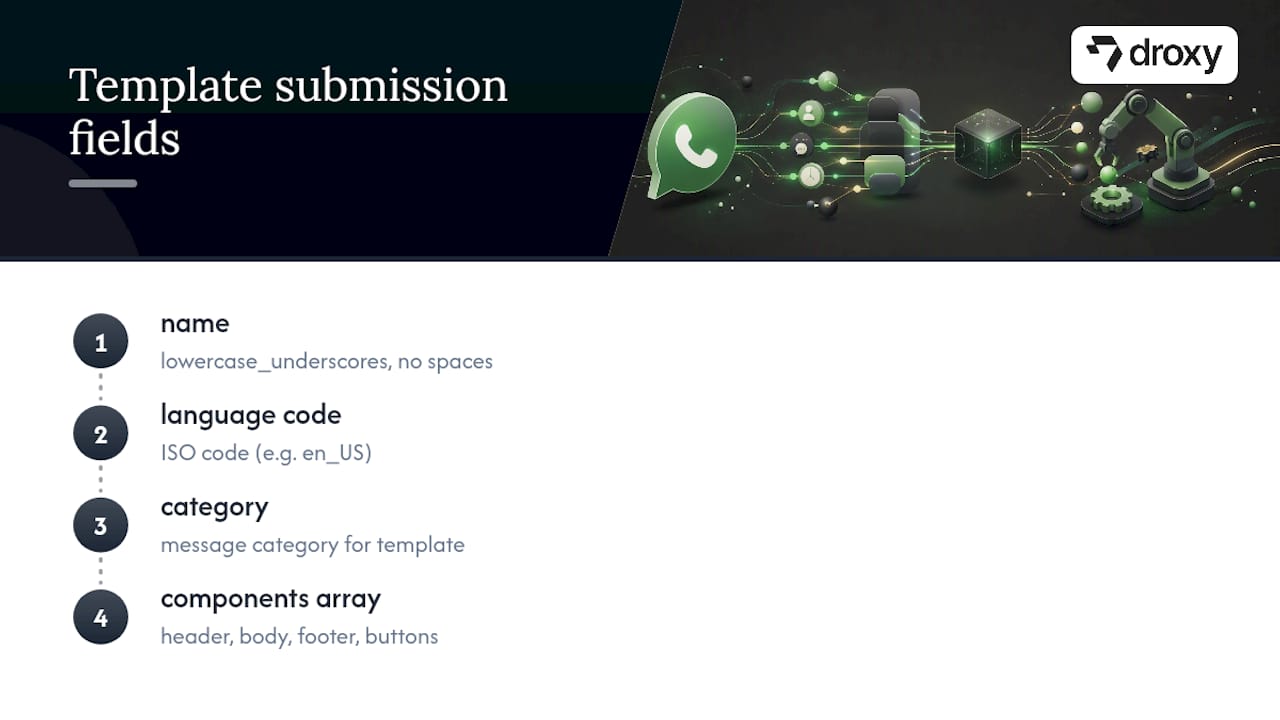
Templates are created through the POST /message_templates endpoint, whether you call it directly or through your provider’s console. Each submission needs a name (lowercase, underscores, no spaces), a language code, a category, and a components array covering the header, body, footer, and buttons you’re building.
A minimal text-only template body looks like this in JSON:
For a media header, add a HEADER component with "format": "IMAGE" and a linked sample media handle. The example field is not optional in practice. It’s how reviewers verify your variables make sense in context, and the WhatsApp Business Platform’s own guidance treats missing sample values as a top rejection cause.
To manage what’s already live, GET /message_templates lists everything tied to your business account, and DELETE /message_templates?name=your_template_name removes one permanently.
Pro Tip: Version your template names from the start (order_confirmation_v1, order_confirmation_v2) instead of editing an approved template in place. Meta re-reviews edited templates, and a version number lets you roll back instantly if a new draft gets rejected.
Sending an Approved Template Through the Cloud API
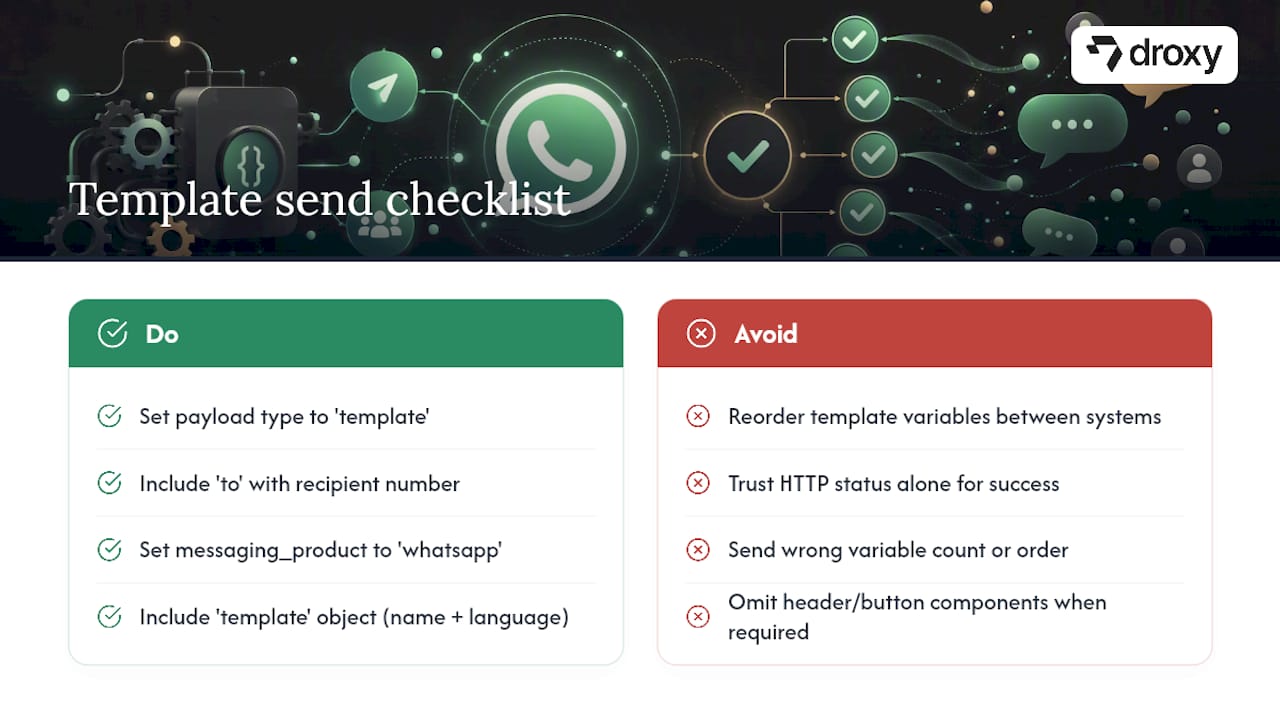
Once approved, sending a template is a POST request to /messages using your phone number ID. The payload needs messaging_product set to "whatsapp", a to field with the recipient’s number, type set to "template", and a template object naming the template and its language.
Variables are strictly positional. Whatever value you place first in your parameters array fills {{1}} in the body, the second fills {{2}}, and so on, regardless of what you call those fields internally. A CRM that sends “order ID” as the second parameter when the template expects it first will produce a broken, mismatched message. Keep your field order locked to the template’s variable order across every system that touches the send.
A basic text send looks like this:
For a header-document send, add a header component with a document parameter carrying a media link. For button-enabled templates with quick replies, include a button component specifying the button’s sub-type and index. Twilio’s implementation notes walk through account-level setup for teams building on that layer instead of calling Meta’s API directly.
Pro Tip: Always inspect the API’s response payload, not just the HTTP status code. A 200 response can still carry an error object inside the body if the template name, language code, or variable count doesn’t match what Meta has on file.
Approval Rules and Why Templates Get Rejected
Most approvals land in minutes to a few hours when the format is clean, according to WhatsApp Business Platform guidance on template review. Delays almost always trace back to a small set of avoidable mistakes.
Category mismatch: promotional language inside a utility or authentication template
Variables placed at the very start or end of the body, or two variables sitting next to each other with no text between them
Missing or unrealistic sample values in the
examplefieldSensitive content: full payment card numbers, health details, or anything resembling a password inside authentication copy
Marketing templates submitted without an opt-out instruction
Beyond rejection risk, category choice affects your cost per message and, in some markets, your reach. Marketing template delivery to US numbers has faced reported restrictions, which is a strong argument for building transactional flows first and treating promotional templates as an addition, not the foundation.
Pro Tip: Submit every new template in a single language first, even if you plan to localize it later. Submitting five language variants at once multiplies your review surface and your risk of a blanket rejection over one small wording issue.
Ready-to-Use Template Examples by Use Case
Pull from copy-paste template libraries as a starting point, then adjust wording to match your brand voice before submission. Category and variable structure matter more than the exact phrasing.
Order confirmation (Utility). Body: “Hi {{1}}, we’ve received your order #{{2}} for {{3}}.” Sample values: “Maria,” “10432,” “wireless headphones.”
Shipping update (Utility). Use a text or location header with body: “Your order #{{1}} is on its way and should arrive by {{2}}.” Map the tracking number to
{{1}}consistently across every shipping template you build.One-time password (Authentication). Keep wording minimal: “{{1}} is your verification code. Do not share this code with anyone.” Authentication templates carry the tightest restrictions on added text or branding.
Appointment reminder (Utility). Body: “Reminder: your appointment with {{1}} is scheduled for {{2}} at {{3}}.”
Cart recovery (Marketing). Body: “Hi {{1}}, you left {{2}} in your cart. Complete your order before it’s gone,” with a required opt-out line and a clear unsubscribe path.
Before going live, send each template to an internal test number in staging and confirm every variable lands in the right position. A five-minute check here catches the mapping errors that are painful to trace once a campaign is running at volume.
Governance, Versioning, and What to Measure
A short pre-submission checklist saves more time than any single formatting fix: confirm the name follows your naming convention, the language code is correct, every variable has a realistic sample value, the submission covers one language only, and the footer carries your brand name where required. A versioned template library with tested sample values cuts rejection rates significantly during campaign ramp-up, especially for teams launching several templates at once.
Track four numbers weekly: delivery rate, engagement rate, opt-out rate on marketing templates, and rejection rate on new submissions. A rising rejection rate usually means someone on the team skipped the sample-value step.
Delivery rate flags carrier or number-quality issues
Engagement rate shows whether your copy and timing actually work
Opt-out rate protects your marketing sending reputation
Rejection rate is your fastest signal that governance has slipped
Pro Tip: If your team manages templates across multiple brands or business units, a feature set built for multi-account variable mapping and retry logic saves far more engineering time than a spreadsheet ever will.
How Droxy Recommends Structuring a Template Program
Assign one owner for template governance, someone who approves names, checks category fit, and enforces version numbers before anything gets submitted. Set an approval SLA so marketing campaigns aren’t blocked waiting on a template stuck in review, and keep a rotating test plan that checks variable mapping every time a template changes.
Automate high-volume, predictable sends: order confirmations, shipping updates, appointment reminders using the most effective newsletter platforms for creators & small businesses to streamline your messaging. Keep manual triggers for edge cases, like a support agent sending a one-off authentication template during a live troubleshooting call. The mix matters more than the tooling.
— Elena
An Easier Way to Run Your WhatsApp Template Program
This no-code system helps reduce manual effort in building, mapping, and monitoring WhatsApp templates by automating variable mapping, retries, and delivery tracking, so your team spends less time managing API payloads and spreadsheet mappings.

Instead of manually confirming that {{1}} lines up with the right order ID every time your CRM updates, Droxy’s WhatsApp agent handles the mapping automatically and retries failed sends without an engineer stepping in. It also supports media headers and buttons, helping order confirmations, shipping alerts, and appointment reminders to keep flowing even when a single send fails on the first attempt. Agencies managing templates across several client accounts can run the same setup under white-label, covered in Droxy’s agency page. Check Droxy’s pricing to see which plan fits your sending volume, and start a trial to see how much manual work disappears from your next campaign.
Sources
Managing Message Templates with the WhatsApp Business Platform
WhatsApp Message Templates: Categories, Rules, Approval & 50+ Examples
Recommended
A WhatsApp message template is a pre-approved, structured message format businesses use to start conversations or reach customers outside the 24-hour service window, and Meta must approve every template before it can be sent. Use templates for order confirmations, shipping alerts, appointment reminders, one-time passwords, and marketing outreach where policy permits. Once approved, you send them through the Cloud API with variables mapped by position.
TL;DR:
Approval times for templates are usually quick but depend on category consistency, sample value accuracy, and absence of sensitive or promotional content.
Templates must be created with accurate sample values and a clear variable order, especially for media headers and buttons, to prevent rejection.
Using a versioning system for templates helps avoid re-approval delays when updates are needed or errors occur.
Sending a template requires strict adherence to variable positions, with mismatched parameters leading to broken messages regardless of API success responses.
Automating template management and variable mapping with tools like Droxy can significantly reduce manual effort and improve campaign reliability.
Droxydroxy.aiAutomate WhatsApp Customer ConversationsDeploy a no-code AI agent on WhatsApp to answer customer questions instantly, while matching your brand's voice across interactions.Explore Droxy
Table of Contents
What Are WhatsApp Message Templates, and When Do You Need One?
Template Components and Categories, Explained
How to Create and Submit a Template
Sending an Approved Template Through the Cloud API
Approval Rules and Why Templates Get Rejected
Ready-to-Use Template Examples by Use Case
Governance, Versioning, and What to Measure
How Droxy Recommends Structuring a Template Program
An Easier Way to Run Your WhatsApp Template Program
Sources
What Are WhatsApp Message Templates, and When Do You Need One?
Once a customer messages your business, you have a 24-hour window to reply with a free-form message. Outside that window, or when your business initiates contact, you need an approved template. This is the core rule behind template fundamentals as Meta defines them: structured, reusable message formats that go through review before they can reach a customer’s inbox.
The lifecycle runs in five stages: you create the template, submit it for review, wait for approval, send it through the API, then monitor how it performs. Each stage has its own failure points, which is why teams that treat templates as a system, rather than a one-off task, avoid most of the headaches.
Typical use cases include:
Order and shipping status updates
One-time passwords and login verification codes
Appointment reminders and confirmations
Payment receipts and billing alerts
Marketing promotions and cart recovery nudges, where your account has marketing template access
Template Components and Categories, Explained
Every template is built from a header, body, footer, and optional buttons, plus a category label that determines how strictly it gets reviewed.
Header. Supports text, image, document, video, or location. Use text headers for simple alerts; use image or document headers for receipts, boarding passes, or shipping labels where a visual adds real value.
Body. This is the message itself, with variables written as
{{1}},{{2}}, and so on. Every variable needs a realistic sample value at submission time, since reviewers reject templates with placeholder text like “example” or blank fields.Footer. A short line of static text, often used for a brand name or a disclaimer. It never contains variables.
Buttons. Up to a handful of quick-reply or call-to-action buttons, such as “Track Order” or “Call Us.” Reviewers check that button behavior matches the stated purpose.
Category. Marketing, Utility, or Authentication. Categories carry different fees and different review rules: marketing templates require an opt-out mechanism, authentication templates face the strictest wording limits, and mixing promotional language into a utility template is one of the fastest ways to get rejected.
How to Create and Submit a Template
Templates are created through the POST /message_templates endpoint, whether you call it directly or through your provider’s console. Each submission needs a name (lowercase, underscores, no spaces), a language code, a category, and a components array covering the header, body, footer, and buttons you’re building.
A minimal text-only template body looks like this in JSON:
For a media header, add a HEADER component with "format": "IMAGE" and a linked sample media handle. The example field is not optional in practice. It’s how reviewers verify your variables make sense in context, and the WhatsApp Business Platform’s own guidance treats missing sample values as a top rejection cause.
To manage what’s already live, GET /message_templates lists everything tied to your business account, and DELETE /message_templates?name=your_template_name removes one permanently.
Pro Tip: Version your template names from the start (order_confirmation_v1, order_confirmation_v2) instead of editing an approved template in place. Meta re-reviews edited templates, and a version number lets you roll back instantly if a new draft gets rejected.
Sending an Approved Template Through the Cloud API
Once approved, sending a template is a POST request to /messages using your phone number ID. The payload needs messaging_product set to "whatsapp", a to field with the recipient’s number, type set to "template", and a template object naming the template and its language.
Variables are strictly positional. Whatever value you place first in your parameters array fills {{1}} in the body, the second fills {{2}}, and so on, regardless of what you call those fields internally. A CRM that sends “order ID” as the second parameter when the template expects it first will produce a broken, mismatched message. Keep your field order locked to the template’s variable order across every system that touches the send.
A basic text send looks like this:
For a header-document send, add a header component with a document parameter carrying a media link. For button-enabled templates with quick replies, include a button component specifying the button’s sub-type and index. Twilio’s implementation notes walk through account-level setup for teams building on that layer instead of calling Meta’s API directly.
Pro Tip: Always inspect the API’s response payload, not just the HTTP status code. A 200 response can still carry an error object inside the body if the template name, language code, or variable count doesn’t match what Meta has on file.
Approval Rules and Why Templates Get Rejected
Most approvals land in minutes to a few hours when the format is clean, according to WhatsApp Business Platform guidance on template review. Delays almost always trace back to a small set of avoidable mistakes.
Category mismatch: promotional language inside a utility or authentication template
Variables placed at the very start or end of the body, or two variables sitting next to each other with no text between them
Missing or unrealistic sample values in the
examplefieldSensitive content: full payment card numbers, health details, or anything resembling a password inside authentication copy
Marketing templates submitted without an opt-out instruction
Beyond rejection risk, category choice affects your cost per message and, in some markets, your reach. Marketing template delivery to US numbers has faced reported restrictions, which is a strong argument for building transactional flows first and treating promotional templates as an addition, not the foundation.
Pro Tip: Submit every new template in a single language first, even if you plan to localize it later. Submitting five language variants at once multiplies your review surface and your risk of a blanket rejection over one small wording issue.
Ready-to-Use Template Examples by Use Case
Pull from copy-paste template libraries as a starting point, then adjust wording to match your brand voice before submission. Category and variable structure matter more than the exact phrasing.
Order confirmation (Utility). Body: “Hi {{1}}, we’ve received your order #{{2}} for {{3}}.” Sample values: “Maria,” “10432,” “wireless headphones.”
Shipping update (Utility). Use a text or location header with body: “Your order #{{1}} is on its way and should arrive by {{2}}.” Map the tracking number to
{{1}}consistently across every shipping template you build.One-time password (Authentication). Keep wording minimal: “{{1}} is your verification code. Do not share this code with anyone.” Authentication templates carry the tightest restrictions on added text or branding.
Appointment reminder (Utility). Body: “Reminder: your appointment with {{1}} is scheduled for {{2}} at {{3}}.”
Cart recovery (Marketing). Body: “Hi {{1}}, you left {{2}} in your cart. Complete your order before it’s gone,” with a required opt-out line and a clear unsubscribe path.
Before going live, send each template to an internal test number in staging and confirm every variable lands in the right position. A five-minute check here catches the mapping errors that are painful to trace once a campaign is running at volume.
Governance, Versioning, and What to Measure
A short pre-submission checklist saves more time than any single formatting fix: confirm the name follows your naming convention, the language code is correct, every variable has a realistic sample value, the submission covers one language only, and the footer carries your brand name where required. A versioned template library with tested sample values cuts rejection rates significantly during campaign ramp-up, especially for teams launching several templates at once.
Track four numbers weekly: delivery rate, engagement rate, opt-out rate on marketing templates, and rejection rate on new submissions. A rising rejection rate usually means someone on the team skipped the sample-value step.
Delivery rate flags carrier or number-quality issues
Engagement rate shows whether your copy and timing actually work
Opt-out rate protects your marketing sending reputation
Rejection rate is your fastest signal that governance has slipped
Pro Tip: If your team manages templates across multiple brands or business units, a feature set built for multi-account variable mapping and retry logic saves far more engineering time than a spreadsheet ever will.
How Droxy Recommends Structuring a Template Program
Assign one owner for template governance, someone who approves names, checks category fit, and enforces version numbers before anything gets submitted. Set an approval SLA so marketing campaigns aren’t blocked waiting on a template stuck in review, and keep a rotating test plan that checks variable mapping every time a template changes.
Automate high-volume, predictable sends: order confirmations, shipping updates, appointment reminders using the most effective newsletter platforms for creators & small businesses to streamline your messaging. Keep manual triggers for edge cases, like a support agent sending a one-off authentication template during a live troubleshooting call. The mix matters more than the tooling.
— Elena
An Easier Way to Run Your WhatsApp Template Program
This no-code system helps reduce manual effort in building, mapping, and monitoring WhatsApp templates by automating variable mapping, retries, and delivery tracking, so your team spends less time managing API payloads and spreadsheet mappings.
Instead of manually confirming that {{1}} lines up with the right order ID every time your CRM updates, Droxy’s WhatsApp agent handles the mapping automatically and retries failed sends without an engineer stepping in. It also supports media headers and buttons, helping order confirmations, shipping alerts, and appointment reminders to keep flowing even when a single send fails on the first attempt. Agencies managing templates across several client accounts can run the same setup under white-label, covered in Droxy’s agency page. Check Droxy’s pricing to see which plan fits your sending volume, and start a trial to see how much manual work disappears from your next campaign.
Sources
Managing Message Templates with the WhatsApp Business Platform
WhatsApp Message Templates: Categories, Rules, Approval & 50+ Examples
Recommended



🚀
Powered by Droxy
Turn every interaction into a conversion
Customer facing AI agents that engage, convert, and support so you can scale what matters.
✨
Learn more
Recent posts

Insights
3 min read
Introducing Agent Memories
Improve your agents' performance with Agent Memories. Prevent agents from repeating the same mistakes by giving them feedback.
Read more

Insights
15 min read
HVAC Marketing in 2025: The Definitive Lead Gen Guide
Discover 15 proven HVAC marketing strategies, plus learn how Droxy's AI website agent converts curious visitors into qualified leads by answering their questions instantly - right when they're most interested in your services.
Read more

Insights
10 min read
10 Best AI Sales Agents in 2025: Tested & Ranked
Discover the top 10 AI sales agents of 2025, designed to enhance lead generation, personalize outreach, and ultimately, close more deals
Read more
Insights
3 min read
Introducing Agent Memories
Improve your agents' performance with Agent Memories. Prevent agents from repeating the same mistakes by giving them feedback.
Read more
Insights
15 min read
HVAC Marketing in 2025: The Definitive Lead Gen Guide
Discover 15 proven HVAC marketing strategies, plus learn how Droxy's AI website agent converts curious visitors into qualified leads by answering their questions instantly - right when they're most interested in your services.
Read more