Chatbot Accessibility: A Practical Guide for US Businesses
Chatbot Accessibility: A Practical Guide for US Businesses
Insights
16 min

An accessible chatbot is one that people with disabilities can open, read, use and finish a task with, using the input method they prefer. That means keyboard-only use, screen readers, clear language and control over pacing. It also means the booking form, payment step or handoff behind the chat works for the same person. Accessibility is a result of the platform, your configuration and your website together. A vendor’s promise alone does not guarantee it.
This guide covers what to check, in what order, and how to test it. It draws on the MITRE Chatbot Accessibility Playbook, W3C guidance and ADA.gov.
DroxySupport Customers Across More ChannelsExplore how Droxy lets businesses deploy customizable AI agents across website chat, phone, and messaging channels, with instant answers around the clock.Explore Droxy
TL;DR
Treat accessibility as five stages: pick the platform, design the content, design the interface, integrate it into your site, then test with real users.
Every chat function must work by keyboard, and screen readers must know who sent each message and where focus goes.
Let people control the pace. Fast-arriving messages, timeouts and shifting text are real barriers.
The ADA applies to online goods and services of businesses open to the public, but no detailed technical standard exists for private sites. WCAG is the usual yardstick.
Never accept “ADA compliant” as a vendor claim. Test your own deployment by hand.
Table of Contents
Why chatbots need their own accessibility checklist
The legal picture in the US
The five stages of an accessible chatbot
Test the whole task, not just the chat
Multiple ways in, multiple ways out
Our perspective: accessibility is configuration plus testing
Where Droxy fits
A pre-launch accessibility checklist
Sources
Why chatbots need their own accessibility checklist
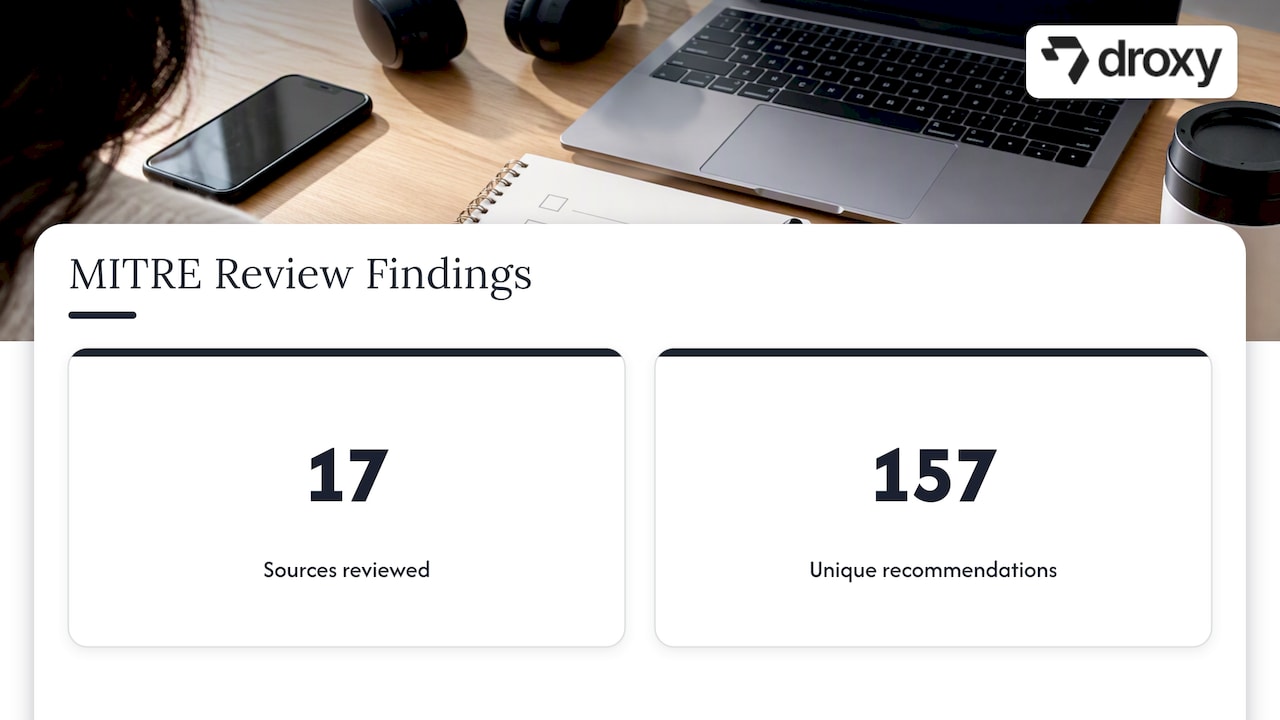
Most teams assume a chat widget inherits the accessibility of the page around it. It does not. A chatbot is a dynamic, constantly changing region: new messages appear, buttons are inserted, focus can jump. Standard WCAG guidance does not fully answer questions about message pacing, focus, conversation history and dynamic updates. That is the finding of MITRE researchers who reviewed 17 sources and compiled 157 unique chatbot recommendations.
The opportunity is real. Conversational interfaces can help people with disabilities, but only when designed for varied sensory, mobility, cognitive, learning, speech and mental-health needs. Natural language alone does not remove barriers.
That matters commercially. If you run a store, a clinic, a hotel or a home service business, your chat window is often the first place a customer asks a question or books. If part of your audience cannot use it, you lose inquiries, and you may carry legal risk.
The legal picture in the US
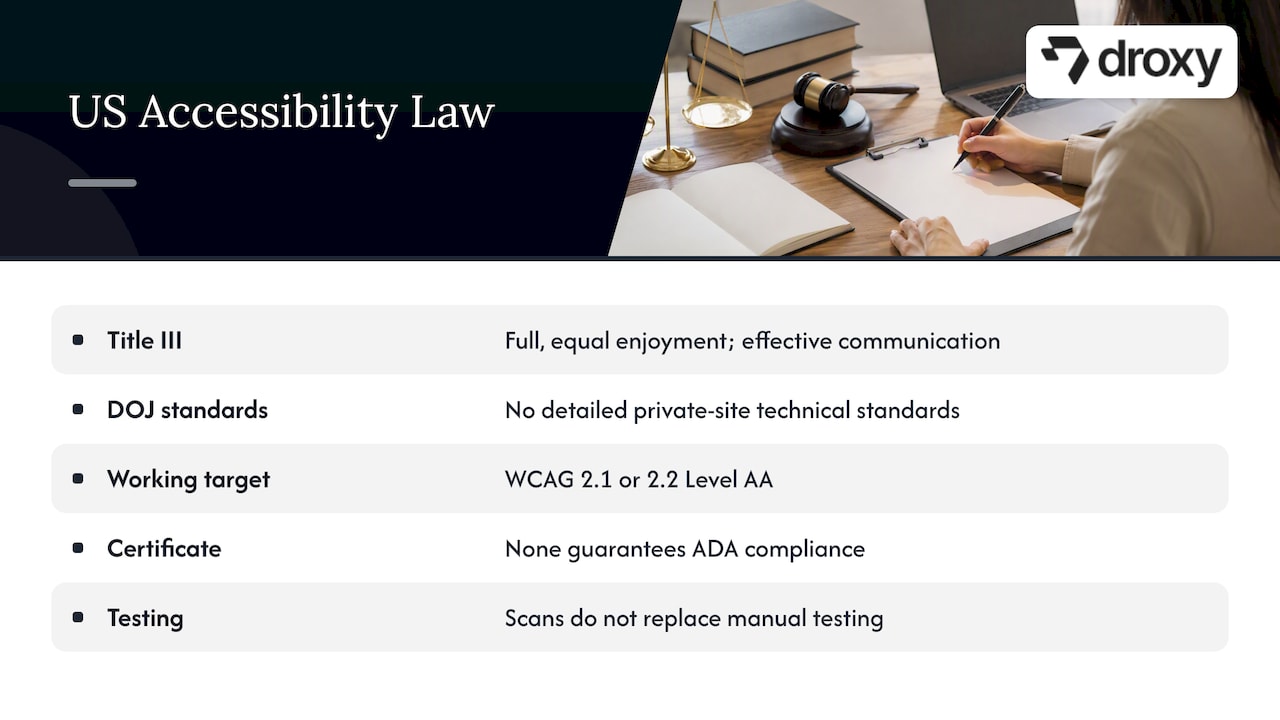
For businesses open to the public, ADA.gov explains that Title III requires full and equal enjoyment of goods and services and effective communication, including online offerings. The guidance names retail stores, hotels, hospitals, medical offices and food establishments among public accommodations.
The same page notes that the Department of Justice has not issued detailed technical standards for private-business websites. WCAG and Section 508 are useful technical guidance. In practice, most teams aim for WCAG 2.1 or 2.2 Level AA as the working target. For a deeper look at how accessibility, legal exposure and search visibility connect, this overview of web accessibility and SEO impact is a helpful companion read.
A practical consequence: there is no certificate that makes a chatbot “ADA compliant”. Accessibility depends on how the bot is deployed and on the host site. Automated scans help, but they do not replace manual keyboard, assistive-technology and disabled-user testing. This is general information, not legal advice. If you have received a demand letter or operate in a regulated field such as healthcare, talk to an attorney who handles ADA matters.
The five stages of an accessible chatbot
The MITRE playbook breaks the work into five activities: select an accessible platform, design accessible content, design the interface, integrate it into the website, and test it with users. Section508.gov points federal teams to this playbook and its self-assessment checklists, which makes it a sensible reference for private businesses too.
Here is how each stage plays out in practice.
1. Choose a platform that lets you fix problems
Platform limits are hard to fix later, so verify accessibility capabilities before you commit. Ask any vendor, including us, these questions:
Can I customize the launcher, colors, fonts and labels?
Is the widget operable by keyboard alone?
Does it expose messages and buttons to screen readers with proper labels?
Can I control message timing and avoid auto-moving text?
Can a person reach a human through an accessible route?
Does the vendor document known gaps?
Ask for a live demo and test it yourself with the keyboard and a screen reader before you sign anything. Our chatbot testing checklist covers the broader QA cases you can run by hand or script alongside these checks.
2. Write content people can actually read
MITRE lists timeouts, fast-arriving messages, shifting text, typos and inaccessible response tiles as barriers for assistive-device users, dyslexic users and people with cognitive or learning disabilities.
Content rules that follow:
Keep answers short, one idea per message.
Use plain words. Define unavoidable jargon.
Avoid emoji strings and ASCII art that screen readers read aloud as noise.
Proofread the knowledge base. Typos hurt readers who use text-to-speech or have dyslexia.
Do not rely on color or images alone to carry meaning.
Offer a clear way to ask again in different words.
Conversation design matters here as much as code. See our guide to chatbot conversation design for how to structure turns so they stay clear.
3. Design the interface for every input method
This is where most failures live. Two areas deserve most of your attention.
Keyboard navigation
Every chatbot function must work without a mouse: opening the launcher, selecting response buttons, moving through conversation history, activating links or media, sending a message and closing the chat. MITRE maps this to WCAG Success Criterion 2.1.1.
Test it yourself in two minutes. Unplug the mouse, press Tab from the top of your page, and try to open the chat, ask a question, pick a quick-reply button and close the window. If focus disappears, gets trapped, or you cannot see where it is, you have a bug.
Screen reader support
Chatbot controls need meaningful ARIA labels, each message should identify its sender, and response-option controls must be exposed to assistive technology with predictable focus. MITRE recommends testing with screen reader users and singles out response buttons and sender identification.
A launcher labeled only with an icon, or a message that reads as unlabeled text, leaves a blind user guessing who said what.
Pacing and motion
Sequential AI messages can disrupt reading when content moves or arrives faster than someone can process it. A practical pattern is to avoid automatic movement, let users advance messages themselves, or keep the scrollable reading area stable. Streaming responses look impressive, but give users a way to pause or to receive the full message at once.
Do not trust visual conventions blindly
The MITRE and W3C study found that placing bot and user messages on opposite sides helped some sighted users, yet a participant with partial vision loss noticed only the bot’s side. A common layout can fail a real person. That is the argument for testing with diverse users, not just inspecting designs.
4. Integrate the chatbot into the website
A frequent failure is treating the widget as an isolated box. The surrounding page, launcher, message history, response controls, focus order and dynamic announcements all matter, and screen reader users need sender identification, correct labels and predictable focus when options appear.
Integration checks:
The launcher sits in a logical place in the tab order.
Opening the chat moves focus into it, and closing returns focus to the launcher.
Page zoom and text resizing do not hide the chat controls. The playbook’s checklist suggests the interface should zoom comfortably to 200% with a third-party screen magnifier.
The chat does not cover important content or cookie and consent controls on small screens.
The widget does not auto-open and steal focus on page load.
5. Test with people, not only tools
Automated checkers catch contrast and missing labels. They do not tell you whether a screen reader user can finish a booking. Build a routine:
Run an automated scan of the page with the chat open.
Complete three core tasks by keyboard only.
Repeat them with a screen reader on desktop and on a phone.
Test at 200% zoom and with high-contrast settings.
Recruit users with disabilities and watch them complete a real task.
Fix, retest, and repeat after every widget or content update.
When you build your broader test plan, our chatbot testing checklist gives you the functional cases to pair with these accessibility ones.
Test the whole task, not just the chat
W3C makes an important distinction: accessibility applies to the complete task and system, not just the natural-language exchange. A bot that answers correctly is still inaccessible if the booking form, product details, payment step, appointment calendar or handoff destination cannot be used by the same person.
That is especially relevant for the businesses we serve:
Business type | Typical chat task | What else must be accessible |
|---|---|---|
Ecommerce | Product questions, order status | Product pages, cart, checkout |
Hospitality | Booking and availability | Date picker, payment form |
Home services | Quote request, scheduling | Calendar, contact form |
Real estate | Lead capture, viewings | Listing pages, forms |
Healthcare | Appointment requests | Patient forms, confirmation messages |
If the bot hands off to a human, check that route too. A chat that ends with “call us” fails someone who cannot use a phone. Offer chat, email or a form as equivalents.
Multiple ways in, multiple ways out
W3C recommends supporting multiple input and output methods: keyboard, speech, switch, eye tracking, screen readers, visual text and braille where applicable. Users should be able to finish a task without being forced to switch modes midway.
For teams running chat across several channels, this has a practical meaning. A customer who cannot type easily may prefer voice. One who is deaf or hard of hearing may need text. Multimodal access should deliver functionally equivalent task completion, not just add a voice button. Test whether a user can do the same booking, lead-capture or support task whichever way they interact.
Our perspective: accessibility is configuration plus testing
We build Droxy so businesses can deploy AI agents on website chat, phone, WhatsApp, Instagram, Facebook and Shopify without code, with deep customization of tone, content and behavior. That customization is the part that matters for accessibility. The words your agent uses, how long its answers run, when it hands off to a person, and which channels you offer are all in your hands.
We will not tell you that any platform, ours included, makes you compliant by default. Accessibility depends on the deployed configuration and the website around it. What we can say is what we would do in your place:
Evaluate a vendor with your own keyboard and screen reader, on your own pages.
Write short, plain answers and keep the knowledge base proofread.
Always keep a human hand-off path, and make sure it has a non-phone option.
Offer more than one channel, so people can pick the one that suits them.
Re-test every time you change the widget, the flow or the site.
Good automation should lower barriers, not add a new one. A customer with a disability who gets an instant, clear answer at 11 p.m. is better served than one who waits until morning. A customer who cannot operate the chat at all is not served, and that is the failure to design against.
— Elena
Where Droxy fits
If you want to try this approach on your own site, start with our AI powered Website agent and run the checks above against your live pages. If your customers also reach you by phone or messaging, you can add the Phone agent or the WhatsApp agent to give people a choice of channel. Plans start from $16 per month on Basic, with Advanced from $80 per month and Enterprise from $240 per month. See the pricing page for what each plan includes.
A pre-launch accessibility checklist
Copy this into your launch ticket:
Platform tested by keyboard and screen reader before purchase.
Launcher labeled, reachable by Tab, and does not auto-open.
Focus moves into the chat on open and returns on close.
Each message identifies its sender to assistive technology.
Quick-reply buttons are labeled, focusable and predictable.
Messages do not move or time out without user control.
Content is plain, short and proofread.
Works at 200% zoom and on mobile.
Booking, checkout and handoff steps tested end to end.
Human alternative available in more than one format.
Manual testing with disabled users scheduled, not only scans.
Re-test planned for every update.
Security and accessibility reviews often run in the same launch window, so it helps to read our guide to AI chatbot security alongside this one.
FAQ
Is there such a thing as an ADA compliant chatbot?
Not as a certified product. ADA.gov says the Department of Justice has not issued detailed technical standards for private-business websites, and it points to WCAG as useful guidance. Compliance depends on how the chatbot is configured and on the website around it, so test your own deployment.
Which standard should I test against?
Most teams use WCAG Level AA as the working target, with the MITRE Chatbot Accessibility Playbook as a chatbot-specific checklist. Section508.gov points to that playbook and its self-assessment checklists. Use both, because WCAG alone leaves gaps on pacing, focus and conversation history.
Can an automated scanner tell me my chatbot is accessible?
No. Scanners catch issues such as missing labels and poor contrast, but ADA.gov notes they do not replace manual keyboard, assistive-technology and disabled-user testing. Use them as a first pass, then complete real tasks by keyboard and screen reader.
Does a voice option make a chatbot accessible?
Not by itself. MITRE advises that multimodal access should offer functionally equivalent task completion across voice, keyboard, mouse and touch. Check that a user can finish the same booking or support task in whichever mode they choose.
Who should I involve in testing?
Involve people who use screen readers, keyboard-only navigation and other assistive tools, plus people with cognitive or learning disabilities. The MITRE and W3C study showed a common layout that worked for sighted users but failed a participant with partial vision loss. Real users find what checklists miss.
Sources
Recommended
An accessible chatbot is one that people with disabilities can open, read, use and finish a task with, using the input method they prefer. That means keyboard-only use, screen readers, clear language and control over pacing. It also means the booking form, payment step or handoff behind the chat works for the same person. Accessibility is a result of the platform, your configuration and your website together. A vendor’s promise alone does not guarantee it.
This guide covers what to check, in what order, and how to test it. It draws on the MITRE Chatbot Accessibility Playbook, W3C guidance and ADA.gov.
DroxySupport Customers Across More ChannelsExplore how Droxy lets businesses deploy customizable AI agents across website chat, phone, and messaging channels, with instant answers around the clock.Explore Droxy
TL;DR
Treat accessibility as five stages: pick the platform, design the content, design the interface, integrate it into your site, then test with real users.
Every chat function must work by keyboard, and screen readers must know who sent each message and where focus goes.
Let people control the pace. Fast-arriving messages, timeouts and shifting text are real barriers.
The ADA applies to online goods and services of businesses open to the public, but no detailed technical standard exists for private sites. WCAG is the usual yardstick.
Never accept “ADA compliant” as a vendor claim. Test your own deployment by hand.
Table of Contents
Why chatbots need their own accessibility checklist
The legal picture in the US
The five stages of an accessible chatbot
Test the whole task, not just the chat
Multiple ways in, multiple ways out
Our perspective: accessibility is configuration plus testing
Where Droxy fits
A pre-launch accessibility checklist
Sources
Why chatbots need their own accessibility checklist
Most teams assume a chat widget inherits the accessibility of the page around it. It does not. A chatbot is a dynamic, constantly changing region: new messages appear, buttons are inserted, focus can jump. Standard WCAG guidance does not fully answer questions about message pacing, focus, conversation history and dynamic updates. That is the finding of MITRE researchers who reviewed 17 sources and compiled 157 unique chatbot recommendations.
The opportunity is real. Conversational interfaces can help people with disabilities, but only when designed for varied sensory, mobility, cognitive, learning, speech and mental-health needs. Natural language alone does not remove barriers.
That matters commercially. If you run a store, a clinic, a hotel or a home service business, your chat window is often the first place a customer asks a question or books. If part of your audience cannot use it, you lose inquiries, and you may carry legal risk.
The legal picture in the US
For businesses open to the public, ADA.gov explains that Title III requires full and equal enjoyment of goods and services and effective communication, including online offerings. The guidance names retail stores, hotels, hospitals, medical offices and food establishments among public accommodations.
The same page notes that the Department of Justice has not issued detailed technical standards for private-business websites. WCAG and Section 508 are useful technical guidance. In practice, most teams aim for WCAG 2.1 or 2.2 Level AA as the working target. For a deeper look at how accessibility, legal exposure and search visibility connect, this overview of web accessibility and SEO impact is a helpful companion read.
A practical consequence: there is no certificate that makes a chatbot “ADA compliant”. Accessibility depends on how the bot is deployed and on the host site. Automated scans help, but they do not replace manual keyboard, assistive-technology and disabled-user testing. This is general information, not legal advice. If you have received a demand letter or operate in a regulated field such as healthcare, talk to an attorney who handles ADA matters.
The five stages of an accessible chatbot
The MITRE playbook breaks the work into five activities: select an accessible platform, design accessible content, design the interface, integrate it into the website, and test it with users. Section508.gov points federal teams to this playbook and its self-assessment checklists, which makes it a sensible reference for private businesses too.
Here is how each stage plays out in practice.
1. Choose a platform that lets you fix problems
Platform limits are hard to fix later, so verify accessibility capabilities before you commit. Ask any vendor, including us, these questions:
Can I customize the launcher, colors, fonts and labels?
Is the widget operable by keyboard alone?
Does it expose messages and buttons to screen readers with proper labels?
Can I control message timing and avoid auto-moving text?
Can a person reach a human through an accessible route?
Does the vendor document known gaps?
Ask for a live demo and test it yourself with the keyboard and a screen reader before you sign anything. Our chatbot testing checklist covers the broader QA cases you can run by hand or script alongside these checks.
2. Write content people can actually read
MITRE lists timeouts, fast-arriving messages, shifting text, typos and inaccessible response tiles as barriers for assistive-device users, dyslexic users and people with cognitive or learning disabilities.
Content rules that follow:
Keep answers short, one idea per message.
Use plain words. Define unavoidable jargon.
Avoid emoji strings and ASCII art that screen readers read aloud as noise.
Proofread the knowledge base. Typos hurt readers who use text-to-speech or have dyslexia.
Do not rely on color or images alone to carry meaning.
Offer a clear way to ask again in different words.
Conversation design matters here as much as code. See our guide to chatbot conversation design for how to structure turns so they stay clear.
3. Design the interface for every input method
This is where most failures live. Two areas deserve most of your attention.
Keyboard navigation
Every chatbot function must work without a mouse: opening the launcher, selecting response buttons, moving through conversation history, activating links or media, sending a message and closing the chat. MITRE maps this to WCAG Success Criterion 2.1.1.
Test it yourself in two minutes. Unplug the mouse, press Tab from the top of your page, and try to open the chat, ask a question, pick a quick-reply button and close the window. If focus disappears, gets trapped, or you cannot see where it is, you have a bug.
Screen reader support
Chatbot controls need meaningful ARIA labels, each message should identify its sender, and response-option controls must be exposed to assistive technology with predictable focus. MITRE recommends testing with screen reader users and singles out response buttons and sender identification.
A launcher labeled only with an icon, or a message that reads as unlabeled text, leaves a blind user guessing who said what.
Pacing and motion
Sequential AI messages can disrupt reading when content moves or arrives faster than someone can process it. A practical pattern is to avoid automatic movement, let users advance messages themselves, or keep the scrollable reading area stable. Streaming responses look impressive, but give users a way to pause or to receive the full message at once.
Do not trust visual conventions blindly
The MITRE and W3C study found that placing bot and user messages on opposite sides helped some sighted users, yet a participant with partial vision loss noticed only the bot’s side. A common layout can fail a real person. That is the argument for testing with diverse users, not just inspecting designs.
4. Integrate the chatbot into the website
A frequent failure is treating the widget as an isolated box. The surrounding page, launcher, message history, response controls, focus order and dynamic announcements all matter, and screen reader users need sender identification, correct labels and predictable focus when options appear.
Integration checks:
The launcher sits in a logical place in the tab order.
Opening the chat moves focus into it, and closing returns focus to the launcher.
Page zoom and text resizing do not hide the chat controls. The playbook’s checklist suggests the interface should zoom comfortably to 200% with a third-party screen magnifier.
The chat does not cover important content or cookie and consent controls on small screens.
The widget does not auto-open and steal focus on page load.
5. Test with people, not only tools
Automated checkers catch contrast and missing labels. They do not tell you whether a screen reader user can finish a booking. Build a routine:
Run an automated scan of the page with the chat open.
Complete three core tasks by keyboard only.
Repeat them with a screen reader on desktop and on a phone.
Test at 200% zoom and with high-contrast settings.
Recruit users with disabilities and watch them complete a real task.
Fix, retest, and repeat after every widget or content update.
When you build your broader test plan, our chatbot testing checklist gives you the functional cases to pair with these accessibility ones.
Test the whole task, not just the chat
W3C makes an important distinction: accessibility applies to the complete task and system, not just the natural-language exchange. A bot that answers correctly is still inaccessible if the booking form, product details, payment step, appointment calendar or handoff destination cannot be used by the same person.
That is especially relevant for the businesses we serve:
Business type | Typical chat task | What else must be accessible |
|---|---|---|
Ecommerce | Product questions, order status | Product pages, cart, checkout |
Hospitality | Booking and availability | Date picker, payment form |
Home services | Quote request, scheduling | Calendar, contact form |
Real estate | Lead capture, viewings | Listing pages, forms |
Healthcare | Appointment requests | Patient forms, confirmation messages |
If the bot hands off to a human, check that route too. A chat that ends with “call us” fails someone who cannot use a phone. Offer chat, email or a form as equivalents.
Multiple ways in, multiple ways out
W3C recommends supporting multiple input and output methods: keyboard, speech, switch, eye tracking, screen readers, visual text and braille where applicable. Users should be able to finish a task without being forced to switch modes midway.
For teams running chat across several channels, this has a practical meaning. A customer who cannot type easily may prefer voice. One who is deaf or hard of hearing may need text. Multimodal access should deliver functionally equivalent task completion, not just add a voice button. Test whether a user can do the same booking, lead-capture or support task whichever way they interact.
Our perspective: accessibility is configuration plus testing
We build Droxy so businesses can deploy AI agents on website chat, phone, WhatsApp, Instagram, Facebook and Shopify without code, with deep customization of tone, content and behavior. That customization is the part that matters for accessibility. The words your agent uses, how long its answers run, when it hands off to a person, and which channels you offer are all in your hands.
We will not tell you that any platform, ours included, makes you compliant by default. Accessibility depends on the deployed configuration and the website around it. What we can say is what we would do in your place:
Evaluate a vendor with your own keyboard and screen reader, on your own pages.
Write short, plain answers and keep the knowledge base proofread.
Always keep a human hand-off path, and make sure it has a non-phone option.
Offer more than one channel, so people can pick the one that suits them.
Re-test every time you change the widget, the flow or the site.
Good automation should lower barriers, not add a new one. A customer with a disability who gets an instant, clear answer at 11 p.m. is better served than one who waits until morning. A customer who cannot operate the chat at all is not served, and that is the failure to design against.
— Elena
Where Droxy fits
If you want to try this approach on your own site, start with our AI powered Website agent and run the checks above against your live pages. If your customers also reach you by phone or messaging, you can add the Phone agent or the WhatsApp agent to give people a choice of channel. Plans start from $16 per month on Basic, with Advanced from $80 per month and Enterprise from $240 per month. See the pricing page for what each plan includes.
A pre-launch accessibility checklist
Copy this into your launch ticket:
Platform tested by keyboard and screen reader before purchase.
Launcher labeled, reachable by Tab, and does not auto-open.
Focus moves into the chat on open and returns on close.
Each message identifies its sender to assistive technology.
Quick-reply buttons are labeled, focusable and predictable.
Messages do not move or time out without user control.
Content is plain, short and proofread.
Works at 200% zoom and on mobile.
Booking, checkout and handoff steps tested end to end.
Human alternative available in more than one format.
Manual testing with disabled users scheduled, not only scans.
Re-test planned for every update.
Security and accessibility reviews often run in the same launch window, so it helps to read our guide to AI chatbot security alongside this one.
FAQ
Is there such a thing as an ADA compliant chatbot?
Not as a certified product. ADA.gov says the Department of Justice has not issued detailed technical standards for private-business websites, and it points to WCAG as useful guidance. Compliance depends on how the chatbot is configured and on the website around it, so test your own deployment.
Which standard should I test against?
Most teams use WCAG Level AA as the working target, with the MITRE Chatbot Accessibility Playbook as a chatbot-specific checklist. Section508.gov points to that playbook and its self-assessment checklists. Use both, because WCAG alone leaves gaps on pacing, focus and conversation history.
Can an automated scanner tell me my chatbot is accessible?
No. Scanners catch issues such as missing labels and poor contrast, but ADA.gov notes they do not replace manual keyboard, assistive-technology and disabled-user testing. Use them as a first pass, then complete real tasks by keyboard and screen reader.
Does a voice option make a chatbot accessible?
Not by itself. MITRE advises that multimodal access should offer functionally equivalent task completion across voice, keyboard, mouse and touch. Check that a user can finish the same booking or support task in whichever mode they choose.
Who should I involve in testing?
Involve people who use screen readers, keyboard-only navigation and other assistive tools, plus people with cognitive or learning disabilities. The MITRE and W3C study showed a common layout that worked for sighted users but failed a participant with partial vision loss. Real users find what checklists miss.
Sources
Recommended



🚀
Powered by Droxy
Turn every interaction into a conversion
Customer facing AI agents that engage, convert, and support so you can scale what matters.
✨
Learn more
Recent posts

Insights
3 min read
Introducing Agent Memories
Improve your agents' performance with Agent Memories. Prevent agents from repeating the same mistakes by giving them feedback.
Read more

Insights
15 min read
HVAC Marketing in 2025: The Definitive Lead Gen Guide
Discover 15 proven HVAC marketing strategies, plus learn how Droxy's AI website agent converts curious visitors into qualified leads by answering their questions instantly - right when they're most interested in your services.
Read more

Insights
10 min read
10 Best AI Sales Agents in 2025: Tested & Ranked
Discover the top 10 AI sales agents of 2025, designed to enhance lead generation, personalize outreach, and ultimately, close more deals
Read more
Insights
3 min read
Introducing Agent Memories
Improve your agents' performance with Agent Memories. Prevent agents from repeating the same mistakes by giving them feedback.
Read more
Insights
15 min read
HVAC Marketing in 2025: The Definitive Lead Gen Guide
Discover 15 proven HVAC marketing strategies, plus learn how Droxy's AI website agent converts curious visitors into qualified leads by answering their questions instantly - right when they're most interested in your services.
Read more