Ecommerce Chatbot Playbook for Teams: Pilot in 4 Weeks, Track Intent
Ecommerce Chatbot Playbook for Teams: Pilot in 4 Weeks, Track Intent
Insights
20 min

The fastest way to win revenue from a chatbot is to pilot a multichannel, integratable agent on cart recovery, then measure intent-level conversions rather than raw chat volume.
TL;DR:
Baymard estimates roughly 70% of carts are abandoned, with checkout friction accounting for 18% to 19% of that total loss.
DTC brands can start with product discovery; expensive product retailers should prioritize pre purchase FAQs, while subscription stores can focus on order tracking.
Pilots take two to four weeks; test in shadow mode, then launch on one channel with human review for one to two weeks.
Judge results by resolved intent, cart recovery, assisted conversions, and escalations; raw chat volume shows activity, but not whether shoppers completed purchases or got help.
Keep full payment card details out of chat, restrict order data to what the bot needs, and set retention and staff access rules before launch.
DroxyAnswer Shoppers Without the WaitDroxy deploys customizable AI agents across website chat and Shopify, helping ecommerce teams respond to customer inquiries around the clock.Explore Droxy
Table of Contents
Why Ecommerce Stores Need Chatbots Now
Chatbot Types and High-Impact Ecommerce Use Cases
Choosing a Platform: Evaluation Criteria and a Selection Checklist
Preparing Your Systems and Content Before Launch
Deploying and Testing: A Low-Risk Rollout Path
Measuring and Optimizing What Actually Matters
Who’s Behind This Playbook
Privacy and Data Security in Ecommerce Chatbot Deployments
Designing Conversations That Sound Like Your Brand
Connecting Chatbots to Your Existing Platforms and CRM
A Four-Week Rollout Any Team Can Start This Month
How Droxy Fits Into Every Step of This Playbook
Sources
Why Ecommerce Stores Need Chatbots Now
The business case for chatbots in ecommerce starts with a number most operators already feel in their gut: average cart abandonment sits near 70%, according to Baymard Institute.
Roughly 70% of online shopping carts get abandoned, and checkout friction alone accounts for 18 to 19% of that loss, a Baymard Institute analysis found. Closing even a fraction of that gap moves real revenue.
A well-placed chatbot moves several levers at once:
Recovers abandoned carts by catching hesitation at checkout and offering help in real time.
Cuts support costs by resolving common questions without a human agent.
Shortens response times from hours to seconds on order status and shipping questions.
Lifts average order value through contextual product recommendations during browsing.
The outcome that matters most is not how many conversations your bot handles. It is whether those conversations resolve the shopper’s actual intent, whether that is finishing a purchase, tracking a package, or getting a sizing answer. Resolved-intent rates and assisted conversion tell you far more about business impact than total chat count ever will.
Chatbot Types and High-Impact Ecommerce Use Cases
Not every chatbot behaves the same way, and picking the wrong type for your first pilot wastes time you don’t have.
Rule-based bots follow decision trees: they work well for narrow, predictable questions like order status but break down fast when shoppers phrase things unexpectedly. AI conversational agents understand natural language and can handle open-ended product questions, complaints, and multi-turn conversations without rigid scripts. Hybrid, human-in-the-loop models let the bot handle routine volume while routing complex or sensitive cases to a person, which tends to be the safest starting point for revenue-critical flows like refunds.
Among ecommerce use cases, a few consistently deliver outsized returns:
Cart recovery messaging that re-engages shoppers who stall at checkout.
Product discovery and recommendations that replace a frustrating search with a guided conversation.
Pre-purchase FAQs on sizing, materials, and shipping that remove last-minute doubt.
Order tracking that answers “where is my package” without a support ticket.
Returns handling that walks shoppers through eligibility and next steps.
Lead capture for shoppers who browse but aren’t ready to buy yet.
Your store profile should drive the choice. DTC brands with strong product storytelling often see the best early wins from product discovery. High-AOV retailers benefit most from pre-purchase FAQs that remove hesitation. Subscription businesses tend to get the fastest payoff from order tracking and billing questions, and marketplaces see outsized gains from cart recovery, since buyer intent is already high. For more structured ideas, our ecommerce chatbot use cases guide maps each scenario to a specific business outcome.
Choosing a Platform: Evaluation Criteria and a Selection Checklist
Picking a chatbot platform is less about finding the flashiest feature set and more about matching capabilities to what your pilot actually needs to prove.
Work through these criteria in order before you commit to a platform:
Channel coverage: does it support website chat, phone, WhatsApp, Instagram, Facebook, and Shopify, or just one channel?
Integrations: can it connect to your storefront, order management system, and CRM without custom engineering?
Knowledge grounding: can you feed it your actual catalog, shipping rules, and return policy so answers stay accurate?
Analytics: does it report intent-level outcomes, not just message counts?
Routing and human hand-off: can it escalate cleanly to a live agent when confidence drops?
Multilingual support: does it serve every language your customer base actually speaks?
Security: how does it handle customer data, and does it meet basic compliance expectations for your market?
Pricing: does the cost structure make sense for a pilot, or does it force an enterprise commitment on day one?
For a first pilot, treat multichannel readiness, integrations, and human hand-off as must-haves. Multilingual support and white-label options are nice-to-haves you can add once the pilot proves out. A small pilot typically takes two to four weeks to configure and launch, while a mid-market rollout across two or three channels usually takes four to six weeks once integrations are mapped.
Pro Tip: Run your pilot on the one channel where your support tickets already cluster, instead of launching all channels at once, so you can isolate what’s actually driving improvement.
Preparing Your Systems and Content Before Launch
A chatbot is only as good as the information it can reach, so this step determines whether your pilot succeeds or stalls.
Start by auditing your knowledge sources: your product catalog, shipping rules, return policy, and existing FAQ content. Rank them by how often shoppers ask about each one, and feed the highest-traffic sources in first. Design conversation flows for your chosen pilot with explicit fallback rules: what the bot says when it doesn’t know an answer, and exactly when it hands off to a human.
Your integration checklist should cover:
Matching APIs or webhooks to your storefront platform for real-time catalog and inventory data.
Order lookup access so the bot can answer status questions without a human.
Analytics tagging so every conversation ties back to a measurable outcome.
Inventory sync so the bot never recommends an item that’s out of stock.
Set confidence scoring policies before launch: ground every product and policy answer in verified data, and escalate to a human whenever confidence drops below your threshold. This matters most for refund amounts, shipping delays, and anything involving money, where a wrong answer costs trust fast.
Pro Tip: Write your fallback and escalation copy before you write your happy-path flows. It’s the difference between a bot that recovers a tricky conversation gracefully and one that frustrates shoppers into leaving.
Our implementation guide for ecommerce customer service walks through this preparation step in more detail, including sample flow structures.
Deploying and Testing: A Low-Risk Rollout Path
Launching a chatbot across every channel on day one is how pilots turn into support disasters. A phased rollout keeps risk contained while you learn what actually works.
Follow this sequence:
Shadow mode first: run the bot alongside your existing support flow without exposing it to shoppers, so you can review its answers against real questions.
Monitored live launch: open the bot to a portion of traffic on one channel, with a human reviewing escalations closely during the first one to two weeks.
Scale across channels: once intent accuracy and escalation rates stabilize, extend to additional channels one at a time.
Before any live traffic reaches the bot, confirm your routing rules, set an SLA for how fast escalations reach a human, and write fallback copy for the moments when the bot genuinely doesn’t know the answer. Tag every conversation with analytics events so you can measure outcomes from the first session.
During testing, track intent accuracy against a target you set in advance, and run confusion analysis on the conversations the bot mishandled to spot patterns. Make small, incremental changes rather than large rewrites, and keep a rollback plan ready in case a change makes things worse instead of better.
Measuring and Optimizing What Actually Matters
Once your pilot is live, the metrics you track determine whether you scale it or quietly shut it down.
Focus on these core KPIs:
Resolved intent rate: the share of conversations where the shopper got what they needed without escalation.
Cart recovery rate: the share of abandoned carts the bot successfully brought back to checkout.
Assisted conversion rate: purchases that happened after a bot conversation, even if the bot didn’t close the sale directly.
Escalation rate: how often the bot hands off to a human, and why.
Average resolution time: how fast shoppers get an answer compared to your old support channel.
CSAT or NPS for bot interactions: whether shoppers actually felt helped.
Chatbots resolve a measurable share of customer service issues without human intervention, according to Statista tracking of resolution effectiveness, which supports treating intent-level resolution as your primary success signal rather than total message volume.
Raw chat volume tells you the bot is being used. It says nothing about whether it’s making money. Attribute recovered revenue by tagging sessions that touched the bot before a completed purchase, then compare conversion rates between bot-assisted and non-assisted sessions. Set an optimization cadence: tune weekly based on confusion analysis, run A/B tests monthly on flow changes, and revisit your roadmap quarterly against revenue and effort tradeoffs. Our chatbot analytics KPI guide breaks these metrics down further for teams building their first dashboard.
Who’s Behind This Playbook
This playbook draws on documented ecommerce chatbot capabilities and published research on cart abandonment and chatbot resolution rates, translated into steps an operator can act on without a technical team. The approach is built around what no-code platforms like Droxy already support: multichannel agents across website, phone, WhatsApp, Instagram, Facebook, and Shopify, deep integrations with existing systems, human hand-off, analytics, and white-label management for agencies running multiple client accounts. Over 60,000 users rely on this kind of setup to power customer service, a scale that reflects how standardized this approach to deployment has become.
Privacy and Data Security in Ecommerce Chatbot Deployments
Every chatbot conversation touches customer data, often including order details, contact information, and sometimes payment-adjacent questions, so security planning belongs in your pilot from the start, not bolted on after launch.
Limit what the bot stores and for how long. Order numbers and shipping addresses are usually necessary for the bot to do its job, but full payment card details should never pass through chat at all. Route anything involving stored card data to your existing secure checkout instead of letting the bot collect it directly.
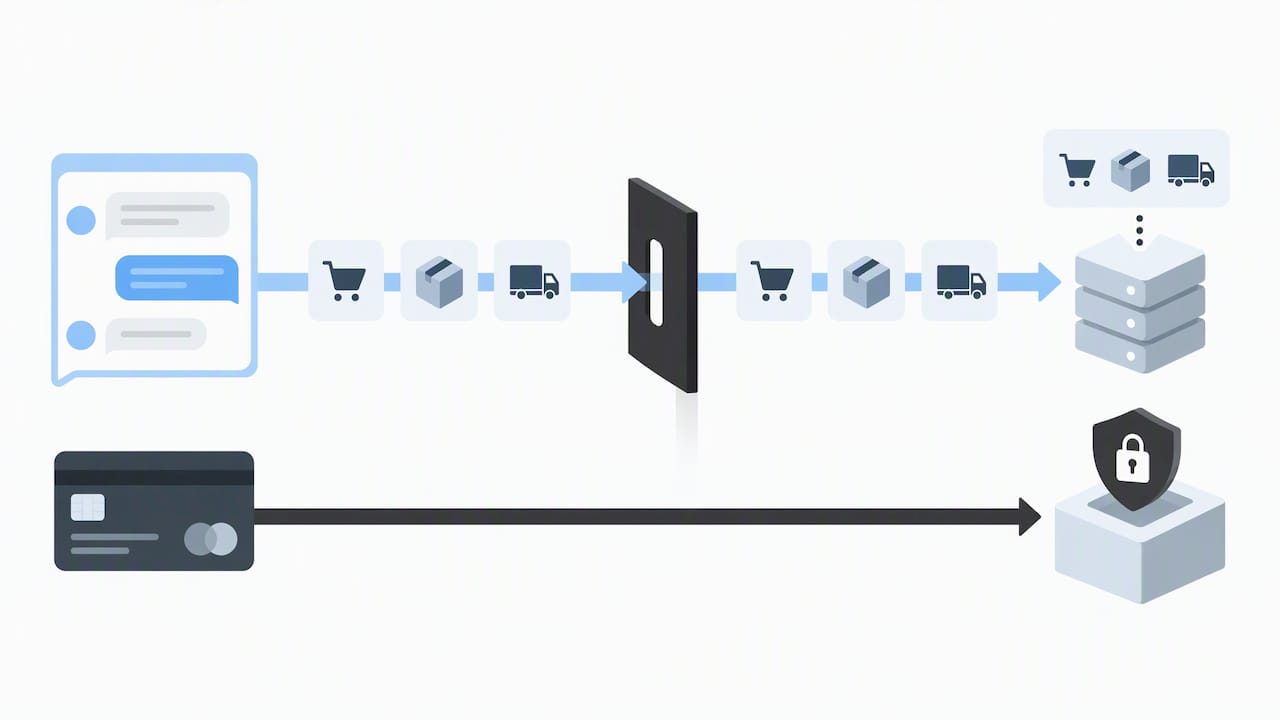
Be clear with shoppers about what the bot can access. A short disclosure at the start of a conversation, letting shoppers know they’re talking to an automated agent and that a human is available on request, builds trust and avoids confusion later.
Set data retention policies explicitly: decide how long conversation logs are kept, who can access them internally, and whether they’re used for anything beyond improving the bot’s responses. If your store serves customers in regions with specific data protection rules, your retention and consent practices need to reflect the rules of each customer’s jurisdiction rather than a single default.
Finally, apply the same access controls to your chatbot admin panel that you’d apply to any system touching customer records. Limit who can export conversation data, require strong authentication for platform access, and review permissions whenever staff roles change. A chatbot that’s fast and helpful but loosely secured creates a liability that can outweigh the revenue gains it was built to capture.
Designing Conversations That Sound Like Your Brand
A chatbot that sounds like a script reader breaks trust the moment a shopper realizes they’re talking to a wall. Conversational design is what makes the difference between a bot shoppers tolerate and one they actually prefer over a web form.
Start with tone. Write sample responses the way your best support agent would actually talk, not the way a policy document reads. If your brand is playful, let the bot use contractions and light humor. If your brand is clinical and precise, like a medical supply store, keep responses short and factual instead.
Keep responses short by default. Shoppers skim chat the same way they skim text messages, so a wall of text defeats the purpose of using chat in the first place. Break longer answers into two or three short exchanges instead of one long paragraph.
Build in graceful recovery. When the bot doesn’t understand a question, it should say so plainly and offer a next step, like rephrasing or connecting to a human, rather than guessing and risking a wrong answer. Avoid repeating the same fallback phrase twice in one conversation, since that’s one of the fastest ways to make a bot feel robotic.
Test your flows out loud before launch. Reading a script aloud exposes stiff phrasing that looks fine on a screen but sounds unnatural in a real exchange. Our ecommerce chatbot examples gallery is worth a look for concrete patterns of how other stores have handled tone and flow design.
Connecting Chatbots to Your Existing Platforms and CRM
A chatbot that can’t see your order history or customer records is limited to generic answers, which defeats most of the value it could otherwise provide.
Start integration planning with your storefront platform, whether that’s Shopify, WooCommerce, or a custom build. The bot needs real-time access to inventory, pricing, and order status, usually through an API or a pre-built connector, so it never gives an answer that contradicts what’s actually true in your system.
Next, connect your CRM so the bot recognizes returning customers and can reference their order history during a conversation. This turns a generic “how can I help” into a specific, useful exchange, and it’s often the difference between a bot that feels helpful and one that feels like starting over every time.
Use tools like Zapier or direct API connections to tie the bot into systems you already run, rather than replacing them. Most no-code platforms support webhook-based integrations that sync data without requiring a developer to maintain custom code long-term. If you’re coordinating integrations across a content and SEO strategy as well, a resource like AI tools for ecommerce growth is a useful companion for thinking about how conversational and content-driven channels work together.
Plan for analytics integration last, so every bot conversation feeds the same reporting dashboard your team already checks daily, rather than creating a separate silo no one looks at.
A Four-Week Rollout Any Team Can Start This Month
Here’s the stance worth taking: most teams overthink chatbot rollout and underthink ownership. The tools are mature enough to launch in weeks, but a pilot without a clear owner drifts for months.
Assign one owner, usually from ops or product, for the first four weeks: week one for knowledge audit and flow design, week two for integration and shadow-mode testing, week three for a monitored live launch on one channel, week four for reviewing resolved-intent rate and deciding whether to scale. Bring marketing in early so cart-recovery messaging matches your brand voice from day one. The single metric worth presenting to leadership is resolved-intent rate tied to recovered revenue, since it’s the number that justifies the next budget conversation. Our four-week conversational commerce framework lays out this same timeline in more operational detail.
— Elena
How Droxy Fits Into Every Step of This Playbook
Every checklist in this playbook maps directly onto what we’ve built: multichannel agents across website chat, phone, WhatsApp, Instagram, Facebook, and Shopify, deployed without code, with integrations into the systems you already run, human hand-off for anything that needs a real person, and analytics that track resolved intent instead of just message count.

Playbook step | What you need | How we support it |
|---|---|---|
Choose a platform | Multichannel, integratable, secure | Website, phone, WhatsApp, Instagram, Facebook, Shopify agents |
Plan and integrate | Catalog, CRM, order data synced | No-code integrations and knowledge grounding |
Deploy and test | Phased rollout, human hand-off | Built-in escalation and monitored launch support |
Measure and optimize | Intent-level KPIs | Analytics dashboard tracking resolution and conversion |
Plans start at $16 a month on the Basic tier, with Advanced and Enterprise options as your channel count and volume grow. If you’re running a multi-client rollout, our agency page covers white-label options for managing several stores from one account. Check pricing and start your pilot this week.
FAQ
What’s the best first chatbot use case for a small ecommerce store?
Cart recovery is usually the strongest first pilot because the shopper’s intent is already high and the fix often just requires a timely, helpful nudge. Pre-purchase FAQs are a close second for stores with higher-consideration products like apparel or electronics.
How long does it take to launch an ecommerce chatbot?
A focused pilot typically takes two to four weeks from knowledge audit to live launch on one channel, based on the phased rollout approach most no-code platforms support. Expanding to additional channels usually adds another few weeks once integrations are mapped.
How much does an ecommerce chatbot cost?
Pricing varies by platform and feature set. On our platform, plans start at $16 a month for Basic, with Advanced and Enterprise tiers available as your channel and volume needs grow.
What metrics show a chatbot pilot is actually working?
Resolved intent rate and cart recovery rate are the clearest early signals, since they tie directly to revenue rather than just activity. Escalation rate and average resolution time help you confirm shoppers are getting real help, not just fast replies.
Is it safe to let a chatbot access customer order data?
Yes, when access is limited to what the bot needs and payment card details are kept out of chat entirely. Clear data retention policies and strong admin access controls keep this low-risk for most stores.
Sources
Recommended
The fastest way to win revenue from a chatbot is to pilot a multichannel, integratable agent on cart recovery, then measure intent-level conversions rather than raw chat volume.
TL;DR:
Baymard estimates roughly 70% of carts are abandoned, with checkout friction accounting for 18% to 19% of that total loss.
DTC brands can start with product discovery; expensive product retailers should prioritize pre purchase FAQs, while subscription stores can focus on order tracking.
Pilots take two to four weeks; test in shadow mode, then launch on one channel with human review for one to two weeks.
Judge results by resolved intent, cart recovery, assisted conversions, and escalations; raw chat volume shows activity, but not whether shoppers completed purchases or got help.
Keep full payment card details out of chat, restrict order data to what the bot needs, and set retention and staff access rules before launch.
DroxyAnswer Shoppers Without the WaitDroxy deploys customizable AI agents across website chat and Shopify, helping ecommerce teams respond to customer inquiries around the clock.Explore Droxy
Table of Contents
Why Ecommerce Stores Need Chatbots Now
Chatbot Types and High-Impact Ecommerce Use Cases
Choosing a Platform: Evaluation Criteria and a Selection Checklist
Preparing Your Systems and Content Before Launch
Deploying and Testing: A Low-Risk Rollout Path
Measuring and Optimizing What Actually Matters
Who’s Behind This Playbook
Privacy and Data Security in Ecommerce Chatbot Deployments
Designing Conversations That Sound Like Your Brand
Connecting Chatbots to Your Existing Platforms and CRM
A Four-Week Rollout Any Team Can Start This Month
How Droxy Fits Into Every Step of This Playbook
Sources
Why Ecommerce Stores Need Chatbots Now
The business case for chatbots in ecommerce starts with a number most operators already feel in their gut: average cart abandonment sits near 70%, according to Baymard Institute.
Roughly 70% of online shopping carts get abandoned, and checkout friction alone accounts for 18 to 19% of that loss, a Baymard Institute analysis found. Closing even a fraction of that gap moves real revenue.
A well-placed chatbot moves several levers at once:
Recovers abandoned carts by catching hesitation at checkout and offering help in real time.
Cuts support costs by resolving common questions without a human agent.
Shortens response times from hours to seconds on order status and shipping questions.
Lifts average order value through contextual product recommendations during browsing.
The outcome that matters most is not how many conversations your bot handles. It is whether those conversations resolve the shopper’s actual intent, whether that is finishing a purchase, tracking a package, or getting a sizing answer. Resolved-intent rates and assisted conversion tell you far more about business impact than total chat count ever will.
Chatbot Types and High-Impact Ecommerce Use Cases
Not every chatbot behaves the same way, and picking the wrong type for your first pilot wastes time you don’t have.
Rule-based bots follow decision trees: they work well for narrow, predictable questions like order status but break down fast when shoppers phrase things unexpectedly. AI conversational agents understand natural language and can handle open-ended product questions, complaints, and multi-turn conversations without rigid scripts. Hybrid, human-in-the-loop models let the bot handle routine volume while routing complex or sensitive cases to a person, which tends to be the safest starting point for revenue-critical flows like refunds.
Among ecommerce use cases, a few consistently deliver outsized returns:
Cart recovery messaging that re-engages shoppers who stall at checkout.
Product discovery and recommendations that replace a frustrating search with a guided conversation.
Pre-purchase FAQs on sizing, materials, and shipping that remove last-minute doubt.
Order tracking that answers “where is my package” without a support ticket.
Returns handling that walks shoppers through eligibility and next steps.
Lead capture for shoppers who browse but aren’t ready to buy yet.
Your store profile should drive the choice. DTC brands with strong product storytelling often see the best early wins from product discovery. High-AOV retailers benefit most from pre-purchase FAQs that remove hesitation. Subscription businesses tend to get the fastest payoff from order tracking and billing questions, and marketplaces see outsized gains from cart recovery, since buyer intent is already high. For more structured ideas, our ecommerce chatbot use cases guide maps each scenario to a specific business outcome.
Choosing a Platform: Evaluation Criteria and a Selection Checklist
Picking a chatbot platform is less about finding the flashiest feature set and more about matching capabilities to what your pilot actually needs to prove.
Work through these criteria in order before you commit to a platform:
Channel coverage: does it support website chat, phone, WhatsApp, Instagram, Facebook, and Shopify, or just one channel?
Integrations: can it connect to your storefront, order management system, and CRM without custom engineering?
Knowledge grounding: can you feed it your actual catalog, shipping rules, and return policy so answers stay accurate?
Analytics: does it report intent-level outcomes, not just message counts?
Routing and human hand-off: can it escalate cleanly to a live agent when confidence drops?
Multilingual support: does it serve every language your customer base actually speaks?
Security: how does it handle customer data, and does it meet basic compliance expectations for your market?
Pricing: does the cost structure make sense for a pilot, or does it force an enterprise commitment on day one?
For a first pilot, treat multichannel readiness, integrations, and human hand-off as must-haves. Multilingual support and white-label options are nice-to-haves you can add once the pilot proves out. A small pilot typically takes two to four weeks to configure and launch, while a mid-market rollout across two or three channels usually takes four to six weeks once integrations are mapped.
Pro Tip: Run your pilot on the one channel where your support tickets already cluster, instead of launching all channels at once, so you can isolate what’s actually driving improvement.
Preparing Your Systems and Content Before Launch
A chatbot is only as good as the information it can reach, so this step determines whether your pilot succeeds or stalls.
Start by auditing your knowledge sources: your product catalog, shipping rules, return policy, and existing FAQ content. Rank them by how often shoppers ask about each one, and feed the highest-traffic sources in first. Design conversation flows for your chosen pilot with explicit fallback rules: what the bot says when it doesn’t know an answer, and exactly when it hands off to a human.
Your integration checklist should cover:
Matching APIs or webhooks to your storefront platform for real-time catalog and inventory data.
Order lookup access so the bot can answer status questions without a human.
Analytics tagging so every conversation ties back to a measurable outcome.
Inventory sync so the bot never recommends an item that’s out of stock.
Set confidence scoring policies before launch: ground every product and policy answer in verified data, and escalate to a human whenever confidence drops below your threshold. This matters most for refund amounts, shipping delays, and anything involving money, where a wrong answer costs trust fast.
Pro Tip: Write your fallback and escalation copy before you write your happy-path flows. It’s the difference between a bot that recovers a tricky conversation gracefully and one that frustrates shoppers into leaving.
Our implementation guide for ecommerce customer service walks through this preparation step in more detail, including sample flow structures.
Deploying and Testing: A Low-Risk Rollout Path
Launching a chatbot across every channel on day one is how pilots turn into support disasters. A phased rollout keeps risk contained while you learn what actually works.
Follow this sequence:
Shadow mode first: run the bot alongside your existing support flow without exposing it to shoppers, so you can review its answers against real questions.
Monitored live launch: open the bot to a portion of traffic on one channel, with a human reviewing escalations closely during the first one to two weeks.
Scale across channels: once intent accuracy and escalation rates stabilize, extend to additional channels one at a time.
Before any live traffic reaches the bot, confirm your routing rules, set an SLA for how fast escalations reach a human, and write fallback copy for the moments when the bot genuinely doesn’t know the answer. Tag every conversation with analytics events so you can measure outcomes from the first session.
During testing, track intent accuracy against a target you set in advance, and run confusion analysis on the conversations the bot mishandled to spot patterns. Make small, incremental changes rather than large rewrites, and keep a rollback plan ready in case a change makes things worse instead of better.
Measuring and Optimizing What Actually Matters
Once your pilot is live, the metrics you track determine whether you scale it or quietly shut it down.
Focus on these core KPIs:
Resolved intent rate: the share of conversations where the shopper got what they needed without escalation.
Cart recovery rate: the share of abandoned carts the bot successfully brought back to checkout.
Assisted conversion rate: purchases that happened after a bot conversation, even if the bot didn’t close the sale directly.
Escalation rate: how often the bot hands off to a human, and why.
Average resolution time: how fast shoppers get an answer compared to your old support channel.
CSAT or NPS for bot interactions: whether shoppers actually felt helped.
Chatbots resolve a measurable share of customer service issues without human intervention, according to Statista tracking of resolution effectiveness, which supports treating intent-level resolution as your primary success signal rather than total message volume.
Raw chat volume tells you the bot is being used. It says nothing about whether it’s making money. Attribute recovered revenue by tagging sessions that touched the bot before a completed purchase, then compare conversion rates between bot-assisted and non-assisted sessions. Set an optimization cadence: tune weekly based on confusion analysis, run A/B tests monthly on flow changes, and revisit your roadmap quarterly against revenue and effort tradeoffs. Our chatbot analytics KPI guide breaks these metrics down further for teams building their first dashboard.
Who’s Behind This Playbook
This playbook draws on documented ecommerce chatbot capabilities and published research on cart abandonment and chatbot resolution rates, translated into steps an operator can act on without a technical team. The approach is built around what no-code platforms like Droxy already support: multichannel agents across website, phone, WhatsApp, Instagram, Facebook, and Shopify, deep integrations with existing systems, human hand-off, analytics, and white-label management for agencies running multiple client accounts. Over 60,000 users rely on this kind of setup to power customer service, a scale that reflects how standardized this approach to deployment has become.
Privacy and Data Security in Ecommerce Chatbot Deployments
Every chatbot conversation touches customer data, often including order details, contact information, and sometimes payment-adjacent questions, so security planning belongs in your pilot from the start, not bolted on after launch.
Limit what the bot stores and for how long. Order numbers and shipping addresses are usually necessary for the bot to do its job, but full payment card details should never pass through chat at all. Route anything involving stored card data to your existing secure checkout instead of letting the bot collect it directly.
Be clear with shoppers about what the bot can access. A short disclosure at the start of a conversation, letting shoppers know they’re talking to an automated agent and that a human is available on request, builds trust and avoids confusion later.
Set data retention policies explicitly: decide how long conversation logs are kept, who can access them internally, and whether they’re used for anything beyond improving the bot’s responses. If your store serves customers in regions with specific data protection rules, your retention and consent practices need to reflect the rules of each customer’s jurisdiction rather than a single default.
Finally, apply the same access controls to your chatbot admin panel that you’d apply to any system touching customer records. Limit who can export conversation data, require strong authentication for platform access, and review permissions whenever staff roles change. A chatbot that’s fast and helpful but loosely secured creates a liability that can outweigh the revenue gains it was built to capture.
Designing Conversations That Sound Like Your Brand
A chatbot that sounds like a script reader breaks trust the moment a shopper realizes they’re talking to a wall. Conversational design is what makes the difference between a bot shoppers tolerate and one they actually prefer over a web form.
Start with tone. Write sample responses the way your best support agent would actually talk, not the way a policy document reads. If your brand is playful, let the bot use contractions and light humor. If your brand is clinical and precise, like a medical supply store, keep responses short and factual instead.
Keep responses short by default. Shoppers skim chat the same way they skim text messages, so a wall of text defeats the purpose of using chat in the first place. Break longer answers into two or three short exchanges instead of one long paragraph.
Build in graceful recovery. When the bot doesn’t understand a question, it should say so plainly and offer a next step, like rephrasing or connecting to a human, rather than guessing and risking a wrong answer. Avoid repeating the same fallback phrase twice in one conversation, since that’s one of the fastest ways to make a bot feel robotic.
Test your flows out loud before launch. Reading a script aloud exposes stiff phrasing that looks fine on a screen but sounds unnatural in a real exchange. Our ecommerce chatbot examples gallery is worth a look for concrete patterns of how other stores have handled tone and flow design.
Connecting Chatbots to Your Existing Platforms and CRM
A chatbot that can’t see your order history or customer records is limited to generic answers, which defeats most of the value it could otherwise provide.
Start integration planning with your storefront platform, whether that’s Shopify, WooCommerce, or a custom build. The bot needs real-time access to inventory, pricing, and order status, usually through an API or a pre-built connector, so it never gives an answer that contradicts what’s actually true in your system.
Next, connect your CRM so the bot recognizes returning customers and can reference their order history during a conversation. This turns a generic “how can I help” into a specific, useful exchange, and it’s often the difference between a bot that feels helpful and one that feels like starting over every time.
Use tools like Zapier or direct API connections to tie the bot into systems you already run, rather than replacing them. Most no-code platforms support webhook-based integrations that sync data without requiring a developer to maintain custom code long-term. If you’re coordinating integrations across a content and SEO strategy as well, a resource like AI tools for ecommerce growth is a useful companion for thinking about how conversational and content-driven channels work together.
Plan for analytics integration last, so every bot conversation feeds the same reporting dashboard your team already checks daily, rather than creating a separate silo no one looks at.
A Four-Week Rollout Any Team Can Start This Month
Here’s the stance worth taking: most teams overthink chatbot rollout and underthink ownership. The tools are mature enough to launch in weeks, but a pilot without a clear owner drifts for months.
Assign one owner, usually from ops or product, for the first four weeks: week one for knowledge audit and flow design, week two for integration and shadow-mode testing, week three for a monitored live launch on one channel, week four for reviewing resolved-intent rate and deciding whether to scale. Bring marketing in early so cart-recovery messaging matches your brand voice from day one. The single metric worth presenting to leadership is resolved-intent rate tied to recovered revenue, since it’s the number that justifies the next budget conversation. Our four-week conversational commerce framework lays out this same timeline in more operational detail.
— Elena
How Droxy Fits Into Every Step of This Playbook
Every checklist in this playbook maps directly onto what we’ve built: multichannel agents across website chat, phone, WhatsApp, Instagram, Facebook, and Shopify, deployed without code, with integrations into the systems you already run, human hand-off for anything that needs a real person, and analytics that track resolved intent instead of just message count.
Playbook step | What you need | How we support it |
|---|---|---|
Choose a platform | Multichannel, integratable, secure | Website, phone, WhatsApp, Instagram, Facebook, Shopify agents |
Plan and integrate | Catalog, CRM, order data synced | No-code integrations and knowledge grounding |
Deploy and test | Phased rollout, human hand-off | Built-in escalation and monitored launch support |
Measure and optimize | Intent-level KPIs | Analytics dashboard tracking resolution and conversion |
Plans start at $16 a month on the Basic tier, with Advanced and Enterprise options as your channel count and volume grow. If you’re running a multi-client rollout, our agency page covers white-label options for managing several stores from one account. Check pricing and start your pilot this week.
FAQ
What’s the best first chatbot use case for a small ecommerce store?
Cart recovery is usually the strongest first pilot because the shopper’s intent is already high and the fix often just requires a timely, helpful nudge. Pre-purchase FAQs are a close second for stores with higher-consideration products like apparel or electronics.
How long does it take to launch an ecommerce chatbot?
A focused pilot typically takes two to four weeks from knowledge audit to live launch on one channel, based on the phased rollout approach most no-code platforms support. Expanding to additional channels usually adds another few weeks once integrations are mapped.
How much does an ecommerce chatbot cost?
Pricing varies by platform and feature set. On our platform, plans start at $16 a month for Basic, with Advanced and Enterprise tiers available as your channel and volume needs grow.
What metrics show a chatbot pilot is actually working?
Resolved intent rate and cart recovery rate are the clearest early signals, since they tie directly to revenue rather than just activity. Escalation rate and average resolution time help you confirm shoppers are getting real help, not just fast replies.
Is it safe to let a chatbot access customer order data?
Yes, when access is limited to what the bot needs and payment card details are kept out of chat entirely. Clear data retention policies and strong admin access controls keep this low-risk for most stores.
Sources
Recommended



🚀
Powered by Droxy
Turn every interaction into a conversion
Customer facing AI agents that engage, convert, and support so you can scale what matters.
✨
Learn more
Recent posts

Insights
3 min read
Introducing Agent Memories
Improve your agents' performance with Agent Memories. Prevent agents from repeating the same mistakes by giving them feedback.
Read more

Insights
15 min read
HVAC Marketing in 2025: The Definitive Lead Gen Guide
Discover 15 proven HVAC marketing strategies, plus learn how Droxy's AI website agent converts curious visitors into qualified leads by answering their questions instantly - right when they're most interested in your services.
Read more

Insights
10 min read
10 Best AI Sales Agents in 2025: Tested & Ranked
Discover the top 10 AI sales agents of 2025, designed to enhance lead generation, personalize outreach, and ultimately, close more deals
Read more
Insights
3 min read
Introducing Agent Memories
Improve your agents' performance with Agent Memories. Prevent agents from repeating the same mistakes by giving them feedback.
Read more
Insights
15 min read
HVAC Marketing in 2025: The Definitive Lead Gen Guide
Discover 15 proven HVAC marketing strategies, plus learn how Droxy's AI website agent converts curious visitors into qualified leads by answering their questions instantly - right when they're most interested in your services.
Read more