The WhatsApp 24-Hour Rule: How the Customer Service Window Works
The WhatsApp 24-Hour Rule: How the Customer Service Window Works
Insights
13 min
The WhatsApp 24-hour rule says that once a customer messages your business, you have 24 hours to reply with free-form messages. After that, you can only reach them with a pre-approved message template. Every new message from the customer restarts the clock. If you run support, sales or bookings on WhatsApp, this one rule shapes how fast you must answer, what you can say and what it costs.
Below, we explain how the window opens and resets, what you can and can’t send, how pricing interacts with it, and how to build a setup that never gets caught out at hour 25.
Droxydroxy.aiRespond on WhatsApp without delayDroxy deploys AI agents across WhatsApp and other channels, helping businesses answer customer inquiries instantly, 24/7.Explore Droxy
TL;DR
The 24-hour customer service window opens when a customer messages you and resets with each new customer message.
Inside the window, you can send free-form replies. Outside it, you can only send approved message templates.
Ads that click to WhatsApp and Facebook Page call-to-action buttons open a longer free window of 72 hours.
The rule runs on the clock, not on your business hours, so weekends and nights count.
An AI agent that answers instantly keeps conversations well inside the window and cuts the risk of lost leads.
Table of Contents
What the WhatsApp 24-hour rule actually says
What you can send inside and outside the window
How pricing interacts with the window
Why the rule exists
Can you extend or get around the 24-hour rule?
A practical setup that respects the window
Our perspective: the window is a response-time test
Keep every conversation inside the window with Droxy
Common mistakes to avoid
Sources
What the WhatsApp 24-hour rule actually says
The rule belongs to the WhatsApp Business Platform, the API-based product that companies and their software providers use to message customers at scale. It is not a feature of any one helpdesk. As one support team puts it, it is a WhatsApp rule, not a Zendesk rule, and applies to all WhatsApp accounts.
Here is the logic in plain terms:
A customer sends your business a message.
That opens a customer service window. WhatsApp’s own pricing page describes it as a 24-hour window in which you can respond with service messages at no charge, and says the window resets with each user message.
While the window is open, you and the customer can exchange free-form messages: text, images, documents, quick answers, follow-up questions.
When 24 hours pass with no new customer message, the window closes. To write to that customer again, you need an approved template.
People search for this under several names: the 24-hour rule, the customer service window, the conversation window. They all describe the same mechanism.
The clock is literal
The window is exactly 24 hours from the time the user reaches out, and it does not pause for your business hours. A customer who writes at 6 p.m. on Friday gives you until 6 p.m. on Saturday. If your team is off over the weekend, the window can expire before anyone reads the message.
That is the practical heart of the rule: speed is not just good service, it is how you keep the channel open.
What you can send inside and outside the window
The difference between the two states is simple but strict.
Inside the 24-hour window | Outside the window | |
|---|---|---|
Who can start | The customer has just messaged you | You, with an approved template |
Message type | Free-form: any text, media, replies | Approved message template only |
Typical use | Answering questions, booking, order help | Reminders, follow-ups, re-engagement |
Customer reply | Reopens or extends the window | Reopens a new 24-hour window |
When a customer replies to your template, a fresh window opens and you are back to free-form conversation. That is why a good template does one job: it earns a reply.
WhatsApp’s business policy is clear that you may reply without a template only within the window, and that chats you start must use an approved template. Templates also need customer consent. Our guide to WhatsApp opt-in rules covers how to word consent text and keep audit records.
How pricing interacts with the window
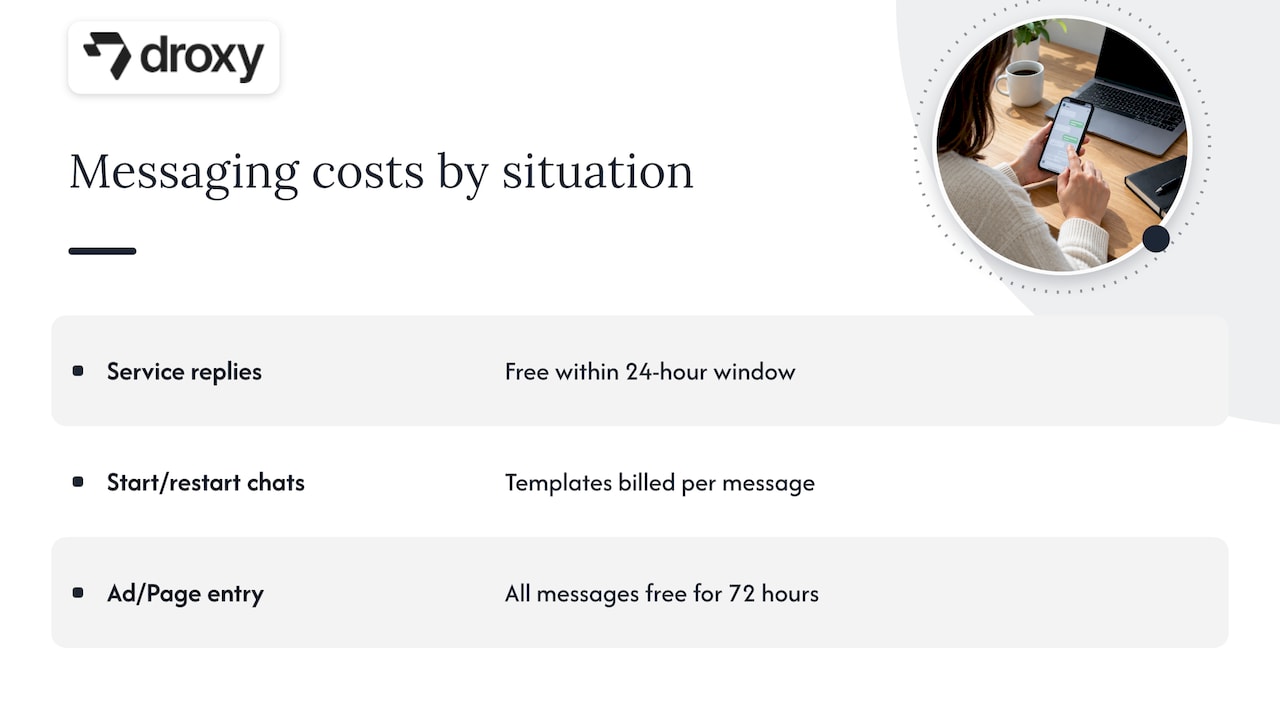
The window is also a pricing boundary. According to WhatsApp, service messages sent within the customer service window carry no charge. Templates you send to start or restart a conversation are billed under WhatsApp’s per-message pricing, which depends on the message category and the recipient’s country. Pricing has changed several times, so check the official pricing page before you budget.
There is also a free entry point. When a customer messages you from an ad that clicks to WhatsApp, or from a Facebook Page call-to-action button, all your messages for the next 72 hours are not charged. For a business running Meta ads, that longer free period is worth designing around: reply fast, qualify the lead and book the next step before it ends.
A worked example
Imagine a home services company that runs a click-to-WhatsApp ad for water heater repair.
Monday, 8:10 p.m.: a homeowner taps the ad and asks for a quote. A window opens, and the free entry point applies.
Monday, 8:11 p.m.: an automated agent asks for the address and the problem, then offers two appointment slots.
Tuesday, 7:30 a.m.: the customer picks a slot. The window resets.
Thursday, 9 a.m.: a technician needs to confirm arrival time. If the customer’s last message was Tuesday, the window has closed, so the confirmation goes out as an approved template.
Nothing here is complicated. It only works smoothly because someone planned for the moment the window closes.
Why the rule exists
WhatsApp built the window to protect users. A person’s phone is a personal space, and the rule keeps businesses from sending unsolicited free-form messages whenever they like. ActiveCampaign’s help center describes the window as the timeframe in which a business can communicate after the customer has started the conversation. The customer starts it. The business responds. If the business wants to speak first or later, it uses a template that WhatsApp has reviewed.
Seen that way, the rule is less a restriction than a promise to your customers: they control when the conversation begins.
Can you extend or get around the 24-hour rule?
Short answer: you can’t extend the window itself, and you shouldn’t try to bypass it. Several helpdesk tools publish workarounds, but they all come down to the same legitimate moves.
What does work:
Reply sooner. Most lost windows are lost because nobody answered for a day.
Ask a question that invites a reply. Every customer message resets the window, so a clear next-step question extends your free-form access.
Use approved templates for follow-ups after the window closes.
Use free entry points from click-to-WhatsApp ads and Page buttons for the 72-hour period.
What doesn’t:
Sending off-policy content in a template to disguise promotion.
Messaging people who never opted in.
Using unofficial tools that mimic the app. They risk your number being restricted.
Plan on templates. Our post on five WhatsApp message templates, with API examples and no-code automation shows the formats that tend to get approved and replied to.
A practical setup that respects the window
Here is how we suggest businesses build around the rule, step by step.
Answer instantly, any hour. An automated agent can respond in seconds at 3 a.m., so the window never expires unread. If you want to start small, our two-week pilot for WhatsApp auto replies and templates lays out a low-risk way to test.
Resolve or advance in the first exchange. Ask for the one detail you need next, such as a date, an order number or a preferred time.
Hand off to a person with context. If the agent can’t solve it, pass the full conversation to your team while the window is still open.
Show the countdown to your team. Your inbox should display when each window closes, so people can prioritize the chats about to expire.
Prepare three to five templates. Cover appointment reminders, order updates, a gentle follow-up and a re-engagement message.
Log consent. Store when and how each customer opted in.
If you handle other social channels, the same logic applies in different forms. Our WhatsApp vs. Messenger pilot for AI support teams compares how the two channels treat conversation timing, and our Instagram-to-WhatsApp test shows how to move interested browsers into a chat.
Small service businesses often pair messaging with other follow-up tools, such as missed-call text-back and a shared inbox. This overview of an integrated lead capture and unified inbox setup for contractors shows how one service provider structures that follow-up.
Our perspective: the window is a response-time test
We build AI agents for customer conversations, and we see the same pattern across ecommerce stores, clinics, hotels and home service companies. The 24-hour rule rarely bites the businesses that answer in seconds. It bites the ones that answer in a day.
That is why we treat the window as a service-quality metric rather than a legal hurdle. If a customer’s question is answered within a minute, the window is nearly irrelevant: the customer writes back, the clock resets, and the conversation finishes long before it matters. If answers take hours, you are spending your free-form access before you have used it.
Three habits make the biggest difference in our experience:
Let an agent take the first reply, trained on your own FAQs, catalog and policies, so the customer gets a real answer instead of “we’ll get back to you.”
End every message with a clear next step, so the customer has a reason to respond and keep the window open.
Treat templates as a second conversation opener, not a rescue. Write them as carefully as you write your website copy.
The businesses that handle this well don’t fight the rule. They build around it, and customers feel the difference.
— Elena
Keep every conversation inside the window with Droxy
Droxy is a no-code platform for deploying AI agents that answer customers on WhatsApp, website chat, phone, Instagram and Facebook. Our WhatsApp agent replies instantly around the clock, captures leads, books appointments, and hands off to your team when a person should step in. You can connect your own knowledge sources and match your brand voice, so replies sound like you.
Plans start at $16 per month on Basic, $80 per month on Advanced and $240 per month on Enterprise. Agencies can also create white-labeled agents for their clients through our agency program. If you are building your own integration instead, see our guide for developers on three production-ready routes to build a WhatsApp chatbot.
Common mistakes to avoid
Assuming business hours pause the clock. They don’t.
Sending a template when a free-form reply would do. If the window is open, answer normally.
Writing templates that read like ads. Keep them useful and specific.
Ignoring verification. A verified profile builds trust, which helps response rates. See our look at two routes to WhatsApp green tick verification.
Forgetting consent. A template is only as good as the permission behind it.
Rules and pricing on WhatsApp’s side change over time, so review the official pricing page and your provider’s documentation at least quarterly.
FAQ
What is the 24-hour rule on WhatsApp?
It is the rule that lets a business send free-form replies for 24 hours after a customer’s last message. Once that time passes without a new customer message, the business can only send approved templates. Each new customer message restarts the 24 hours.
How do I get around WhatsApp’s 24-hour restriction?
You don’t remove it. You work within it: reply quickly, end messages with a question that invites an answer, and use approved templates after the window closes. Ads that click to WhatsApp and Facebook Page buttons also give you 72 hours of unbilled messaging.
Does the 24-hour window follow my business hours?
No. The timer runs continuously from the customer’s last message, including nights, weekends and holidays. If your team is offline, an automated agent can keep the conversation moving until someone is back.
Can you see who viewed your WhatsApp Status after 24 hours?
That question is about a different feature. The business messaging rule governs conversations between customers and companies, not who sees a personal Status. For Status viewer behavior and privacy settings, check the WhatsApp Help Center or the app, since those details can change.
Sources
Recommended
The WhatsApp 24-hour rule says that once a customer messages your business, you have 24 hours to reply with free-form messages. After that, you can only reach them with a pre-approved message template. Every new message from the customer restarts the clock. If you run support, sales or bookings on WhatsApp, this one rule shapes how fast you must answer, what you can say and what it costs.
Below, we explain how the window opens and resets, what you can and can’t send, how pricing interacts with it, and how to build a setup that never gets caught out at hour 25.
Droxydroxy.aiRespond on WhatsApp without delayDroxy deploys AI agents across WhatsApp and other channels, helping businesses answer customer inquiries instantly, 24/7.Explore Droxy
TL;DR
The 24-hour customer service window opens when a customer messages you and resets with each new customer message.
Inside the window, you can send free-form replies. Outside it, you can only send approved message templates.
Ads that click to WhatsApp and Facebook Page call-to-action buttons open a longer free window of 72 hours.
The rule runs on the clock, not on your business hours, so weekends and nights count.
An AI agent that answers instantly keeps conversations well inside the window and cuts the risk of lost leads.
Table of Contents
What the WhatsApp 24-hour rule actually says
What you can send inside and outside the window
How pricing interacts with the window
Why the rule exists
Can you extend or get around the 24-hour rule?
A practical setup that respects the window
Our perspective: the window is a response-time test
Keep every conversation inside the window with Droxy
Common mistakes to avoid
Sources
What the WhatsApp 24-hour rule actually says
The rule belongs to the WhatsApp Business Platform, the API-based product that companies and their software providers use to message customers at scale. It is not a feature of any one helpdesk. As one support team puts it, it is a WhatsApp rule, not a Zendesk rule, and applies to all WhatsApp accounts.
Here is the logic in plain terms:
A customer sends your business a message.
That opens a customer service window. WhatsApp’s own pricing page describes it as a 24-hour window in which you can respond with service messages at no charge, and says the window resets with each user message.
While the window is open, you and the customer can exchange free-form messages: text, images, documents, quick answers, follow-up questions.
When 24 hours pass with no new customer message, the window closes. To write to that customer again, you need an approved template.
People search for this under several names: the 24-hour rule, the customer service window, the conversation window. They all describe the same mechanism.
The clock is literal
The window is exactly 24 hours from the time the user reaches out, and it does not pause for your business hours. A customer who writes at 6 p.m. on Friday gives you until 6 p.m. on Saturday. If your team is off over the weekend, the window can expire before anyone reads the message.
That is the practical heart of the rule: speed is not just good service, it is how you keep the channel open.
What you can send inside and outside the window
The difference between the two states is simple but strict.
Inside the 24-hour window | Outside the window | |
|---|---|---|
Who can start | The customer has just messaged you | You, with an approved template |
Message type | Free-form: any text, media, replies | Approved message template only |
Typical use | Answering questions, booking, order help | Reminders, follow-ups, re-engagement |
Customer reply | Reopens or extends the window | Reopens a new 24-hour window |
When a customer replies to your template, a fresh window opens and you are back to free-form conversation. That is why a good template does one job: it earns a reply.
WhatsApp’s business policy is clear that you may reply without a template only within the window, and that chats you start must use an approved template. Templates also need customer consent. Our guide to WhatsApp opt-in rules covers how to word consent text and keep audit records.
How pricing interacts with the window
The window is also a pricing boundary. According to WhatsApp, service messages sent within the customer service window carry no charge. Templates you send to start or restart a conversation are billed under WhatsApp’s per-message pricing, which depends on the message category and the recipient’s country. Pricing has changed several times, so check the official pricing page before you budget.
There is also a free entry point. When a customer messages you from an ad that clicks to WhatsApp, or from a Facebook Page call-to-action button, all your messages for the next 72 hours are not charged. For a business running Meta ads, that longer free period is worth designing around: reply fast, qualify the lead and book the next step before it ends.
A worked example
Imagine a home services company that runs a click-to-WhatsApp ad for water heater repair.
Monday, 8:10 p.m.: a homeowner taps the ad and asks for a quote. A window opens, and the free entry point applies.
Monday, 8:11 p.m.: an automated agent asks for the address and the problem, then offers two appointment slots.
Tuesday, 7:30 a.m.: the customer picks a slot. The window resets.
Thursday, 9 a.m.: a technician needs to confirm arrival time. If the customer’s last message was Tuesday, the window has closed, so the confirmation goes out as an approved template.
Nothing here is complicated. It only works smoothly because someone planned for the moment the window closes.
Why the rule exists
WhatsApp built the window to protect users. A person’s phone is a personal space, and the rule keeps businesses from sending unsolicited free-form messages whenever they like. ActiveCampaign’s help center describes the window as the timeframe in which a business can communicate after the customer has started the conversation. The customer starts it. The business responds. If the business wants to speak first or later, it uses a template that WhatsApp has reviewed.
Seen that way, the rule is less a restriction than a promise to your customers: they control when the conversation begins.
Can you extend or get around the 24-hour rule?
Short answer: you can’t extend the window itself, and you shouldn’t try to bypass it. Several helpdesk tools publish workarounds, but they all come down to the same legitimate moves.
What does work:
Reply sooner. Most lost windows are lost because nobody answered for a day.
Ask a question that invites a reply. Every customer message resets the window, so a clear next-step question extends your free-form access.
Use approved templates for follow-ups after the window closes.
Use free entry points from click-to-WhatsApp ads and Page buttons for the 72-hour period.
What doesn’t:
Sending off-policy content in a template to disguise promotion.
Messaging people who never opted in.
Using unofficial tools that mimic the app. They risk your number being restricted.
Plan on templates. Our post on five WhatsApp message templates, with API examples and no-code automation shows the formats that tend to get approved and replied to.
A practical setup that respects the window
Here is how we suggest businesses build around the rule, step by step.
Answer instantly, any hour. An automated agent can respond in seconds at 3 a.m., so the window never expires unread. If you want to start small, our two-week pilot for WhatsApp auto replies and templates lays out a low-risk way to test.
Resolve or advance in the first exchange. Ask for the one detail you need next, such as a date, an order number or a preferred time.
Hand off to a person with context. If the agent can’t solve it, pass the full conversation to your team while the window is still open.
Show the countdown to your team. Your inbox should display when each window closes, so people can prioritize the chats about to expire.
Prepare three to five templates. Cover appointment reminders, order updates, a gentle follow-up and a re-engagement message.
Log consent. Store when and how each customer opted in.
If you handle other social channels, the same logic applies in different forms. Our WhatsApp vs. Messenger pilot for AI support teams compares how the two channels treat conversation timing, and our Instagram-to-WhatsApp test shows how to move interested browsers into a chat.
Small service businesses often pair messaging with other follow-up tools, such as missed-call text-back and a shared inbox. This overview of an integrated lead capture and unified inbox setup for contractors shows how one service provider structures that follow-up.
Our perspective: the window is a response-time test
We build AI agents for customer conversations, and we see the same pattern across ecommerce stores, clinics, hotels and home service companies. The 24-hour rule rarely bites the businesses that answer in seconds. It bites the ones that answer in a day.
That is why we treat the window as a service-quality metric rather than a legal hurdle. If a customer’s question is answered within a minute, the window is nearly irrelevant: the customer writes back, the clock resets, and the conversation finishes long before it matters. If answers take hours, you are spending your free-form access before you have used it.
Three habits make the biggest difference in our experience:
Let an agent take the first reply, trained on your own FAQs, catalog and policies, so the customer gets a real answer instead of “we’ll get back to you.”
End every message with a clear next step, so the customer has a reason to respond and keep the window open.
Treat templates as a second conversation opener, not a rescue. Write them as carefully as you write your website copy.
The businesses that handle this well don’t fight the rule. They build around it, and customers feel the difference.
— Elena
Keep every conversation inside the window with Droxy
Droxy is a no-code platform for deploying AI agents that answer customers on WhatsApp, website chat, phone, Instagram and Facebook. Our WhatsApp agent replies instantly around the clock, captures leads, books appointments, and hands off to your team when a person should step in. You can connect your own knowledge sources and match your brand voice, so replies sound like you.
Plans start at $16 per month on Basic, $80 per month on Advanced and $240 per month on Enterprise. Agencies can also create white-labeled agents for their clients through our agency program. If you are building your own integration instead, see our guide for developers on three production-ready routes to build a WhatsApp chatbot.
Common mistakes to avoid
Assuming business hours pause the clock. They don’t.
Sending a template when a free-form reply would do. If the window is open, answer normally.
Writing templates that read like ads. Keep them useful and specific.
Ignoring verification. A verified profile builds trust, which helps response rates. See our look at two routes to WhatsApp green tick verification.
Forgetting consent. A template is only as good as the permission behind it.
Rules and pricing on WhatsApp’s side change over time, so review the official pricing page and your provider’s documentation at least quarterly.
FAQ
What is the 24-hour rule on WhatsApp?
It is the rule that lets a business send free-form replies for 24 hours after a customer’s last message. Once that time passes without a new customer message, the business can only send approved templates. Each new customer message restarts the 24 hours.
How do I get around WhatsApp’s 24-hour restriction?
You don’t remove it. You work within it: reply quickly, end messages with a question that invites an answer, and use approved templates after the window closes. Ads that click to WhatsApp and Facebook Page buttons also give you 72 hours of unbilled messaging.
Does the 24-hour window follow my business hours?
No. The timer runs continuously from the customer’s last message, including nights, weekends and holidays. If your team is offline, an automated agent can keep the conversation moving until someone is back.
Can you see who viewed your WhatsApp Status after 24 hours?
That question is about a different feature. The business messaging rule governs conversations between customers and companies, not who sees a personal Status. For Status viewer behavior and privacy settings, check the WhatsApp Help Center or the app, since those details can change.
Sources
Recommended



🚀
Powered by Droxy
Turn every interaction into a conversion
Customer facing AI agents that engage, convert, and support so you can scale what matters.
✨
Learn more
Recent posts

Insights
3 min read
Introducing Agent Memories
Improve your agents' performance with Agent Memories. Prevent agents from repeating the same mistakes by giving them feedback.
Read more

Insights
15 min read
HVAC Marketing in 2025: The Definitive Lead Gen Guide
Discover 15 proven HVAC marketing strategies, plus learn how Droxy's AI website agent converts curious visitors into qualified leads by answering their questions instantly - right when they're most interested in your services.
Read more

Insights
10 min read
10 Best AI Sales Agents in 2025: Tested & Ranked
Discover the top 10 AI sales agents of 2025, designed to enhance lead generation, personalize outreach, and ultimately, close more deals
Read more
Insights
3 min read
Introducing Agent Memories
Improve your agents' performance with Agent Memories. Prevent agents from repeating the same mistakes by giving them feedback.
Read more
Insights
15 min read
HVAC Marketing in 2025: The Definitive Lead Gen Guide
Discover 15 proven HVAC marketing strategies, plus learn how Droxy's AI website agent converts curious visitors into qualified leads by answering their questions instantly - right when they're most interested in your services.
Read more