How to Replace IVR with AI: A Practical Guide
How to Replace IVR with AI: A Practical Guide
Insights
15 min
You can replace your IVR with an AI voice agent without ripping out your phone system overnight. The agent answers in natural language, works out what the caller needs, resolves the routine requests and hands the rest to a person with context. The safest path is staged: map your call reasons, rebuild the top few as conversations, run the old menu as a fallback, then retire it as the numbers prove out.
This guide walks you through that path, step by step, so your business can answer every call instantly without making callers press 3 for billing.
DroxyAnswer Calls Without the Phone TreeDroxy lets businesses deploy AI agents for phone interactions, providing instant answers while helping reduce wait times and missed inquiries.Explore Droxy
TL;DR
An AI voice agent replaces the menu with a conversation. Callers say what they need, and the agent answers, books, captures the lead or routes the call.
Don’t switch everything at once. Start with your five most common call reasons and keep a human hand-off on every path.
Be open that callers are talking to AI, and check your consent and recording rules before you go live, especially for outbound calls.
Judge the switch on resolution rate, hand-off quality, wait time and booked appointments, not on how modern it sounds.
Droxy’s no-code phone agent lets you build and test this without developers. Plans start from $16 per month.
Table of Contents
Why businesses are leaving the phone tree
IVR vs. AI voice agent: what actually changes
Before you start: audit your calls
Design the conversation, not the menu
A staged migration plan
Where AI replaces IVR best, by industry
Our perspective: treat it as a service upgrade, not a cost cut
Stay on the right side of the rules
How to measure whether it’s working
Common mistakes to avoid
Try it with Droxy
Sources
Why businesses are leaving the phone tree
IVR was built to save staff time, and it did. But it pushed the effort onto the caller: listen to six options, pick the wrong one, start over. Analysts at Metrigy describe how companies have misused and overused IVRs, and that conversational AI call handling is stepping in. Their global study of 656 companies found that 37.6% planned to fully replace IVR with AI triage agents, and the share rose to 62.5% among the top-performing firms.
That gap is worth noticing. The companies seeing the best business results are the ones most likely to drop the menu entirely.
For a small or mid-sized business the pain is more practical than philosophical:
Missed calls after hours. A menu that says “leave a message” loses the lead who calls the next plumber.
Wrong-department transfers. Every misroute costs a minute for the caller and another for your team.
Rigid wording. Callers don’t know your internal categories. They say “my order never came,” not “option 4, shipping inquiries.”
No data. A keypress tells you little. A transcript tells you exactly why people called.
IVR vs. AI voice agent: what actually changes
Traditional IVR | AI voice agent | |
|---|---|---|
How callers interact | Press keys or say fixed phrases | Speak naturally, in their own words |
Handling a new question | Fails or loops to a menu | Answers from your knowledge sources or escalates |
Routing | Based on the menu path chosen | Based on what the caller says and the context |
Changing a script | Developer or vendor ticket | Edit instructions and knowledge, then test |
Data you get | Menu selections, call counts | Transcripts, reasons, outcomes, lead details |
Hand-off to humans | Cold transfer | Transfer with a summary of the conversation |
If you want the longer background, our guides on what an AI voice agent is and what an AI phone system is cover the technology in more depth.
Before you start: audit your calls
Most failed migrations start with a technical project plan and no call data. Spend a week on this first.
Pull your call reasons. Use call logs, voicemail, and your existing IVR reports. Group calls into 8 to 12 reasons: opening hours, order status, booking, quotes, billing, emergencies, and so on.
Rank by volume and by simplicity. The best first candidates are frequent and answerable from a document or a calendar.
Mark the calls that must reach a person. Complaints, emergencies, high-value sales, anything with legal or safety weight.
Listen to 30 real calls. Notice the words callers use. Those become the phrases your agent must understand.
Ask your frontline team. BCG’s research on agentic AI in customer service stresses that this is a business-led transformation, not just a tech deployment. Your receptionists and support reps know where callers get stuck and where an agent is likely to fail, so involve them in design and testing.
Design the conversation, not the menu
The mistake to avoid is rebuilding your menu as a script: “Say sales, support, or billing.” That keeps the problem and adds a voice.
Instead, design around outcomes.
Open with an invitation
Greet the caller, say who you are, state that it’s an AI assistant, and ask how you can help. One open question replaces the whole tree.
Give the agent real knowledge
An agent is only as good as what it can look up. Connect your FAQ, price lists, policies, service areas and product catalog. With Droxy you can bring knowledge in from multiple sources, so the agent answers from your material rather than guessing.
Define what it can do, and what it can’t
Write these as plain rules:
Can: answer common questions, check hours, capture name and contact details, book or reschedule appointments, recommend products.
Can’t: promise refunds beyond policy, give medical or legal advice, quote custom jobs without a human.
Must escalate: anger, urgency words, repeated misunderstanding, or a direct request for a person.
Plan every hand-off
The hand-off is where AI earns trust or loses it. A good one passes along who called, what they asked and what’s already been tried, so nobody asks the caller to repeat themselves. Build the escalation path before you build anything clever.
Match your brand voice
Callers judge your company by how the agent sounds. Set the tone, vocabulary and language options deliberately. If your customers speak more than one language, test each one with real phrases rather than assuming parity.
A staged migration plan
Here is a rollout that keeps your risk low.
Stage 1: Shadow and build (week 1 to 2)
Configure the agent with your top five call reasons. Test internally with your team calling in, using the awkward phrasing real callers use. Fix what breaks.
Stage 2: Overflow and after hours (week 3 to 4)
Send only the calls you would otherwise miss to the agent: after hours, lunch, and busy peaks. This is the lowest-risk win, because the alternative is voicemail. Review transcripts daily.
Stage 3: Front door for a slice of traffic (week 5 to 8)
Route a share of daytime calls, or one number or location, to the agent first. Keep your old menu one keypress away for a short period, and watch where callers ask for it.
Stage 4: Retire the menu
Once resolution and hand-off numbers hold steady, make the agent the default for all calls. Keep the review habit. Your offers, hours and policies change, and the agent’s knowledge has to change with them.
Check your telephony as well. The agent has to sit on top of your numbers and carrier, and a modern VoIP phone service makes forwarding, number portability and routing far easier than legacy lines.
Where AI replaces IVR best, by industry
Home services: emergency versus routine triage, quote requests, and appointment booking while crews are on the job.
Healthcare practices: scheduling, directions, forms and general office questions around the clock. Clinical questions go to staff (more on safeguards below).
Hospitality: reservations, room and table availability, and policy questions.
Real estate: capture the lead, qualify the budget and timing, and book viewings before the caller phones another agent.
Ecommerce: order status, returns and product recommendations, with the same agent also handling website chat, WhatsApp and Instagram so customers get consistent answers.
If you want concrete scenarios, see our collection of AI contact center use cases and AI customer service examples.
Our perspective: treat it as a service upgrade, not a cost cut
We build Droxy for businesses that don’t have a contact center team or an engineering department. What we see is that the strongest rollouts start from a customer problem: calls going unanswered, leads going cold, staff buried in repetitive questions. They don’t start from “let’s get an AI.”
Three beliefs shape how we build:
Customization matters more than the model. An agent that sounds like your brand and knows your business beats a generic one every time. That’s why we focus on deep customization and multiple knowledge sources.
The phone is one channel among several. Customers who call today may text on WhatsApp tomorrow. One agent logic across phone, website chat, WhatsApp, Instagram and Facebook means they don’t get a different company on every channel.
Humans stay in the loop. Hand-off to your team isn’t a failure mode. It’s a feature, and the quality of that hand-off is the first thing we’d test.
If you do nothing else, start with after-hours calls. You’ll see real transcripts within days, and they will teach you more than any planning meeting.
— Elena
Stay on the right side of the rules
Switching to AI changes what you owe callers. Some of this depends on your state, industry and country, so confirm specifics with your own counsel.
Be transparent. The FTC’s guidance on AI companies is clear that misrepresenting what an AI can do or pretending it is a human professional can break consumer protection law, and that you need reliable evidence for performance claims. Tell callers up front they’re speaking with an AI assistant, and never claim it replaces a licensed professional.
Be careful with data. Your privacy policy should disclose if third-party vendors process call data, and customer data shouldn’t be used for purposes you haven’t disclosed. Ask any vendor, including us, how recordings and transcripts are stored and used.
Check outbound calling rules. The FCC has confirmed that the TCPA applies to AI technologies that generate human voices, so outbound AI calls need the same consent discipline as any other automated calls. If you’re in the US, ask your attorney before you automate outbound calling.
Keep people in command in healthcare. Guidance on AI in clinical settings stresses a human-in-command approach, where AI isn’t an unmonitored decision-maker and responsibility stays with the practitioner. Although that circular is aimed at Welsh clinical settings, the principle applies to any practice: let the agent schedule and answer office questions, and send symptoms, medication and urgent questions to staff. If you handle protected health information in the US, talk with your compliance officer about HIPAA obligations and vendor agreements before launch.
How to measure whether it’s working
Deloitte’s research found that although 92% of C-suite executives report AI deployments, only 42% have realized tangible ROI. The gap often comes from keeping AI on internal tasks instead of customer-facing work. You close it by picking a handful of numbers before launch and checking them weekly:
Resolution rate: share of calls fully handled without a person.
Hand-off quality: percentage of escalations where staff didn’t have to re-ask basic questions.
Answer speed and abandoned calls: how many callers hang up before reaching anyone.
Booked appointments and captured leads: the revenue-linked numbers.
Top unanswered questions: gaps in your knowledge base, found in transcripts.
For a deeper breakdown, our post on KPIs that prove call center automation ROI lists the metrics we’d track, and our guide to analyzing calls with AI shows how to turn transcripts into improvements. Tie these to your wider conversion rate optimization work so you can see whether faster answers lead to more booked jobs and sales.
Common mistakes to avoid
Cutting over in one day. Stage it. A single bad week costs you customers you won’t hear from.
Building one giant agent for every path. Start narrow, prove it, then expand.
Hiding the human option. If a caller asks for a person, give them one.
Skipping the knowledge work. Outdated hours and prices in the agent’s sources become wrong answers at scale.
Never reading transcripts. The first month of transcripts is your best training material.
Ignoring other channels. If callers also message on WhatsApp or Instagram, give those channels the same knowledge.
Try it with Droxy
Droxy is a no-code platform for deploying AI agents on your phone line, website chat, WhatsApp, Instagram, Facebook and Shopify. With the Droxy phone agent you can set the voice and tone, connect your knowledge, capture leads, book appointments, route calls and hand off to your team, then watch the results in analytics. It connects to your existing systems through API and Zapier.
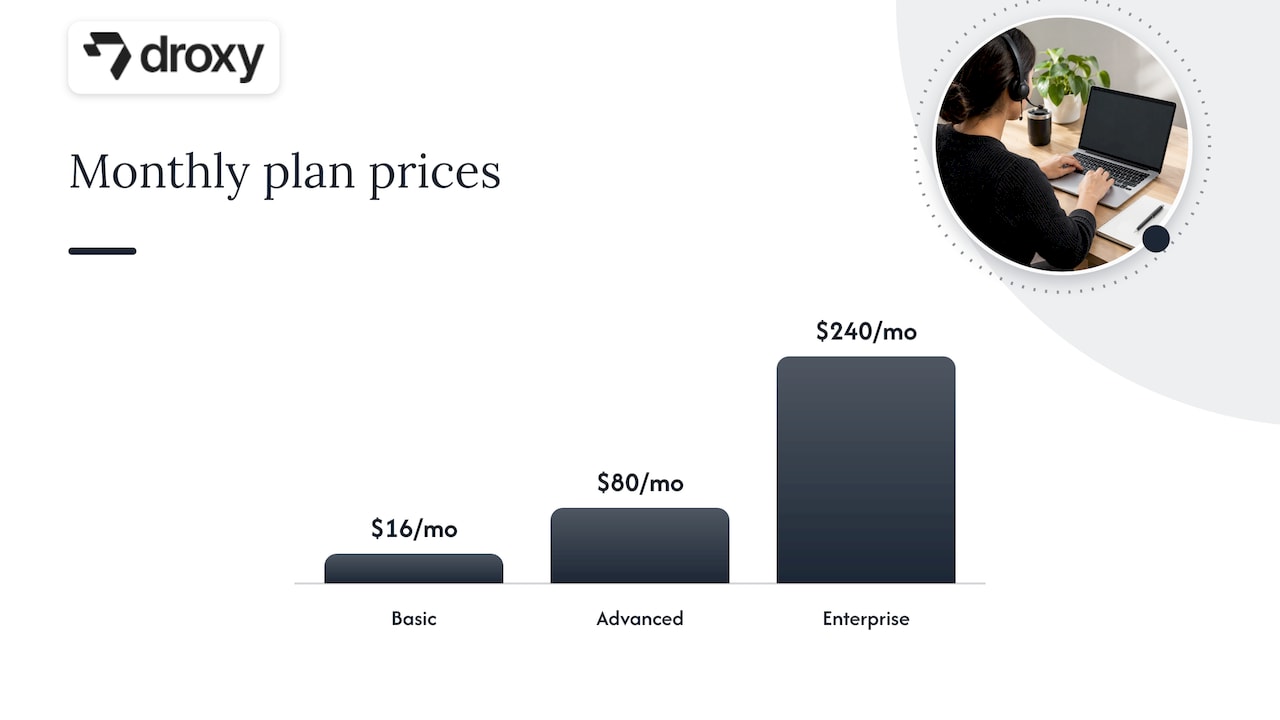
Plans start from $16 per month for Basic, $80 per month for Advanced and $240 per month for Enterprise. See the plans on the pricing page to pick the one that fits your call volume, or start with the Droxy app and build your first agent.
Running an agency or consultancy? Droxy also supports white-labeling, so you can offer AI agents under your own brand. Learn more on our agency page.
FAQ
Can AI completely replace my IVR?
For most small and mid-sized businesses, yes, over time. Plan to keep a human path for complaints, emergencies and anything high-stakes. The Metrigy study found 37.6% of companies planned full replacement, so you would be among a large group moving in that direction.
Do I need a developer to replace IVR with AI?
Not with a no-code platform. You define the agent’s instructions, tone and knowledge sources, and test by calling it. A developer helps if you want deep integrations, but Zapier and API connections cover many common setups.
Will callers know they’re talking to AI?
They should. Tell them at the start of the call. Regulators such as the FTC expect honesty about what AI is and what it can do, and callers generally respond better when they aren’t surprised.
How long does the switch take?
A focused first agent covering your top call reasons can be built and tested in days. A staged rollout from overflow calls to full replacement typically takes a couple of months, depending on how much you tune along the way.
What happens when the AI can’t answer?
It should escalate. A well-built agent hands the call to a person along with a summary of the conversation, or captures the caller’s details for a callback if nobody is available.
Sources
Goodbye IVR Hell: Smart AI Will Take Over Phone Calls, Metrigy
AI Companies: Uphold Your Privacy and Confidentiality Commitments, FTC
FCC Confirms that TCPA Applies to AI Technologies that Generate Human Voices
Safe and responsible adoption of ambient voice technologies, GOV.WALES
Recommended
You can replace your IVR with an AI voice agent without ripping out your phone system overnight. The agent answers in natural language, works out what the caller needs, resolves the routine requests and hands the rest to a person with context. The safest path is staged: map your call reasons, rebuild the top few as conversations, run the old menu as a fallback, then retire it as the numbers prove out.
This guide walks you through that path, step by step, so your business can answer every call instantly without making callers press 3 for billing.
DroxyAnswer Calls Without the Phone TreeDroxy lets businesses deploy AI agents for phone interactions, providing instant answers while helping reduce wait times and missed inquiries.Explore Droxy
TL;DR
An AI voice agent replaces the menu with a conversation. Callers say what they need, and the agent answers, books, captures the lead or routes the call.
Don’t switch everything at once. Start with your five most common call reasons and keep a human hand-off on every path.
Be open that callers are talking to AI, and check your consent and recording rules before you go live, especially for outbound calls.
Judge the switch on resolution rate, hand-off quality, wait time and booked appointments, not on how modern it sounds.
Droxy’s no-code phone agent lets you build and test this without developers. Plans start from $16 per month.
Table of Contents
Why businesses are leaving the phone tree
IVR vs. AI voice agent: what actually changes
Before you start: audit your calls
Design the conversation, not the menu
A staged migration plan
Where AI replaces IVR best, by industry
Our perspective: treat it as a service upgrade, not a cost cut
Stay on the right side of the rules
How to measure whether it’s working
Common mistakes to avoid
Try it with Droxy
Sources
Why businesses are leaving the phone tree
IVR was built to save staff time, and it did. But it pushed the effort onto the caller: listen to six options, pick the wrong one, start over. Analysts at Metrigy describe how companies have misused and overused IVRs, and that conversational AI call handling is stepping in. Their global study of 656 companies found that 37.6% planned to fully replace IVR with AI triage agents, and the share rose to 62.5% among the top-performing firms.
That gap is worth noticing. The companies seeing the best business results are the ones most likely to drop the menu entirely.
For a small or mid-sized business the pain is more practical than philosophical:
Missed calls after hours. A menu that says “leave a message” loses the lead who calls the next plumber.
Wrong-department transfers. Every misroute costs a minute for the caller and another for your team.
Rigid wording. Callers don’t know your internal categories. They say “my order never came,” not “option 4, shipping inquiries.”
No data. A keypress tells you little. A transcript tells you exactly why people called.
IVR vs. AI voice agent: what actually changes
Traditional IVR | AI voice agent | |
|---|---|---|
How callers interact | Press keys or say fixed phrases | Speak naturally, in their own words |
Handling a new question | Fails or loops to a menu | Answers from your knowledge sources or escalates |
Routing | Based on the menu path chosen | Based on what the caller says and the context |
Changing a script | Developer or vendor ticket | Edit instructions and knowledge, then test |
Data you get | Menu selections, call counts | Transcripts, reasons, outcomes, lead details |
Hand-off to humans | Cold transfer | Transfer with a summary of the conversation |
If you want the longer background, our guides on what an AI voice agent is and what an AI phone system is cover the technology in more depth.
Before you start: audit your calls
Most failed migrations start with a technical project plan and no call data. Spend a week on this first.
Pull your call reasons. Use call logs, voicemail, and your existing IVR reports. Group calls into 8 to 12 reasons: opening hours, order status, booking, quotes, billing, emergencies, and so on.
Rank by volume and by simplicity. The best first candidates are frequent and answerable from a document or a calendar.
Mark the calls that must reach a person. Complaints, emergencies, high-value sales, anything with legal or safety weight.
Listen to 30 real calls. Notice the words callers use. Those become the phrases your agent must understand.
Ask your frontline team. BCG’s research on agentic AI in customer service stresses that this is a business-led transformation, not just a tech deployment. Your receptionists and support reps know where callers get stuck and where an agent is likely to fail, so involve them in design and testing.
Design the conversation, not the menu
The mistake to avoid is rebuilding your menu as a script: “Say sales, support, or billing.” That keeps the problem and adds a voice.
Instead, design around outcomes.
Open with an invitation
Greet the caller, say who you are, state that it’s an AI assistant, and ask how you can help. One open question replaces the whole tree.
Give the agent real knowledge
An agent is only as good as what it can look up. Connect your FAQ, price lists, policies, service areas and product catalog. With Droxy you can bring knowledge in from multiple sources, so the agent answers from your material rather than guessing.
Define what it can do, and what it can’t
Write these as plain rules:
Can: answer common questions, check hours, capture name and contact details, book or reschedule appointments, recommend products.
Can’t: promise refunds beyond policy, give medical or legal advice, quote custom jobs without a human.
Must escalate: anger, urgency words, repeated misunderstanding, or a direct request for a person.
Plan every hand-off
The hand-off is where AI earns trust or loses it. A good one passes along who called, what they asked and what’s already been tried, so nobody asks the caller to repeat themselves. Build the escalation path before you build anything clever.
Match your brand voice
Callers judge your company by how the agent sounds. Set the tone, vocabulary and language options deliberately. If your customers speak more than one language, test each one with real phrases rather than assuming parity.
A staged migration plan
Here is a rollout that keeps your risk low.
Stage 1: Shadow and build (week 1 to 2)
Configure the agent with your top five call reasons. Test internally with your team calling in, using the awkward phrasing real callers use. Fix what breaks.
Stage 2: Overflow and after hours (week 3 to 4)
Send only the calls you would otherwise miss to the agent: after hours, lunch, and busy peaks. This is the lowest-risk win, because the alternative is voicemail. Review transcripts daily.
Stage 3: Front door for a slice of traffic (week 5 to 8)
Route a share of daytime calls, or one number or location, to the agent first. Keep your old menu one keypress away for a short period, and watch where callers ask for it.
Stage 4: Retire the menu
Once resolution and hand-off numbers hold steady, make the agent the default for all calls. Keep the review habit. Your offers, hours and policies change, and the agent’s knowledge has to change with them.
Check your telephony as well. The agent has to sit on top of your numbers and carrier, and a modern VoIP phone service makes forwarding, number portability and routing far easier than legacy lines.
Where AI replaces IVR best, by industry
Home services: emergency versus routine triage, quote requests, and appointment booking while crews are on the job.
Healthcare practices: scheduling, directions, forms and general office questions around the clock. Clinical questions go to staff (more on safeguards below).
Hospitality: reservations, room and table availability, and policy questions.
Real estate: capture the lead, qualify the budget and timing, and book viewings before the caller phones another agent.
Ecommerce: order status, returns and product recommendations, with the same agent also handling website chat, WhatsApp and Instagram so customers get consistent answers.
If you want concrete scenarios, see our collection of AI contact center use cases and AI customer service examples.
Our perspective: treat it as a service upgrade, not a cost cut
We build Droxy for businesses that don’t have a contact center team or an engineering department. What we see is that the strongest rollouts start from a customer problem: calls going unanswered, leads going cold, staff buried in repetitive questions. They don’t start from “let’s get an AI.”
Three beliefs shape how we build:
Customization matters more than the model. An agent that sounds like your brand and knows your business beats a generic one every time. That’s why we focus on deep customization and multiple knowledge sources.
The phone is one channel among several. Customers who call today may text on WhatsApp tomorrow. One agent logic across phone, website chat, WhatsApp, Instagram and Facebook means they don’t get a different company on every channel.
Humans stay in the loop. Hand-off to your team isn’t a failure mode. It’s a feature, and the quality of that hand-off is the first thing we’d test.
If you do nothing else, start with after-hours calls. You’ll see real transcripts within days, and they will teach you more than any planning meeting.
— Elena
Stay on the right side of the rules
Switching to AI changes what you owe callers. Some of this depends on your state, industry and country, so confirm specifics with your own counsel.
Be transparent. The FTC’s guidance on AI companies is clear that misrepresenting what an AI can do or pretending it is a human professional can break consumer protection law, and that you need reliable evidence for performance claims. Tell callers up front they’re speaking with an AI assistant, and never claim it replaces a licensed professional.
Be careful with data. Your privacy policy should disclose if third-party vendors process call data, and customer data shouldn’t be used for purposes you haven’t disclosed. Ask any vendor, including us, how recordings and transcripts are stored and used.
Check outbound calling rules. The FCC has confirmed that the TCPA applies to AI technologies that generate human voices, so outbound AI calls need the same consent discipline as any other automated calls. If you’re in the US, ask your attorney before you automate outbound calling.
Keep people in command in healthcare. Guidance on AI in clinical settings stresses a human-in-command approach, where AI isn’t an unmonitored decision-maker and responsibility stays with the practitioner. Although that circular is aimed at Welsh clinical settings, the principle applies to any practice: let the agent schedule and answer office questions, and send symptoms, medication and urgent questions to staff. If you handle protected health information in the US, talk with your compliance officer about HIPAA obligations and vendor agreements before launch.
How to measure whether it’s working
Deloitte’s research found that although 92% of C-suite executives report AI deployments, only 42% have realized tangible ROI. The gap often comes from keeping AI on internal tasks instead of customer-facing work. You close it by picking a handful of numbers before launch and checking them weekly:
Resolution rate: share of calls fully handled without a person.
Hand-off quality: percentage of escalations where staff didn’t have to re-ask basic questions.
Answer speed and abandoned calls: how many callers hang up before reaching anyone.
Booked appointments and captured leads: the revenue-linked numbers.
Top unanswered questions: gaps in your knowledge base, found in transcripts.
For a deeper breakdown, our post on KPIs that prove call center automation ROI lists the metrics we’d track, and our guide to analyzing calls with AI shows how to turn transcripts into improvements. Tie these to your wider conversion rate optimization work so you can see whether faster answers lead to more booked jobs and sales.
Common mistakes to avoid
Cutting over in one day. Stage it. A single bad week costs you customers you won’t hear from.
Building one giant agent for every path. Start narrow, prove it, then expand.
Hiding the human option. If a caller asks for a person, give them one.
Skipping the knowledge work. Outdated hours and prices in the agent’s sources become wrong answers at scale.
Never reading transcripts. The first month of transcripts is your best training material.
Ignoring other channels. If callers also message on WhatsApp or Instagram, give those channels the same knowledge.
Try it with Droxy
Droxy is a no-code platform for deploying AI agents on your phone line, website chat, WhatsApp, Instagram, Facebook and Shopify. With the Droxy phone agent you can set the voice and tone, connect your knowledge, capture leads, book appointments, route calls and hand off to your team, then watch the results in analytics. It connects to your existing systems through API and Zapier.
Plans start from $16 per month for Basic, $80 per month for Advanced and $240 per month for Enterprise. See the plans on the pricing page to pick the one that fits your call volume, or start with the Droxy app and build your first agent.
Running an agency or consultancy? Droxy also supports white-labeling, so you can offer AI agents under your own brand. Learn more on our agency page.
FAQ
Can AI completely replace my IVR?
For most small and mid-sized businesses, yes, over time. Plan to keep a human path for complaints, emergencies and anything high-stakes. The Metrigy study found 37.6% of companies planned full replacement, so you would be among a large group moving in that direction.
Do I need a developer to replace IVR with AI?
Not with a no-code platform. You define the agent’s instructions, tone and knowledge sources, and test by calling it. A developer helps if you want deep integrations, but Zapier and API connections cover many common setups.
Will callers know they’re talking to AI?
They should. Tell them at the start of the call. Regulators such as the FTC expect honesty about what AI is and what it can do, and callers generally respond better when they aren’t surprised.
How long does the switch take?
A focused first agent covering your top call reasons can be built and tested in days. A staged rollout from overflow calls to full replacement typically takes a couple of months, depending on how much you tune along the way.
What happens when the AI can’t answer?
It should escalate. A well-built agent hands the call to a person along with a summary of the conversation, or captures the caller’s details for a callback if nobody is available.
Sources
Goodbye IVR Hell: Smart AI Will Take Over Phone Calls, Metrigy
AI Companies: Uphold Your Privacy and Confidentiality Commitments, FTC
FCC Confirms that TCPA Applies to AI Technologies that Generate Human Voices
Safe and responsible adoption of ambient voice technologies, GOV.WALES
Recommended



🚀
Powered by Droxy
Turn every interaction into a conversion
Customer facing AI agents that engage, convert, and support so you can scale what matters.
✨
Learn more
Recent posts

Insights
3 min read
Introducing Agent Memories
Improve your agents' performance with Agent Memories. Prevent agents from repeating the same mistakes by giving them feedback.
Read more

Insights
15 min read
HVAC Marketing in 2025: The Definitive Lead Gen Guide
Discover 15 proven HVAC marketing strategies, plus learn how Droxy's AI website agent converts curious visitors into qualified leads by answering their questions instantly - right when they're most interested in your services.
Read more

Insights
10 min read
10 Best AI Sales Agents in 2025: Tested & Ranked
Discover the top 10 AI sales agents of 2025, designed to enhance lead generation, personalize outreach, and ultimately, close more deals
Read more
Insights
3 min read
Introducing Agent Memories
Improve your agents' performance with Agent Memories. Prevent agents from repeating the same mistakes by giving them feedback.
Read more
Insights
15 min read
HVAC Marketing in 2025: The Definitive Lead Gen Guide
Discover 15 proven HVAC marketing strategies, plus learn how Droxy's AI website agent converts curious visitors into qualified leads by answering their questions instantly - right when they're most interested in your services.
Read more