WhatsApp Chatbot Use Cases: 9 Ways Businesses Put Them to Work
WhatsApp Chatbot Use Cases: 9 Ways Businesses Put Them to Work
Insights
14 min

The best WhatsApp chatbot use cases are the repetitive, high-volume conversations your team answers all day: order and delivery questions, appointment booking, lead qualification, reminders and FAQs. A chatbot handles those instantly, at any hour, and hands the rest to a person. Below, you will find nine use cases by industry, what the evidence says about each, the Meta rules that shape them, and a simple way to pick your first one.
DroxyAnswer WhatsApp inquiries fasterDroxy lets businesses deploy AI agents on WhatsApp to answer customer questions instantly, around the clock, alongside other channels.Explore Droxy
TL;DR
Start with the questions you answer most often. Order status, opening hours, pricing and booking requests are the easiest wins.
WhatsApp works best as a front door for support, booking and lead qualification. For payments, a trusted web checkout often converts better than in-chat payment.
Replies inside the 24-hour customer service window are free. Marketing and authentication messages always carry Meta fees.
Always offer a clear path to a human, both for customers and to stay within Meta’s policy.
Pick one use case, run it for a few weeks, measure, then expand.
Table of Contents
Why WhatsApp is worth automating
The nine use cases, by industry
Quick comparison: which use case fits which business
Where WhatsApp chatbots fall short
Know Meta’s rules before you launch
Our perspective: start narrow, measure, then widen
How to launch your first use case in four steps
Run these use cases with Droxy
Sources
Why WhatsApp is worth automating
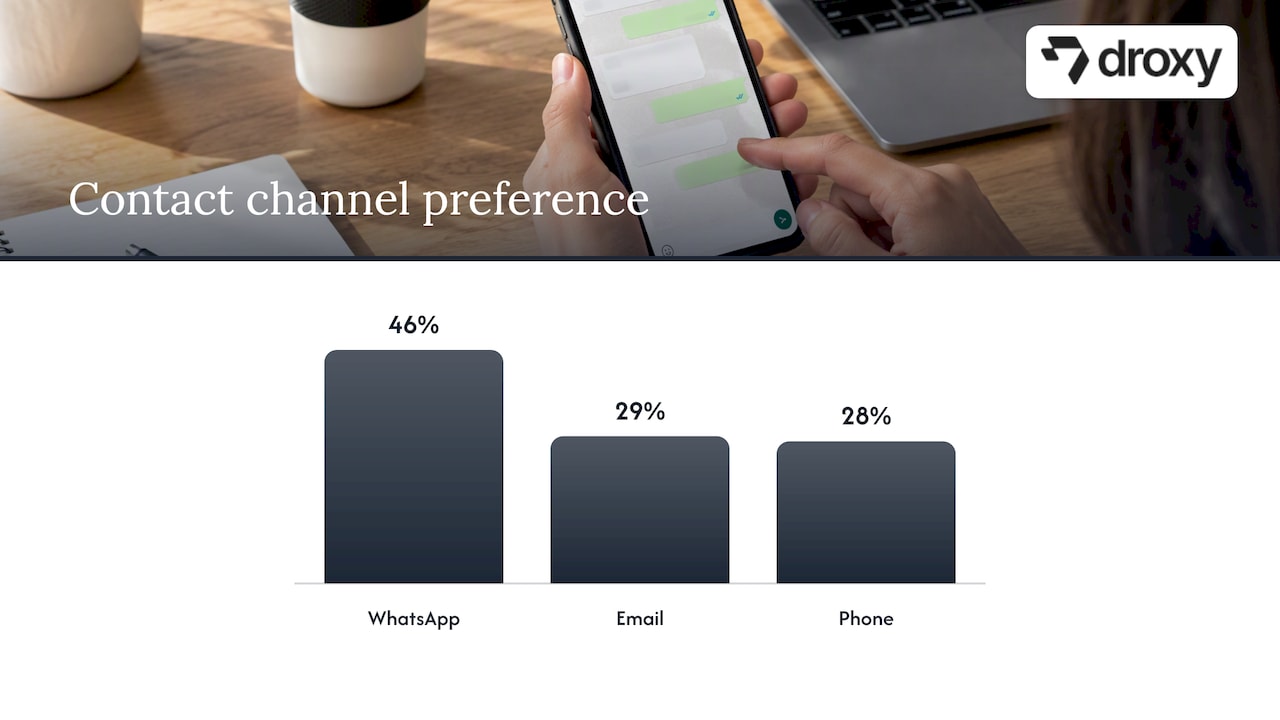
Customers already live in the app. A 2024 survey of 500 consumers in Hong Kong found that 46% preferred WhatsApp for contacting businesses, against 29% for email and 28% for phone. That is one market, so treat it as a signal and not a global rule. Still, it matches what many owners see: customers message first and expect an answer in minutes.
That expectation is where small teams lose business. An inquiry that sits for three hours at 9 p.m. often goes to a competitor. A chatbot closes that gap, and it works around the clock while your staff handle the conversations that need judgment.
A good bot is not a wall. It answers what it can, captures what it cannot, and passes the conversation on with the full history attached.
The nine use cases, by industry
1. Order tracking and delivery updates (ecommerce)
“Where is my order?” is the most common ticket in online retail, and it has a factual answer. Connect your chatbot to your store or shipping data and it can reply with status, carrier and expected date in seconds. Retail is already leaning this way: in a South African survey, 69.2% of retailers used WhatsApp for support, making it the most common use.
What to build: order lookup by order number or phone number, return and exchange policy answers, and a hand-off for damaged or missing items.
For a deeper catalog of store-specific ideas, see our guide to ecommerce chatbot use cases.
2. Product recommendations and pre-sale questions
Shoppers ask “Does this come in blue?” or “Which one fits a small kitchen?” before they buy. A bot trained on your catalog and product pages can answer, suggest alternatives and send a link to the product page. This is the sales-assist role: it qualifies interest and then moves the buyer to a secure page.
3. Appointment booking and reminders (beauty, hospitality, healthcare)
Booking is a natural fit because it is a short, structured conversation: service, date, time, confirmation. Reminders then cut no-shows. In a case study from WhatsApp, Yves Rocher in Hong Kong used WhatsApp automation for beauty treatments and reported a 21% increase in treatment bookings and a 17% rise in sales over three months. It is a single brand’s result, so do not promise yourself the same numbers. It does show that booking and reminders are worth testing.
What to build: availability check, booking, rescheduling, a reminder the day before and a one-tap cancel option.
4. Lead capture and qualification (real estate, agencies, home services)
In real estate and home services, the first business to reply usually wins the job. A chatbot can greet a new inquiry at once and ask the questions you would ask anyway:
Real estate: budget, area, bedrooms, move-in date, and whether the buyer wants a site visit.
Home services: type of problem, address or ZIP code, urgency, and preferred time window.
Agencies and consultants: company size, goal, timeline, and budget range.
The bot then books a visit or call, or sends a summary to the right person. Your team starts each conversation with the facts already collected.
5. Technician and service visit updates (home services, utilities)
Field service generates “when are you arriving?” messages. Claro Chile built a solution called Where is My Tech? on the WhatsApp Business Platform to automate communication around technician visits. A smaller home services company can do the same in spirit: confirm the appointment, send an arrival window, and let the customer reschedule in the chat.
6. Travel and time-sensitive notifications
Some messages are urgent and transactional. The travel agency Despegar used WhatsApp utility messages for important flight updates, improving open rates, click-through rates and customer response times. The same pattern fits hotels and restaurants: booking confirmations, check-in details, delay notices and table changes.
7. Patient communication for clinics (healthcare)
Practices get many calls that are not clinical: hours, directions, insurance accepted, how to prepare for a visit, booking and rescheduling. A WhatsApp bot can take these over so front-desk staff focus on patients in the room. Keep the bot to non-clinical tasks and send anything that sounds like a symptom, an emergency or a medical question to staff right away. Before you connect any patient information, check your obligations under HIPAA, which applies to many US practices, with your compliance officer or attorney. Outside clinics, the WHO has profiled Bot MD, a chat tool for doctors that connects with hospital information systems, which shows how far healthcare messaging can go when it is built carefully.
8. After-hours first response (any business)
You do not need a complex flow to benefit. A bot that answers after closing time, collects the customer’s need, and promises a follow-up by a specific time already improves the experience. It also stops the Monday-morning pile-up. Our guide on WhatsApp auto replies and templates for SMBs shows how to set up the basics.
9. Ticket deflection and FAQ answers
Most support queues are dominated by a short list of questions. If your bot answers the top ten from your help center, policies and product pages, ticket volume drops and your team handles fewer repeats. Feed it from several sources (website, documents, past answers) so replies stay consistent, and review the questions it could not answer every week. Those gaps are your next content to write.
Quick comparison: which use case fits which business
Business type | Best first use case | What the bot collects | When it hands off |
|---|---|---|---|
Online store | Order tracking and FAQs | Order number, email | Damaged item, refund dispute |
Salon, spa, restaurant | Booking and reminders | Service, date, party size | Special requests, complaints |
Real estate agency | Lead qualification | Budget, area, timeline | Ready to view a property |
Home services | Quote request and scheduling | Problem, ZIP code, urgency | Emergency, complex quote |
Clinic | Non-clinical front desk | Visit type, preferred time | Symptoms, urgent needs |
Agency or consultant | Intake for client accounts | Goal, budget, timeline | Discovery call |
Where WhatsApp chatbots fall short
Honesty about limits makes your rollout better.
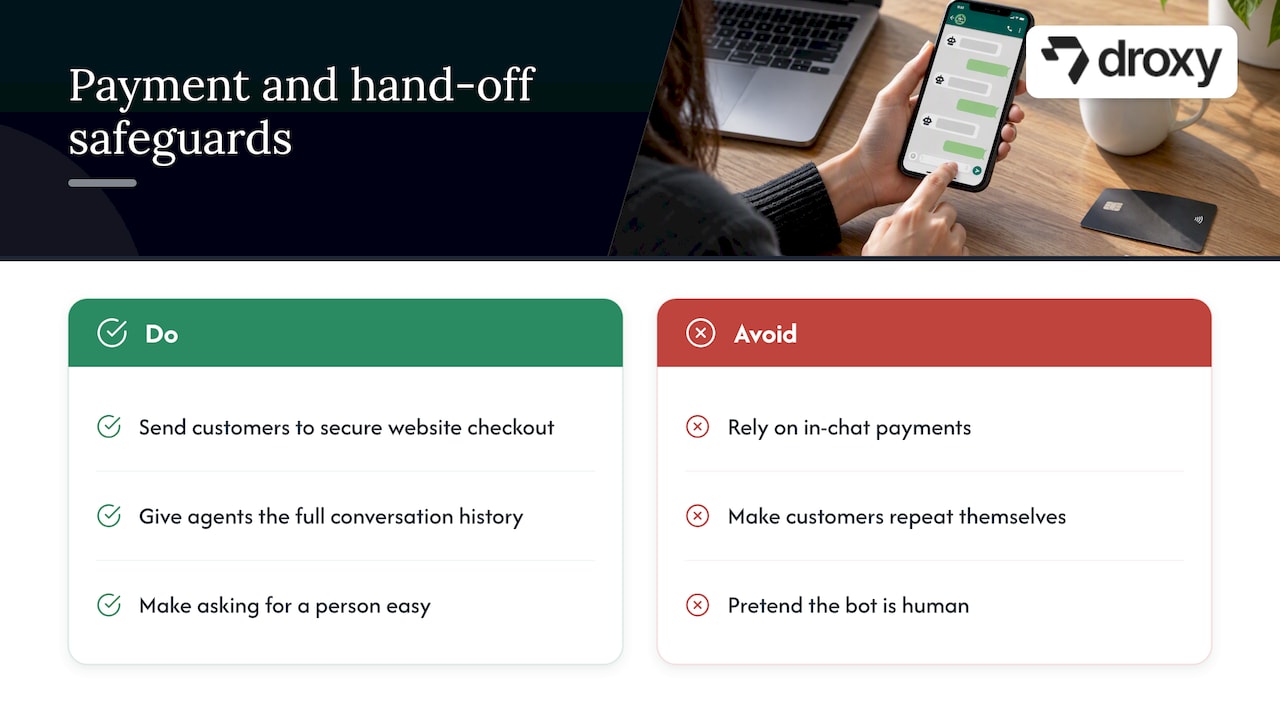
In-chat payments are a harder sell than you expect. Retail analysts quoted by the Sunday Times in South Africa describe a trust gap around paying in-app: while most retailers use WhatsApp for support, only about 17% have integrated payment links. The practical approach is to let the bot qualify, answer and recommend, then send the customer to your secure website checkout.
Transfers can frustrate people. The common complaint is having to repeat yourself after a hand-off. Make sure your human agents see the whole conversation, ideally inside the same tools they use for your CRM or helpdesk. Our guide to chatbot integration covers how to connect the pieces.
A bot that pretends to be human backfires. Keep the tone warm and on-brand, but make it easy to ask for a person.
Know Meta’s rules before you launch
Three points shape every WhatsApp project.
The 24-hour window. When a customer messages you, a customer service window opens and resets every time they write. Meta’s pricing page states that service conversations are free of charge within that window. Meta has changed its pricing structure several times, so confirm current rates on the official page before you budget.
Templates outside the window. Under the WhatsApp Business policy, you may only start a conversation with an approved message template. Marketing and authentication messages carry Meta fees even while a service window is open.
A human escape route. Your bot should always offer a way to reach a person, by agent transfer, phone or email. Relying on automated replies with no escalation path can put your account at risk of limitation.
On top of that, only message people who have opted in, and make opting out easy.
Our perspective: start narrow, measure, then widen
We built Droxy because we saw the same pattern in every industry we serve: businesses lose leads not because they lack interest, but because replies come too late. Over 60,000 users now run their customer service on our platform, and the lesson that holds up is simple. Pick one conversation that is frequent, factual and slightly annoying for your team, and automate that first.
Three habits separate good rollouts from disappointing ones.
Train on your real material. The bot should draw from your website, documents and policies, not generic answers.
Design the hand-off first. Decide which topics go to a person, and make sure the history travels with the conversation.
Review weekly. Read the conversations the bot could not resolve. They tell you what to add.
WhatsApp is also rarely the only channel. Many of our customers run the same agent on their website, phone line, Instagram and Facebook, so a customer gets the same answer wherever they ask. If you are still choosing between messaging channels, our pilot comparing WhatsApp and Messenger for support teams is a good starting point.
— Elena
How to launch your first use case in four steps
Pick the conversation. Export two weeks of messages and tickets. Choose the topic that appears most and has a clear answer.
Write the answers and the boundaries. Gather policies, prices, hours and FAQs. List what the bot must never answer alone, such as refunds over a limit or anything medical.
Connect your systems. Link your calendar, store, CRM or helpdesk so the bot can act, not just talk. API and Zapier connections cover most setups.
Pilot, then expand. Run it for two to four weeks with your own team watching. Track resolution rate, response time, hand-off rate and leads captured.
Building the business case matters too. If you need to show finance what a bot will return, use our chatbot ROI calculation guide. For a broader view of how teams tie chatbot work to measurable outcomes, this walkthrough on chatbot development ROI is a helpful companion.
Run these use cases with Droxy
Droxy is a no-code platform, so you can build and launch an AI agent without developers. The WhatsApp agent covers support, lead capture, appointment booking, multilingual replies and human hand-off, and you can customize its voice to match your brand. The same agent can run on your website, phone, Instagram and Facebook. Plans start at $16 per month for Basic, $80 for Advanced and $240 for Enterprise, so you can begin with one use case and grow from there.
If you manage client accounts, our agency program lets you create white-labeled agents under your own brand and control client access from one place.
FAQ
What is the most common WhatsApp chatbot use case?
Customer support is the most common. In the South African retail survey cited above, 69.2% of respondents used WhatsApp mainly for support. Order status, hours, pricing and returns questions are usually the first to automate.
Can a WhatsApp chatbot take payments?
Technically it can send payment links, but many customers hesitate to pay inside a chat. Reporting on retail suggests a hybrid approach works better: the bot answers questions and qualifies the buyer, then sends them to a secure web checkout.
Is a WhatsApp chatbot free to run?
Not entirely. Replies inside the 24-hour customer service window are free according to Meta, but marketing and authentication templates carry fees, and your chatbot platform has its own subscription. Check Meta’s pricing page for current rates before you plan a campaign.
Do I need a human agent behind the bot?
Yes. Meta’s policy expects a clear escalation path, and customers expect one too. Set rules for when the bot hands off, and make sure the agent sees the full chat history.
Which industries benefit most?
Any business with frequent, repeatable conversations does: ecommerce, hospitality, home services, real estate, clinics and agencies. The strongest results come when the use case is specific, such as booking or order tracking, and not a general-purpose bot.
Sources
Customers prefer WhatsApp over calls, The Standard (Hong Kong)
WhatsApp pops up in retail, but shoppers are still wary, BusinessDay
WhatsApp clicks into retail, but shoppers still wary of paying in-app, Sunday Times
Recommended
The best WhatsApp chatbot use cases are the repetitive, high-volume conversations your team answers all day: order and delivery questions, appointment booking, lead qualification, reminders and FAQs. A chatbot handles those instantly, at any hour, and hands the rest to a person. Below, you will find nine use cases by industry, what the evidence says about each, the Meta rules that shape them, and a simple way to pick your first one.
DroxyAnswer WhatsApp inquiries fasterDroxy lets businesses deploy AI agents on WhatsApp to answer customer questions instantly, around the clock, alongside other channels.Explore Droxy
TL;DR
Start with the questions you answer most often. Order status, opening hours, pricing and booking requests are the easiest wins.
WhatsApp works best as a front door for support, booking and lead qualification. For payments, a trusted web checkout often converts better than in-chat payment.
Replies inside the 24-hour customer service window are free. Marketing and authentication messages always carry Meta fees.
Always offer a clear path to a human, both for customers and to stay within Meta’s policy.
Pick one use case, run it for a few weeks, measure, then expand.
Table of Contents
Why WhatsApp is worth automating
The nine use cases, by industry
Quick comparison: which use case fits which business
Where WhatsApp chatbots fall short
Know Meta’s rules before you launch
Our perspective: start narrow, measure, then widen
How to launch your first use case in four steps
Run these use cases with Droxy
Sources
Why WhatsApp is worth automating
Customers already live in the app. A 2024 survey of 500 consumers in Hong Kong found that 46% preferred WhatsApp for contacting businesses, against 29% for email and 28% for phone. That is one market, so treat it as a signal and not a global rule. Still, it matches what many owners see: customers message first and expect an answer in minutes.
That expectation is where small teams lose business. An inquiry that sits for three hours at 9 p.m. often goes to a competitor. A chatbot closes that gap, and it works around the clock while your staff handle the conversations that need judgment.
A good bot is not a wall. It answers what it can, captures what it cannot, and passes the conversation on with the full history attached.
The nine use cases, by industry
1. Order tracking and delivery updates (ecommerce)
“Where is my order?” is the most common ticket in online retail, and it has a factual answer. Connect your chatbot to your store or shipping data and it can reply with status, carrier and expected date in seconds. Retail is already leaning this way: in a South African survey, 69.2% of retailers used WhatsApp for support, making it the most common use.
What to build: order lookup by order number or phone number, return and exchange policy answers, and a hand-off for damaged or missing items.
For a deeper catalog of store-specific ideas, see our guide to ecommerce chatbot use cases.
2. Product recommendations and pre-sale questions
Shoppers ask “Does this come in blue?” or “Which one fits a small kitchen?” before they buy. A bot trained on your catalog and product pages can answer, suggest alternatives and send a link to the product page. This is the sales-assist role: it qualifies interest and then moves the buyer to a secure page.
3. Appointment booking and reminders (beauty, hospitality, healthcare)
Booking is a natural fit because it is a short, structured conversation: service, date, time, confirmation. Reminders then cut no-shows. In a case study from WhatsApp, Yves Rocher in Hong Kong used WhatsApp automation for beauty treatments and reported a 21% increase in treatment bookings and a 17% rise in sales over three months. It is a single brand’s result, so do not promise yourself the same numbers. It does show that booking and reminders are worth testing.
What to build: availability check, booking, rescheduling, a reminder the day before and a one-tap cancel option.
4. Lead capture and qualification (real estate, agencies, home services)
In real estate and home services, the first business to reply usually wins the job. A chatbot can greet a new inquiry at once and ask the questions you would ask anyway:
Real estate: budget, area, bedrooms, move-in date, and whether the buyer wants a site visit.
Home services: type of problem, address or ZIP code, urgency, and preferred time window.
Agencies and consultants: company size, goal, timeline, and budget range.
The bot then books a visit or call, or sends a summary to the right person. Your team starts each conversation with the facts already collected.
5. Technician and service visit updates (home services, utilities)
Field service generates “when are you arriving?” messages. Claro Chile built a solution called Where is My Tech? on the WhatsApp Business Platform to automate communication around technician visits. A smaller home services company can do the same in spirit: confirm the appointment, send an arrival window, and let the customer reschedule in the chat.
6. Travel and time-sensitive notifications
Some messages are urgent and transactional. The travel agency Despegar used WhatsApp utility messages for important flight updates, improving open rates, click-through rates and customer response times. The same pattern fits hotels and restaurants: booking confirmations, check-in details, delay notices and table changes.
7. Patient communication for clinics (healthcare)
Practices get many calls that are not clinical: hours, directions, insurance accepted, how to prepare for a visit, booking and rescheduling. A WhatsApp bot can take these over so front-desk staff focus on patients in the room. Keep the bot to non-clinical tasks and send anything that sounds like a symptom, an emergency or a medical question to staff right away. Before you connect any patient information, check your obligations under HIPAA, which applies to many US practices, with your compliance officer or attorney. Outside clinics, the WHO has profiled Bot MD, a chat tool for doctors that connects with hospital information systems, which shows how far healthcare messaging can go when it is built carefully.
8. After-hours first response (any business)
You do not need a complex flow to benefit. A bot that answers after closing time, collects the customer’s need, and promises a follow-up by a specific time already improves the experience. It also stops the Monday-morning pile-up. Our guide on WhatsApp auto replies and templates for SMBs shows how to set up the basics.
9. Ticket deflection and FAQ answers
Most support queues are dominated by a short list of questions. If your bot answers the top ten from your help center, policies and product pages, ticket volume drops and your team handles fewer repeats. Feed it from several sources (website, documents, past answers) so replies stay consistent, and review the questions it could not answer every week. Those gaps are your next content to write.
Quick comparison: which use case fits which business
Business type | Best first use case | What the bot collects | When it hands off |
|---|---|---|---|
Online store | Order tracking and FAQs | Order number, email | Damaged item, refund dispute |
Salon, spa, restaurant | Booking and reminders | Service, date, party size | Special requests, complaints |
Real estate agency | Lead qualification | Budget, area, timeline | Ready to view a property |
Home services | Quote request and scheduling | Problem, ZIP code, urgency | Emergency, complex quote |
Clinic | Non-clinical front desk | Visit type, preferred time | Symptoms, urgent needs |
Agency or consultant | Intake for client accounts | Goal, budget, timeline | Discovery call |
Where WhatsApp chatbots fall short
Honesty about limits makes your rollout better.
In-chat payments are a harder sell than you expect. Retail analysts quoted by the Sunday Times in South Africa describe a trust gap around paying in-app: while most retailers use WhatsApp for support, only about 17% have integrated payment links. The practical approach is to let the bot qualify, answer and recommend, then send the customer to your secure website checkout.
Transfers can frustrate people. The common complaint is having to repeat yourself after a hand-off. Make sure your human agents see the whole conversation, ideally inside the same tools they use for your CRM or helpdesk. Our guide to chatbot integration covers how to connect the pieces.
A bot that pretends to be human backfires. Keep the tone warm and on-brand, but make it easy to ask for a person.
Know Meta’s rules before you launch
Three points shape every WhatsApp project.
The 24-hour window. When a customer messages you, a customer service window opens and resets every time they write. Meta’s pricing page states that service conversations are free of charge within that window. Meta has changed its pricing structure several times, so confirm current rates on the official page before you budget.
Templates outside the window. Under the WhatsApp Business policy, you may only start a conversation with an approved message template. Marketing and authentication messages carry Meta fees even while a service window is open.
A human escape route. Your bot should always offer a way to reach a person, by agent transfer, phone or email. Relying on automated replies with no escalation path can put your account at risk of limitation.
On top of that, only message people who have opted in, and make opting out easy.
Our perspective: start narrow, measure, then widen
We built Droxy because we saw the same pattern in every industry we serve: businesses lose leads not because they lack interest, but because replies come too late. Over 60,000 users now run their customer service on our platform, and the lesson that holds up is simple. Pick one conversation that is frequent, factual and slightly annoying for your team, and automate that first.
Three habits separate good rollouts from disappointing ones.
Train on your real material. The bot should draw from your website, documents and policies, not generic answers.
Design the hand-off first. Decide which topics go to a person, and make sure the history travels with the conversation.
Review weekly. Read the conversations the bot could not resolve. They tell you what to add.
WhatsApp is also rarely the only channel. Many of our customers run the same agent on their website, phone line, Instagram and Facebook, so a customer gets the same answer wherever they ask. If you are still choosing between messaging channels, our pilot comparing WhatsApp and Messenger for support teams is a good starting point.
— Elena
How to launch your first use case in four steps
Pick the conversation. Export two weeks of messages and tickets. Choose the topic that appears most and has a clear answer.
Write the answers and the boundaries. Gather policies, prices, hours and FAQs. List what the bot must never answer alone, such as refunds over a limit or anything medical.
Connect your systems. Link your calendar, store, CRM or helpdesk so the bot can act, not just talk. API and Zapier connections cover most setups.
Pilot, then expand. Run it for two to four weeks with your own team watching. Track resolution rate, response time, hand-off rate and leads captured.
Building the business case matters too. If you need to show finance what a bot will return, use our chatbot ROI calculation guide. For a broader view of how teams tie chatbot work to measurable outcomes, this walkthrough on chatbot development ROI is a helpful companion.
Run these use cases with Droxy
Droxy is a no-code platform, so you can build and launch an AI agent without developers. The WhatsApp agent covers support, lead capture, appointment booking, multilingual replies and human hand-off, and you can customize its voice to match your brand. The same agent can run on your website, phone, Instagram and Facebook. Plans start at $16 per month for Basic, $80 for Advanced and $240 for Enterprise, so you can begin with one use case and grow from there.
If you manage client accounts, our agency program lets you create white-labeled agents under your own brand and control client access from one place.
FAQ
What is the most common WhatsApp chatbot use case?
Customer support is the most common. In the South African retail survey cited above, 69.2% of respondents used WhatsApp mainly for support. Order status, hours, pricing and returns questions are usually the first to automate.
Can a WhatsApp chatbot take payments?
Technically it can send payment links, but many customers hesitate to pay inside a chat. Reporting on retail suggests a hybrid approach works better: the bot answers questions and qualifies the buyer, then sends them to a secure web checkout.
Is a WhatsApp chatbot free to run?
Not entirely. Replies inside the 24-hour customer service window are free according to Meta, but marketing and authentication templates carry fees, and your chatbot platform has its own subscription. Check Meta’s pricing page for current rates before you plan a campaign.
Do I need a human agent behind the bot?
Yes. Meta’s policy expects a clear escalation path, and customers expect one too. Set rules for when the bot hands off, and make sure the agent sees the full chat history.
Which industries benefit most?
Any business with frequent, repeatable conversations does: ecommerce, hospitality, home services, real estate, clinics and agencies. The strongest results come when the use case is specific, such as booking or order tracking, and not a general-purpose bot.
Sources
Customers prefer WhatsApp over calls, The Standard (Hong Kong)
WhatsApp pops up in retail, but shoppers are still wary, BusinessDay
WhatsApp clicks into retail, but shoppers still wary of paying in-app, Sunday Times
Recommended



🚀
Powered by Droxy
Turn every interaction into a conversion
Customer facing AI agents that engage, convert, and support so you can scale what matters.
✨
Learn more
Recent posts

Insights
3 min read
Introducing Agent Memories
Improve your agents' performance with Agent Memories. Prevent agents from repeating the same mistakes by giving them feedback.
Read more

Insights
15 min read
HVAC Marketing in 2025: The Definitive Lead Gen Guide
Discover 15 proven HVAC marketing strategies, plus learn how Droxy's AI website agent converts curious visitors into qualified leads by answering their questions instantly - right when they're most interested in your services.
Read more

Insights
10 min read
10 Best AI Sales Agents in 2025: Tested & Ranked
Discover the top 10 AI sales agents of 2025, designed to enhance lead generation, personalize outreach, and ultimately, close more deals
Read more
Insights
3 min read
Introducing Agent Memories
Improve your agents' performance with Agent Memories. Prevent agents from repeating the same mistakes by giving them feedback.
Read more
Insights
15 min read
HVAC Marketing in 2025: The Definitive Lead Gen Guide
Discover 15 proven HVAC marketing strategies, plus learn how Droxy's AI website agent converts curious visitors into qualified leads by answering their questions instantly - right when they're most interested in your services.
Read more