Support Triage Automation: A Practical Setup Guide
Support Triage Automation: A Practical Setup Guide
Insights
17 min

Support triage automation means letting software handle the first steps of every incoming request: work out what it is, decide how urgent it is, and send it to the right person or answer it on the spot. Done well, your team stops sorting and starts solving. Done badly, it sends angry customers to the wrong queue faster than before. This guide shows you how to build it properly, step by step.
DroxyAnswer support requests fasterDroxy AI agents answer customer questions across chat, phone, WhatsApp, Instagram and Facebook, and can hand off requests to your team.Explore Droxy
TL;DR
Triage is three separate jobs: classify, prioritize, route. Automate and test each one on its own.
Start with a short list of categories and four priority levels, then add rules for the obvious cases before adding AI for the messy ones.
Always keep a clear path to a human for urgent, sensitive or unclear requests.
Measure misroutes, reassignments, time to first response and time to human, then review them every month.
Droxy lets you deploy AI agents that answer, capture details and hand off across chat, phone, WhatsApp, Instagram and Facebook without code.
Table of Contents
What support triage actually involves
What to categorize, prioritize and route
How to build categories and priority levels
Rules, AI or both?
Routing urgent, sensitive and unclear requests
Benefits and risks to plan for
Step-by-step: setting up support triage automation
How to measure and improve triage
Our perspective: triage is a trust problem, not a speed problem
Where Droxy fits
Sources
What support triage actually involves
Triage is the front door of your support operation. Every message that arrives, whether by email, chat, phone or social, needs three decisions before anyone can help.
The IF4IT service management guidance describes them as distinct but connected controls:
Classification identifies the type of work, the affected service, the requester’s context and what needs to be fulfilled.
Prioritization weighs impact, urgency, risk and service expectations.
Routing selects the responsible queue, person, workflow, vendor or support group.
The same guidance argues that keeping these three apart reduces inappropriate handling and misrouting. That is a useful design rule for automation. If one big “smart” step does everything, you cannot tell which part failed when a ticket lands in the wrong place.
Manual triage usually fails in predictable ways. One person reads every message, so the queue stalls when they are away. Two people label the same problem differently. Urgent messages sit behind a pile of password resets. Automation fixes these by applying the same logic to every request, at any hour.
What to categorize, prioritize and route
Before you touch a tool, decide what information you want attached to every request. The IF4IT guidance lists the useful attributes: work type, affected service, customer group, fulfillment area, source channel, impact, urgency, risk and required action.
Typical classes include incidents, service requests, access requests, information requests, approvals, monitoring events, changes, problem investigations and general customer inquiries. Not every business needs all of them. A small online shop might only need five.
Here is how that looks for different Droxy audiences:
Business | Typical categories | Usually urgent |
|---|---|---|
Ecommerce | Order status, returns, product questions, payment issues | Failed payments, wrong or damaged items |
Hospitality | Booking, changes, cancellations, special requests | Same-day changes, guest complaints on site |
Home services | Quote request, scheduling, emergency call-out | No heat, active leaks, safety issues |
Real estate | New listing inquiry, viewing request, existing client | Hot buyer ready to view today |
Healthcare practice | Appointment, billing, records, clinical question | Anything describing symptoms or an emergency |
Agency | Client onboarding, change requests, outages | Client-facing downtime |
Notice that “urgent” depends on the business. A late reply to a product question costs you a sale. A late reply to a patient describing symptoms can cost far more. Define urgency in your own terms, not a generic template.
How to build categories and priority levels
Most teams over-engineer this step. Fifty categories look thorough on a whiteboard and fall apart in practice because nobody, human or machine, can tell them apart reliably.
Keep the category list short
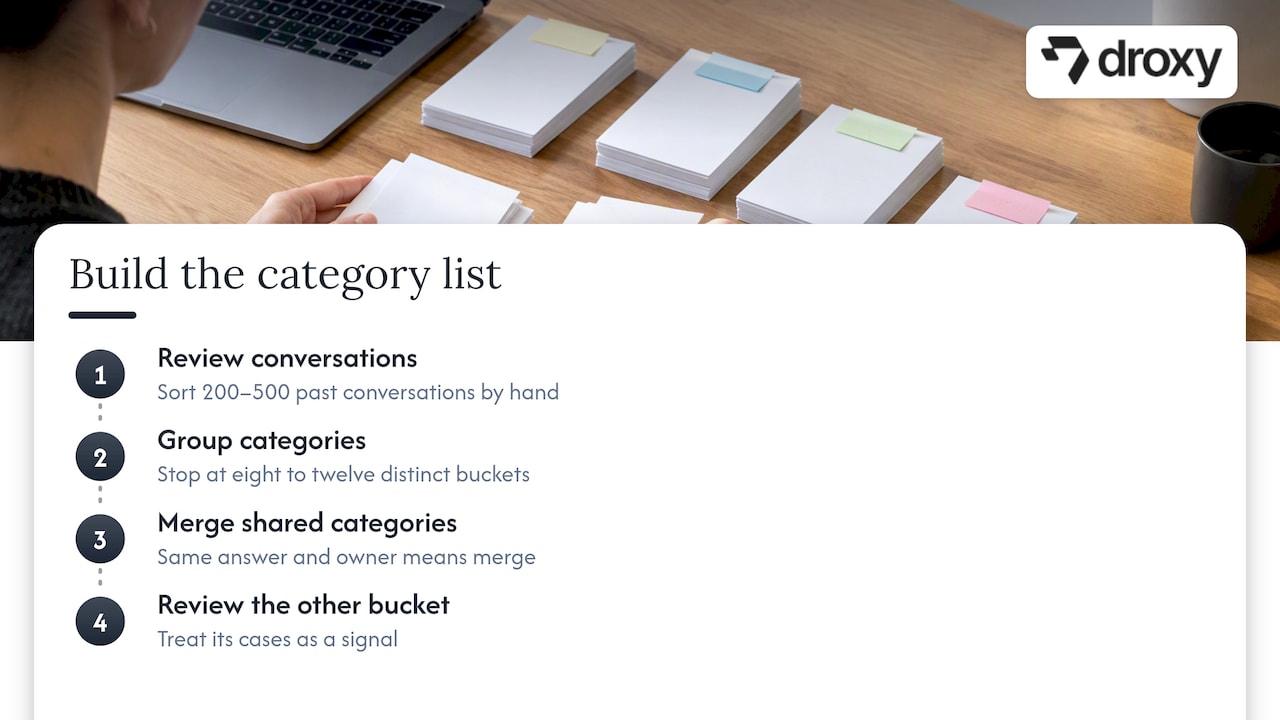
Pull your last 200 to 500 conversations and sort them by hand. Group them until each bucket is clearly different from the others, and stop at eight to twelve. If two categories always get the same answer and go to the same person, merge them. Add an “other” bucket, and treat anything that lands there as a signal to review.
Use four priority levels
Four levels are easy to remember and easy to automate. Define each by impact and urgency, and write one example for each:
Critical: safety risk, money at risk right now, or a complete stoppage. Example: a customer cannot check out, or a homeowner reports a burst pipe.
High: a significant problem with a short deadline. Example: a guest arriving tonight whose booking is missing.
Normal: a real question or problem with no immediate deadline.
Low: general information or a request that can wait a day or two.
Attach a response target to each level. Your own team’s capacity should set the numbers, since an ambitious target you cannot meet is worse than a modest one you can.
Write the rules in plain language first
For each category and level, write one sentence: “If a message mentions a refund and an order number, classify it as Returns, priority Normal, route to the orders queue.” If you cannot write the sentence, the AI will not guess it correctly either.
Rules, AI or both?
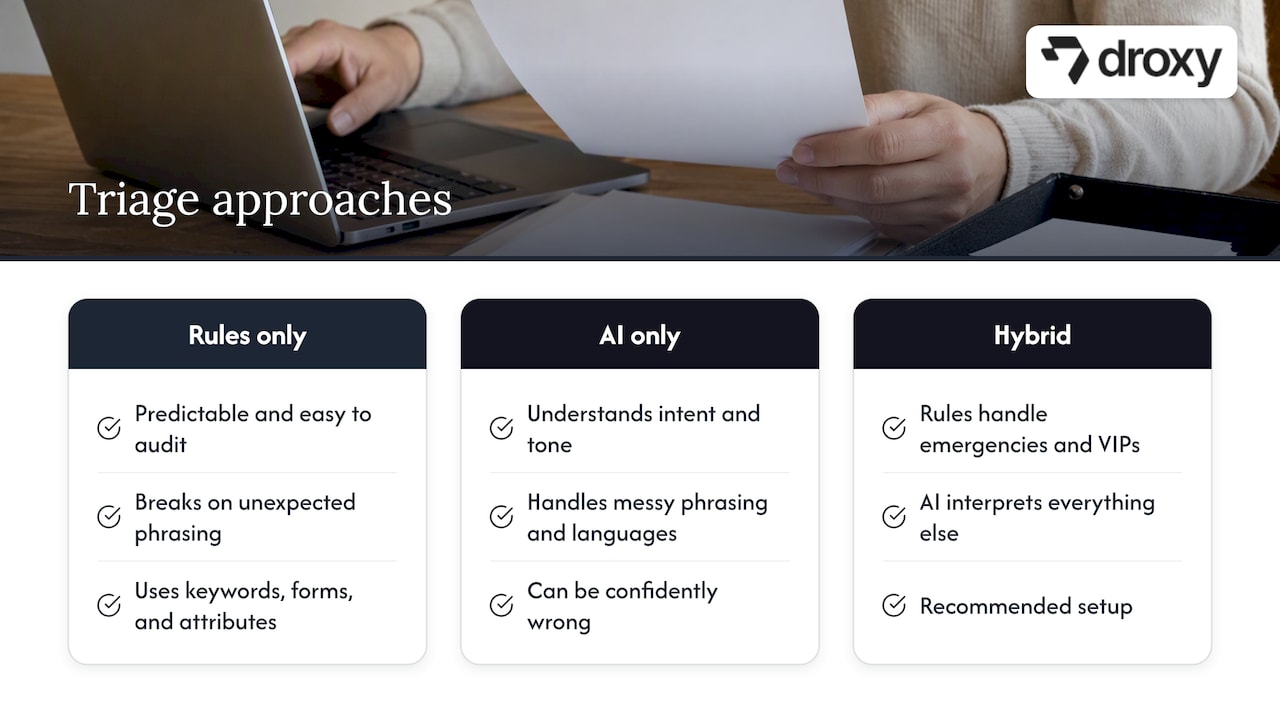
You have three options, and the right answer for most businesses is a combination.
Rules only. Keyword matches, form fields, channel and customer attributes. They are predictable and easy to audit, but they break when customers phrase things in unexpected ways. “My order never showed up” and “where is my stuff” mean the same thing, and a keyword list will miss one of them.
AI only. A language model reads the message, understands intent and tone, and picks a category. It handles messy phrasing and many languages well. It can also be confidently wrong, so it needs guardrails.
Hybrid. Rules handle what must never fail: emergency words, VIP customers, specific order values. AI handles interpretation of everything else. This is the setup we recommend.
IF4IT’s guidance says routing rules should reflect ownership, fulfillment responsibility, approvals, technical skills, business rules, escalation paths and system-of-record requirements, while preserving context, priority and status. In practice that last point matters most. When a request moves from a bot to a person, or from one team to another, the customer should never have to repeat themselves.
Routing urgent, sensitive and unclear requests
The most important design decision in triage automation is what happens when the system is not sure. Build three explicit escape routes.
Urgent requests
Set rules that bypass the normal flow. Specific words, such as “gas smell,” “chargeback,” “locked out,” or “chest pain,” should trigger an immediate alert and a human hand-off, not a polite automated answer. For field-based businesses, getting that alert to the right person fast matters as much as detecting it, and this guide to real-time notifications for field teams covers how managers keep the people on the ground informed.
Sensitive requests
Complaints, legal threats, billing disputes, health details and anything involving a vulnerable customer should go to a trained person. For healthcare practices in particular, the agent should schedule, answer logistics questions and collect details, but never offer clinical advice. Our overview of healthcare contact center automation covers where that line sits.
Unclear requests
If the AI’s confidence is low, the best move is often a clarifying question: “Is this about an existing order or a new purchase?” If the second attempt still fails, hand off. Customers forgive a bot that admits its limits. They do not forgive one that loops.
Whatever the trigger, the hand-off itself must be fast and complete. The transcript, the customer’s details, the category and the priority all travel with the request. Our guide to chatbot human handoff goes into the mechanics, including how to aim for a short time to human.
Teams that route to specialists or external vendors can borrow from other industries too. This lead routing checklist for contractors shows how a fast, rules-based assignment keeps inbound requests from going cold, and the same logic applies to support queues.
Benefits and risks to plan for
The upside is real: less manual sorting, quicker first responses and a lighter load on your agents. A June 2026 study in JAMIA Open, based in the United States, evaluated language models for automated ticket handling and points to potential workload reduction and shorter response times.
The same research flags the risks: models can misjudge how complex a ticket is and give incorrect responses, especially on high-complexity tickets. Its conclusion is that human oversight has to continue. That matches what we see in practice. Automation is strongest on high-volume, low-complexity work, and weakest where judgment, empathy or liability are involved.
If you are weighing how far to trust language models in a service setting, these tips on using AI effectively from the therapy field make a similar point about keeping a professional in the loop.
Translate those risks into design choices:
Route complex or high-value tickets to people by default.
Let the AI answer only from a knowledge base you control.
Log every automated decision so you can audit it.
Review a sample of conversations every week at the start.
Step-by-step: setting up support triage automation
Audit your volume. Export a few hundred recent conversations from every channel. Count by topic and by how long each took.
Define categories and priorities. Use the short lists described above, with an example for each.
Decide what the AI may answer alone. Typically order status, opening hours, policies, pricing, how-to questions and booking.
Decide what always goes to a person. Disputes, safety, health, high-value accounts, repeated contacts.
Connect your knowledge. Point the agent at your help articles, product catalog, policies and past answers, so it replies in your voice with correct facts.
Wire up routing. Map each category to a queue, person or workflow, and make sure context travels with the request. Our notes on helpdesk chatbot integration walk through connecting to an existing system.
Test before launch. Run realistic and awkward messages through the system. Our chatbot testing checklist lists eleven cases worth covering.
Launch on one channel. Start with website chat or WhatsApp, watch the results, then expand.
Review and tune. Read the misroutes, fix the rule or the knowledge gap, and repeat.
How to measure and improve triage
You cannot improve what you do not count. Track a small set of numbers from the first day, and compare them to your pre-automation baseline.
Metric | What it tells you | What to do if it looks bad |
|---|---|---|
Misroute rate (tickets reassigned after first routing) | Whether categories and routing rules are accurate | Merge confusing categories, add examples |
Time to first response | Whether customers are being acknowledged quickly | Check channel coverage and after-hours behavior |
Time to human on escalations | Whether hand-off works | Review triggers, alerting and staffing |
Share resolved without a person | How much workload is actually removed | Expand knowledge base on top unresolved topics |
Priority overrides by agents | Whether urgency is judged correctly | Tighten the rules for critical and high |
Customer satisfaction on automated conversations | Whether speed is costing quality | Read the low-rated chats |
A few habits make the numbers useful:
Review a sample weekly. Twenty conversations read end to end teach you more than any dashboard.
Let agents flag errors. Give them one click to mark “wrong category” or “wrong priority.” Those flags are your training data.
Look at the “other” bucket. Rising volume there means a new topic is emerging.
Fix the source. If the same question keeps arriving, the answer may belong in your product or your website. We cover that in how to reduce support tickets.
If calls are a large part of your volume, analyzing them gives you the same visibility. Here is how to use AI to analyze calls.
Our perspective: triage is a trust problem, not a speed problem
We build AI agents for businesses that cannot afford to miss a message: shops with customers in several time zones, practices with phones that ring after hours, home service companies where the first reply wins the job. Speed matters to all of them. But after working with this problem, we think the best triage systems are designed around trust.
Customers trust a fast answer only if it is correct. Your team trusts automation only if they can see why it made a decision and override it. So we push for three things. First, a human-sounding agent that stays inside your brand voice and your own knowledge. Second, a visible, easy path to a person whenever the customer wants one or the situation calls for it. Third, analytics that show you what the agent handled and where it struggled, so you can improve it every month.
The businesses that get the most from automation do not try to automate everything. They automate the repetitive majority, protect the sensitive minority, and keep their people for the conversations that need them.
— Elena
Where Droxy fits
Droxy is a no-code platform for deploying AI agents that answer customers, capture leads, book appointments and hand off to your team. You can run them on a website agent, a phone agent, a WhatsApp agent, plus Instagram and Facebook, all customized to your voice and connected to your existing systems through API or Zapier. Smart routing, multilingual support and analytics are part of the platform, and agencies can white-label agents for their own clients.
Plans start from $16 per month for Basic, with Advanced from $80 per month and Enterprise from $240 per month. See the current options on the Droxy pricing page.
If you are still deciding between automation styles, our chatbots vs live chat checklist and our guide to customer service automation help you compare. For concrete outcomes, see these AI customer service examples.
FAQ
What is the difference between ticket triage and ticket routing?
Routing is one part of triage. Triage also includes classifying what the request is and deciding how urgent it is. Routing then sends it to the right owner. Treating them as separate steps makes problems easier to find.
Can AI handle support triage without humans?
It can handle the routine majority, such as order status, policies and bookings. It should not work alone on complex, sensitive or high-value requests, since research shows models can misjudge complexity and respond incorrectly. Keep a clear hand-off to a person for those cases.
How many categories and priority levels do I need?
Start with eight to twelve categories and four priority levels. Add more only when a real pattern in your conversations demands it. Too many options lower accuracy for both people and AI.
How long does it take to set up?
The thinking, meaning categories, rules and knowledge, takes the longest. With a no-code platform, a single channel can be live quickly once those are defined. Plan a few weeks of weekly reviews afterward to tune it.
How do I know if triage automation is working?
Compare misroute rate, time to first response, time to human and the share resolved without a person against your baseline. Read a sample of conversations every week. If agents keep overriding categories or priorities, the rules need work.
Sources
IF4IT: Classify, prioritize, and route service work consistently
JAMIA Open: Evaluating large language models for automated ticket handling (June 2026)
Recommended
Support triage automation means letting software handle the first steps of every incoming request: work out what it is, decide how urgent it is, and send it to the right person or answer it on the spot. Done well, your team stops sorting and starts solving. Done badly, it sends angry customers to the wrong queue faster than before. This guide shows you how to build it properly, step by step.
DroxyAnswer support requests fasterDroxy AI agents answer customer questions across chat, phone, WhatsApp, Instagram and Facebook, and can hand off requests to your team.Explore Droxy
TL;DR
Triage is three separate jobs: classify, prioritize, route. Automate and test each one on its own.
Start with a short list of categories and four priority levels, then add rules for the obvious cases before adding AI for the messy ones.
Always keep a clear path to a human for urgent, sensitive or unclear requests.
Measure misroutes, reassignments, time to first response and time to human, then review them every month.
Droxy lets you deploy AI agents that answer, capture details and hand off across chat, phone, WhatsApp, Instagram and Facebook without code.
Table of Contents
What support triage actually involves
What to categorize, prioritize and route
How to build categories and priority levels
Rules, AI or both?
Routing urgent, sensitive and unclear requests
Benefits and risks to plan for
Step-by-step: setting up support triage automation
How to measure and improve triage
Our perspective: triage is a trust problem, not a speed problem
Where Droxy fits
Sources
What support triage actually involves
Triage is the front door of your support operation. Every message that arrives, whether by email, chat, phone or social, needs three decisions before anyone can help.
The IF4IT service management guidance describes them as distinct but connected controls:
Classification identifies the type of work, the affected service, the requester’s context and what needs to be fulfilled.
Prioritization weighs impact, urgency, risk and service expectations.
Routing selects the responsible queue, person, workflow, vendor or support group.
The same guidance argues that keeping these three apart reduces inappropriate handling and misrouting. That is a useful design rule for automation. If one big “smart” step does everything, you cannot tell which part failed when a ticket lands in the wrong place.
Manual triage usually fails in predictable ways. One person reads every message, so the queue stalls when they are away. Two people label the same problem differently. Urgent messages sit behind a pile of password resets. Automation fixes these by applying the same logic to every request, at any hour.
What to categorize, prioritize and route
Before you touch a tool, decide what information you want attached to every request. The IF4IT guidance lists the useful attributes: work type, affected service, customer group, fulfillment area, source channel, impact, urgency, risk and required action.
Typical classes include incidents, service requests, access requests, information requests, approvals, monitoring events, changes, problem investigations and general customer inquiries. Not every business needs all of them. A small online shop might only need five.
Here is how that looks for different Droxy audiences:
Business | Typical categories | Usually urgent |
|---|---|---|
Ecommerce | Order status, returns, product questions, payment issues | Failed payments, wrong or damaged items |
Hospitality | Booking, changes, cancellations, special requests | Same-day changes, guest complaints on site |
Home services | Quote request, scheduling, emergency call-out | No heat, active leaks, safety issues |
Real estate | New listing inquiry, viewing request, existing client | Hot buyer ready to view today |
Healthcare practice | Appointment, billing, records, clinical question | Anything describing symptoms or an emergency |
Agency | Client onboarding, change requests, outages | Client-facing downtime |
Notice that “urgent” depends on the business. A late reply to a product question costs you a sale. A late reply to a patient describing symptoms can cost far more. Define urgency in your own terms, not a generic template.
How to build categories and priority levels
Most teams over-engineer this step. Fifty categories look thorough on a whiteboard and fall apart in practice because nobody, human or machine, can tell them apart reliably.
Keep the category list short
Pull your last 200 to 500 conversations and sort them by hand. Group them until each bucket is clearly different from the others, and stop at eight to twelve. If two categories always get the same answer and go to the same person, merge them. Add an “other” bucket, and treat anything that lands there as a signal to review.
Use four priority levels
Four levels are easy to remember and easy to automate. Define each by impact and urgency, and write one example for each:
Critical: safety risk, money at risk right now, or a complete stoppage. Example: a customer cannot check out, or a homeowner reports a burst pipe.
High: a significant problem with a short deadline. Example: a guest arriving tonight whose booking is missing.
Normal: a real question or problem with no immediate deadline.
Low: general information or a request that can wait a day or two.
Attach a response target to each level. Your own team’s capacity should set the numbers, since an ambitious target you cannot meet is worse than a modest one you can.
Write the rules in plain language first
For each category and level, write one sentence: “If a message mentions a refund and an order number, classify it as Returns, priority Normal, route to the orders queue.” If you cannot write the sentence, the AI will not guess it correctly either.
Rules, AI or both?
You have three options, and the right answer for most businesses is a combination.
Rules only. Keyword matches, form fields, channel and customer attributes. They are predictable and easy to audit, but they break when customers phrase things in unexpected ways. “My order never showed up” and “where is my stuff” mean the same thing, and a keyword list will miss one of them.
AI only. A language model reads the message, understands intent and tone, and picks a category. It handles messy phrasing and many languages well. It can also be confidently wrong, so it needs guardrails.
Hybrid. Rules handle what must never fail: emergency words, VIP customers, specific order values. AI handles interpretation of everything else. This is the setup we recommend.
IF4IT’s guidance says routing rules should reflect ownership, fulfillment responsibility, approvals, technical skills, business rules, escalation paths and system-of-record requirements, while preserving context, priority and status. In practice that last point matters most. When a request moves from a bot to a person, or from one team to another, the customer should never have to repeat themselves.
Routing urgent, sensitive and unclear requests
The most important design decision in triage automation is what happens when the system is not sure. Build three explicit escape routes.
Urgent requests
Set rules that bypass the normal flow. Specific words, such as “gas smell,” “chargeback,” “locked out,” or “chest pain,” should trigger an immediate alert and a human hand-off, not a polite automated answer. For field-based businesses, getting that alert to the right person fast matters as much as detecting it, and this guide to real-time notifications for field teams covers how managers keep the people on the ground informed.
Sensitive requests
Complaints, legal threats, billing disputes, health details and anything involving a vulnerable customer should go to a trained person. For healthcare practices in particular, the agent should schedule, answer logistics questions and collect details, but never offer clinical advice. Our overview of healthcare contact center automation covers where that line sits.
Unclear requests
If the AI’s confidence is low, the best move is often a clarifying question: “Is this about an existing order or a new purchase?” If the second attempt still fails, hand off. Customers forgive a bot that admits its limits. They do not forgive one that loops.
Whatever the trigger, the hand-off itself must be fast and complete. The transcript, the customer’s details, the category and the priority all travel with the request. Our guide to chatbot human handoff goes into the mechanics, including how to aim for a short time to human.
Teams that route to specialists or external vendors can borrow from other industries too. This lead routing checklist for contractors shows how a fast, rules-based assignment keeps inbound requests from going cold, and the same logic applies to support queues.
Benefits and risks to plan for
The upside is real: less manual sorting, quicker first responses and a lighter load on your agents. A June 2026 study in JAMIA Open, based in the United States, evaluated language models for automated ticket handling and points to potential workload reduction and shorter response times.
The same research flags the risks: models can misjudge how complex a ticket is and give incorrect responses, especially on high-complexity tickets. Its conclusion is that human oversight has to continue. That matches what we see in practice. Automation is strongest on high-volume, low-complexity work, and weakest where judgment, empathy or liability are involved.
If you are weighing how far to trust language models in a service setting, these tips on using AI effectively from the therapy field make a similar point about keeping a professional in the loop.
Translate those risks into design choices:
Route complex or high-value tickets to people by default.
Let the AI answer only from a knowledge base you control.
Log every automated decision so you can audit it.
Review a sample of conversations every week at the start.
Step-by-step: setting up support triage automation
Audit your volume. Export a few hundred recent conversations from every channel. Count by topic and by how long each took.
Define categories and priorities. Use the short lists described above, with an example for each.
Decide what the AI may answer alone. Typically order status, opening hours, policies, pricing, how-to questions and booking.
Decide what always goes to a person. Disputes, safety, health, high-value accounts, repeated contacts.
Connect your knowledge. Point the agent at your help articles, product catalog, policies and past answers, so it replies in your voice with correct facts.
Wire up routing. Map each category to a queue, person or workflow, and make sure context travels with the request. Our notes on helpdesk chatbot integration walk through connecting to an existing system.
Test before launch. Run realistic and awkward messages through the system. Our chatbot testing checklist lists eleven cases worth covering.
Launch on one channel. Start with website chat or WhatsApp, watch the results, then expand.
Review and tune. Read the misroutes, fix the rule or the knowledge gap, and repeat.
How to measure and improve triage
You cannot improve what you do not count. Track a small set of numbers from the first day, and compare them to your pre-automation baseline.
Metric | What it tells you | What to do if it looks bad |
|---|---|---|
Misroute rate (tickets reassigned after first routing) | Whether categories and routing rules are accurate | Merge confusing categories, add examples |
Time to first response | Whether customers are being acknowledged quickly | Check channel coverage and after-hours behavior |
Time to human on escalations | Whether hand-off works | Review triggers, alerting and staffing |
Share resolved without a person | How much workload is actually removed | Expand knowledge base on top unresolved topics |
Priority overrides by agents | Whether urgency is judged correctly | Tighten the rules for critical and high |
Customer satisfaction on automated conversations | Whether speed is costing quality | Read the low-rated chats |
A few habits make the numbers useful:
Review a sample weekly. Twenty conversations read end to end teach you more than any dashboard.
Let agents flag errors. Give them one click to mark “wrong category” or “wrong priority.” Those flags are your training data.
Look at the “other” bucket. Rising volume there means a new topic is emerging.
Fix the source. If the same question keeps arriving, the answer may belong in your product or your website. We cover that in how to reduce support tickets.
If calls are a large part of your volume, analyzing them gives you the same visibility. Here is how to use AI to analyze calls.
Our perspective: triage is a trust problem, not a speed problem
We build AI agents for businesses that cannot afford to miss a message: shops with customers in several time zones, practices with phones that ring after hours, home service companies where the first reply wins the job. Speed matters to all of them. But after working with this problem, we think the best triage systems are designed around trust.
Customers trust a fast answer only if it is correct. Your team trusts automation only if they can see why it made a decision and override it. So we push for three things. First, a human-sounding agent that stays inside your brand voice and your own knowledge. Second, a visible, easy path to a person whenever the customer wants one or the situation calls for it. Third, analytics that show you what the agent handled and where it struggled, so you can improve it every month.
The businesses that get the most from automation do not try to automate everything. They automate the repetitive majority, protect the sensitive minority, and keep their people for the conversations that need them.
— Elena
Where Droxy fits
Droxy is a no-code platform for deploying AI agents that answer customers, capture leads, book appointments and hand off to your team. You can run them on a website agent, a phone agent, a WhatsApp agent, plus Instagram and Facebook, all customized to your voice and connected to your existing systems through API or Zapier. Smart routing, multilingual support and analytics are part of the platform, and agencies can white-label agents for their own clients.
Plans start from $16 per month for Basic, with Advanced from $80 per month and Enterprise from $240 per month. See the current options on the Droxy pricing page.
If you are still deciding between automation styles, our chatbots vs live chat checklist and our guide to customer service automation help you compare. For concrete outcomes, see these AI customer service examples.
FAQ
What is the difference between ticket triage and ticket routing?
Routing is one part of triage. Triage also includes classifying what the request is and deciding how urgent it is. Routing then sends it to the right owner. Treating them as separate steps makes problems easier to find.
Can AI handle support triage without humans?
It can handle the routine majority, such as order status, policies and bookings. It should not work alone on complex, sensitive or high-value requests, since research shows models can misjudge complexity and respond incorrectly. Keep a clear hand-off to a person for those cases.
How many categories and priority levels do I need?
Start with eight to twelve categories and four priority levels. Add more only when a real pattern in your conversations demands it. Too many options lower accuracy for both people and AI.
How long does it take to set up?
The thinking, meaning categories, rules and knowledge, takes the longest. With a no-code platform, a single channel can be live quickly once those are defined. Plan a few weeks of weekly reviews afterward to tune it.
How do I know if triage automation is working?
Compare misroute rate, time to first response, time to human and the share resolved without a person against your baseline. Read a sample of conversations every week. If agents keep overriding categories or priorities, the rules need work.
Sources
IF4IT: Classify, prioritize, and route service work consistently
JAMIA Open: Evaluating large language models for automated ticket handling (June 2026)
Recommended



🚀
Powered by Droxy
Turn every interaction into a conversion
Customer facing AI agents that engage, convert, and support so you can scale what matters.
✨
Learn more
Recent posts

Insights
3 min read
Introducing Agent Memories
Improve your agents' performance with Agent Memories. Prevent agents from repeating the same mistakes by giving them feedback.
Read more

Insights
15 min read
HVAC Marketing in 2025: The Definitive Lead Gen Guide
Discover 15 proven HVAC marketing strategies, plus learn how Droxy's AI website agent converts curious visitors into qualified leads by answering their questions instantly - right when they're most interested in your services.
Read more

Insights
10 min read
10 Best AI Sales Agents in 2025: Tested & Ranked
Discover the top 10 AI sales agents of 2025, designed to enhance lead generation, personalize outreach, and ultimately, close more deals
Read more
Insights
3 min read
Introducing Agent Memories
Improve your agents' performance with Agent Memories. Prevent agents from repeating the same mistakes by giving them feedback.
Read more
Insights
15 min read
HVAC Marketing in 2025: The Definitive Lead Gen Guide
Discover 15 proven HVAC marketing strategies, plus learn how Droxy's AI website agent converts curious visitors into qualified leads by answering their questions instantly - right when they're most interested in your services.
Read more