
To train a chatbot on your documents, you collect your best source material (PDFs, help articles, policies, price lists, web pages), clean it up, load it into a knowledge base the chatbot can search, then test it with real customer questions and fix the gaps. In most business tools this is not “training” in the machine-learning sense. The chatbot looks up the right passage in your content and writes the answer from it. That is good news: you can do it in an afternoon, without code, and improve it every week.
This guide walks through what training really means, how to prepare documents, how to train a chatbot on your website, how to test answers, and how to keep the whole thing accurate over time.
DroxyDeploy AI Agents for Customer ConversationsDroxy lets businesses deploy customizable AI agents across chat, phone, messaging, and Shopify to answer customer inquiries around the clock.Explore Droxy
TL;DR
“Training” a business chatbot usually means giving it a searchable knowledge base, not retraining the AI model itself.
Document quality decides answer quality: current, consistent, self-contained documents beat large piles of messy files.
Add your website as a source too, and re-sync it whenever prices, hours or policies change.
Test with real customer questions before launch, then review unanswered questions on a regular schedule.
Set a human hand-off for anything the chatbot cannot answer, and keep private data out of the knowledge base.
Table of Contents
What “training” a chatbot on documents really means
How a chatbot finds answers in your files
Step 1: Choose the documents that deserve to be in
Step 2: Prepare the content so answers stay accurate
Step 3: Upload documents and connect your website
Step 4: Set the voice, the limits and the hand-off
Step 5: Test before customers do
Step 6: Improve it over time
Privacy and security: what not to upload
Our perspective: start small, keep it honest
Put your documents to work with Droxy
Sources
What “training” a chatbot on documents really means
The word “training” covers two quite different things, and mixing them up leads to wasted effort.
Fine-tuning changes the model itself. According to TechTarget’s overview of training an LLM on your own data, fine-tuning takes a pretrained model and adjusts its parameters, such as weights, using custom data so its outputs lean toward your business. It needs prepared datasets, technical skill and compute budget. It also bakes knowledge into the model, so when your prices change you have to repeat the work.
Retrieval from a knowledge base leaves the model alone. Your documents sit in a searchable store, and for each question the chatbot pulls the most relevant passages and uses them to compose the answer. Change a document, and the next answer changes with it.
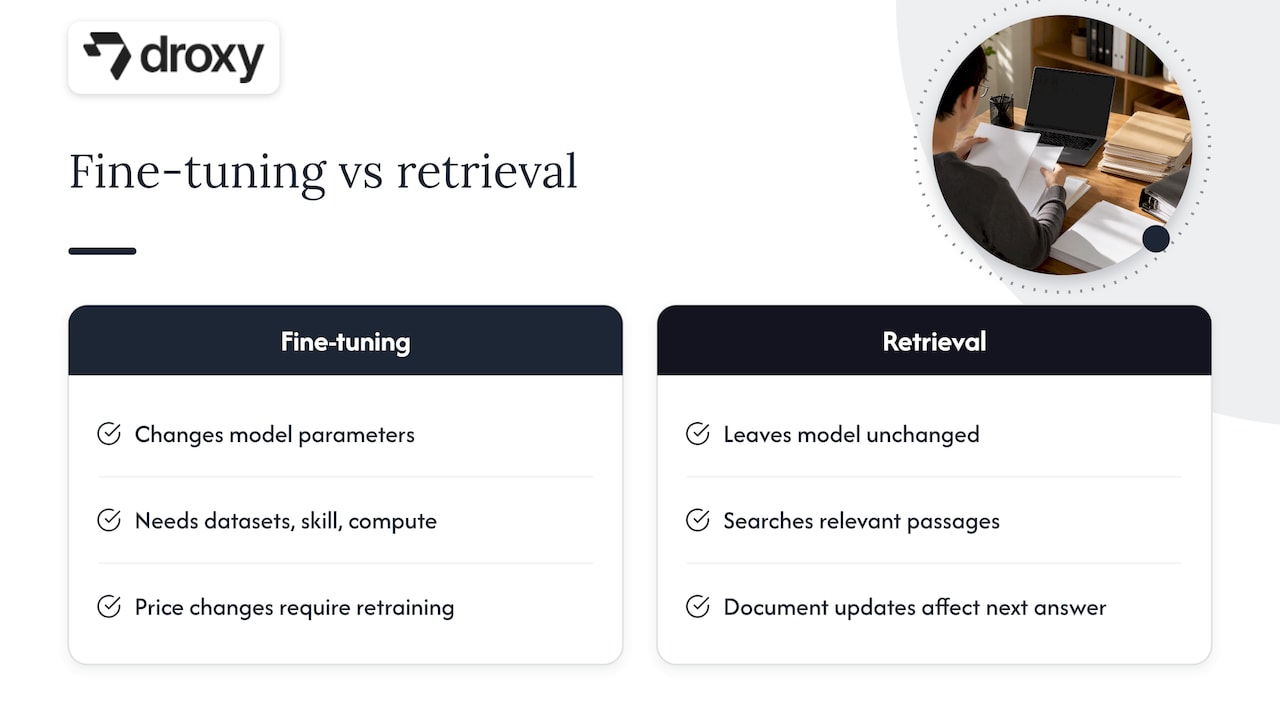
For customer support, sales questions and booking, retrieval is almost always the better fit. Your information changes often, you need answers that point back to a source, and you do not want an engineer involved every time a return policy is updated. If you want the deeper technical picture, our post on production RAG chatbots covers hybrid retrieval, metadata and confidence gates.
If you are wondering how this differs from pasting questions into a general-purpose assistant, see our comparison of an AI chatbot vs. ChatGPT. The short version: a business chatbot answers from your content, in your voice, on your channels.
How a chatbot finds answers in your files
Knowing the mechanics helps you prepare better documents. The pipeline documented by Illinois Chat, a university-built system, is a good general example. Uploaded files go through these stages:
Text extraction. The text is pulled out of the PDF, document or page.
Duplicate checking. Files already in the system are recognized.
Chunking. The text is split into smaller passages.
Embedding. Each chunk is converted into a numerical representation of its meaning.
Storage. The vectors, the text, metadata and the original file are saved in a searchable index.
When a customer asks something, the question is embedded the same way, the closest chunks are retrieved, and those passages are handed to the language model to write the reply. Some systems also pull in neighboring text around a matching chunk for context. Illinois Chat notes that this parent-document retrieval is a method it has explored but does not offer today, so do not assume every tool does it.
What this means for you in practice:
Chunks are the unit of retrieval. If one fact is split across three documents, the chatbot may find only one part.
Headings and clear wording matter. A passage that states “Return window: 30 days” is easier to match than one buried in a long paragraph of legal text.
Conflicting files produce conflicting answers. The chatbot has no way to know which version you meant.
Step 1: Choose the documents that deserve to be in
Start with what customers actually ask, not with everything you own. Pull the last two or three months of emails, chat logs, call notes and social messages, and list the 30 to 50 most common questions. Then find the document that answers each one.
Good first sources for most businesses:
Help center or FAQ pages
Shipping, returns and warranty policies
Product or service descriptions and price lists
Booking, cancellation and scheduling rules
Service area, opening hours and contact details
Onboarding guides, manuals and spec sheets
Anything your team keeps repeating in replies
Leave out internal drafts, outdated brochures, contracts with customer names, and anything you would not want quoted back to a stranger. A chatbot cannot tell a confidential memo from a public policy page unless you keep the memo out.
Step 2: Prepare the content so answers stay accurate
This is the step that separates a chatbot people trust from one that embarrasses you. Alibaba Cloud’s guidance on knowledge base Q&A puts it plainly: accuracy starts with high-quality, current source material, because outdated or inaccurate documents can mislead the model, while a well-structured knowledge base improves both retrieval and upkeep.
The same guidance recommends a few habits worth copying:
Make each document a self-contained unit. One topic per document, with no repeated copies of the same facts.
Consolidate related information. If shipping rules live in four places, merge them.
Standardize terminology. Pick one name for each product, plan or service, and keep a short glossary. If your site says “appointment” in one place and “visit” in another, the chatbot may treat them as different things.
Review for gaps, conflicts and outdated content on a regular schedule.
The broader point about consistency and fresh content is also why chatbots have become so central to how businesses handle customers, a theme explored in the role of chatbots in business success.
A quick cleanup checklist
Delete or archive old versions. Keep only the current one.
Add dates to policies (“Effective January 2026”) so you can spot stale files.
Turn scanned images into real text. A photographed price sheet may not be readable by the chatbot.
Write answers in full sentences. A table of abbreviations is hard to match to a question.
Put the most important rule first in each section, then the exceptions.
Split giant files (a 200-page manual) by topic when you can.
A worked example
Imagine a home service company with a price sheet that says “Standard call-out: see rates” and a separate FAQ that says “Call-out fee waived with repair.” A customer asks, “How much is a call-out?” The chatbot has two partial answers and no way to reconcile them. Rewrite both into one “Call-out fees” document that states the fee, when it is waived and which areas it covers. The chatbot now has one clear passage to retrieve, and your team stops hearing “your chat said something different.”
Step 3: Upload documents and connect your website
With clean content, loading it is the easy part. In a no-code platform you typically add sources in one place: upload files, paste text, or point the chatbot at a URL. Droxy lets you bring in knowledge from multiple sources, so documents, pages and text can feed the same agent.
Training a chatbot on your website
Many readers want to train a chatbot on their website rather than on files. The idea is the same: your pages become the knowledge base, and the chatbot answers from your actual services, prices and policies. A few practical rules:
Start with the pages that answer questions: pricing, services, FAQs, shipping and returns, contact and booking pages.
Skip noise. Blog posts from five years ago, tag archives and thin pages dilute retrieval.
Check that important text is real text. Prices or hours placed inside images are easy to miss.
Decide how updates reach the chatbot. Some tools re-crawl pages automatically, others need you to re-sync by hand. Find out which yours does, and write the answer into your routine.
Re-sync after every real change to prices, services, hours, service areas or policies.
A good habit is to treat your website as the single source of truth. When something changes, fix the page first, then refresh the chatbot. That way your site and your chatbot never disagree.
Mix sources deliberately
Website pages are great for public facts. Documents are better for details: manuals, spec sheets, detailed policies. Use both, but avoid pasting the same fact in two formats. Duplicates are exactly what cause mismatched answers when only one copy gets updated.
Step 4: Set the voice, the limits and the hand-off
A knowledge base tells the chatbot what is true. Instructions tell it how to behave. Before you test, decide:
Tone. Friendly and brief, formal and precise, or somewhere between. Write two or three sample replies you would be happy to see.
Scope. What the chatbot should answer, and what it should decline (legal advice, medical diagnosis, refunds above a threshold).
Fallback. What it says when it does not find an answer. “I don’t have that information, but I can connect you with our team” beats a confident guess every time.
Hand-off. When a person takes over, who gets notified, and through which channel.
Language. If you serve customers in more than one language, test each one separately.
Droxy agents support human hand-off, multilingual replies, lead capture and appointment booking, so the same trained agent can answer a question, collect contact details and book a visit. Our guide to FAQ chatbot design shows how to structure replies so most questions resolve in two exchanges.
Step 5: Test before customers do
Never launch on the strength of three friendly questions. Build a test set and run it.
Use real questions. Copy 30 to 50 from your inbox and chat history, in the customers’ own wording, typos included.
Add trick questions. Ask about things you do not offer, or about a policy that changed recently.
Check every answer against the source. Is it correct, complete and consistent with your current documents?
Try rephrasing. Ask the same thing three different ways.
Test the edges. Angry messages, vague messages, multi-part questions, questions in another language.
Confirm hand-off works. Trigger it on purpose and check that a person actually receives the conversation.
A useful frame comes from a NIST public-comment submission, whose authors recommend evaluating the retrieval part and the answer-generation part of a RAG system both separately and together. Applied to your chatbot, ask two questions about every wrong answer: did it find the right passage (retrieval), and did it use that passage faithfully (generation)? A wrong answer with the right passage retrieved is a wording or instruction problem. A wrong answer with the wrong passage is a content or structure problem. The same authors list accuracy, completeness, relevance and legality among the criteria worth checking, which makes a handy scorecard.
Keep a simple spreadsheet: question, expected answer, actual answer, pass or fail, fix. Re-run it after every significant content change.
Step 6: Improve it over time
Launch is the beginning. The best chatbots get better because someone looks at what went wrong each week.
Review what it could not answer
Open the conversations where the chatbot said it did not know, handed off to a human, or got a thumbs-down. Group them. Most fall into three buckets:
Missing content. The answer was never written down. Add it to the website or a document.
Unclear content. The answer exists but is vague or scattered. Rewrite it as one clear passage.
Out of scope. The question belongs with a person. Make sure the hand-off is smooth.
If customers keep asking whether you take Saturday appointments and the chatbot keeps stumbling, the fix is not a cleverer chatbot. It is one clear sentence on your site.
Set a schedule
Task | How often |
|---|---|
Re-sync website content | After any change to prices, hours, services or policies |
Review unanswered and handed-off conversations | Weekly at first, then monthly |
Re-run your test set | After major content updates |
Audit documents for conflicts and stale files | Quarterly |
Check analytics for top questions and drop-off points | Monthly |
Analytics are your guide here. Watch which questions come up most, where conversations end, and how many get escalated. Our chatbot best practices post covers the habits that keep results climbing, and AI chatbot personalization shows how to tailor replies once the basics are solid.
Privacy and security: what not to upload
Everything in your knowledge base can, in principle, surface in an answer. Treat it that way.
Keep personal customer data, payment details, health records and internal credentials out of the documents.
Separate public knowledge from internal knowledge, and give internal-only material to internal-only tools.
Know where your data is stored and who can access it, and ask your vendor how it is encrypted.
Publish a clear privacy policy that says what the chatbot collects and why.
The NIST submission cited above recommends a global AI privacy framework that standardizes data anonymization and encryption, with data-sharing standards that respect data sovereignty. You do not need a framework to start, but the principle holds for any business: anonymize what you can and share only what the chatbot needs. For depth, read our guides on AI chatbot security and the clauses a chatbot privacy policy should include. If you handle regulated data, such as patient information, talk to your compliance adviser or attorney before loading anything.
Our perspective: start small, keep it honest
We see the same pattern again and again. Teams assume the hard part is the AI. It is not. The hard part is deciding what is true, writing it down once, and keeping it current. The businesses that get the best results do not upload the most files. They upload the cleanest ones.
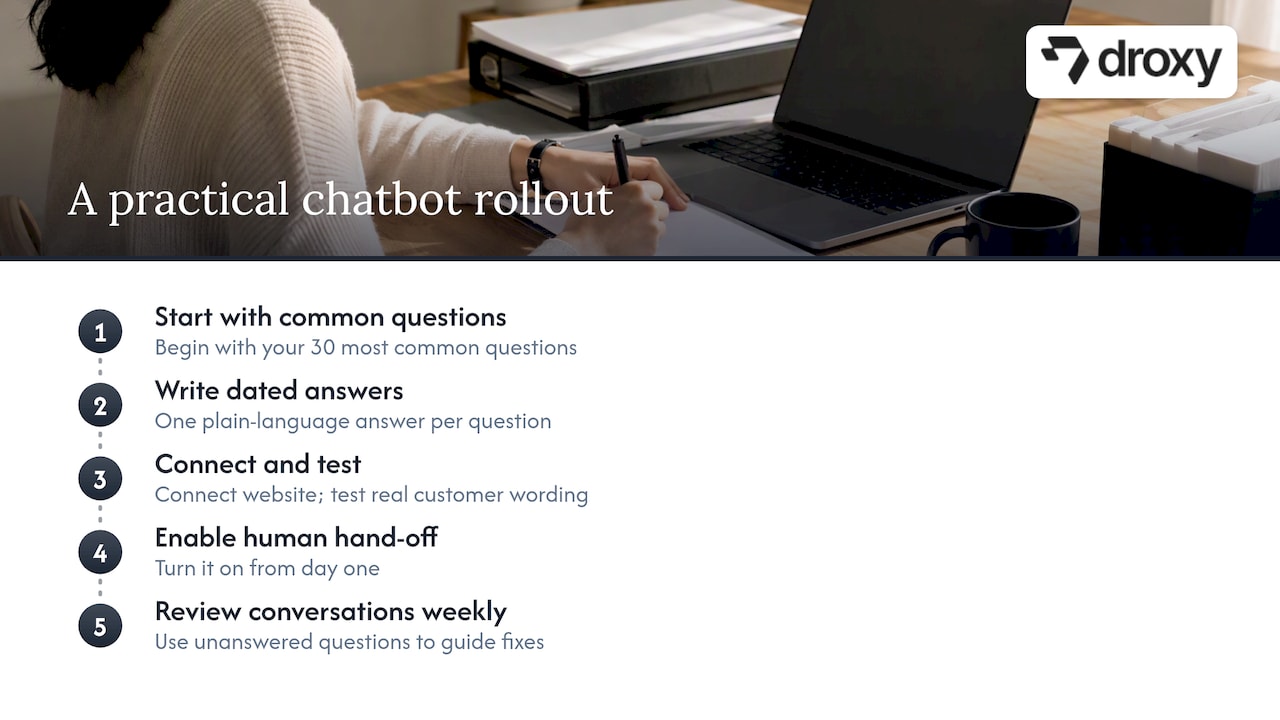
Our advice is simple. Begin with your 30 most common questions. Give each one a single, dated, plain-language answer. Connect your website as a source, test with real customer wording, and turn on human hand-off from day one so no customer is ever stuck. Then look at the conversations every week. Each unanswered question is a free lesson in what your customers need, and each fix makes your agent, and often your website, a little better.
A chatbot trained this way works around the clock without drifting from your voice, and your team spends its time on the conversations that really need a person. For more on the building blocks, see our step-by-step guide to training a chatbot and our overview of the five RAG parts of a knowledge base chatbot.
— Elena
Put your documents to work with Droxy
If you would rather not wire this together yourself, Droxy is a no-code platform for building AI agents that answer from your own content. You add your documents and website, shape the voice, and deploy the same agent on your website chat, phone, WhatsApp, Instagram, Facebook or Shopify store. It includes human hand-off, multilingual support, lead capture, appointment booking and analytics, and it connects to your existing systems through an API or Zapier.

Plans start from $16 per month for Basic, $80 per month for Advanced and $240 per month for Enterprise; see the pricing page for what each includes. Want to start with one channel? Take a look at the website agent, or create an account in the Droxy app and load your first documents.
FAQ
Can I train a chatbot on my own documents without coding?
Yes. No-code platforms let you upload files, paste text or add a website URL, and the chatbot retrieves answers from that content. You do not need to retrain a model. Your job is to supply clean, current documents and to test the answers.
What file types and content work best?
Clear, text-based documents with one topic each work best: help articles, policies, price lists, manuals and FAQs. Scanned images and text inside pictures may not be readable, so convert them to real text first. Check your platform’s supported formats before you upload.
How do I keep a website-trained chatbot up to date?
Re-sync it whenever you change prices, services, hours or policies, and confirm whether your tool re-crawls pages automatically or needs a manual refresh. Fix the website first, then refresh the chatbot, so the two always match. A monthly review of unanswered questions catches whatever slips through.
Will the chatbot make things up?
It can, especially when the answer is missing or documents conflict. You reduce the risk by keeping content consistent, telling the chatbot to say so when it does not know, and setting a human hand-off. Test with questions you know it cannot answer to see how it behaves.
Is it safe to upload customer or internal data?
Only upload what you are comfortable having quoted in an answer. Keep personal data, payment details and confidential files out of the knowledge base, and ask your vendor how data is stored and protected. For regulated information, check with your compliance adviser first.
Sources
Recommended
To train a chatbot on your documents, you collect your best source material (PDFs, help articles, policies, price lists, web pages), clean it up, load it into a knowledge base the chatbot can search, then test it with real customer questions and fix the gaps. In most business tools this is not “training” in the machine-learning sense. The chatbot looks up the right passage in your content and writes the answer from it. That is good news: you can do it in an afternoon, without code, and improve it every week.
This guide walks through what training really means, how to prepare documents, how to train a chatbot on your website, how to test answers, and how to keep the whole thing accurate over time.
DroxyDeploy AI Agents for Customer ConversationsDroxy lets businesses deploy customizable AI agents across chat, phone, messaging, and Shopify to answer customer inquiries around the clock.Explore Droxy
TL;DR
“Training” a business chatbot usually means giving it a searchable knowledge base, not retraining the AI model itself.
Document quality decides answer quality: current, consistent, self-contained documents beat large piles of messy files.
Add your website as a source too, and re-sync it whenever prices, hours or policies change.
Test with real customer questions before launch, then review unanswered questions on a regular schedule.
Set a human hand-off for anything the chatbot cannot answer, and keep private data out of the knowledge base.
Table of Contents
What “training” a chatbot on documents really means
How a chatbot finds answers in your files
Step 1: Choose the documents that deserve to be in
Step 2: Prepare the content so answers stay accurate
Step 3: Upload documents and connect your website
Step 4: Set the voice, the limits and the hand-off
Step 5: Test before customers do
Step 6: Improve it over time
Privacy and security: what not to upload
Our perspective: start small, keep it honest
Put your documents to work with Droxy
Sources
What “training” a chatbot on documents really means
The word “training” covers two quite different things, and mixing them up leads to wasted effort.
Fine-tuning changes the model itself. According to TechTarget’s overview of training an LLM on your own data, fine-tuning takes a pretrained model and adjusts its parameters, such as weights, using custom data so its outputs lean toward your business. It needs prepared datasets, technical skill and compute budget. It also bakes knowledge into the model, so when your prices change you have to repeat the work.
Retrieval from a knowledge base leaves the model alone. Your documents sit in a searchable store, and for each question the chatbot pulls the most relevant passages and uses them to compose the answer. Change a document, and the next answer changes with it.
For customer support, sales questions and booking, retrieval is almost always the better fit. Your information changes often, you need answers that point back to a source, and you do not want an engineer involved every time a return policy is updated. If you want the deeper technical picture, our post on production RAG chatbots covers hybrid retrieval, metadata and confidence gates.
If you are wondering how this differs from pasting questions into a general-purpose assistant, see our comparison of an AI chatbot vs. ChatGPT. The short version: a business chatbot answers from your content, in your voice, on your channels.
How a chatbot finds answers in your files
Knowing the mechanics helps you prepare better documents. The pipeline documented by Illinois Chat, a university-built system, is a good general example. Uploaded files go through these stages:
Text extraction. The text is pulled out of the PDF, document or page.
Duplicate checking. Files already in the system are recognized.
Chunking. The text is split into smaller passages.
Embedding. Each chunk is converted into a numerical representation of its meaning.
Storage. The vectors, the text, metadata and the original file are saved in a searchable index.
When a customer asks something, the question is embedded the same way, the closest chunks are retrieved, and those passages are handed to the language model to write the reply. Some systems also pull in neighboring text around a matching chunk for context. Illinois Chat notes that this parent-document retrieval is a method it has explored but does not offer today, so do not assume every tool does it.
What this means for you in practice:
Chunks are the unit of retrieval. If one fact is split across three documents, the chatbot may find only one part.
Headings and clear wording matter. A passage that states “Return window: 30 days” is easier to match than one buried in a long paragraph of legal text.
Conflicting files produce conflicting answers. The chatbot has no way to know which version you meant.
Step 1: Choose the documents that deserve to be in
Start with what customers actually ask, not with everything you own. Pull the last two or three months of emails, chat logs, call notes and social messages, and list the 30 to 50 most common questions. Then find the document that answers each one.
Good first sources for most businesses:
Help center or FAQ pages
Shipping, returns and warranty policies
Product or service descriptions and price lists
Booking, cancellation and scheduling rules
Service area, opening hours and contact details
Onboarding guides, manuals and spec sheets
Anything your team keeps repeating in replies
Leave out internal drafts, outdated brochures, contracts with customer names, and anything you would not want quoted back to a stranger. A chatbot cannot tell a confidential memo from a public policy page unless you keep the memo out.
Step 2: Prepare the content so answers stay accurate
This is the step that separates a chatbot people trust from one that embarrasses you. Alibaba Cloud’s guidance on knowledge base Q&A puts it plainly: accuracy starts with high-quality, current source material, because outdated or inaccurate documents can mislead the model, while a well-structured knowledge base improves both retrieval and upkeep.
The same guidance recommends a few habits worth copying:
Make each document a self-contained unit. One topic per document, with no repeated copies of the same facts.
Consolidate related information. If shipping rules live in four places, merge them.
Standardize terminology. Pick one name for each product, plan or service, and keep a short glossary. If your site says “appointment” in one place and “visit” in another, the chatbot may treat them as different things.
Review for gaps, conflicts and outdated content on a regular schedule.
The broader point about consistency and fresh content is also why chatbots have become so central to how businesses handle customers, a theme explored in the role of chatbots in business success.
A quick cleanup checklist
Delete or archive old versions. Keep only the current one.
Add dates to policies (“Effective January 2026”) so you can spot stale files.
Turn scanned images into real text. A photographed price sheet may not be readable by the chatbot.
Write answers in full sentences. A table of abbreviations is hard to match to a question.
Put the most important rule first in each section, then the exceptions.
Split giant files (a 200-page manual) by topic when you can.
A worked example
Imagine a home service company with a price sheet that says “Standard call-out: see rates” and a separate FAQ that says “Call-out fee waived with repair.” A customer asks, “How much is a call-out?” The chatbot has two partial answers and no way to reconcile them. Rewrite both into one “Call-out fees” document that states the fee, when it is waived and which areas it covers. The chatbot now has one clear passage to retrieve, and your team stops hearing “your chat said something different.”
Step 3: Upload documents and connect your website
With clean content, loading it is the easy part. In a no-code platform you typically add sources in one place: upload files, paste text, or point the chatbot at a URL. Droxy lets you bring in knowledge from multiple sources, so documents, pages and text can feed the same agent.
Training a chatbot on your website
Many readers want to train a chatbot on their website rather than on files. The idea is the same: your pages become the knowledge base, and the chatbot answers from your actual services, prices and policies. A few practical rules:
Start with the pages that answer questions: pricing, services, FAQs, shipping and returns, contact and booking pages.
Skip noise. Blog posts from five years ago, tag archives and thin pages dilute retrieval.
Check that important text is real text. Prices or hours placed inside images are easy to miss.
Decide how updates reach the chatbot. Some tools re-crawl pages automatically, others need you to re-sync by hand. Find out which yours does, and write the answer into your routine.
Re-sync after every real change to prices, services, hours, service areas or policies.
A good habit is to treat your website as the single source of truth. When something changes, fix the page first, then refresh the chatbot. That way your site and your chatbot never disagree.
Mix sources deliberately
Website pages are great for public facts. Documents are better for details: manuals, spec sheets, detailed policies. Use both, but avoid pasting the same fact in two formats. Duplicates are exactly what cause mismatched answers when only one copy gets updated.
Step 4: Set the voice, the limits and the hand-off
A knowledge base tells the chatbot what is true. Instructions tell it how to behave. Before you test, decide:
Tone. Friendly and brief, formal and precise, or somewhere between. Write two or three sample replies you would be happy to see.
Scope. What the chatbot should answer, and what it should decline (legal advice, medical diagnosis, refunds above a threshold).
Fallback. What it says when it does not find an answer. “I don’t have that information, but I can connect you with our team” beats a confident guess every time.
Hand-off. When a person takes over, who gets notified, and through which channel.
Language. If you serve customers in more than one language, test each one separately.
Droxy agents support human hand-off, multilingual replies, lead capture and appointment booking, so the same trained agent can answer a question, collect contact details and book a visit. Our guide to FAQ chatbot design shows how to structure replies so most questions resolve in two exchanges.
Step 5: Test before customers do
Never launch on the strength of three friendly questions. Build a test set and run it.
Use real questions. Copy 30 to 50 from your inbox and chat history, in the customers’ own wording, typos included.
Add trick questions. Ask about things you do not offer, or about a policy that changed recently.
Check every answer against the source. Is it correct, complete and consistent with your current documents?
Try rephrasing. Ask the same thing three different ways.
Test the edges. Angry messages, vague messages, multi-part questions, questions in another language.
Confirm hand-off works. Trigger it on purpose and check that a person actually receives the conversation.
A useful frame comes from a NIST public-comment submission, whose authors recommend evaluating the retrieval part and the answer-generation part of a RAG system both separately and together. Applied to your chatbot, ask two questions about every wrong answer: did it find the right passage (retrieval), and did it use that passage faithfully (generation)? A wrong answer with the right passage retrieved is a wording or instruction problem. A wrong answer with the wrong passage is a content or structure problem. The same authors list accuracy, completeness, relevance and legality among the criteria worth checking, which makes a handy scorecard.
Keep a simple spreadsheet: question, expected answer, actual answer, pass or fail, fix. Re-run it after every significant content change.
Step 6: Improve it over time
Launch is the beginning. The best chatbots get better because someone looks at what went wrong each week.
Review what it could not answer
Open the conversations where the chatbot said it did not know, handed off to a human, or got a thumbs-down. Group them. Most fall into three buckets:
Missing content. The answer was never written down. Add it to the website or a document.
Unclear content. The answer exists but is vague or scattered. Rewrite it as one clear passage.
Out of scope. The question belongs with a person. Make sure the hand-off is smooth.
If customers keep asking whether you take Saturday appointments and the chatbot keeps stumbling, the fix is not a cleverer chatbot. It is one clear sentence on your site.
Set a schedule
Task | How often |
|---|---|
Re-sync website content | After any change to prices, hours, services or policies |
Review unanswered and handed-off conversations | Weekly at first, then monthly |
Re-run your test set | After major content updates |
Audit documents for conflicts and stale files | Quarterly |
Check analytics for top questions and drop-off points | Monthly |
Analytics are your guide here. Watch which questions come up most, where conversations end, and how many get escalated. Our chatbot best practices post covers the habits that keep results climbing, and AI chatbot personalization shows how to tailor replies once the basics are solid.
Privacy and security: what not to upload
Everything in your knowledge base can, in principle, surface in an answer. Treat it that way.
Keep personal customer data, payment details, health records and internal credentials out of the documents.
Separate public knowledge from internal knowledge, and give internal-only material to internal-only tools.
Know where your data is stored and who can access it, and ask your vendor how it is encrypted.
Publish a clear privacy policy that says what the chatbot collects and why.
The NIST submission cited above recommends a global AI privacy framework that standardizes data anonymization and encryption, with data-sharing standards that respect data sovereignty. You do not need a framework to start, but the principle holds for any business: anonymize what you can and share only what the chatbot needs. For depth, read our guides on AI chatbot security and the clauses a chatbot privacy policy should include. If you handle regulated data, such as patient information, talk to your compliance adviser or attorney before loading anything.
Our perspective: start small, keep it honest
We see the same pattern again and again. Teams assume the hard part is the AI. It is not. The hard part is deciding what is true, writing it down once, and keeping it current. The businesses that get the best results do not upload the most files. They upload the cleanest ones.
Our advice is simple. Begin with your 30 most common questions. Give each one a single, dated, plain-language answer. Connect your website as a source, test with real customer wording, and turn on human hand-off from day one so no customer is ever stuck. Then look at the conversations every week. Each unanswered question is a free lesson in what your customers need, and each fix makes your agent, and often your website, a little better.
A chatbot trained this way works around the clock without drifting from your voice, and your team spends its time on the conversations that really need a person. For more on the building blocks, see our step-by-step guide to training a chatbot and our overview of the five RAG parts of a knowledge base chatbot.
— Elena
Put your documents to work with Droxy
If you would rather not wire this together yourself, Droxy is a no-code platform for building AI agents that answer from your own content. You add your documents and website, shape the voice, and deploy the same agent on your website chat, phone, WhatsApp, Instagram, Facebook or Shopify store. It includes human hand-off, multilingual support, lead capture, appointment booking and analytics, and it connects to your existing systems through an API or Zapier.
Plans start from $16 per month for Basic, $80 per month for Advanced and $240 per month for Enterprise; see the pricing page for what each includes. Want to start with one channel? Take a look at the website agent, or create an account in the Droxy app and load your first documents.
FAQ
Can I train a chatbot on my own documents without coding?
Yes. No-code platforms let you upload files, paste text or add a website URL, and the chatbot retrieves answers from that content. You do not need to retrain a model. Your job is to supply clean, current documents and to test the answers.
What file types and content work best?
Clear, text-based documents with one topic each work best: help articles, policies, price lists, manuals and FAQs. Scanned images and text inside pictures may not be readable, so convert them to real text first. Check your platform’s supported formats before you upload.
How do I keep a website-trained chatbot up to date?
Re-sync it whenever you change prices, services, hours or policies, and confirm whether your tool re-crawls pages automatically or needs a manual refresh. Fix the website first, then refresh the chatbot, so the two always match. A monthly review of unanswered questions catches whatever slips through.
Will the chatbot make things up?
It can, especially when the answer is missing or documents conflict. You reduce the risk by keeping content consistent, telling the chatbot to say so when it does not know, and setting a human hand-off. Test with questions you know it cannot answer to see how it behaves.
Is it safe to upload customer or internal data?
Only upload what you are comfortable having quoted in an answer. Keep personal data, payment details and confidential files out of the knowledge base, and ask your vendor how data is stored and protected. For regulated information, check with your compliance adviser first.
Sources
Recommended



🚀
Powered by Droxy
Turn every interaction into a conversion
Customer facing AI agents that engage, convert, and support so you can scale what matters.
✨
Learn more
Recent posts

Insights
3 min read
Introducing Agent Memories
Improve your agents' performance with Agent Memories. Prevent agents from repeating the same mistakes by giving them feedback.
Read more

Insights
15 min read
HVAC Marketing in 2025: The Definitive Lead Gen Guide
Discover 15 proven HVAC marketing strategies, plus learn how Droxy's AI website agent converts curious visitors into qualified leads by answering their questions instantly - right when they're most interested in your services.
Read more

Insights
10 min read
10 Best AI Sales Agents in 2025: Tested & Ranked
Discover the top 10 AI sales agents of 2025, designed to enhance lead generation, personalize outreach, and ultimately, close more deals
Read more
Insights
3 min read
Introducing Agent Memories
Improve your agents' performance with Agent Memories. Prevent agents from repeating the same mistakes by giving them feedback.
Read more
Insights
15 min read
HVAC Marketing in 2025: The Definitive Lead Gen Guide
Discover 15 proven HVAC marketing strategies, plus learn how Droxy's AI website agent converts curious visitors into qualified leads by answering their questions instantly - right when they're most interested in your services.
Read more